






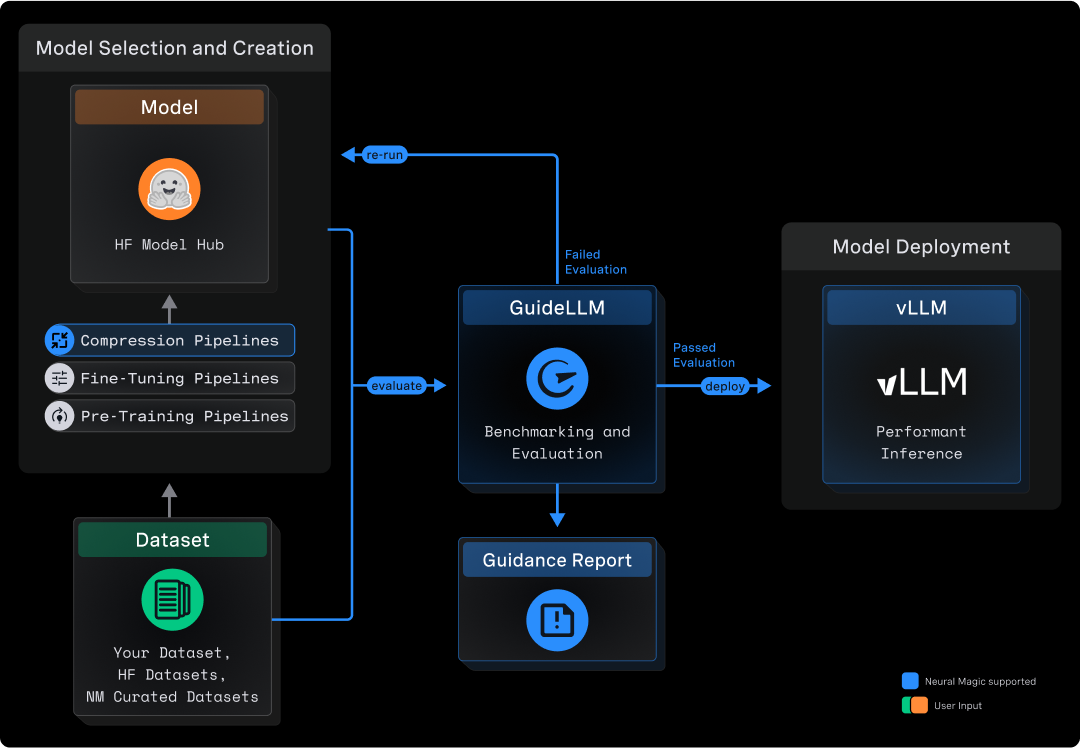
GuideLLM is a platform for evaluating how language models perform under real workloads and configurations. It simulates end-to-end interactions with OpenAI-compatible and vLLM-native servers, generates workload patterns that reflect production usage, and produces detailed reports that help teams understand system behavior, resource needs, and operational limits. GuideLLM supports real and synthetic datasets, multimodal inputs, and flexible execution profiles, giving engineering and ML teams a consistent framework for assessing model behavior, tuning deployments, and planning capacity as their systems evolve.
GuideLLM gives teams a clear picture of performance, efficiency, and reliability when deploying LLMs in production-like environments.
- Captures complete latency and token-level statistics for SLO-driven evaluation, including full distributions for TTFT, ITL, and end-to-end behavior.
- Generates realistic, configurable traffic patterns across synchronous, concurrent, and rate-based modes, including reproducible sweeps to identify safe operating ranges.
- Supports both real and synthetic multimodal datasets, enabling controlled experiments and production-style evaluations in one framework.
- Produces standardized, exportable reports for dashboards, analysis, and regression tracking, ensuring consistency across teams and workflows.
- Delivers high-throughput, extensible benchmarking with multiprocessing, threading, async execution, and a flexible CLI/API for customization or quickstarts.
Many tools benchmark endpoints, not models, and miss the details that matter for LLMs. GuideLLM focuses exclusively on LLM-specific workloads, measuring TTFT, ITL, output distributions, and dataset-driven variation. It fits into everyday engineering tasks by using standard Python interfaces and HuggingFace datasets instead of custom formats or research-only pipelines. It is also built for performance, supporting high-rate load generation and accurate scheduling far beyond simple scripts or example benchmarks. The table below highlights how this approach compares to other options.
| Tool | CLI | API | High Perf | Full Metrics | Data Modalities | Data Sources | Profiles | Backends | Endpoints | Output Types |
|---|---|---|---|---|---|---|---|---|---|---|
| GuideLLM | ✅ | ✅ | ✅ | ✅ | Text, Image, Audio, Video | HuggingFace, Files, Synthetic, Custom | Synchronous, Concurrent, Throughput, Constant, Poisson, Sweep | OpenAI-compatible | /completions, /chat/completions, /audio/translation, /audio/transcription | console, json, csv, html |
| inference-perf | ✅ | ❌ | ✅ | ❌ | Text | Synthetic, Specific Datasets | Concurrent, Constant, Poisson, Sweep | OpenAI-compatible | /completions, /chat/completions | json, png |
| genai-bench | ✅ | ❌ | ❌ | ❌ | Text, Image, Embedding, ReRank | Synthetic, File | Concurrent | OpenAI-compatible, Hosted Cloud | /chat/completions, /embeddings | console, xlsx, png |
| llm-perf | ❌ | ❌ | ✅ | ❌ | Text | Synthetic | Concurrent | OpenAI-compatible, Hosted Cloud | /chat/completions | json |
| ollama-benchmark | ✅ | ❌ | ❌ | ❌ | Text | Synthetic | Synchronous | Ollama | /completions | console, json |
| vllm/benchmarks | ✅ | ❌ | ❌ | ❌ | Text | Synthetic, Specific Datasets | Synchronous, Throughput, Constant, Sweep | OpenAI-compatible, vLLM API | /completions, /chat/completions | console, png |
This section summarizes the newest capabilities available to users and outlines the current areas of development. It helps readers understand how the platform is evolving and what to expect next.
Recent Additions
- New CLI interface with improved configuration and validation.
- New backends for in-process vLLM Python API and websocket audio transcription.
- Multi-turn conversation capabilities for benchmarking chat agents and dialogue systems.
- Full tool calling support (client and server side) in chat completions and responses APIs.
- Synthetic video and image datasets for controlled experimentation.
- Replay of Mooncake trace files for realistic load testing.
- Support for benchmarking Geospatial LLMs.
Active Development
- Replay of OTEL and WEKA trace files.
- Improved scenarios for benchmarking standard workflows.
- Ability to stack scenario files for complex benchmarking workflows.
- Ability to override constraints for individual benchmarks in a profile.
- gRPC backend for benchmarking vLLM-native servers.
The Quick Start shows how to install GuideLLM, launch a server, and run your first benchmark in a few minutes.
Before installing, ensure you have the following prerequisites:
- OS: Linux or MacOS
- Python: 3.10 - 3.13
Install the latest GuideLLM release from PyPi using pip :
pip install guidellm[recommended]Or install from source:
pip install git+https://github.com/vllm-project/guidellm.gitOr run the latest container from ghcr.io/vllm-project/guidellm:
podman run \
  --rm -it \
  -v "./results:/results:rw" \
  -e GUIDELLM__SPEC__BACKEND='{"kind": "openai_http", "target": "http://localhost:8000"}' \
  -e GUIDELLM__SPEC__PROFILE='{"kind": "sweep"}' \
  -e GUIDELLM__SPEC__CONSTRAINTS='[{"kind": "max_duration", "seconds": 30}]' \
  -e GUIDELLM__SPEC__DATA='[{"kind": "synthetic_text", "prompt_tokens": 256, "output_tokens": 128}]' \
ghcr.io/vllm-project/guidellm:latestStart any OpenAI-compatible endpoint. For vLLM:
vllm serve "neuralmagic/Meta-Llama-3.1-8B-Instruct-quantized.w4a16"Verify the server is running at http://localhost:8000.
Run a sweep that identifies the maximum performance and maximum rates for the model:
guidellm run \
  --backend kind=openai_http,target=http://localhost:8000 \
  --profile kind=sweep \
  --constraint kind=max_duration,seconds=30 \
  --data kind=synthetic_text,prompt_tokens=256,output_tokens=128
You will see progress updates and per-benchmark summaries during the run, as given below:
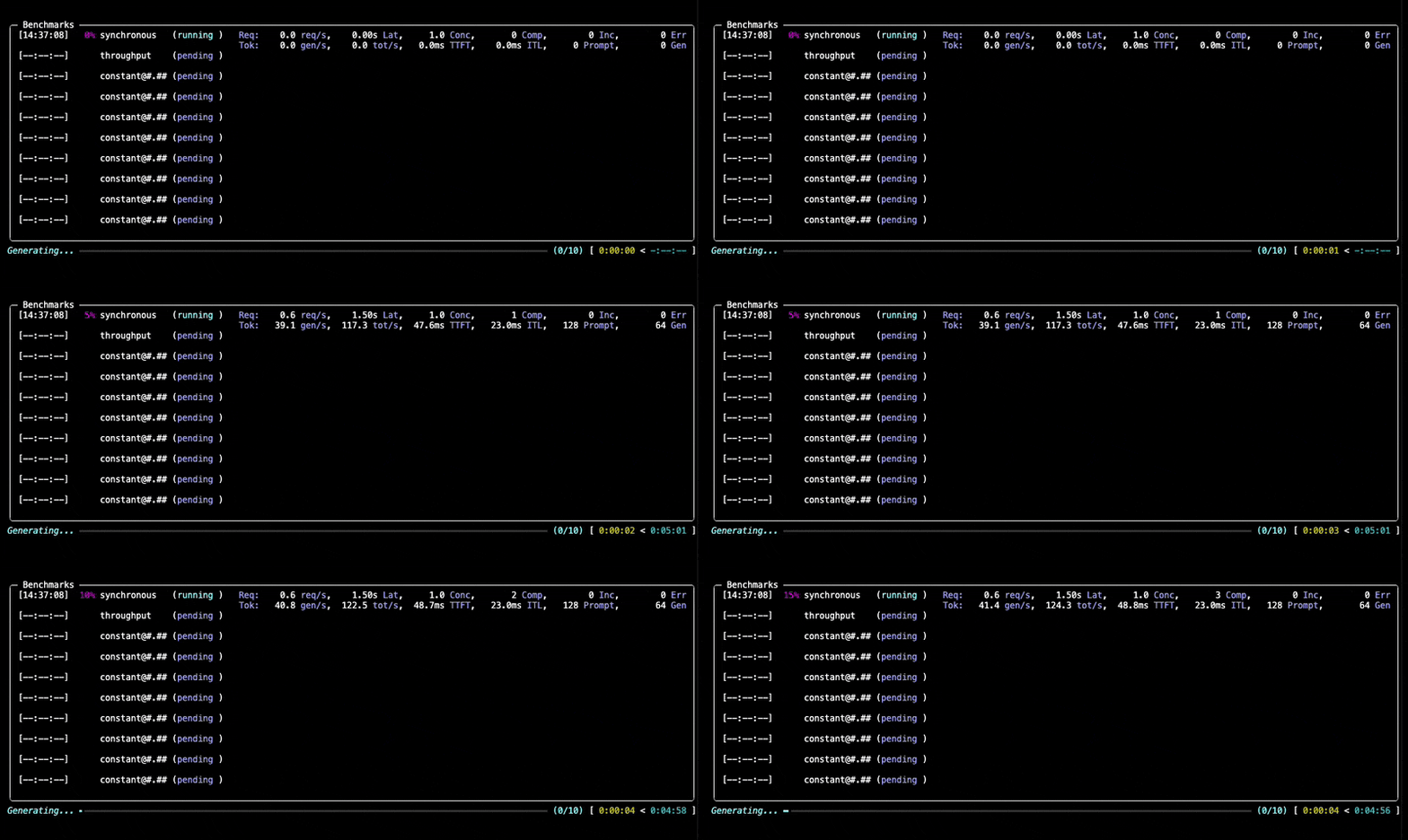
After the benchmark completes, GuideLLM saves all results into the output directory you specified (default: the current directory). You'll see a summary printed in the console along with a set of file locations (.json, .csv, .html) that contain the full results of the run.
The following section, Output Files and Reports, explains what each file contains and how to use them for analysis, visualization, or automation.
After running the Quick Start benchmark, GuideLLM writes several output files to the directory you specified. Each one focuses on a different layer of analysis, ranging from a quick on-screen summary to fully structured data for dashboards and regression pipelines.
Console Output
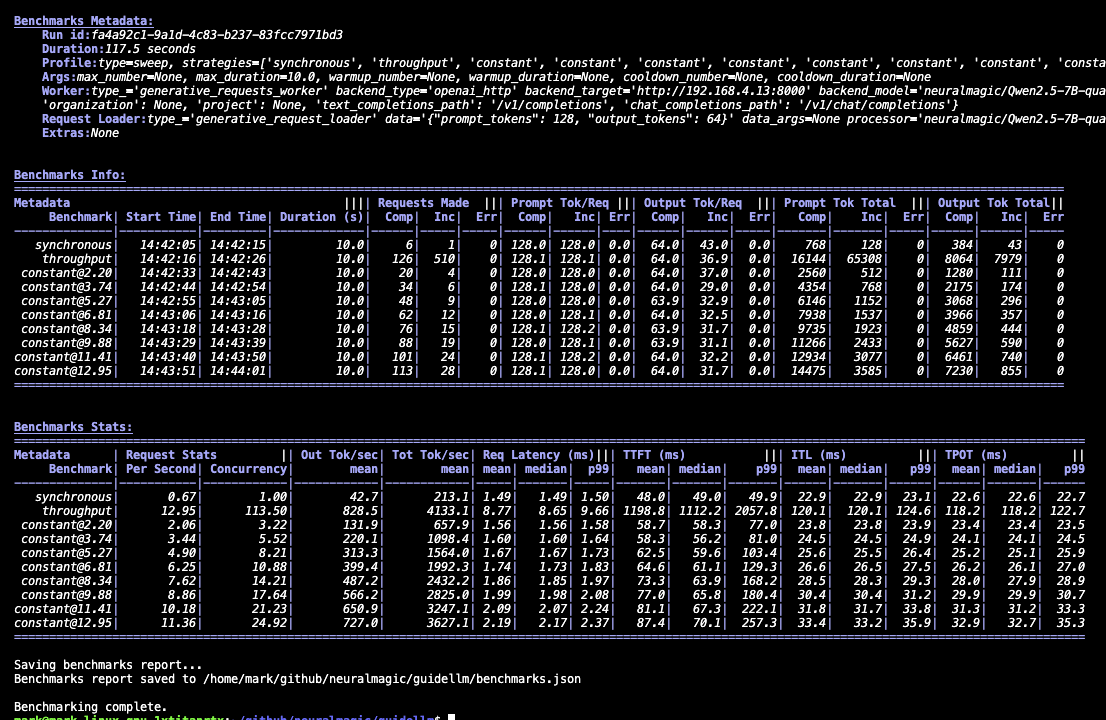
The console provides a lightweight summary with high-level statistics for each benchmark in the run. It's useful for quick checks to confirm that the server responded correctly, the load sweep completed, and the system behaved as expected. Additionally, the output tables can be copied and pasted into spreadsheet software using | as the delimiter. The sections will look similar to the following:
benchmarks.json
This file is the authoritative record of the entire benchmark session. It includes configuration, metadata, per-benchmark statistics, and sample request entries with individual request timings. Use it for debugging, deeper analysis, or loading into Python with GenerativeBenchmarksReport.
Alternatively, a YAML version of this file can be generated for easier human readability with the same content as benchmarks.json using --output yaml "path=benchmarks.yaml".
benchmarks.csv
This file provides a compact tabular view of each benchmark with the fields most commonly used for reporting—throughput, latency percentiles, token counts, and rate information. It opens cleanly in spreadsheets and BI tools and is well-suited for comparisons across runs.
benchmarks.html
The HTML report provides a visual summary of results, including charts of latency distributions, throughput behavior, and generation patterns. It's ideal for quick exploration or sharing with teammates without requiring them to parse JSON.
GuideLLM supports a wide range of LLM benchmarking workflows. The examples below show how to run typical scenarios and highlight the parameters that matter most. For a complete list of arguments, details, and options, run guidellm run --help.
Each registry-backed option uses the form --<option> kind=<TYPE>,<CONFIG>..., where CONFIG is key=value pairs. For more complex configurations, use JSON or YAML, e.g. --data '{"kind":"huggingface","source":"abisee/cnn_dailymail","load_kwargs":{"name":"3.0.0"}}'.
Simulating different applications requires different traffic shapes. This example demonstrates rate-based load testing using a constant profile at 10 requests per second, running for 20 seconds with synthetic data of 128 prompt tokens and 256 output tokens.
guidellm run \
  --backend kind=openai_http,target=http://localhost:8000 \
  --profile kind=constant,rate=10 \
  --constraint kind=max_duration,seconds=20 \
  --data kind=synthetic_text,prompt_tokens=128,output_tokens=256
Key parameters:
--profile kind=<type>: Defines the traffic pattern —synchronous,concurrent,throughput,constant,poisson, orsweep--profile kind=constant,rate=10: Forconstant/poisson, set requests per second in the profile config; forconcurrent, usestreams=; forthroughput, usemax_concurrency=--constraint kind=max_duration,seconds=<seconds>or--constraint kind=max_requests,count=<count>: Limit each strategy by time or request count
GuideLLM supports HuggingFace datasets, local files, and synthetic data. This example loads the CNN DailyMail dataset from HuggingFace and maps the article column to prompts while using the summary token count column to determine output lengths.
guidellm run \
  --backend kind=openai_http,target=http://localhost:8000 \
  --data kind=huggingface,source=abisee/cnn_dailymail,load_kwargs.name=3.0.0 \
  --data-column-mapper kind=generative_column_mapper,column_mappings.text_column=article
Key parameters:
--data: Data type plus config —synthetic_text,huggingface,json_file,csv_file,text_file,trace_synthetic, and others. Repeat for multiple sources.--data-column-mapper: Column mapping preprocessor and JSON config for fields such astext_columnoroutput_tokens_count_column--data-loader type=pytorch,samples=1000: Limit how many rows are loaded (-1for all)--tokenizer huggingface_auto "model=gpt2": Tokenizer for synthetic data or local token counting
You can benchmark chat completions, text completions, or other supported request types. This example configures the benchmark to test the chat completions API using a custom dataset file, with GuideLLM automatically formatting requests to match the chat completions schema.
guidellm run \
  --backend kind=openai_http,target=http://localhost:8000,request_format=/v1/chat/completions \
  --data kind=json_file,path=path/to/data.json
Key parameters:
--backend: Backend type and connection settings, including thetargetOpenAI-compatible endpoint URL andrequest_formatfor the API endpoint (/v1/chat/completions,/v1/completions,/v1/embeddings,/v1/audio/transcriptions, and others)
Built-in scenarios bundle schedules, dataset settings, and request formatting to standardize common testing patterns. This example uses the pre-configured chat scenario which includes appropriate defaults for chat model evaluation, with any additional CLI arguments overriding the scenario's settings.
guidellm run \
  --config chat \
  --backend kind=openai_http,target=http://localhost:8000
Key parameters:
--config(alias--scenario,-c): Built-in scenario name or path to a custom scenario file. CLI options override scenario defaults.
Warmup, cooldown, and maximum limits help ensure stable, repeatable measurements. This example runs a concurrent benchmark with 16 parallel requests, using 10% warmup and cooldown periods to exclude initialization and shutdown effects, while limiting the test to stop if more than 5 errors occur.
guidellm run \
  --backend kind=openai_http,target=http://localhost:8000 \
  --profile kind=concurrent,streams=16,warmup=0.1,cooldown=0.1 \
  --constraint kind=max_errors,count=5 \
  --constraint kind=over_saturation \
  --data kind=synthetic_text,prompt_tokens=256,output_tokens=128
Key parameters:
--profile kind=<type>: Profile config supportswarmupandcooldown(percentage or absolute units)--constraint kind=max_duration,seconds=<seconds>/--constraint kind=max_requests,count=<count>: Stop each strategy by time or request count--constraint kind=max_errors,count=<count>: Stop when total errors exceed the threshold--constraint kind=over_saturation: Enable over-saturation detection (empty config uses defaults)
Developers interested in extending GuideLLM can use the project's established development workflow. Local setup, environment activation, and testing instructions are outlined in DEVELOPING.md. This guide explains how to run the benchmark suite, validate changes, and work with the CLI or API during development. Contribution standards are documented in CONTRIBUTING.md, including coding conventions, commit structure, and review guidelines. These standards help maintain stability as the platform evolves. The CODE_OF_CONDUCT.md outlines expectations for respectful and constructive participation across all project spaces. For contributors who want deeper reference material, the documentation covers installation, backends, datasets, metrics, output types, and architecture. Reviewing these topics is useful when adding new backends, request types, or data integrations. Release notes and changelogs are linked from the GitHub Releases page and provide historical context for ongoing work.
The complete documentation provides the details that do not fit in this README. It includes installation steps, backend configuration, dataset handling, metrics definitions, output formats, tutorials, and an architecture overview. These references help you explore the platform more deeply or integrate it into existing workflows.
Notable docs are given below:
- Installation Guide - This guide provides step-by-step instructions for installing GuideLLM, including prerequisites and setup tips.
- Backends Guide - A comprehensive overview of supported backends and how to set them up for use with GuideLLM.
- Data/Datasets Guide - Information on supported datasets, including how to use them for benchmarking.
- Metrics Guide - Detailed explanations of the metrics used in GuideLLM, including definitions and how to interpret them.
- Outputs Guide - Information on the different output formats supported by GuideLLM and how to use them.
- Architecture Overview - A detailed look at GuideLLM's design, components, and how they interact.
GuideLLM is licensed under the Apache License 2.0.
If you find GuideLLM helpful in your research or projects, please consider citing it:
@misc{guidellm2024,
  title={GuideLLM: Scalable Inference and Optimization for Large Language Models},
  author={Neural Magic, Inc.},
  year={2024},
  howpublished={\url{https://github.com/vllm-project/guidellm}},
}