VS Code extension and CLI for editing and previewing Transitrix diagrams.
Text-first BPMN authoring: write your process as structured YAML, compile to valid BPMN 2.0 XML with automatic layout, preview live in VS Code or the browser.
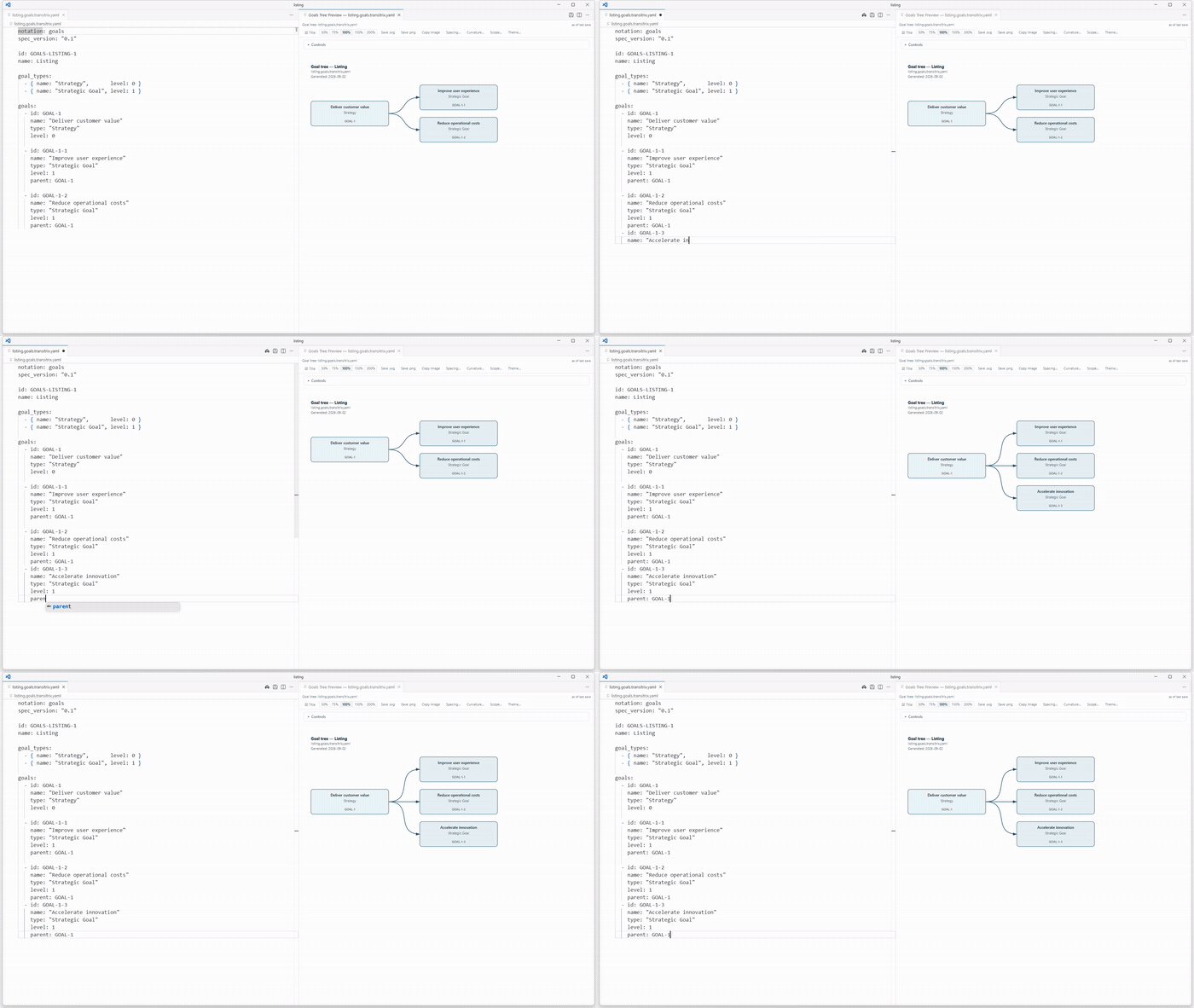
Write goals and plans in YAML, save the file, and inspect the diagram beside the source. These screenshots use Transitrix Studio 3.7.3. Open an image at full size to read the labels and identifiers.
A YAML goals model beside its preview in VS Code.
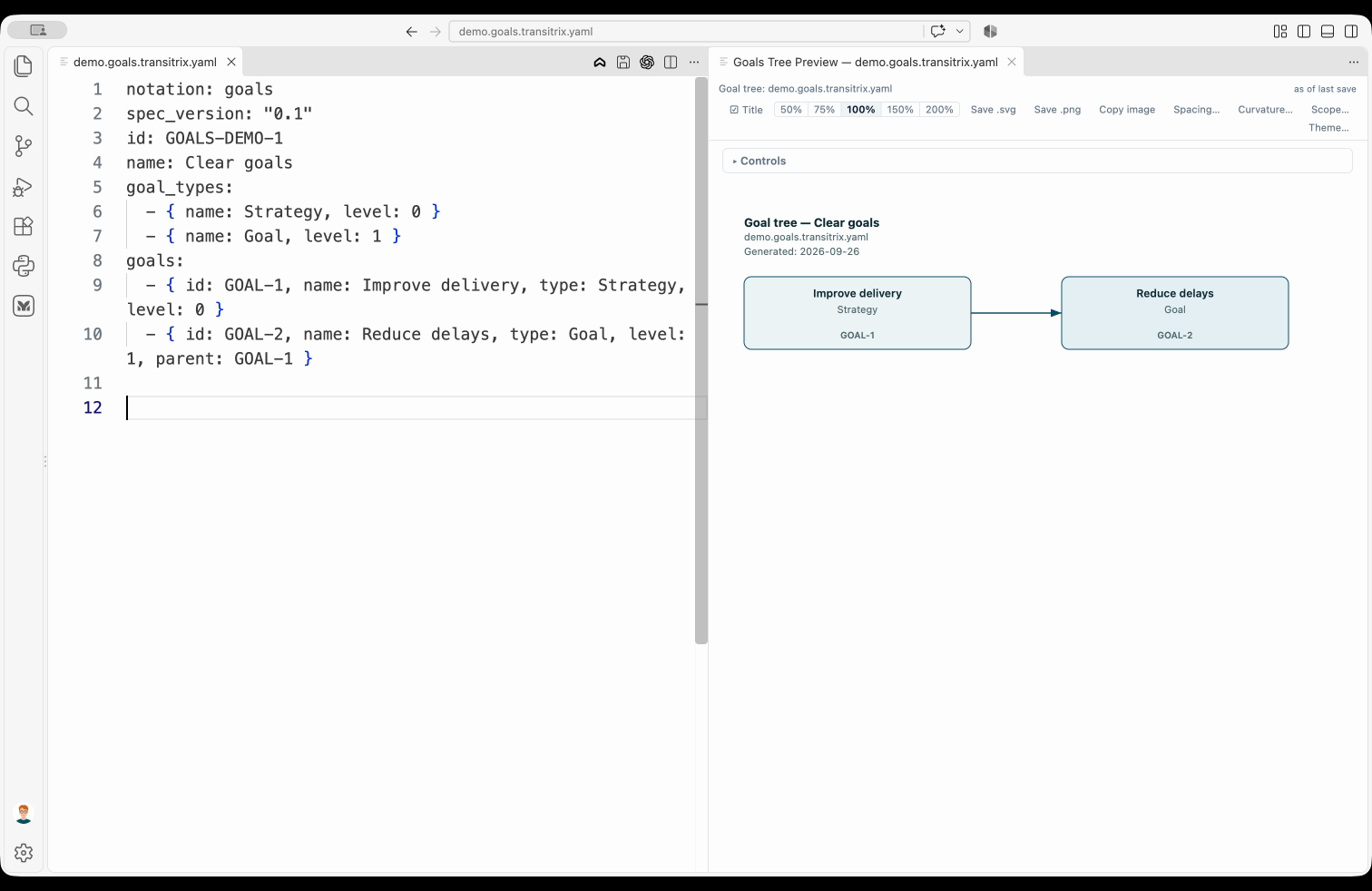
Improve quality appears as a new child goal.
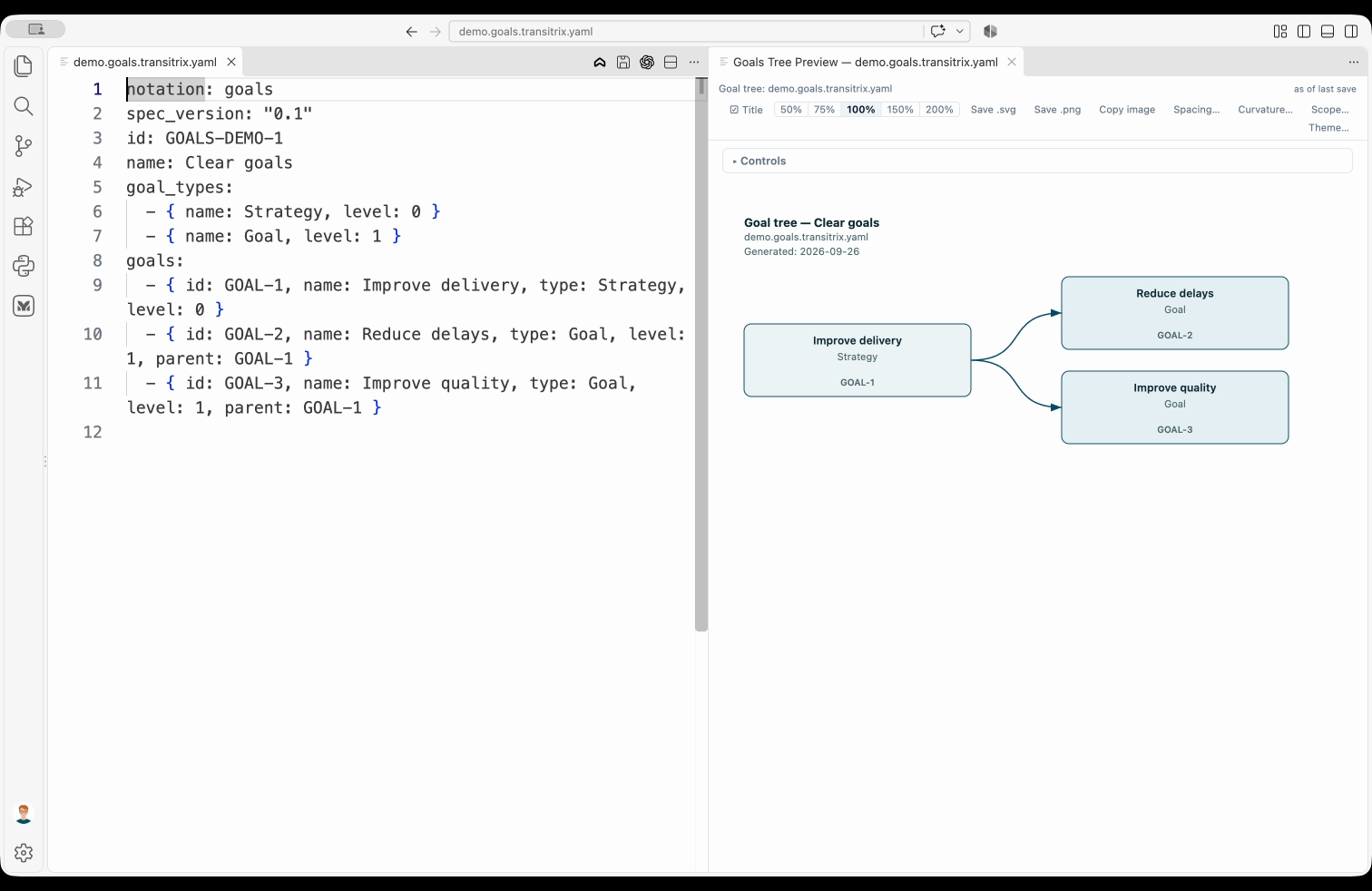
A DGCA model connects a driver, goal, change and action.
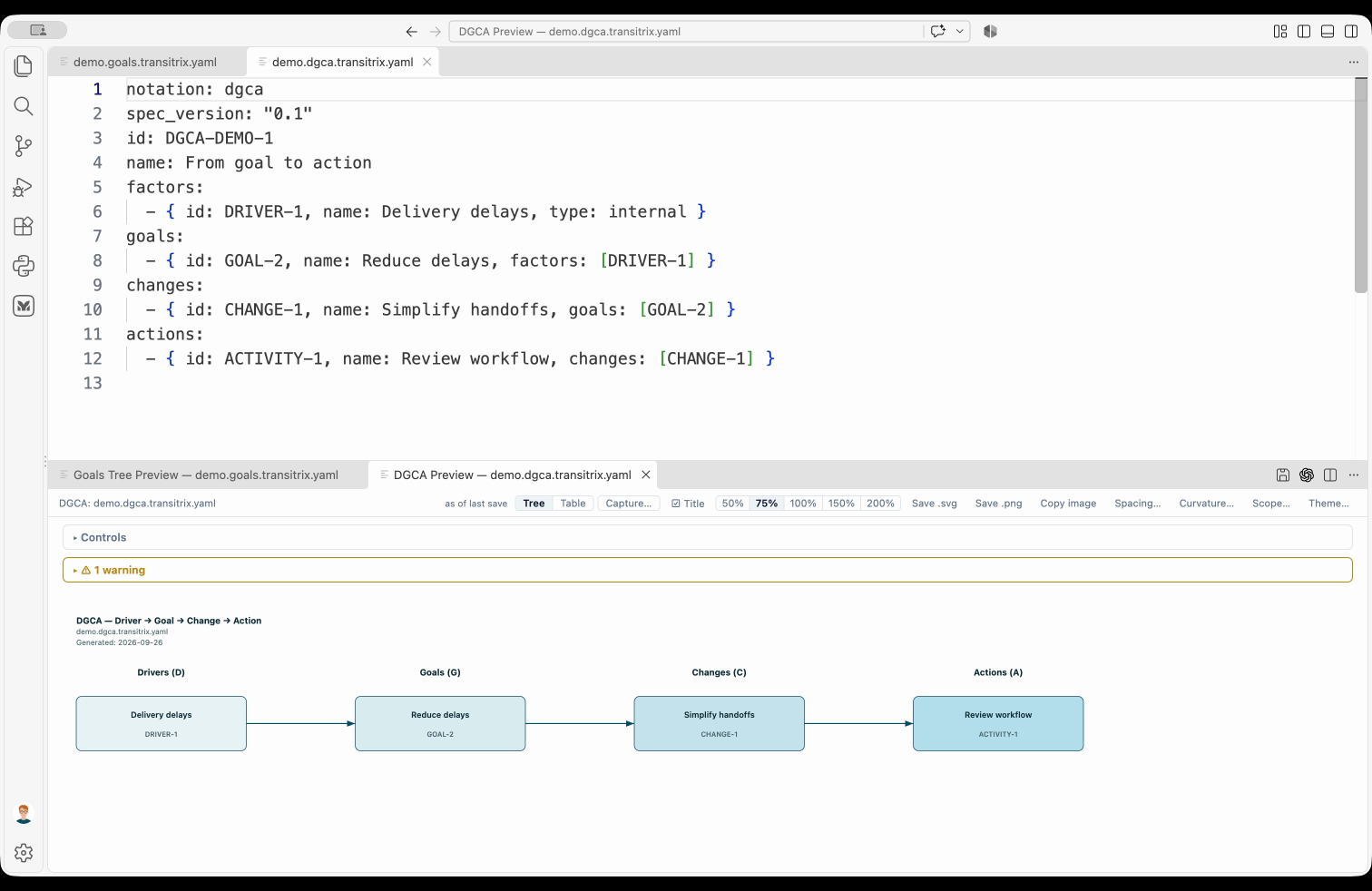
The standalone DGCA example shows a warning because no canon root is attached; the four-node chain is still rendered.
Transitrix Studio brings text-first diagram authoring to VS Code. Instead of dragging shapes in a GUI editor, you write YAML — structured, diffable, reviewable in pull requests. The compiler produces BPMN 2.0 XML with computed layout coordinates using the ELK (Eclipse Layout Kernel) engine.
Studio previews strategy, process, capability and catalogue models, with additional compliance and traceability views in VS Code. See the extension's format guide and the methodology's notation specifications.
Legacy identifiers. The pre-rename
cervinname is fully retired in extension 3.0+ and CLI 2.0+. Use canonical*.<short-name>.transitrix.yamlsuffixes (e.g.*.bpmn.transitrix.yamlfor BPMN).
Updated for Studio 3.8.0 in VS Code-compatible editors, the separately installed CLI 2.10.0, and Methodology 7.0.0. JetBrains support is described separately below; check its marketplace listing for the available plugin version.
- Connect strategy to delivery. Preview goal trees, driver–goal–change–activity chains (DGCA/DGA), activity networks and activity cards. VS Code also offers Gantt and critical-path views, plus completion percentages when model progress records are available. Notation guide.
- Describe processes in text. Preview process maps and stage-by-stage process blueprints. In VS Code, author BPMN in YAML and preview the diagram; the CLI compiles it to BPMN 2.0 XML with automatic layout. BPMN quick start.
- Explore capabilities and catalogues. Preview applications, products, nested blocks and supported inline scenarios. In VS Code, capability maturity is read from dated history records as of the current date. Catalogue previews depend on the supported document form. Format overview · Capability history.
- Trace requirements and review release coverage. In VS Code, open Transitrix: Traceability Matrix to follow links upstream or downstream, focus on a selected element and compare adjacent columns. Transitrix: Requirements by Release shows scope-specific counts with drill-down lists. Both reports share product, project, release and date selection, retain navigation context and refresh after model changes. They require the corresponding model records. Requirements reports.
- Inspect compliance and verification. VS Code provides compliance impact and coverage views, a gap dashboard, and a separate requirement–verification matrix for requirements, assertions and verification results. These views need the corresponding model records. Compliance validation.
- Record numerical risk degrees. Author likelihood, impact and residual risk as numbers on an explicit adopter-defined scale in Methodology 7.0.0 models, and check them with the CLI. Existing qualitative values remain supported. Numeric risk authoring.
- Share diagrams and findings. VS Code saves supported diagram previews as SVG or PNG. Export the gap dashboard and requirement–verification matrix as CSV, or the Traceability Matrix and Requirements by Release snapshot as JSON. PNG clipboard copying is Windows-only. The CLI exports compliance reports as Markdown or PDF; PDF requires the optional WeasyPrint executable. Preview exports · CLI commands.
- Create consistent model elements. VS Code commands and the CLI scaffold goals, drivers, constraints and requirements with admission and lifecycle fields, checking IDs and references before writing. Element creation.
- Check models in scripts and CI. The CLI validates individual files or repository models and emits JSON findings with file-coverage counts. Unsupported forms are explicitly reported as unvalidated and fail strict repository validation. The model's methodology version selects the applicable ACTION numeric rules. The CLI runs independently of either editor and requires Node.js 20 or newer. CLI reference · Validation scope.
Choose your host: the VS Code extension (also installable in compatible Cursor, VSCodium and Windsurf editors) opens recognised previews automatically and refreshes them on save; autosave can shorten the edit–preview loop. Preview settings.
The JetBrains plugin requires a compatible IDE with JCEF (platform builds 242–262). Open Transitrix: Preview Notation from the editor's context menu. Its read-only preview is a snapshot: close and reopen it after editing. It supports strategy, process-map/blueprint and supported catalogue previews, but does not include BPMN, the VS Code requirements/compliance reports or SVG/PNG export commands. Capability history requires the VS Code or repository-validation context; JetBrains cannot resolve it for a standalone preview. JetBrains installation.
The editor plugins bundle their renderers; the CLI is a separate installation, not a command added to your shell by installing an editor plugin. No DSM installation is required for the capabilities listed here. Install the CLI.
From the Open VSX Registry (VS Code, Cursor, VSCodium, Windsurf):
Search for Transitrix Studio in the Extensions panel of your editor. The Open VSX Registry is the primary install route for VS Code as well as its derivatives — no per-editor build, the VSIX is identical everywhere.
From GitHub Releases:
Download the .vsix file from GitHub Releases and install:
code --install-extension transitrix-studio-1.0.0.vsixA companion IntelliJ IDEA plugin is available on the JetBrains Marketplace — install it from Settings → Plugins → Marketplace and search for Transitrix Studio (source under intellij/).
Create a file example.bpmn.transitrix.yaml:
process:
  id: OrderFulfillment
  name: Order Fulfillment
  pools:
    - id: main
      name: Order Fulfillment
      lanes:
        - id: sales
          name: Sales
          elements:
            - { id: start, type: startEvent }
            - { id: receiveOrder, type: userTask, name: Receive order }
            - { id: end, type: endEvent }
  flows:
    - { from: start, to: receiveOrder }
    - { from: receiveOrder, to: end }
Open it in VS Code — the preview panel opens automatically and refreshes on save (not on every keystroke — see the extension README's "Get started" section for the recommended files.autoSave setting if you want it to feel live).
The transitrix CLI compiles, validates and serves notation files outside VS
Code — for scripts and CI. Install from npm:
npm install -g @transitrix/cli
transitrix --help
Or from a clone (development):
git clone https://github.com/transitrix/transitrix-studio
cd transitrix-studio && npm install && npm run build
npm link                             # puts `transitrix` on your PATH
Then:
transitrix compile input.bpmn.transitrix.yaml output.bpmn
transitrix validate input.bpmn.transitrix.yaml --json
transitrix serve                     # local web UI at http://localhost:8765
Read-only document provenance checks compare retained run records, recipes and issued output in the CLI and VS Code.
Full command reference: docs/cli.md. The VS Code extension does not put the CLI on your PATH — use @transitrix/cli or a clone build for terminal workflows.
transitrix-studio/
  src/              — BPMN core pipeline (parser, layout, emitter, CLI)
  extension/        — VS Code extension
  packages/diagrams/ — shared renderers and validators (@transitrix/diagrams)
  ui/               — Vite browser UI (transitrix serve)
  tests/            — Vitest suite + notation corpus (tests/fixtures/)
  schemas/          — JSON Schema sources
  organizations/    — worked example organization
  docs/             — Project documentation (see docs/README.md)
See docs/repo-layout.md for a detailed directory map.
Notation semantics and design rationale: github.com/transitrix/methodology.
Each release includes build provenance attestation and a Software Bill of Materials (SBOM). To verify a downloaded release:
gh attestation verify --owner transitrix transitrix-studio-X.Y.Z.vsixSee SECURITY.md for details on reporting vulnerabilities, security policies, and audit information.
For MCP Apps integration from source, see the read-only diagram viewer prototype. It covers Goals and a bounded PlantUML sequence subset; desktop host compatibility is separate from released IDE support.
Work for this repository is filed in transitrix/transitrix-hq, not in this repository's issue tracker. The headquarters repository is private; to report bugs, request features, or suggest improvements, open a pull request here or contact hello@transitrix.com.
See CONTRIBUTING.md. By submitting a pull request, you agree that your contribution is licensed under the project's MIT License (LICENSE).
Created and maintained by Valerii Korobeinikov.
Run Transitrix: Traceability Matrix or Transitrix: Requirements by Release
from the VS Code command palette. Select a catalogue folder containing
transitrix.yaml, a product, one of its releases, an optional project, and an as-at date.
Both panels use the same snapshot. Missing membership or failed source reads
produce incomplete populations with unknown totals and visible known IDs.
The matrix supports exact ID/name focus, independent upstream/downstream walks, and adjacent stage pairs. Pair arrows move one stage at a time, with position and boundary indicators; empty stages and links across hidden stages remain visible. Cards display individual verification outcomes and evidence diagnostics. Open record and link-identity buttons navigate to the contributing source records. Stage cards, edges, assignments and findings use pages of 40 with visible totals; scroll the columns and use Next page to inspect every item. JSON export retains the complete projection regardless of the displayed page.
Scope, date, focus, direction, pair position, pages and viewport are saved per workspace and context. Reset clears focus and presentation state while keeping the selected scope. Product, release and project can remain explicitly unselected; invalid combinations show diagnostics instead of inferred membership. In the release report, click any stage, population or quality-metric count to open its exact contributor list, then Open in matrix for the selected record. The matrix preserves scope, date, snapshot and reason, with both trace directions visible. Product/release navigation leaves project unselected unless you choose it. The six quality categories overlap and must not be summed into a defect total. Counts are distinct IDs, never completion or coverage percentages. The first five metrics and requirement stages use the release/project intersection; no effective release assignment and its stage breakdown always use the whole product, at the same date, across all its modelled releases. Other-release-only, invalid assignments and unresolved membership are separate. Reference slots, unattributable findings and context nodes have separate units and clickable lists. Direct obligations attach to the selected release; inherited obligations retain their predecessor and relation identities. Verification outcomes are never inherited or aggregated into a single success verdict. Export shared projection saves the populations, graph, findings and assignment provenance as JSON. Save/create/delete/rename refresh both panels together. The header identifies the content digest, available Git base revision and date; a failed refresh retains the previous snapshot marked stale.
These reports implement the requirement-chain/0.2 projection interface. Author
explicit product_scope, project_scope, project_product, required_for and
source/decomposition relations; release assignment does not imply membership.
Requirement verification remains direct, release-qualified and lifecycle-aware.
The existing repository-wide Requirement–Verification Matrix and its CSV export
retain their ordering and coverage meanings. Projection interface support does
not change the pinned methodology version or establish publication compatibility.
MIT — see LICENSE.