Real-time Nav2 tuning — no restart needed
Tune your robot's navigation parameters while it's running — without killing and relaunching nodes. nav2_config connects to your live Nav2 stack and gives you a visual editor for every navigation parameter. Change max_vel_x and watch your robot speed up. Adjust inflation_radius and see the costmap respond. No more edit–kill–relaunch–wait–test cycles.
Nav2 tuning without this tool looks like:
- Edit YAML
- Kill the stack
- Wait for bringup
- Test
- Repeat
nav2_config cuts that loop. Change a param, see the effect, adjust again — all on a running robot.

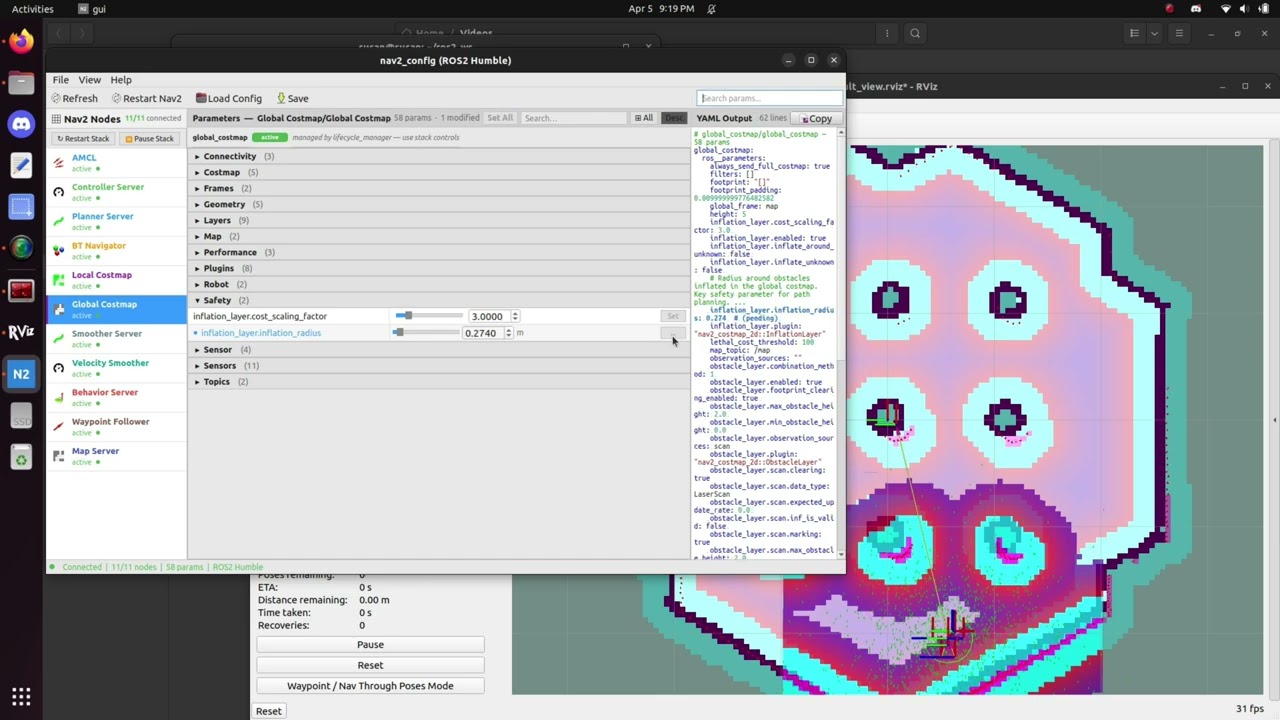
Click to watch — real-time parameter tuning on a running Nav2 stack
Core
- Real-time parameter tuning — change a parameter via
ros2 param set, the effect is immediate on the running robot - Auto-discovery — continuously polls for running Nav2 nodes via ROS2 node graph
- Works with ANY Nav2 plugin — reads live parameters directly, not just hardcoded schema entries
- 560 parameters across 18 Nav2 nodes — every one with a description and tuning advice; 325 also carry numeric ranges
- Per-param Set button — visual feedback cycle: idle → ready → pending → success / failed
- Config file as source of truth — load/save
nav2_params.yamlvia File > Load Config - RViz2-native light theme — looks at home alongside RViz2, rqt, and Foxglove
- Topic and TF frame dropdowns — auto-populated from the live ROS2 graph
- YAML preview — live-generated YAML with syntax highlighting
- Keyboard shortcuts —
Ctrl+Ksearch,Ctrl+Ssave,Ctrl+Oload
Advanced
- Lifecycle control panel — Restart Stack / Pause Stack buttons with per-node state badges
- Multi lifecycle_manager support — works with navigation + localization managers simultaneously
- Array parameter editing — edit plugin lists, observation sources, and other array params directly in the GUI
- Automatic post-set service calls — clears costmaps, reloads map, triggers AMCL nomotion update after relevant param changes
- External change detection — detects params changed outside nav2_config (via
ros2 param setor another tool) and syncs the UI automatically - Config staged until set succeeds — changes are only committed to the config file after ROS2 confirms the set succeeded; no silent corruption
- History tab — records every parameter change with timestamp, source, node, and old/new value; click any entry and hit Undo to revert it
- Compare tab — diff live Nav2 params against a YAML file or another snapshot; selectively apply individual differences back to the running stack
- Expert Mode — enables direct per-node lifecycle transitions (Configure/Activate/Deactivate/Cleanup) for manual recovery. Bypasses lifecycle_manager — use only for stuck node recovery, not routine ops.
- Resume Stack — resumes a paused Nav2 stack without full restart
- Namespaced stack discovery — discovers Nav2 nodes by basename, works with
/robot1/controller_serverstyle namespaces - Round-trip YAML preservation — comments, blank lines, and inline arrays survive load/save unchanged (via ruamel.yaml)
- Live ROS2 type validation — detects schema/type mismatches at runtime, uses the correct ROS2 type automatically
| Distro | Ubuntu | Status |
|---|---|---|
| Humble Hawksbill | 22.04 LTS | Tested (community reports) |
| Iron Irwini | 22.04 LTS | EOL — not actively supported |
| Jazzy Jalisco | 24.04 LTS | Tested (community verified on Turtlebot4 + Raspberry Pi 5) |
nav2_config uses standard rclpy APIs (param services, lifecycle services) that are consistent across distros. Humble and Jazzy are the actively supported targets. Iron reached EOL in December 2024 — it may still work but isn't tested.
# Clone into your workspace
cd ~/ros2_ws/src
git clone https://github.com/sutharsan-311/nav2_config.git

# Install ROS dependencies (installs PyQt6 automatically on Jazzy)
cd ~/ros2_ws
rosdep install --from-paths src --ignore-src -r -y

# On Humble (22.04) only: PyQt6 isn't in apt, so install it via pip
pip install PyQt6

# Build
colcon build --packages-select nav2_config
source install/setup.bash
PyQt6 on Humble: Ubuntu 22.04 has no
python3-pyqt6apt package, sorosdep installskips it cleanly — the rosdep key means it no longer errors, but you still need thepip install PyQt6line above. On Jazzy (24.04) rosdep installs it for you and the pip step isn't needed. See the Installation Guide for details.
sudo apt install ros-humble-nav2-config# 1. Make sure Nav2 is running (simulation or real robot)
ros2 launch nav2_bringup tb3_simulation_launch.py
# 2. In another terminal, launch nav2_config
source ~/ros2_ws/install/setup.bash
ros2 run nav2_config guiLaunch nav2_config, then use File > Load Config to load your nav2_params.yaml. This file is the source of truth for parameter values. Click any node in the left panel to view and edit its parameters.
- Load your config: File > Load Config → select nav2_params.yaml
- Click a node in the left panel
- Edit a parameter value and click Set
- Parameters that support hot-reload apply immediately
- Parameters marked with a restart icon require stack restart — use Restart Stack when done
- Save your changes:
Ctrl+S
| Shortcut | Action |
|---|---|
Ctrl+K |
Focus search |
Ctrl+S |
Save YAML |
Ctrl+O |
Load YAML |
Escape |
Clear search |
Use the stack controls at the top of the node panel:
- Restart Stack — full deactivate → cleanup → configure → activate cycle
- Pause Stack — deactivates all nodes without cleanup
- Resume Stack — reactivates a paused stack
All stack operations go through lifecycle_manager when present.
Expert Mode (toolbar toggle) exposes direct per-node transitions for manual recovery of stuck nodes. Direct transitions bypass lifecycle_manager and can cause CRITICAL FAILURE on an active stack — only use for recovery.
- Installation Guide
- Remote Robot Setup
- Lifecycle Management
- YAML Round-Trip Behavior
- History and Compare
- Troubleshooting
| Feature | rqt_reconfigure | nav2_config |
|---|---|---|
| Generic params | ✓ | ✓ |
| Nav2-specific descriptions | ✗ | ✓ |
| Tuning advice | ✗ | ✓ |
| YAML config file management | ✗ | ✓ |
| Post-set service calls | ✗ | ✓ |
| Lifecycle management | ✗ | ✓ |
| Array parameter editing (plugins, observation sources) | ✗ | ✓ |
| Lifecycle control panel | ✗ | ✓ |
| Namespaced stack discovery | ✗ | ✓ |
| External change detection | ✗ | ✓ |
| RViz2 light theme | ✗ | ✓ |
| Expert Mode for node recovery | ✗ | ✓ |
| Resume Stack | ✗ | ✓ |
| Round-trip YAML preservation | ✗ | ✓ |
| Live ROS2 type validation | ✗ | ✓ |
| File-vs-live mismatch indicators | ✗ | ✓ |
nav2_config uses ROS2's built-in parameter services (list_parameters, get_parameters, set_parameters) to read and write parameters on running nodes. Most Nav2 parameters support dynamic reconfiguration — changes take effect immediately without restarting the node.
Parameters that require a node restart (like changing plugins) are written to the config file and queued for the next Nav2 lifecycle restart.
PRs are welcome. Good areas to contribute:
- Parameter schema (
nav2_config/schema/nav2_params.json) — better descriptions, missing parameters, corrected ranges - ROS2 distro testing — test reports on Iron and Jazzy
cd ~/ros2_ws/src
git clone https://github.com/sutharsan-311/nav2_config.git
cd ~/ros2_ws
colcon build --packages-select nav2_config
source install/setup.bash

# Run tests
colcon test --packages-select nav2_config
colcon test-result --verbose- Python 3.10+ with type hints everywhere
- Follow existing patterns (dataclasses for models, Qt signals for thread communication)
- Add docstrings to all public methods
- Run
flake8before submitting
Apache-2.0 — see LICENSE for details.
Built by Sutharsan — a ROS2 developer who got tired of the kill-edit-relaunch cycle while deploying AMRs in hospitals.