


The stash-native package makes it simple to add Stash in-app purchases (IAPs) and webshops to your game or app. It delivers seamless, native-like payment flows and selection dialogs, which appear as system dialogs on Android and iOS through lightweight embedded webviews, while providing direct callbacks to your application. Library is delivered as AAR for Android and xcframework for iOS.
Overview
Setup
API
Reference
If you're using one of the game engines listed below, we offer dedicated wrappers for this library. These wrappers provide ready-to-use interfaces for integrating Stash features into your project.
| Engine | Repository | Compatibility | |
|---|---|---|---|
 |
Unity | stash-unity | Unity 2019.4+ (LTS recommended) |
 |
Unreal Engine | stash-unreal | Unreal Engine 4.27+ (4.x/5.x branches available) |
For building your own wrappers, see docs/building-wrappers.md for integration patterns and a integration checklist.
Latest pre-built binaries are always available on Releases Page:
- Android:
stashnative-release.aar(orStashNative-<tag>.aarfrom releases) - iOS:
StashNative.xcframework.zip
Both platforms include sample apps under ./Android/sample/ and ./iOS/Sample/ (open StashNativeSample.xcodeproj in Xcode). Run the Android sample with ./gradlew :sample:installDebug from the Android/ directory.
Note: Android emulator (Apple Silicon): On arm64-v8a AVDs, the default GPU mode (
auto) can yield an emptyGL_VERSIONand crash the WebView GPU thread. Useswangle(-gpu swangleorhw.gpu.mode=swanglein~/.android/avd/<your-avd>.avd/config.ini).
Stash also host a test card on https://test.stashpreview.com/ that can be used with all presentation methods below to test callbacks and exceptions without real Stash URLs.
- Download
StashNative-<tag>.aarfrom GitHub Releases and add it to your project (e.g.libs/). - In your app's
build.gradle:
dependencies {
    implementation files('libs/StashNative-<tag>.aar')
    implementation 'androidx.appcompat:appcompat:1.6.1'
    // Also include androidx.browser for Chrome Custom Tabs on external checkout flows.
    // implementation 'androidx.browser:browser:1.7.0'
}
To build the AAR locally: cd Android && ./gradlew :stashnative:assembleRelease (output in stashnative/build/outputs/aar/).
XCFramework (recommended): Download StashNative.xcframework.zip from GitHub Releases, unzip it, add StashNative.xcframework to your Xcode project, and under Frameworks, Libraries, and Embedded Content set it to Embed & Sign.
Swift Package Manager: In Xcode choose File → Add Packages... and add https://github.com/stashgg/stash-native.git, then select the StashNative package for your target.
The library exposes three ways to open Stash URLs (Stash Pay & Stash Webshop): openCard (in-app sheet / drawer), openModal (in-app centered popup), and openBrowser (Open in Chrome Custom Tabs on Android & SFSafariViewController on iOS).
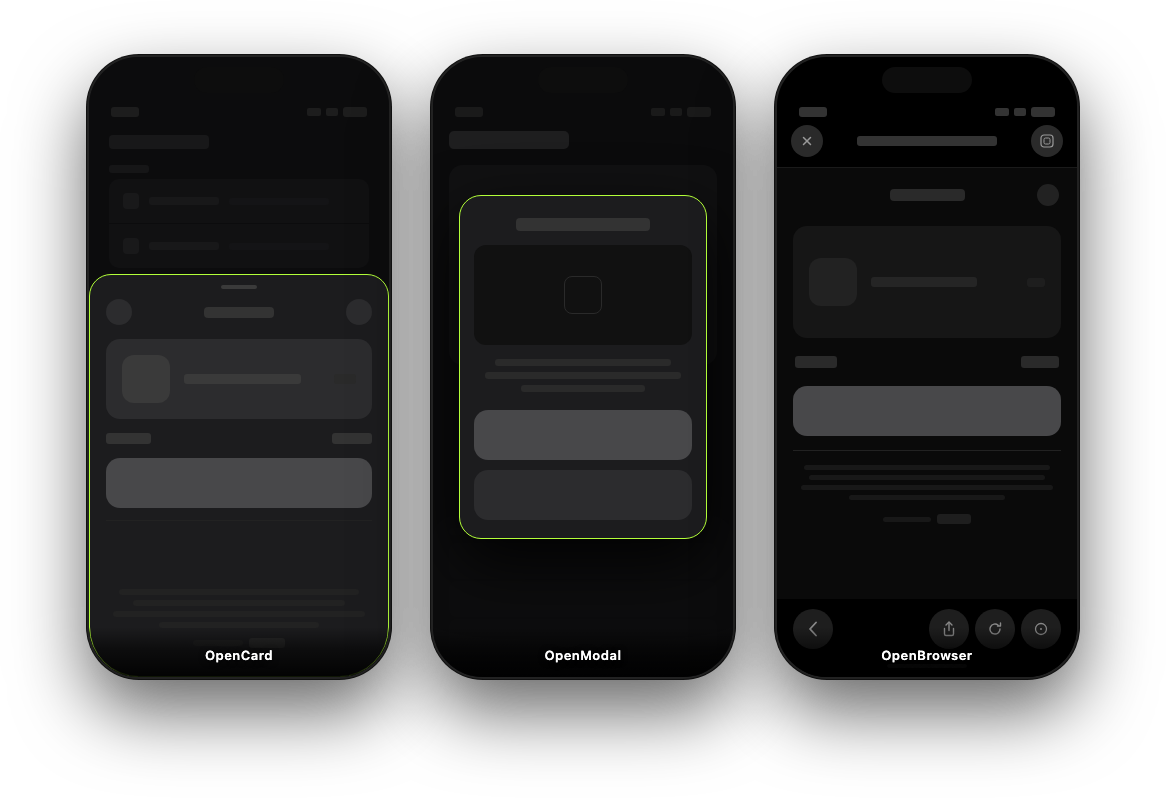
Drawer-style card: slides up from the bottom on phones and shows centered on tablets (Mimics native Apple Pay, Google Pay experience). Suited for Stash Pay payment links or pre-authenticated webshop links.
Android
StashNativeCard.CardConfig config = new StashNativeCard.CardConfig();  // or null for defaults
StashNativeCard.getInstance().openCard("https://testcard.stashpreview.com", config);
iOS (Swift)
let config = StashNativeCardConfig()  // or nil for defaults
StashNativeCard.sharedInstance().openCard(withURL: "https://testcard.stashpreview.com", config: config)
iOS (Objective-C)
StashNativeCardConfig *config = [[StashNativeCardConfig alloc] init];  // or nil for defaults
[[StashNativeCard sharedInstance] openCardWithURL:@"https://testcard.stashpreview.com" config:config];Pass a CardConfig (or nil/null for defaults) to configure presentation.
| Aspect | Description |
|---|---|
| forcePortrait | Forces the card to display in portrait mode, even if the host app or game is locked to landscape orientation. Read section below first ! |
| Phone Dimensions | cardHeightRatioPortrait, cardWidthRatioLandscape, and cardHeightRatioLandscape (values from 0.1 to 1.0). All dimensions are within the device's safe area. |
| Tablet Dimensions | tabletWidthRatioPortrait, tabletHeightRatioPortrait, tabletWidthRatioLandscape, tabletHeightRatioLandscape (0.1–1.0). All dimensions are within the device's safe area. |
| backgroundColor | Color hex string (e.g. #RRGGBB). When set, the sheet background follows that color instead of system light/dark. Only for custom UIs, leave unchanged by default. |
Android
StashNativeCard.CardConfig config = new StashNativeCard.CardConfig();
config.forcePortrait = false;
config.cardHeightRatioPortrait = 0.68f;
// ... tabletWidthRatioPortrait, tabletHeightRatioPortrait, etc. (see table above)
stashNative.openCard(url, config);
iOS (Swift)
let config = StashNativeCardConfig()
config.forcePortrait = false
config.cardHeightRatioPortrait = 0.68
// ... tabletWidthRatioPortrait, tabletHeightRatioPortrait, etc. (see table above)
stashNative.openCard(withURL: url, config: config)Warning: Forcing portrait from landscape mode may cause brief visual artifacts on some devices. For landscape-locked games, size the card to fill the screen for best results.
Use forcePortrait when the host game or app is landscape but you want the Stash card displayed in portrait.
Android: If forcePortrait is true, checkout opens in a dedicated portrait-locked activity that runs in your app's process and auto-rotates as needed.
iOS: If forcePortrait is true, the SDK unlocks portrait for its own windows at runtime, even in landscape-locked games. No AppDelegate or Info.plist changes required; only the card/browser window can rotate.
Opting out (iOS, advanced): If you manage orientation unlocking yourself on iOS, disable the automatic hook and call the SDK bridge method manually:
// Before first openCard call:
StashNativeCard.sharedInstance().disableAutoOrientationUnlock = YES;

// In your AppDelegate:
- (UIInterfaceOrientationMask)application:(UIApplication *)app
    supportedInterfaceOrientationsForWindow:(UIWindow *)window {
    UIInterfaceOrientationMask stash = [StashNativeCard supportedInterfaceOrientationsForWindow:window];
    if (stash) return stash;
    return UIInterfaceOrientationMaskLandscape; // your game default
}
Known edge case (iOS 16+): If your project explicitly sets
UISceneSupportedInterfaceOrientationsto landscape-only inside the scene configuration inInfo.plist, iOS enforces that at the scene level and the automatic hook cannot override it. Remove that key or addUIInterfaceOrientationPortraitto it.
When forcePortrait is true and the host app is in landscape, Android rotates the activity to portrait. During this transition the underlying app surface may appear black or distorted. To mask this, you can optionally pass a screenshot of the current screen to the SDK before calling openCard. The SDK will display it as a full-screen backdrop behind the dim overlay, creating a seamless visual transition.
This is completely optional — if no backdrop is set, the card opens normally with the standard dim overlay.
Android (native)
// Capture however you prefer — e.g. PixelCopy, View.drawingCache, or your own render target
Bitmap screenshot = captureCurrentScreen();

StashNativeCard.setBackdropBitmap(screenshot);  // static, call before openCard
StashNativeCard.getInstance().openCard(url, config);
Unity (C#)
// Capture at end of frame
yield return new WaitForEndOfFrame();
Texture2D tex = new Texture2D(Screen.width, Screen.height, TextureFormat.RGB24, false);
tex.ReadPixels(new Rect(0, 0, Screen.width, Screen.height), 0, 0);
tex.Apply();
byte[] png = tex.EncodeToPNG();
Destroy(tex);

// Pass to the SDK via JNI
using (var cls = new AndroidJavaClass("com.stash.stashnative.StashNativeCard")) {
    cls.CallStatic("setBackdropBytes", (object)png);
}

// Then open the card as usual
stashNative.Call("openCard", url, config);- The bitmap is consumed and recycled automatically by the SDK after use — no cleanup needed.
setBackdropBitmap(Bitmap)accepts a pre-built Bitmap;setBackdropBytes(byte[])accepts PNG/JPEG bytes (convenient from JNI/Unity).- The backdrop is rotated 90° and center-cropped to fill the portrait screen, matching the original scene as closely as possible.
- When dismissed, the dim overlay fades out; the backdrop stays visible while the checkout activity returns to landscape, then the activity finishes (with a timeout fallback if landscape is not reported).
| Event | Description |
|---|---|
| Payment Success | Called when the payment completes successfully. Includes detail about order in the callback payload. |
| Payment Failure | Called when the payment fails. |
| Dialog Dismissed | Called when the user dismisses the dialog. |
| External payment | Called when external payment browser has started (CCT / Safari view controller). |
| Browser Closed | Called when external payment browser was closed (CCT / Safari view controller). |
| Opt-In Response | Called when a channel selection response is received. |
| Page Loaded | Called when the page finishes loading (with load time in ms). |
| Network Error | Called when the page load fails (no connection, HTTP error, timeout). |
Set a listener (Android) or delegate (iOS) before calling openCard or openModal. Same callback interface is used for both.
Android — implement StashNativeCardListener (or extend StashNativeCardListenerAdapter to override only the callbacks you need):
StashNativeCard.getInstance().setActivity(this);
StashNativeCard.getInstance().setListener(new StashNativeCard.StashNativeCardListener() {
    @Override
    public void onPaymentSuccess(String order) {
        // Handle successful payment
    }

    @Override
    public void onPaymentFailure() {
        // Handle failed payment
    }

    ....
});
Forward onActivityResult from the same activity you pass to setActivity so onBrowserClosed is reliable when Chrome Custom Tabs use startActivityForResult (StashNativeCard.REQUEST_CODE_CUSTOM_TAB). Portrait checkout forwards from StashNativeCardPortraitActivity automatically. External browser (ACTION_VIEW) still uses lifecycle-based detection.
@Override
protected void onActivityResult(int requestCode, int resultCode, Intent data) {
    if (StashNativeCard.getInstance().onActivityResult(requestCode, resultCode, data)) {
        return;
    }
    super.onActivityResult(requestCode, resultCode, data);
}
iOS (Swift) — set the delegate and implement StashNativeCardDelegate (all methods are optional):
StashNativeCard.sharedInstance().delegate = self
// In your class (e.g. ViewController):
extension YourViewController: StashNativeCardDelegate {
    func stashNativeCardDidCompletePayment(withOrder order: String?) {
        // Handle successful payment
    }
    func stashNativeCardDidFailPayment() {
        // Handle failed payment
    }
    ....
}
iOS (Objective-C) — set the delegate and implement the optional protocol methods:
[StashNativeCard sharedInstance].delegate = self;

// In your class:
- (void)stashNativeCardDidCompletePaymentWithOrder:(NSString *)order {
    // Handle successful payment
}
- (void)stashNativeCardDidFailPayment {
    // Handle failed payment
}
....Centered modal on all devices. Same layout on phone and tablet; allows dynamic resize and screen rotation. Suited for channel selection or an alternative checkout style.
Android
StashNativeCard.ModalConfig config = new StashNativeCard.ModalConfig();  // or null for defaults
StashNativeCard.getInstance().openModal("https://testcard.stashpreview.com", config);
iOS (Swift)
let config = StashNativeModalConfig()  // or nil for defaults
StashNativeCard.sharedInstance().openModal(withURL: "https://testcard.stashpreview.com", config: config)
iOS (Objective-C)
StashNativeModalConfig *config = [[StashNativeModalConfig alloc] init];  // or nil for defaults
[[StashNativeCard sharedInstance] openModalWithURL:@"https://testcard.stashpreview.com" config:config];Pass a ModalConfig (or nil/null) to control dismiss behavior and sizing. Pass nil/null for defaults.
| Aspect | Description |
|---|---|
| Behavior | allowDismiss (default true). |
| Phone | phoneWidthRatioPortrait, phoneHeightRatioPortrait, phoneWidthRatioLandscape, phoneHeightRatioLandscape (0.1–1.0). |
| Tablet | tabletWidthRatioPortrait, tabletHeightRatioPortrait, tabletWidthRatioLandscape, tabletHeightRatioLandscape (0.1–1.0). |
| backgroundColor | Same optional HTML hex as on CardConfig / StashNativeCardConfig. Omit for SDK defaults. |
Android
StashNativeCard.ModalConfig config = new StashNativeCard.ModalConfig();
config.allowDismiss = true;
// ... phoneWidthRatioPortrait, phoneHeightRatioPortrait, tablet ratios, etc. (see table above)
stashNative.openModal(url, config);
iOS (Swift)
let config = StashNativeModalConfig()
config.allowDismiss = true
// ... phoneWidthRatioPortrait, phoneHeightRatioPortrait, tablet ratios, etc. (see table above)
stashNative.openModal(withURL: url, config: config)Same as openCard: same events and the same listener/delegate. Set it once as shown in the Callbacks section under openCard; it receives events for both card and modal calls.
Opens the URL in the platform browser: on Android, Chrome Custom Tabs when androidx.browser is on the classpath, otherwise the system browser (ACTION_VIEW); on iOS, SFSafariViewController. No in-app UI. On Android, forward onActivityResult from the same activity as setActivity so onBrowserClosed runs when Custom Tabs finish; external browser uses lifecycle detection. On iOS, stashNativeCardDidCloseBrowser fires when Safari is dismissed. Use when you only need a simple browser view. openBrowser can also be used as a fallback method for openCard and openModal.
Android
StashNativeCard.getInstance().openBrowser("https://testcard.stashpreview.com");
// In your Activity:
@Override
protected void onActivityResult(int requestCode, int resultCode, Intent data) {
    if (StashNativeCard.getInstance().onActivityResult(requestCode, resultCode, data)) {
        return;
    }
    super.onActivityResult(requestCode, resultCode, data);
}
iOS (Swift)
StashNativeCard.sharedInstance().openBrowser(withURL: "https://testcard.stashpreview.com")
// Optionally dismiss when handling a deeplink:
StashNativeCard.sharedInstance().closeBrowser()
iOS (Objective-C)
[[StashNativeCard sharedInstance] openBrowserWithURL:@"https://testcard.stashpreview.com"];
// Optionally dismiss when handling a deeplink:
[[StashNativeCard sharedInstance] closeBrowser];
On iOS, closeBrowser() dismisses the Safari view. On Android, closeBrowser() is a no-op (Chrome Custom Tabs cannot be closed by the app).
When the user leaves your app for Chrome Custom Tabs or the system browser, Android may kill your app on memory pressure. You can opt in to a short foreground service that shows a low-priority notification and improves survival on budget / Android Go–class devices:
StashNativeCard.getInstance().setKeepAliveEnabled(true);
StashNativeCard.KeepAliveConfig cfg = new StashNativeCard.KeepAliveConfig();
cfg.notificationTitle = "Payment in progress";
cfg.notificationText = "Tap to return to the app";
cfg.notificationIconResId = R.drawable.ic_notification; // optional; use 0 for library default
StashNativeCard.getInstance().setKeepAliveConfig(cfg);-
Default: keep-alive is off.
-
Manifest: required
foregroundServiceentries are auto-merged; no manual changes needed. On Android 14+, service auto-stops after ~3 minutes or when your app resumes. -
Opt out: remove
com.stash.stashnative.StashKeepAliveServiceviatools:node="remove"in your manifest. -
Notifications: no
POST_NOTIFICATIONSpermission is added; on Android 13+ notifications may be hidden unless requested, but the service still works. -
Permissions & Google Play: With keep-alive, your manifest adds
FOREGROUND_SERVICEandFOREGROUND_SERVICE_SHORT_SERVICE. In Google Play Console, declare foreground service usage and the shortService type, and describe its use (e.g., keeping application alive after browser launch).
Requirements, OS matrices, testing environments, known limitations, and platform API / store compliance notes are documented in COMPATIBILITY.md.
This package follows Semantic Versioning (major.minor.patch):
- Major: Breaking changes
- Minor: New features (backward compatible)
- Patch: Bug fixes
Query the SDK version at runtime:
// Android
String version = StashNativeCard.getVersion();
// iOS (Swift)
let version = StashNativeCard.sdkVersion()// iOS (Objective-C)
NSString *version = [StashNativeCard sdkVersion];- Documentation: https://docs.stash.gg
- Email: developers@stash.gg