Draws properties of Arcade Physics bodies. Demo
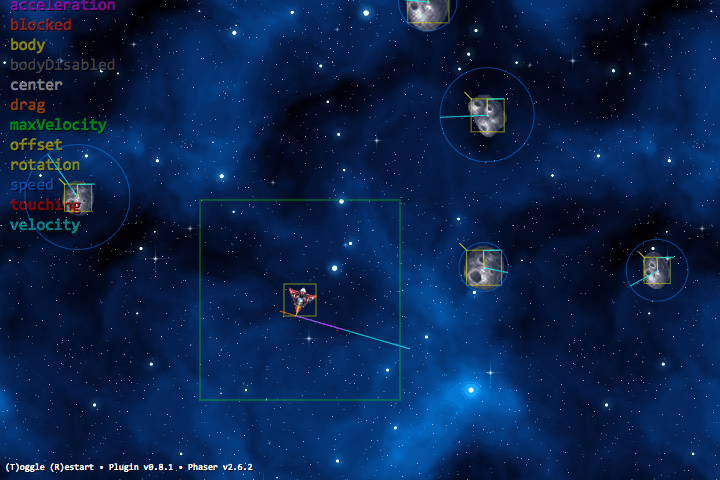
npm install -S phaser-plugin-debug-arcade-physics
or
bower install -S samme/phaser-plugin-debug-arcade-physics
or add DebugArcadePhysics.js after phaser.js.
game.plugins.add(Phaser.Plugin.DebugArcadePhysics);
// OR
game.plugins.add(Phaser.Plugin.DebugArcadePhysics, {
    // options … (see Configure, below)
});You can try these in the demo.
game.debug.arcade.configSet({ // default values:
    bodyFilled:                false,
    filter:                    null ,
    lineWidth:                 1    ,
    on:                        true ,
    renderAcceleration:        true ,
    renderAngularAcceleration: true ,
    renderAngularDrag:         true ,
    renderAngularVelocity:     true ,
    renderBlocked:             true ,
    renderBody:                true ,
    renderBodyDisabled:        true ,
    renderCenter:              true ,
    renderConfig:              false,
    renderDrag:                true ,
    renderFriction:            true ,
    renderLegend:              true ,
    renderMaxVelocity:         true ,
    renderOffset:              true ,
    renderRotation:            true ,
    renderSpeed:               true ,
    renderTouching:            true ,
    renderVelocity:            true ,
}); // -> see console for valuesSome filters are included:
existsisAliveisBulletisNotBulletisNotParticleisNotSpriteisParticleisSprite
// Example:
// Hide bodies of objects w/ exists=false (Phaser ignores these, but doesn't disable them)
game.debug.arcade.configSet({
    filter: Phaser.Plugin.DebugArcadePhysics.exists
});

// Example:
// Keep automatic rendering 'on' but limit to Bullets
game.debug.arcade.configSet({
    filter: Phaser.Plugin.DebugArcadePhysics.isBullet
});

// Example:
// Keep automatic rendering 'on' but limit to certain objects:
game.debug.arcade.configSet({
  filter: function (obj) { return obj.name === "player" }
});// Turn automatic rendering off
game.debug.arcade.off()
// Draw just one body
game.debug.arcade.renderObj(player);
// Draw one property of one body
game.debug.arcade.renderVelocity(player);