Link Microsoft Access to ODBC database and other tools.
- With
TransferDatabasecommands if tables do not have a PK you will get a pop up from Access, just click OK. Warning the pop up may end up hidden behind another window and you wouldn't know (apears to hang). - You can use short hand connection strings. SQLite:
filename, MS SQL:server@database(using Integrated Security) - Use full path names
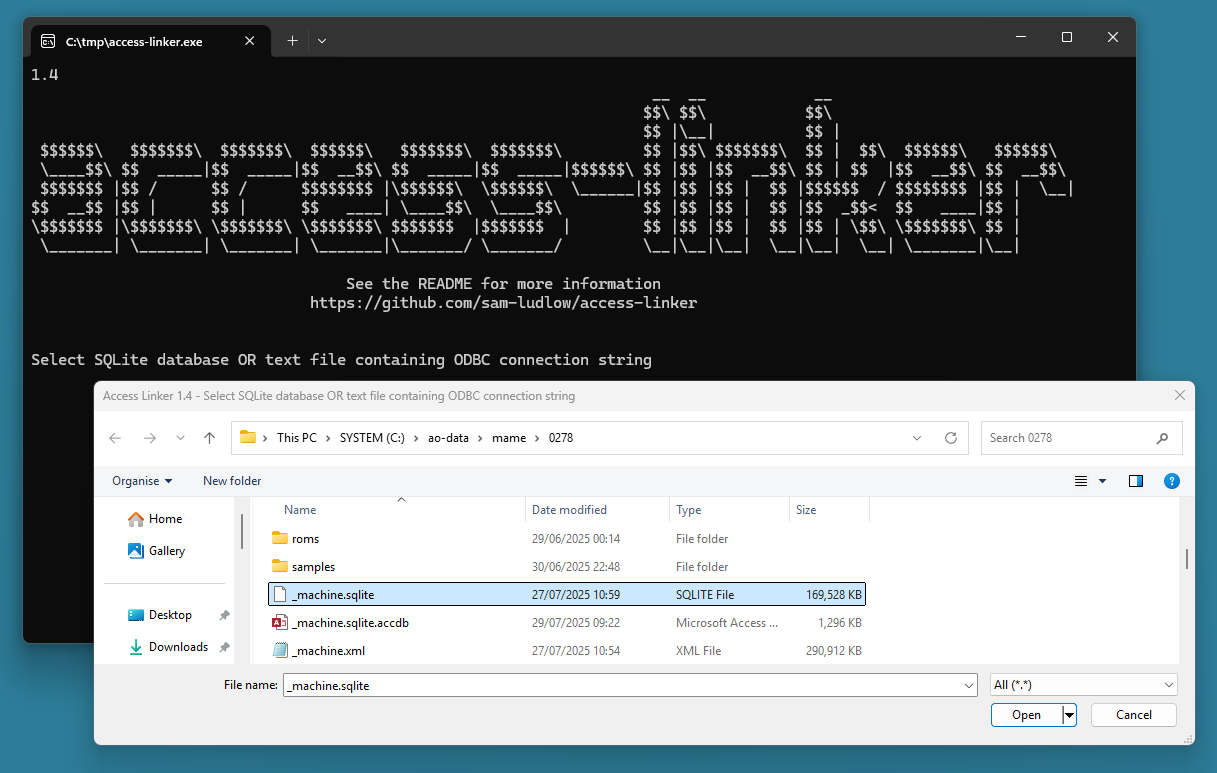
Start access-linker without any arguments then select sorce file, the target access database will have .accdb on the end.
| File Extention | Usage |
|---|---|
.txt |
Link Access to an ODBC database from text file containing connection string |
.xml |
Bulk Insert into Access from XML using OLE DB |
.sqlite, .* |
Link Access to SQLite database using ODBC |
| Name | Description | Example |
|---|---|---|
| access-delete | Delete an Access database | access-linker.exe access-delete filename="C:\tmp\target.accdb" |
| access-create | Create an empty Access database (stored internally) | access-linker.exe access-create filename="C:\tmp\target.accdb" |
| access-schema | View Access database schema using ADO.NET connection.GetSchema() | access-linker.exe access-schema filename="C:\tmp\target.accdb" |
| access-link | Link Access to an ODBC database using TransferDatabase | access-linker.exe access-link filename="C:\tmp\target.accdb" odbc="C:\tmp\source.sqlite" |
| access-link-new | New Access and Link to an ODBC database using TransferDatabase | access-linker.exe access-link-new filename="C:\tmp\target.accdb" odbc="my-mssql-server@source-database" |
| access-import | Import into Access from an ODBC database using TransferDatabase | access-linker.exe access-import filename="C:\tmp\target.accdb" odbc="C:\tmp\source.sqlite" |
| access-import-new | New Access and Import from an ODBC database using TransferDatabase | access-linker.exe access-import-new filename="C:\tmp\target.accdb" odbc="my-mssql-server@source-database" |
| access-export | Export from Access to and ODBC database using TransferDatabase | access-linker.exe access-export filename="C:\source.accdb" odbc="my-mssql-server@target-database" |
| access-insert | Bulk Insert into Access from ODBC source using OLE DB | access-linker.exe access-insert filename="C:\tmp\target.accdb" odbc="C:\tmp\source.sqlite" |
| access-insert-new | New Access and Bulk Insert from ODBC source using OLE DB | access-linker.exe access-insert-new filename="C:\tmp\target.accdb" odbc="my-mssql-server@source-database" |
| Name | Description | Example |
|---|---|---|
| sqlite-delete | Delete an SQLite database | access-linker.exe sqlite-delete filename="C:\tmp\target.sqlite" |
| sqlite-create | Create an empty SQLite database | access-linker.exe sqlite-create filename="C:\tmp\target.sqlite" |
| Name | Description | Example |
|---|---|---|
| mssql-delete | Delete an MS SQL database | access-linker.exe mssql-delete mssql=my-mssql-server name=target-database |
| mssql-create | Create an empty MS SQL database | access-linker.exe mssql-create mssql=my-mssql-server name=target-database |
| mssql-schema-ansi | View MS SQL database schema using INFORMATION_SCHEMA | access-linker.exe mssql-schema-ansi mssql=my-mssql-server@target-database |
| mssql-databases | List all databases on server | access-linker.exe mssql-databases mssql=my-mssql-server |
| mssql-backup | Backup SQL Server to file | access-linker.exe mssql-backup filename="C:\tmp\target.bak" mssql=my-mssql-server name=source-database |
| mssql-restore | Restore SQL Server from file | access-linker.exe mssql-restore filename="C:\tmp\source.bak" mssql=my-mssql-server name=target-database |
| mssql-shrink-ldf | Shrink MS SQL Log file (.LDF) | access-linker.exe mssql-shrink-ldf mssql=my-mssql-server@target-database |
| mssql-shrink-mdf | Shrink MS SQL Data file (.MDF) | access-linker.exe mssql-shrink-mdf mssql=my-mssql-server@target-database |
| Name | Description | Example |
|---|---|---|
| odbc-schema | View ODBC database schema using ADO.NET connection.GetSchema() (SQLite example) | access-linker.exe odbc-schema odbc="DRIVER={SQLite3 ODBC Driver};DATABASE='C:\tmp\source.sqlite';" |
| odbc-schema | View ODBC database schema using ADO.NET connection.GetSchema() (MS SQL example) | access-linker.exe odbc-schema odbc="Driver={ODBC Driver 18 for SQL Server};SERVER=my-mssql-server;DATABASE=source-database;Trusted_Connection=Yes;TrustServerCertificate=Yes;" |
| Name | Description | Example |
|---|---|---|
| xml-insert-new | New Access and Bulk Insert from XML using OLE DB | access-linker.exe xml-insert-new filename="C:\tmp\source.xml" |
MS Access uses ODBC to connect to SQLite. You need to install dirvers. You can list them with the Power Shell command Get-OdbcDriver.
http://www.ch-werner.de/sqliteodbc/
DRIVER={SQLite3 ODBC Driver};DATABASE=SQLITE-FILENAME;
MS Access uses ODBC to connect to SQL Server. You need to install dirvers. If you have installed SSMS you will already have them (just watch out for version numbers 17/18). You can list them with the Power Shell command Get-OdbcDriver.
https://learn.microsoft.com/en-us/sql/connect/odbc/download-odbc-driver-for-sql-server
Windows Authentication.
Driver={ODBC Driver 18 for SQL Server};SERVER=MY-SERVER;DATABASE=MY-DATABASE;Trusted_Connection=Yes;TrustServerCertificate=Yes;
SQL Authentication (username & password)
Driver={ODBC Driver 18 for SQL Server};SERVER=MY-SERVER;DATABASE=MY-DATABASE;UID=api;PWD=api;TrustServerCertificate=Yes;
OLE DB Providers are part of the Office Installation. You can list them with the Power Shell command (New-Object system.data.oledb.oledbenumerator).GetElements().
If you don't have Office installed or using OLE DB on the server to connect to MS Access you should use the Access 365 Runtime
MS Access
"Provider='Microsoft.ACE.OLEDB.16.0';User ID='Admin';Password='';Data Source=ACCESS-FILENAME;"
access-linker will automatically append the Access System Database to the connection string. You have to run Access for the first time to create this file.
Jet OLEDB:System Database='C:\Users\Sam\AppData\Roaming\Microsoft\Access\System.mdw';
Windows Authentication.
"Data Source=MY-SERVER;Initial Catalog=MY-DATABASE;Integrated Security=True;TrustServerCertificate=True;"
SQL Authentication (username & password)
"Data Source=MY-SERVER;Initial Catalog=MY-DATABASE;User Id='MY-USER';Password='MY-PASS';TrustServerCertificate=True;"