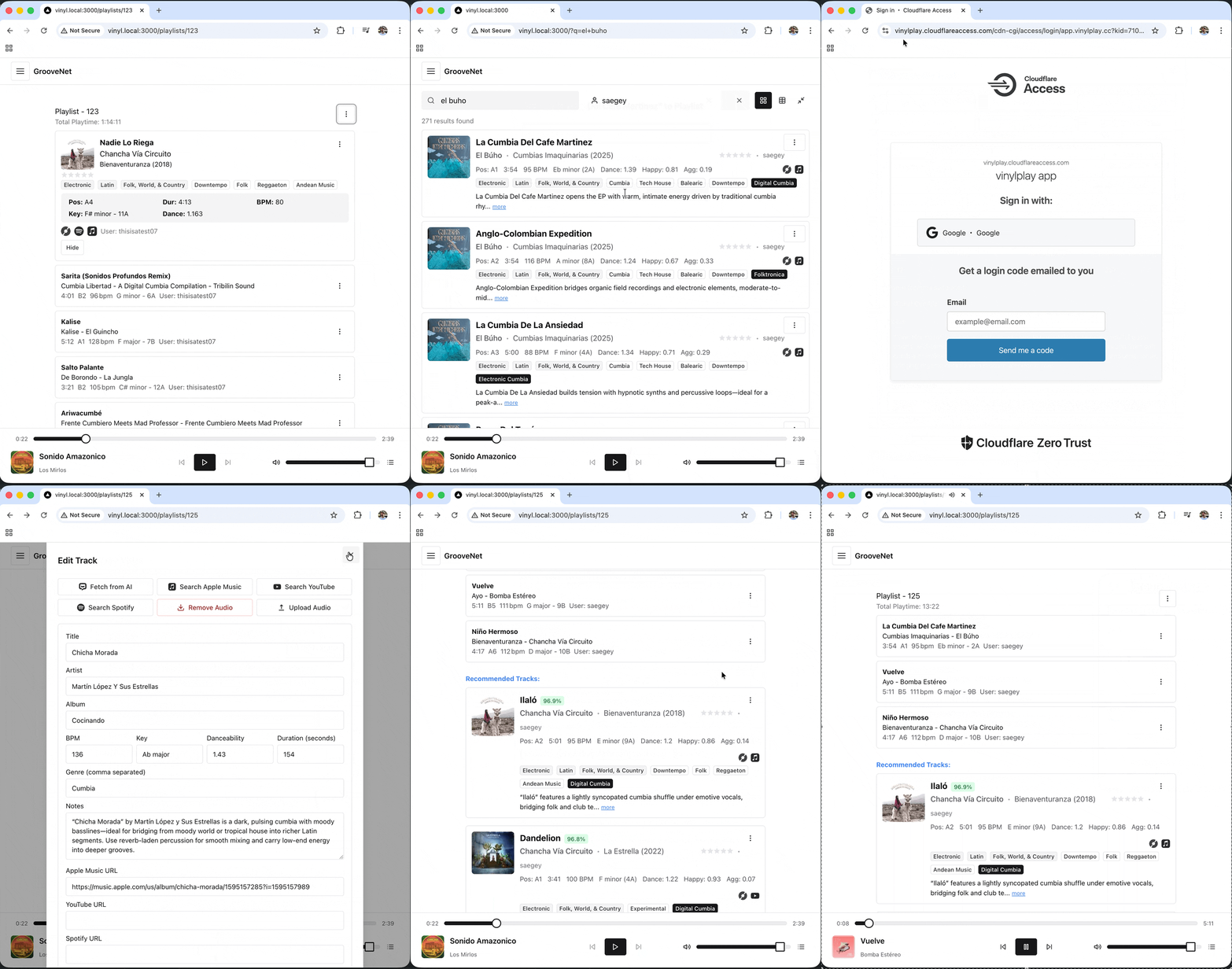
A self-hosted, full-stack app for managing your vinyl collection. Import from Discogs, enrich metadata with Apple Music and YouTube, analyze audio for BPM/key/mood, and generate intelligent playlists — all from a web UI or terminal.
- Powerful Search: PostgreSQL full-text + fuzzy search with infinite scroll and advanced filtering
- Multi-Platform Integration: Discogs, Apple Music, YouTube, and SoundCloud
- Audio Analysis: Essentia-powered BPM, key detection, and mood analysis
- Smart Playlisting: Genetic algorithm playlist generation based on BPM, key, mood, and genre
- Metadata Enrichment: Bulk editing, AI-assisted completion, and track linking across platforms
- Vector Similarity Search: Find similar tracks using OpenAI embeddings (optional)
- Friend Collections: Browse and share collections with friends
- CLI + MCP Server: Terminal client and Claude Code integration
- Backup / Restore: Full database backup and restore via web UI
dj-playlist/
├── my-collection-search/        # Main Next.js application + API
│   ├── src/
│   │   ├── app/                 # App Router pages and API routes
│   │   ├── components/          # React components
│   │   ├── server/              # Backend repositories and services
│   │   ├── types/               # TypeScript types (source of truth)
│   │   └── api-contract/        # Zod schemas shared across routes
│   ├── migrations/              # PostgreSQL migrations (node-pg-migrate)
│   └── .env.example             # Environment variable template
├── packages/
│   ├── groovenet-client/        # Shared typed API client (@groovenet/client)
│   └── groovenet-cli/           # CLI tool (npm: @groovenet/cli, bin: groovenet)
├── mcp-server/                  # MCP server for Claude Code integration
├── essentia-api/                # Python FastAPI audio analysis microservice
├── ga-service/                  # Python genetic algorithm playlist service
├── download-worker/             # Python background worker (yt-dlp, gamdl, audio downloads)
└── justfile                     # Task runner (just compose-dev, just release, etc.)
- Docker & Docker Compose v2
- just — task runner (
brew install just) - Node.js 20+ (for local JS development)
- A Discogs account with a collection
git clone <your-repo-url>
cd dj-playlist

# Configure environment
cp my-collection-search/.env.example my-collection-search/.env
# Edit .env with your credentials

# Start all services with hot reload
just compose-dev

# In another terminal, run migrations
just migrate-up
App is available at http://localhost:3000.
After starting, navigate to the import page and click Sync from Discogs to load your collection.
cp my-collection-search/.env.example my-collection-search/.env
# Edit .env with production credentials

docker compose -f my-collection-search/docker-compose.prod.yml up -d
docker compose -f my-collection-search/docker-compose.prod.yml run --rm migratecp my-collection-search/.env.example my-collection-search/.env
just compose-dev # or omit -dev for production mode
just migrate-upPre-built images are x86_64 only. Mac users build locally from source.
just release-localbuild   # tag + deploy to vinyl.local (builds on server)
just release              # tag + push images to registry + deploy
Set PROD_HOST and PROD_STACK_DIR in your environment or justfile to match your server.
Copy .env.example to .env and fill in the values. All platform integrations are optional except Discogs.
| Variable | Required | Description |
|---|---|---|
DATABASE_URL |
✅ | Postgres connection string |
POSTGRES_USER / POSTGRES_PASSWORD / POSTGRES_DB |
✅ | DB credentials |
DISCOGS_USER_TOKEN |
✅ | API token from discogs.com/settings/developers |
DISCOGS_USERNAME |
✅ | Your Discogs username |
DISCOGS_FOLDER_ID |
✅ | 0 for all folders |
APPLE_MUSIC_TEAM_ID |
— | 10-char team ID from Apple Developer account |
APPLE_MUSIC_KEY_ID |
— | 10-char MusicKit key ID |
APPLE_MUSIC_PRIVATE_KEY |
— | Contents of your .p8 key file (paste with real newlines) |
YOUTUBE_API_KEY |
— | YouTube Data API v3 key |
OPENAI_API_KEY |
— | Required for AI metadata and vector search features |
NEXT_PUBLIC_POSTHOG_KEY |
— | PostHog analytics (optional) |
RESTIC_REPOSITORY / RESTIC_PASSWORD |
— | Remote backup via restic + Backblaze B2 |
For Apple Music, paste the full contents of your .p8 file as the APPLE_MUSIC_PRIVATE_KEY value (with real newlines, not \n literals).
Migrations are managed with node-pg-migrate. Files live in my-collection-search/migrations/.
just migrate-up              # run pending migrations
just migrate-down            # roll back last migration
just migrate-create NAME=foo # create a new migration file- Backup: Web UI → Settings → Backup, or
POST /api/backup - Restore: Web UI → Settings → Restore (upload a
.sqldump)
Backups are SQL dumps stored in the db_dumps volume. The restore process drops and recreates the schema, then re-imports data.
A terminal client for your collection — useful over Tailscale or SSH from any machine.
npm install -g @groovenet/cliOr from source:
npm install && just build-packages
cd packages/groovenet-cli && npm linkgroovenet config set api_base http://groovenet.local:3000/api
groovenet config show# Tracks
groovenet tracks search "acid house" --bpm-min 120 --bpm-max 135
groovenet tracks show <track-id>
groovenet tracks update <track-id> --rating 5 --tags "acid,classic"
# Albums
groovenet albums list
groovenet albums show <release-id>
groovenet albums download <release-id>
# Playlists
groovenet playlists list
groovenet playlists show <id>
groovenet playlists create "Friday Night"
groovenet playlists generate <id>
# Playback
groovenet play <track-id>
groovenet pause
groovenet stop
groovenet now-playing
# Friends
groovenet friends list
groovenet friends add <username>All commands support --json for scripting.
Allows Claude to browse and manage your collection through natural language.
npm install && just build-packages

claude mcp add --transport stdio --scope project groovenet \
  -- node /path/to/dj-playlist/mcp-server/build/index.js
For remote access (e.g. over Tailscale):
claude mcp add --transport stdio --scope user groovenet \
  -- env API_BASE=http://groovenet.local:3000/api \
node /path/to/dj-playlist/mcp-server/build/index.js| Category | Tools |
|---|---|
| Tracks | search_tracks, get_track_details, update_track, get_missing_apple_music |
| Albums | search_albums, get_album, update_album, download_album |
| Playlists | list_playlists, get_playlist, create_playlist, generate_ai_playlist |
| Friends | get_friends, add_friend |
| External | search_apple_music, search_youtube |
See mcp-server/README.md for full documentation.
| Layer | Tech |
|---|---|
| Frontend | Next.js 16, React 19, TypeScript, Chakra UI v3, TanStack Query v5, Zustand |
| Backend | Next.js API Routes, PostgreSQL 15 + pgvector, Redis, node-pg-migrate |
| Audio analysis | Python FastAPI + Essentia |
| Playlist generation | Python FastAPI + genetic algorithm |
| Download worker | Python + yt-dlp + gamdl |
| Package management | npm workspaces (JS), uv (Python) |
| External APIs | Discogs, Apple Music, YouTube, OpenAI |
Database connection issues
docker compose logs db
docker compose exec db psql -U djplaylist -d djplaylist -c "SELECT 1;"
Migrations out of sync (schema exists but pgmigrations table is empty)
# Connect to the DB and manually insert the migration records
docker compose exec db psql -U djplaylist djplaylist
Then insert rows into pgmigrations for each migration that has already been applied.
Audio analysis failing
docker compose logs essentia-api
curl http://localhost:8001/health
Port conflicts — modify ports: in docker-compose.yml (e.g. "3001:3000")
- TypeScript strict mode throughout
- Use
queryKeys.tshelpers — don't build query keys by hand - Add migrations for all schema changes
- When adding API endpoints: add to
groovenet-client, then wire into CLI and/or MCP server - Build order:
just build-packages(client → cli → mcp-server)
MIT