Blazing-fast Python web framework with production-grade routing backed by a minimal, event-driven C core





Catzilla is a high-performance Python web framework built for teams that want Python ergonomics without paying the usual runtime tax. Its HTTP engine lives in C, uses libuv and llhttp, and exposes a clean decorator-based API that feels familiar to Python developers while keeping request handling tight and predictable.
It is designed for low-latency APIs, high-throughput services, streaming workloads, and systems where memory usage matters just as much as raw throughput.
- Fast where it matters: C-backed request parsing, routing, and response dispatch
- Pythonic to use:
@app.get(...), typed parameters, validation, and clean handler code - Built for production: middleware, background tasks, uploads, streaming, caching, and DI
- Memory-aware by default: jemalloc-backed allocation strategy where available
- Portable: supports Linux, macOS, and Windows with source and wheel-based workflows
In the benchmark suite included in this repository, Catzilla currently leads FastAPI, Flask, and Django in direct localhost HTTP benchmarks for both single-worker and 10-worker runs. These numbers should be read as framework-overhead and runtime-efficiency comparisons, not as universal production guarantees. The current published artifact set covers the basic direct HTTP suite: hello world, JSON response, complex JSON, path parameters, and query parameters.
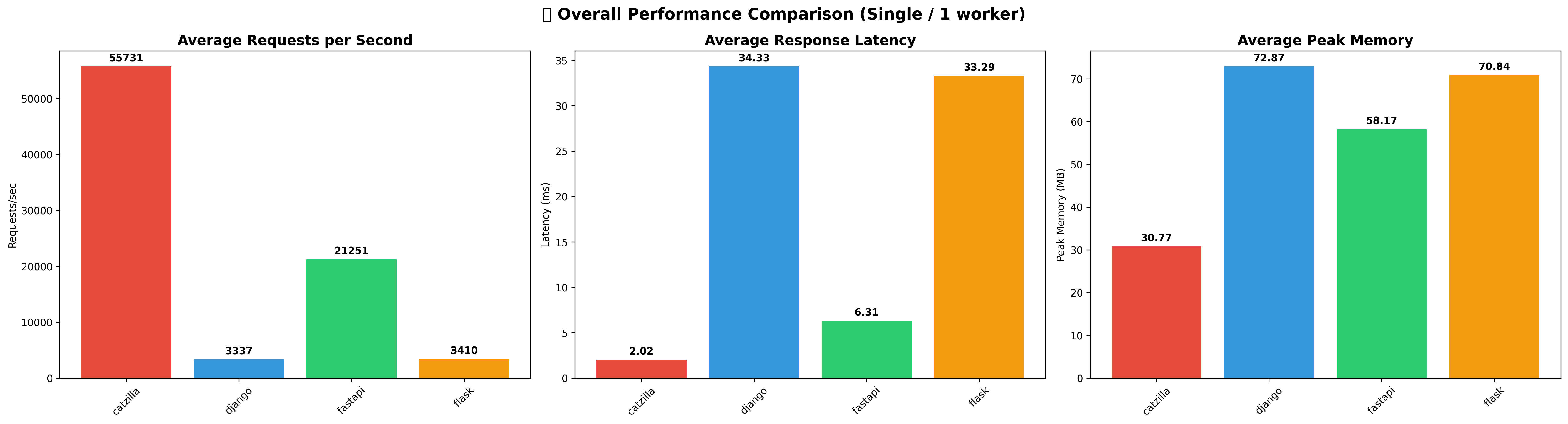
- Average throughput: 55,731 req/s
- Best endpoint:
basic_hello_worldat 82,817 req/s - Average latency: 2.02ms
- Average peak memory: 30.77MB
- Lead over FastAPI: 2.6x average throughput
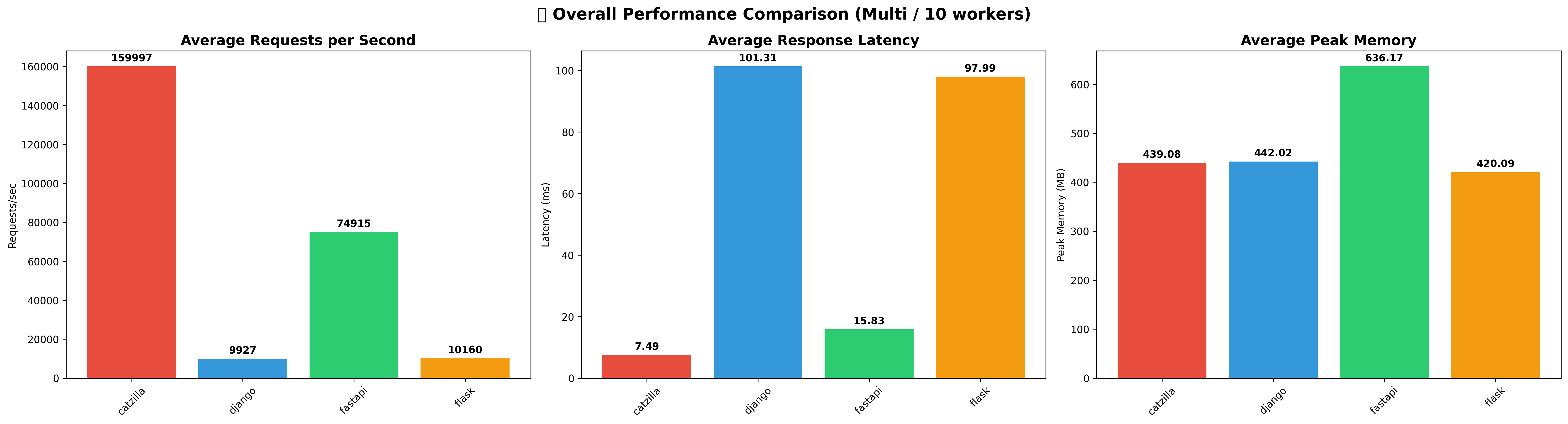
- Average throughput: 159,997 req/s
- Best endpoint:
basic_hello_worldat 190,612 req/s - Average latency: 7.49ms
- Average peak memory: 439.08MB
- Lead over FastAPI: 2.1x average throughput
Current benchmark docs and artifacts:
- Current report: PERFORMANCE_REPORT.md
- Transparent generated report: benchmarks/results/transparent_performance_report.md
- Methodology and reproduction guide: benchmarks/README.md
- ⚡ Hybrid C/Python architecture for low-overhead request handling
- 🔥 Trie-based routing with dynamic path parameters and fast lookup
- 🧱 Minimal API surface with familiar decorator-style routing
- 🔁 Sync and async handlers with native deferred async response support
- 📦 Lean dependency model focused on the standard library and native code
- 🛣️ Dynamic path and query parameters with typed extraction
- ✅ Validation layer for request models and parameter constraints
- 🧩 Dependency injection and middleware composition
- 📤 Streaming responses, file uploads, background tasks, and static file serving
- 🚦 HTTP error handling for 404, 405, 415, and framework-level exceptions
- 📖 Readable Python handlers on top of a high-performance core
- 🧪 Comprehensive unit and end-to-end validation across Python and C layers
- 🔧 Cross-platform build and packaging support
- 🧰 Benchmark suite included so performance claims are reproducible
Catzilla ships with a memory strategy tuned for long-running services, including jemalloc integration where available. The goal is simple: keep throughput high while reducing fragmentation and avoiding the typical memory blow-up that shows up under sustained load.
app = Catzilla()

# Real-time memory statistics
stats = app.get_memory_stats()
print(f"Memory efficiency: {stats['fragmentation_percent']:.1f}%")
print(f"Allocated: {stats['allocated_mb']:.2f} MB")- Request Arena: Optimized for short-lived request processing
- Response Arena: Efficient response building and serialization
- Cache Arena: Long-lived data with minimal fragmentation
- Static Arena: Static file serving with memory pooling
- Task Arena: Background operations with isolated allocation
Install Catzilla from PyPI:
pip install catzillaSystem Requirements:
- Python 3.9+ (3.10+ recommended)
- Windows, macOS, or Linux
- Minimal runtime dependency footprint (
psutilonly)
Platform-Specific Features:
- Linux/macOS: jemalloc memory allocator (high performance)
- Windows: Standard malloc (reliable performance)
- See Platform Support Guide for details
python -c "import catzilla; print(f'Catzilla v{catzilla.__version__} installed successfully!')"For specific versions or if PyPI is unavailable:
# Download specific wheel for your platform from:
# https://github.com/rezwanahmedsami/catzilla/releases/latest
pip install <downloaded-wheel-file>For development or contributing:
# Clone with submodules
git clone --recursive https://github.com/rezwanahmedsami/catzilla.git
cd catzilla

# Create virtual environment
python -m venv venv
source venv/bin/activate  # On Windows: venv\Scripts\activate

# Install in development mode
pip install -e .
Build Requirements (Source Only):
- Python 3.9-3.14
- CMake 3.15+
- C Compiler: GCC/Clang (Linux/macOS) or MSVC (Windows)
Create a small application with sync routes, async routes, and typed parameters:
# app.py
from typing import Optional
import asyncio

from catzilla import BaseModel, Catzilla, JSONResponse, Path, Query, Request, Response

app = Catzilla(
    production=False,
    show_banner=True,
    log_requests=True,
)

class UserCreate(BaseModel):
    id: Optional[int] = None
    name: str
    email: Optional[str] = None

@app.get("/")
def home(request: Request) -> Response:
    return JSONResponse({
        "framework": "catzilla",
        "message": "Hello from Catzilla",
        "mode": "sync",
    })

@app.get("/health")
async def health(request: Request) -> Response:
    await asyncio.sleep(0)
    return JSONResponse({
        "status": "ok",
        "mode": "async",
    })

@app.get("/users/{user_id}")
def get_user(request: Request, user_id: int = Path(..., ge=1)) -> Response:
    return JSONResponse({
        "user_id": user_id,
        "message": f"Retrieved user {user_id}",
    })

@app.get("/search")
def search(
    request: Request,
    q: str = Query(""),
    limit: int = Query(10, ge=1, le=100),
) -> Response:
    return JSONResponse({
        "query": q,
        "limit": limit,
        "results": [{"id": index, "title": f"Result {index}"} for index in range(limit)],
    })

@app.post("/users")
def create_user(request: Request, user: UserCreate) -> Response:
    return JSONResponse({
        "message": "User created successfully",
        "user": {"id": user.id, "name": user.name, "email": user.email},
    }, status_code=201)

if __name__ == "__main__":
    app.listen(port=8000, host="127.0.0.1")
Run your app:
python app.pyThen visit http://127.0.0.1:8000.
Existing code works unchanged (App is an alias for Catzilla):
from catzilla import App  # Still works!
app = App() # Same memory benefitsCatzilla provides comprehensive cross-platform support with pre-built wheels for all major operating systems and Python versions.
| Platform | Architecture | Status | Wheel Available |
|---|---|---|---|
| Linux | x86_64 | ✅ Full Support | ✅ manylinux2014 |
| macOS | x86_64 (Intel) | ✅ Full Support | ✅ macOS 10.15+ |
| macOS | ARM64 (Apple Silicon) | ✅ Full Support | ✅ macOS 11.0+ |
| Windows | x86_64 | ✅ Full Support | ✅ Windows 10+ |
| Linux | ARM64 | ❌ No pre-built wheel |
*ARM64 Linux requires building from source with proper build tools installed.
| Python Version | Linux x86_64 | macOS Intel | macOS ARM64 | Windows |
|---|---|---|---|---|
| 3.9 | ✅ | ✅ | ✅ | ✅ |
| 3.10 | ✅ | ✅ | ✅ | ✅ |
| 3.11 | ✅ | ✅ | ✅ | ✅ |
| 3.12 | ✅ | ✅ | ✅ | ✅ |
| 3.13 | ✅ | ✅ | ✅ | ✅ |
| 3.14 | ✅ | ✅ | ✅ | ✅ |
- Instant installation with zero compilation time
- No build dependencies required (CMake, compilers, etc.)
- Optimized binaries for maximum performance
- Available for: Linux x86_64, macOS (Intel/ARM64), Windows x86_64
# Automatic platform detection
pip install <wheel-url-from-releases>- Build from source when pre-built wheels aren't available
- Requires build tools: CMake 3.15+, C compiler, Python headers
- Longer installation time due to compilation
# For ARM64 Linux or custom builds
pip install https://github.com/rezwanahmedsami/catzilla/releases/download/vx.x.x/catzilla-x.x.x.tar.gz- Native performance on all supported platforms
- Architecture-specific optimizations in pre-built wheels
- Cross-platform C core ensures consistent behavior
- Platform-specific wheel tags for optimal compatibility
For detailed compatibility information, see SYSTEM_COMPATIBILITY.md.
Catzilla includes a benchmark harness that compares it against FastAPI, Flask, and Django across direct HTTP paths and feature-specific slices. The current published benchmark artifacts in this repository cover the basic direct HTTP suite in two modes: Single / 1 worker and Multi / 10 workers.
Direct localhost server benchmarking | wrk | macOS arm64 | 10s duration
This is real benchmark data collected from the repository benchmark runner. It is useful for comparing framework overhead and implementation efficiency on the same machine and workload shape.
| Mode | Catzilla | FastAPI | Flask | Django |
|---|---|---|---|---|
| Single / 1 worker avg RPS | 55,731 | 21,251 | 3,410 | 3,337 |
| Single / 1 worker avg latency | 2.02ms | 6.31ms | 33.29ms | 34.33ms |
| Single / 1 worker avg peak memory | 30.77MB | 58.17MB | 70.84MB | 72.87MB |
| Multi / 10 workers avg RPS | 159,997 | 74,915 | 10,160 | 9,927 |
| Multi / 10 workers avg latency | 7.49ms | 15.83ms | 97.99ms | 101.31ms |
| Multi / 10 workers avg peak memory | 439.08MB | 636.17MB | 420.09MB | 442.02MB |
- Best current result:
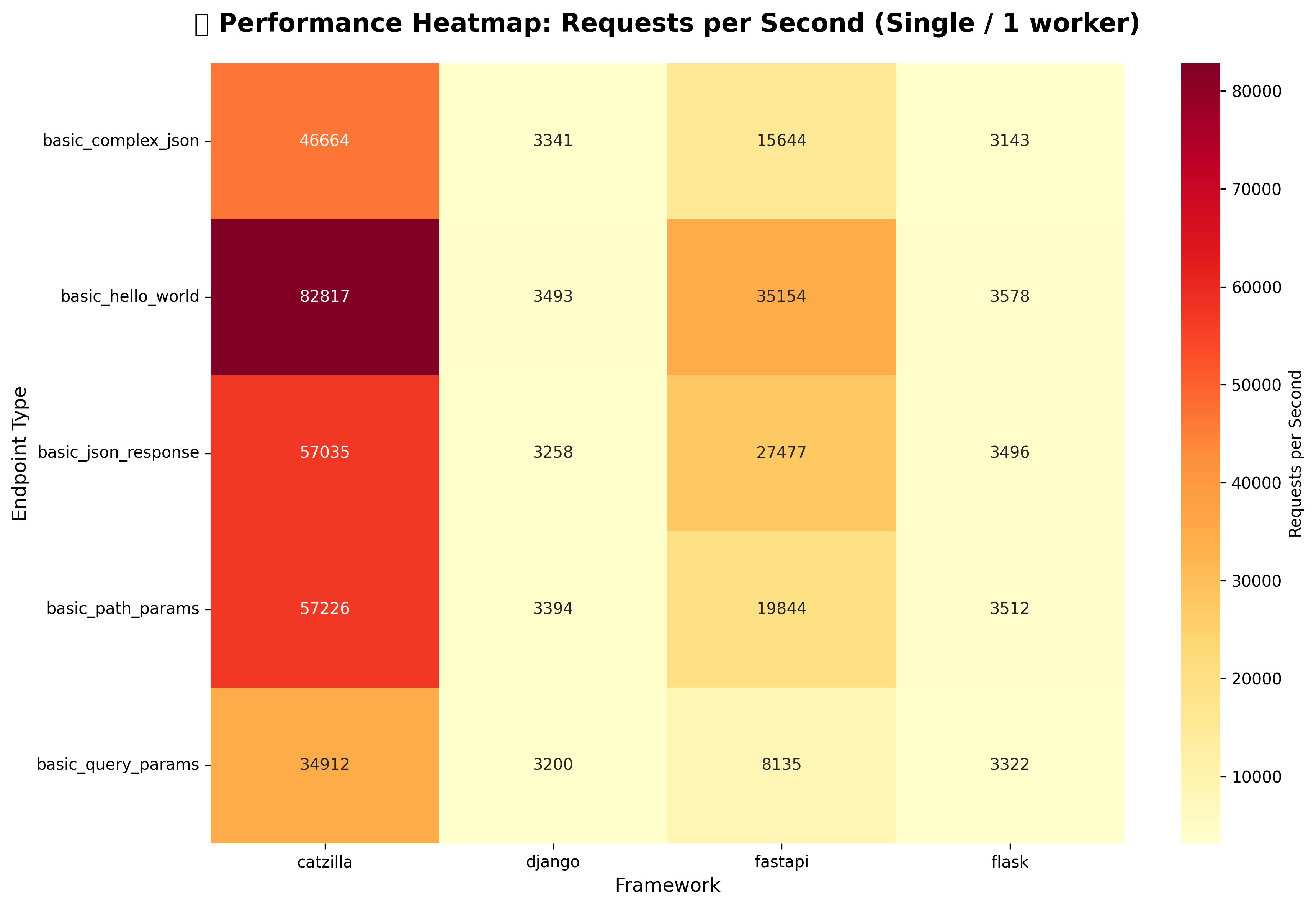
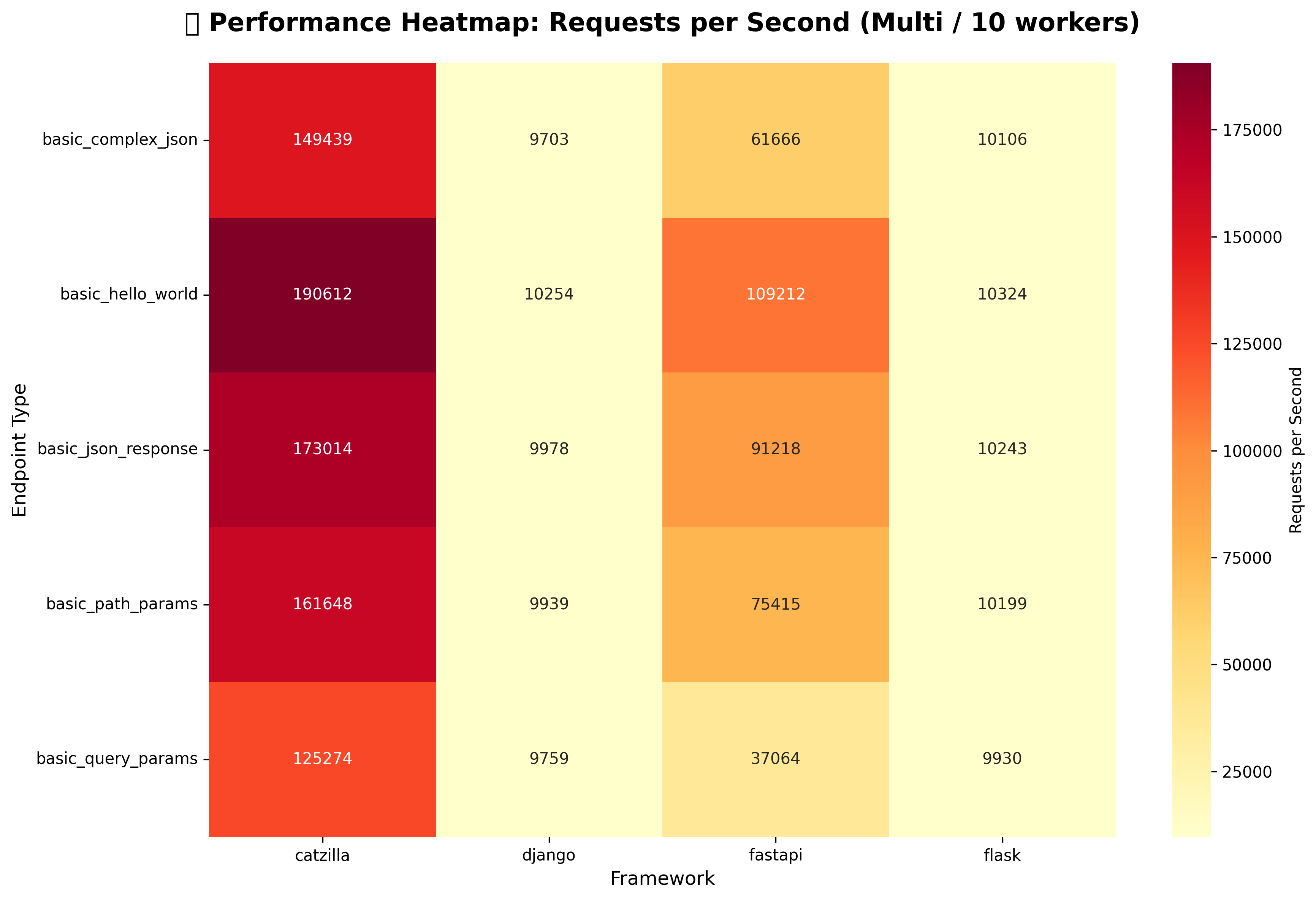
basic_hello_worldat 82,817 req/s single-worker and 190,612 req/s at 10 workers. - Lowest current Catzilla result in the published basic suite:
basic_query_paramsat 34,912 req/s single-worker and 125,274 req/s at 10 workers. - Catzilla leads every published endpoint in both worker modes in the current direct HTTP dataset.
- PERFORMANCE_REPORT.md: release-facing benchmark report for the current stable version
- benchmarks/results/basic_performance_report.md: generated detailed table for the latest basic run
- benchmarks/results/transparent_performance_report.md: generated artifact summary with embedded charts
- benchmarks/README.md: methodology, commands, and interpretation notes
📋 View Complete Performance Report - Detailed analysis with current charts and endpoint-by-endpoint data
- ⚡ High-throughput requirements (API gateways, microservices, data pipelines)
- 🎯 Low-latency critical applications (real-time APIs, financial trading, gaming backends)
- 🧬 Resource efficiency (cloud computing, embedded systems, edge computing)
- 🚀 C-level performance with Python developer experience
Note: Comprehensive benchmark suite with automated testing available in benchmarks/ directory.
For detailed development instructions, see CONTRIBUTING.md.
# Complete build (recommended)
./scripts/build.sh

# Manual CMake build
cmake -S . -B build -DCMAKE_BUILD_TYPE=Debug
cmake --build build -j$(nproc)
pip install -e .The project includes C tests, Python unit tests, and end-to-end validation:
# Run all tests ( C + Python Unit + e2e)
./scripts/run_tests.sh

# Run specific test suites
./scripts/run_tests.sh --python  # Python Unit tests only
./scripts/run_tests.sh --c       # C tests only
./scripts/run_tests.sh --e2e       # e2e tests only
./scripts/run_tests.sh --verbose # Detailed output- Trie-Based Routing: O(log n) average case lookup performance
- Memory Efficient: Zero memory leaks, optimized allocation patterns
- Route Conflict Detection: Warns about potentially overlapping routes during development
- Method Normalization: Case-insensitive HTTP methods with automatic uppercase conversion
- Parameter Injection: Automatic extraction and injection of path parameters to handlers
- Route Lookup: O(log n) average case with advanced trie data structure
- Memory Management: Zero memory leaks with efficient recursive cleanup
- Scalability: Tested with 100+ routes without performance degradation
- Concurrency: Thread-safe design ready for production workloads
- HTTP Processing: Built on libuv and llhttp for maximum throughput
We welcome contributions! Please see CONTRIBUTING.md for detailed guidelines on:
- Setting up the development environment
- Building and testing the project
- Code style and conventions
- Submitting pull requests
- Debugging and performance optimization
📖 Complete Documentation - Comprehensive guides, API reference, and tutorials
- Getting Started Guide - Quick start tutorial
- System Compatibility - Platform support and installation guide
- Examples - Real-world example applications
- Contributing - Development guide for contributors
Rezwan Ahmed Sami 📧 samiahmed0f0@gmail.com 📘 Facebook
MIT License — See LICENSE for full details.