A Premiere Pro extension for creating and aligning static subtitles with an intuitive click-to-mark workflow.
This extension simplifies the process of adding subtitles to your Premiere Pro projects. Load your subtitle text file, mark start and end times by clicking buttons while playing your video, and automatically generate caption tracks in Premiere Pro.
The plugin is live and can be accessed from Click and Align Subtitle tool
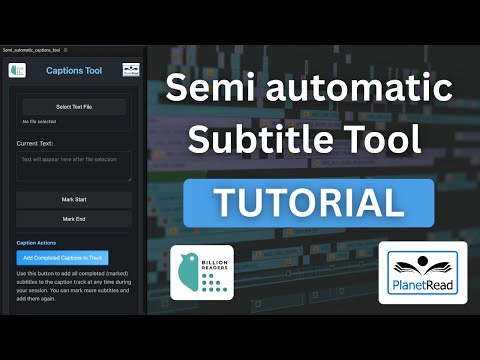


- Load Text Files: Support for both
.txtfile formats - Flexible Encoding: Automatically handles UTF-16 and UTF-8 text file encoding
- Click-to-Mark Workflow:
- Mark start time for each subtitle
- Mark end time to complete a subtitle and move to the next
- Mid-Session Export: Add completed captions to the track at any time during your session
- Incremental Workflow: Continue marking more subtitles and add them again as needed
- Auto-Caption Track Creation: Automatically creates caption tracks in Premiere Pro
- Timeline Markers: Creates visual markers on the timeline for each subtitle
- State Persistence: Saves your progress automatically
ClickAndAlignSubtitleTool/
├── CSInterface.js          # Adobe CEP interface library
├── CSXS/
│   └── manifest.xml         # Extension manifest (configures the extension)
├── jsx/
│   └── subtitles.jsx        # Main ExtendScript logic for subtitle processing
├── index.html               # UI HTML interface
├── main.js                  # JavaScript logic and event handlers
├── style.css                # Styling and UI design
├── bird_logo.png            # Brand logo (left)
├── planetread_logo.png      # Brand logo (right)
├── DEVELOPER.md             # Architecture and function reference (maintainers)
└── README.md                # This file
- Adobe Premiere Pro: 25.0 and later (CEP manifest range
[25.0, 99.9]) - CEP Runtime: Version 12.0 or higher
- Operating System: Windows or macOS
- Windows:
C:\Program Files (x86)\Common Files\Adobe\CEP\extensions\ - macOS:
~/Library/Application Support/Adobe/CEP/extensions/
Copy the entire ClickAndAlignSubtitleTool folder to the extensions directory.
For development/testing purposes, you may need to enable unsigned extensions:
Windows:
- Create or edit the registry key:
HKEY_CURRENT_USER\Software\Adobe\CSXS.12 - Add a String value:
PlayerDebugMode=1
macOS:
- Open Terminal
- Run:
defaults write com.adobe.CSXS.12 PlayerDebugMode 1
Close and restart Adobe Premiere Pro to load the extension.
Go to Window > Extensions > Click and Align Subtitle Tool
-
Load Your Subtitle File
- Click "Load Text File"
- Choose a
.txtfile - The first subtitle line will appear in the text area
-
Mark Start Time
- Play your video in Premiere Pro
- When you reach the point where the subtitle should start, click "Mark Start"
- A timeline marker will be created
-
Mark End Time
- Continue playing the video
- When the subtitle should end, click "Mark End"
- The current subtitle is completed and the next subtitle line appears
-
Add Captions to Track
- At any point during your session, click "Add Completed Captions to Track"
- This exports all completed (marked) subtitles to a caption track
- You can continue marking more subtitles and add them again
-
Reset (Optional)
- Click "Reset Subtitles" to clear all progress and start over
Text Files (.txt):
- One subtitle per line
- Supports UTF-8 and UTF-16 encoding
- Empty lines are automatically filtered out
- You can mark multiple subtitles before exporting them all at once
- The extension automatically saves your progress
- Timeline markers help you visualize subtitle placement
- The extension uses temporary files in the system temp folder to avoid permission issues
- Bundle ID:
com.planetread.clickandalign.subtitle(seeCSXS/manifest.xml) - Version: 2.0.0
- Panel Size: 400x800 pixels
- Auto-Visible: Yes
The extension automatically saves your subtitle state to:
- Location: User data folder
- File:
static_subtitle_tool_state.json - Format: JSON
SRT files for caption import are created in the system temporary folder to avoid file permission issues.
- Verify the extension is in the correct directory
- Check that unsigned extensions are enabled (for development)
- Restart Premiere Pro
- Check the ExtendScript Toolkit console for errors
- Ensure your text file is saved as UTF-8 or UTF-16
- Check that the file is not corrupted
- Verify file permissions allow reading
- Ensure you have an active sequence in Premiere Pro
- Verify that at least one subtitle has both start and end times marked
- Ensure you have an active sequence selected
- Check that the playhead position is valid
- Verify sequence is not locked
See DEVELOPER.md for architecture (CEP ↔ ExtendScript), UI-to-host call map, state and export flow, and tables of major functions in main.js and jsx/subtitles.jsx.
The main.js panel script handles CSInterface initialization, button and spacing event wiring, evalScript calls into ExtendScript, and tool active/inactive UI state.
This project is open source and available under the MIT License.
For support, questions, or feedback, please contact:
- Email: rahulshendre789@gmail.com
- Declared Premiere compatibility 25.0 through 99.9 in the manifest (reduce resubmits on new Premiere minors)
- Bundle / panel version aligned to 2.0.0
- UI copy: load file button wording updated (Load Text File)
- Initial release
- Static subtitle marking workflow
- Support for TXT file formats
- Auto-caption track creation
- Timeline marker integration