







A router-native activity stats and bike service tracker for OpenWrt. A single POSIX shell script driven by cron uses curl and jq to fetch activity data, then writes static HTML and JSON into uhttpd's web root — no extra daemon, almost no RAM. Three data sources are supported; the router's built-in web server serves everything. Can also run locally via Docker or Windows WSL.
| Source | Config file | When to use |
|---|---|---|
| Strava API (OAuth) | /etc/strava-my-activities.conf |
You have a Strava API subscription. See Data-Source-Strava-API |
| Strava scrape mode | /etc/strava-my-activities.conf (STRAVA_MY_SOURCE=scrape) |
No subscription — uses the browser session cookie. See Data-Source-Scrape-Mode |
| HealthSync / Google Drive | /etc/healthsync-activities.conf |
Fully Strava-API-free — healthsync.app exports to Drive. See Data-Source-HealthSync |
| Page | URL | What it shows |
|---|---|---|
| Club leaderboard | /strava/ |
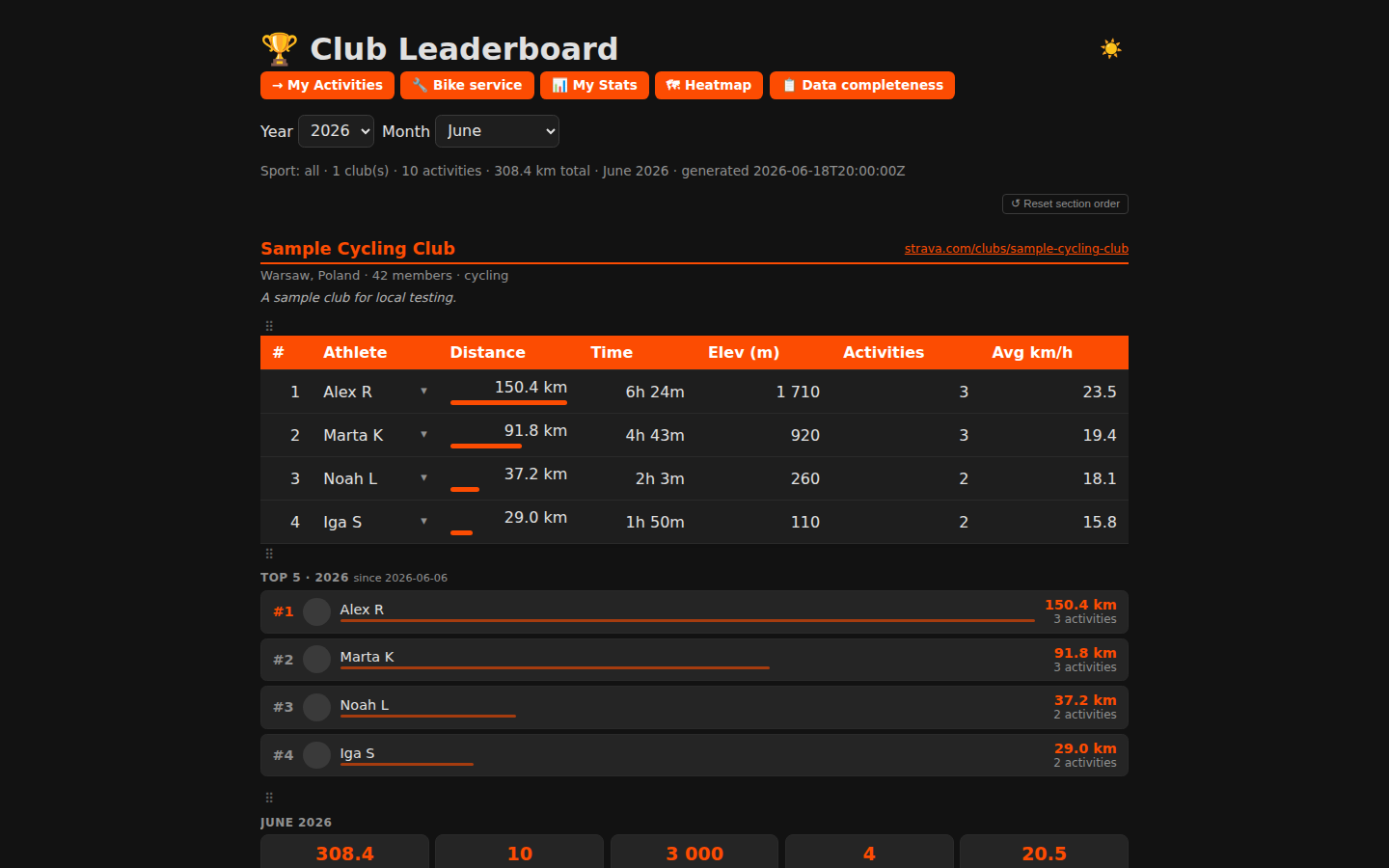
Monthly/yearly distance ranking for your Strava club, filterable by year and month |
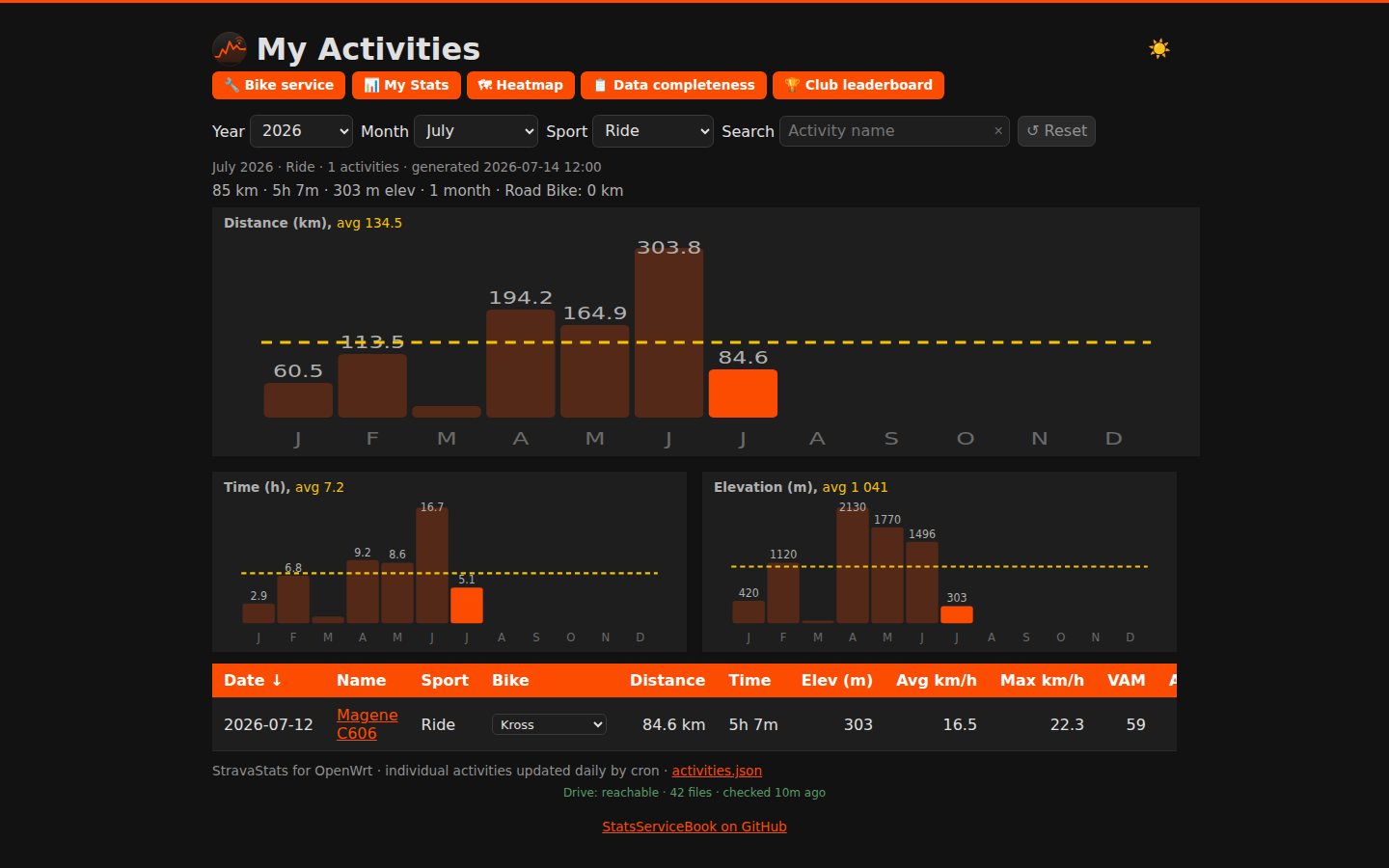
| My Activities | /strava/me/ |
Sortable activity table with year/month/sport filters, bests strip, and monthly bar charts |
| Activity detail | /strava/me/activity.html |
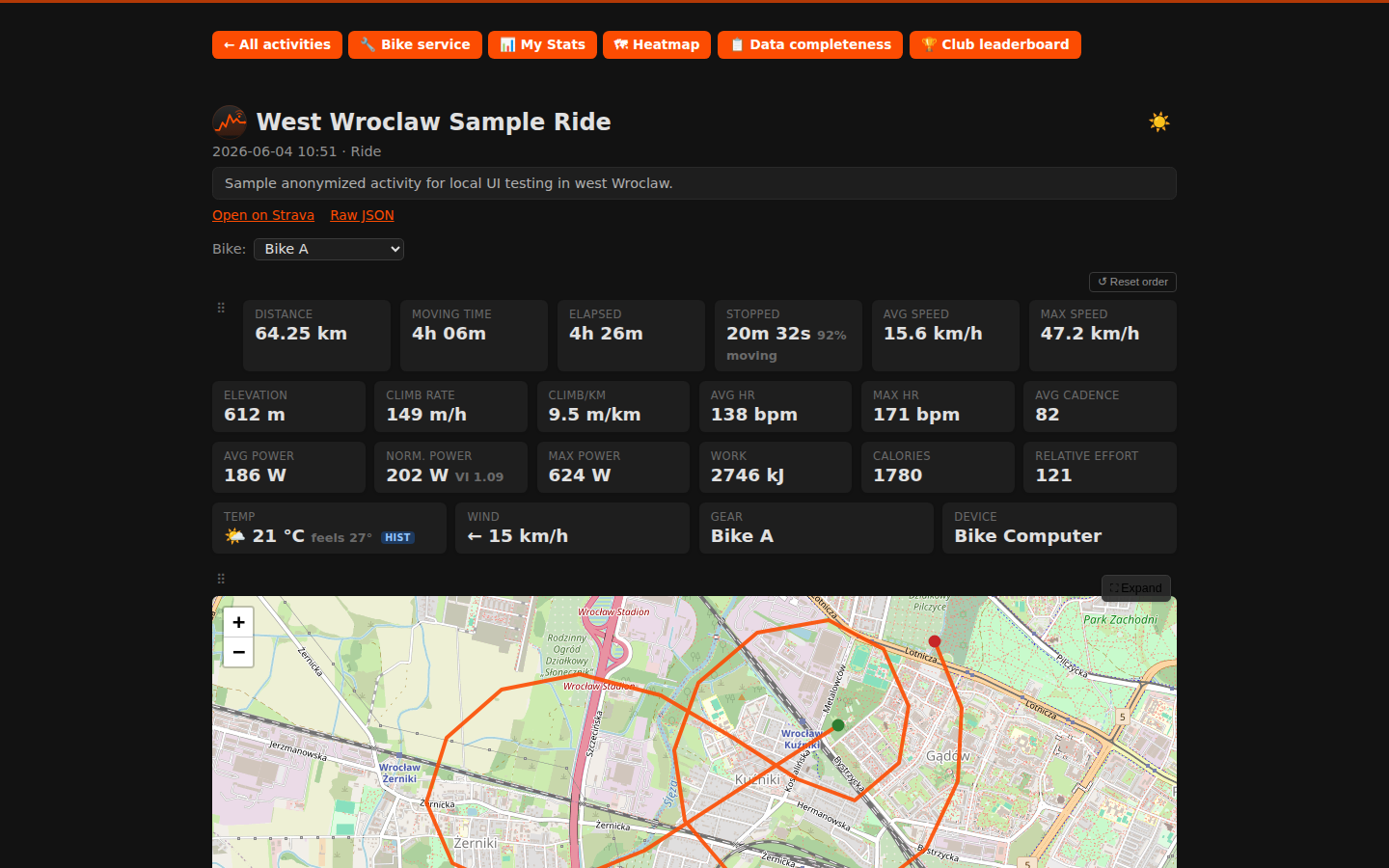
Stat cards, interactive route map (Leaflet + OSM), per-km splits, elevation, HR, cadence charts |
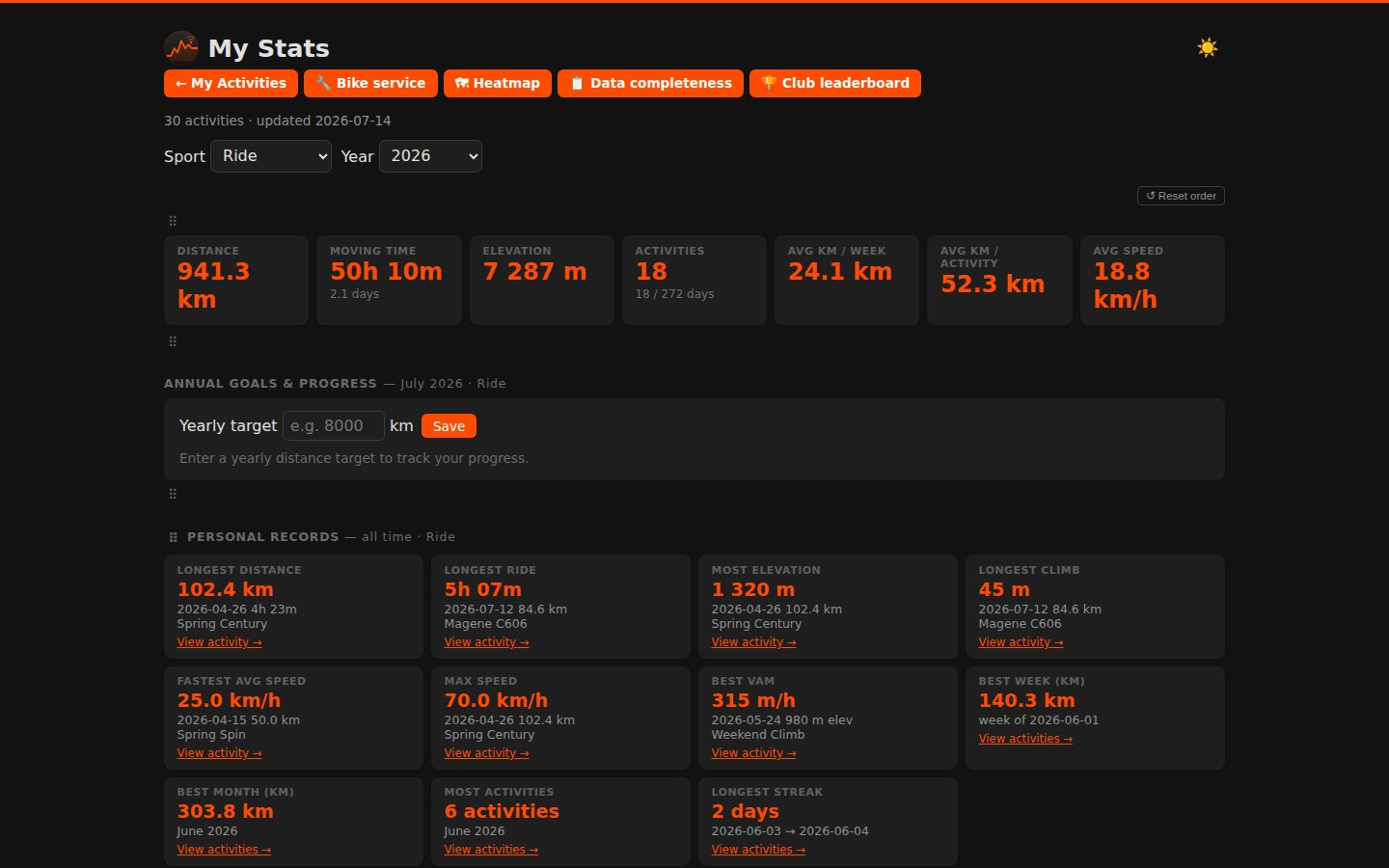
| Personal stats | /strava/me/stats.html |
Aggregate KPIs, personal records, Top 10 leaderboard per metric, year-over-year heatmap, sport breakdown |
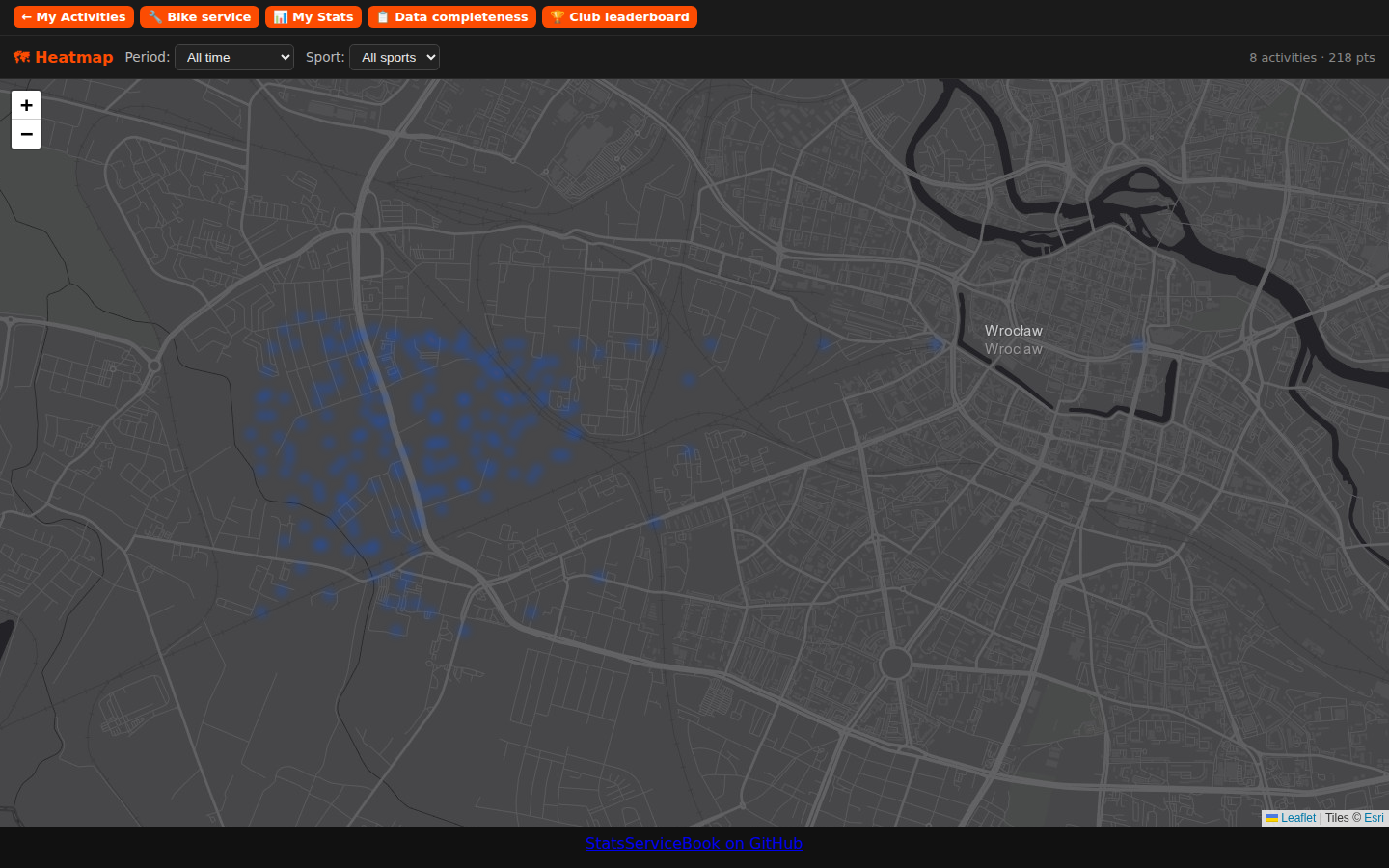
| Activity heatmap | /strava/me/heatmap.html |
Full-viewport Leaflet heat overlay of all GPS routes; period + sport-type filter |
| card for synch is also not updated when Sync C | Data completeness | /strava/me/data-quality.html |
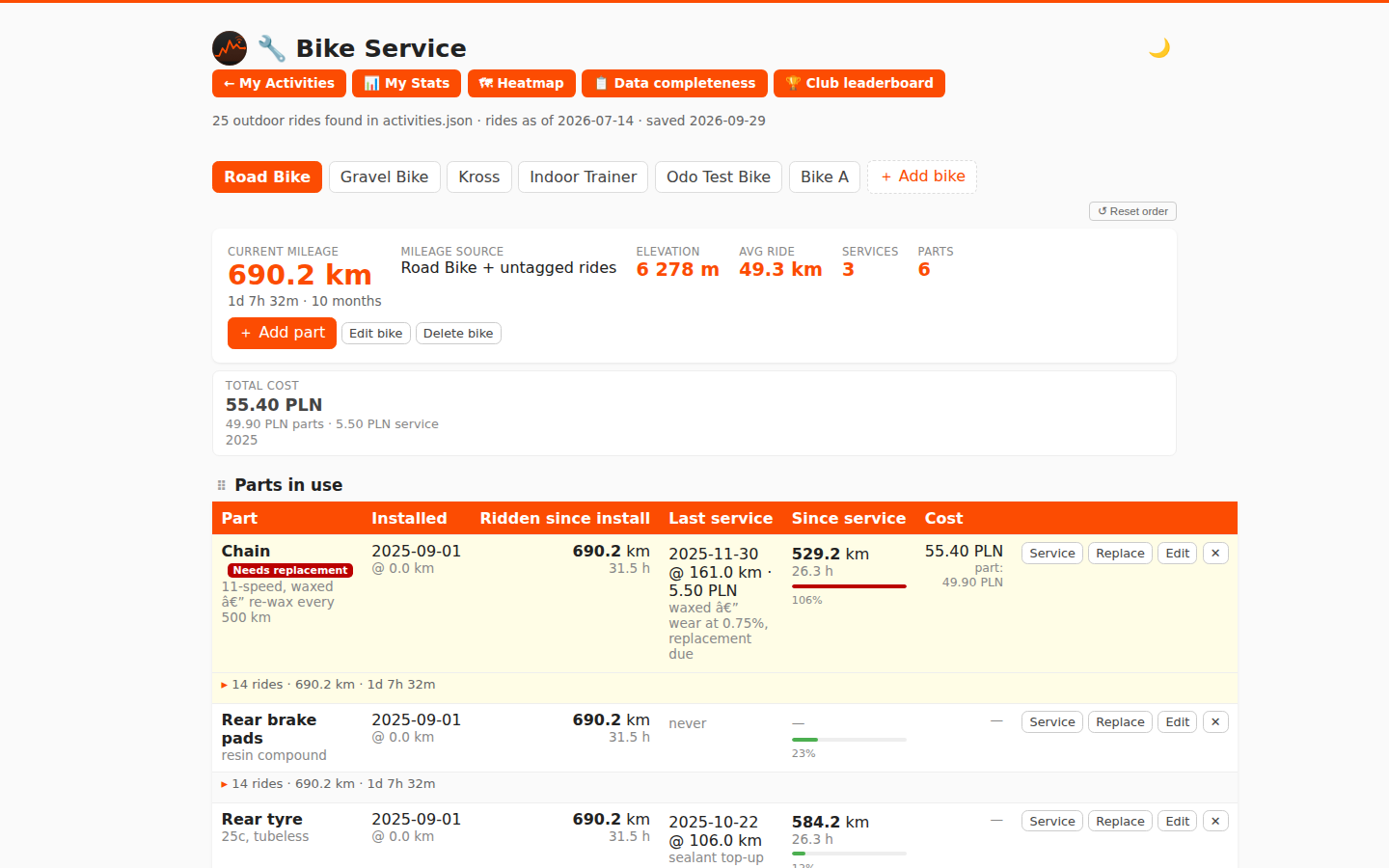
| Bike service | /strava/me/bike.html |
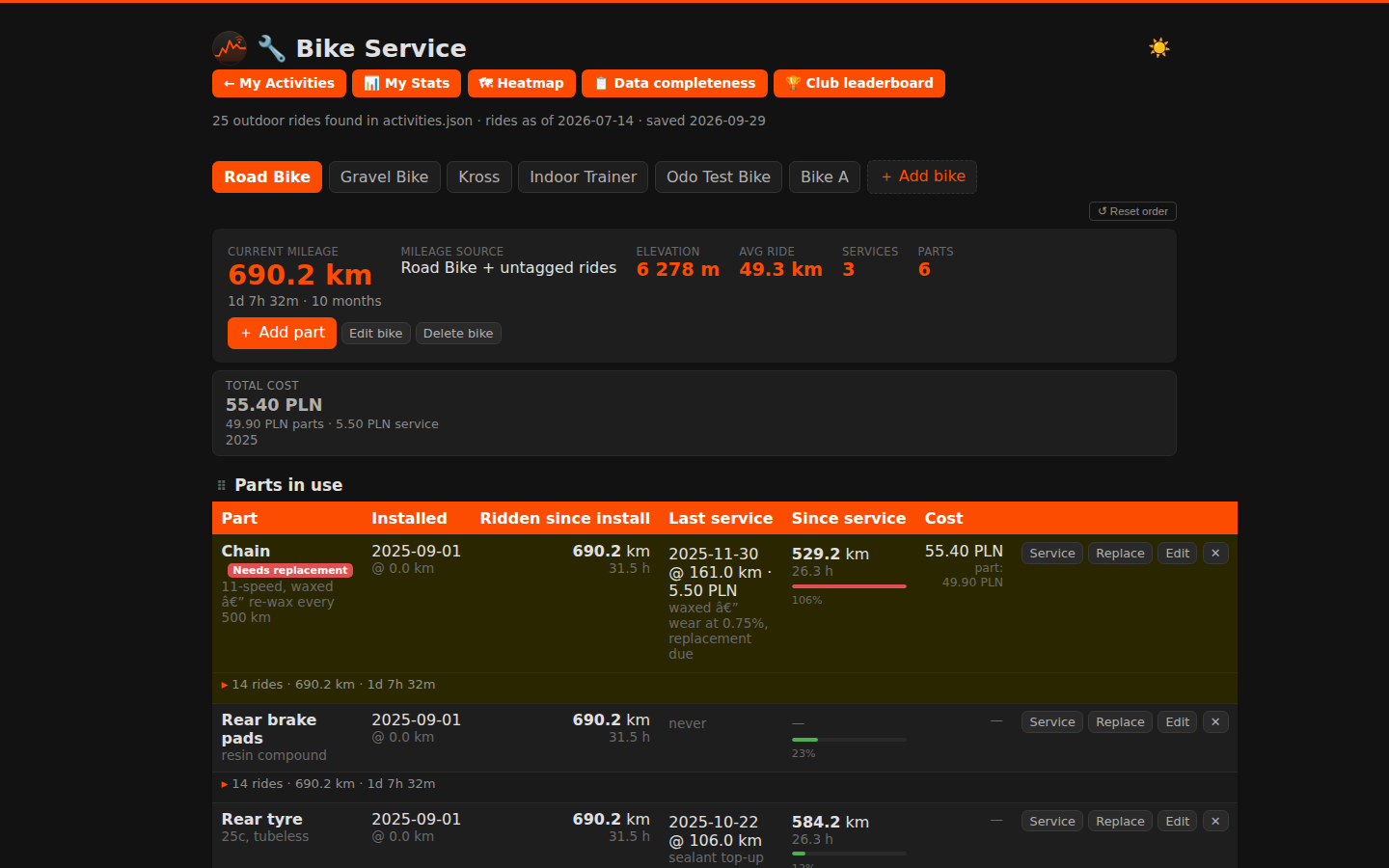
Maintenance log per bike with a cross-bike queue of overdue and upcoming services, auto-mileage, and cost tracking |
My Activities dashboard
- Sortable table: distance, time, elevation, avg/max speed, VAM, avg HR, avg power, work (kJ)
- Year/month/sport-type filters; period "bests" strip (longest, most climbing, fastest, best VAM, most work); "Longest climb" tile shows "—" when no GPX data is available for the filtered set
- Monthly bar charts for distance, time, and elevation — all client-side from a single JSON file
Data completeness
- Audits activities for missing GPS, heart-rate metrics, and detail records; GPS is shown as unknown when details are unavailable.
- The issue list can be filtered by GPS, heart rate, and details; heart-rate-only issues are hidden by default and can be enabled.
- Shows the latest Strava, HealthSync, and club leaderboard run. Failed, disabled, unreported, or more-than-48-hour-old imports are flagged; HealthSync keepalive checks do not count as activity imports.
- Sync now — each source card has a "↻ Sync now" button that triggers the corresponding script via
/cgi-bin/trigger-sync; a "↻ Sync all" button triggers all sources at once. The button polls the status file and shows a live log while the run is in progress. Run IDs let the page detect completed runs even when the attempt timestamp does not change. The log follows new output unless you scroll up, in which case your reading position is preserved. - Email status & send — an "Email" section is always visible. When status files (
email-monthly-status.json/email-weekly-status.json/email-yearly-status.json) are present in the web root, cards show the last subject, recipient count, and run log. A "Send email now" card lets you trigger any email type on demand: pick Monthly / Weekly / Yearly from the dropdown, optionally enter an override recipient address (leave blank to use the configured default recipients), and click Send — the request POSTs to/cgi-bin/send-email. - Cookie management — when scrape mode is active, a "Session cookie" section shows the current
_strava4_sessionvalidity (green / amber / red). An inline form lets you paste a fresh cookie value; saving calls/cgi-bin/update-cookiewhich writes it to both My Activities and leaderboard configs and clears the session cache. Previously the banner appeared on the dashboard and leaderboard pages; it now lives only on this page. - Activity import status is recorded in
strava-sync-status.jsonandhealthsync-sync-status.json; leaderboard status is in/strava/leaderboard-sync-status.json; email status inemail-{monthly,weekly,yearly}-status.json.
Activity detail
- Interactive route map (Leaflet + OpenStreetMap), per-km splits bar chart, elevation profile, HR chart, cadence chart
- Stat cards: pace/speed, VAM, normalized power + variability index, work, calories, relative effort, gear; Walk/Run/Hike activities show actual device step count when available (scrape mode), otherwise an estimate (cadence × 2 × moving time)
- The activity detail page shows Strava's official Relative Effort from the activity summary when it is missing from the cached detail file.
- Activities with heart-rate data also show a separately labelled estimated HR effort. It weights time in zones (<60%, 60–80%, 80–90%, 90–100%, >100% of HRmax) by 1–5, then divides by 7. Recorded HR samples or split averages are used when available; otherwise average HR is used for the full moving time. If the feed and detail file lack average/max HR but a GPX track has pulse samples, the sync calculates and caches an estimate from those samples. This is an approximation, not Strava's official score.
- The Stats page keeps the raw Strava
suffer_scoreand estimated HR effort separate in its personal records and Top 10 selector. Estimated effort is calculated independently for every activity with HR data, including activities that also have an official Strava score. - Longest-climb detection — highlights the single longest continuous climb on the route map (blue segment) with sport-aware grade and gain thresholds; configurable via
STRAVA_MY_CLIMB_MIN_GAIN_*,STRAVA_MY_CLIMB_MIN_GRADE_*,STRAVA_MY_CLIMB_MIN_DISTANCE, andSTRAVA_MY_CLIMB_DESCENT_RESETin the config - Weather: temperature, feels-like, wind speed + direction, WMO code icon, precipitation — from Open-Meteo per activity date + GPS location
Club leaderboard
- Month/year filter, multiple clubs (
STRAVA_CLUB_IDS), ranked by distance with avg speed - Per-club sections: filtered-period tiles, Top 5 year athletes, single-activity highlights (fastest / longest / most elevation), this-year summary, all-time club totals
- Accumulating store — deduplicated daily, filter back through full history
Personal stats
- KPI cards, year overview table, monthly breakdown chart, year-over-year km/month heatmap
- Annual Goals — set a yearly Ride distance target; progress and year-end projection with monthly and weekly targets distributed by the previous year's activity pattern (equal split when no history is available)
- Personal records — longest ride, most climbing, fastest avg speed, max speed, best VAM, most power, most energy (kJ), most steps (Walk/Hike), best week, best month by km and by count, longest streak — all-time across all sports; each record links to the activity
- Top 10 leaderboard — ranked table of your top 10 activities for a chosen metric (Distance, Moving time, Elevation, Avg speed, Max speed, Power, Work, VAM, Longest climb, Steps); dropdown to switch metric; default is Longest climb; respects sport + year filters; each row links to the activity detail page
- Month ‹/› navigation — when a past year is selected, prev/next buttons let you browse month by month without opening the dropdown
Activity heatmap
- Full-viewport dark map (Esri World Dark Gray + OSM fallback) showing all GPS activity routes as a heat overlay
- Period filter: Last 3 months (default), Last 30 days, Last 7 days, All time, or individual years
- Sport-type filter: defaults to Ride; dynamically populated from your data; "All sports" option
- Point count and activity count shown in the top bar; fits the map to visible tracks
Bike service tracker
- Parts with multiple named service types, each with independent km / riding-hours / calendar-time thresholds
- Part names and vendors have built-in suggestions plus persistent custom dictionaries; entries remain free-form, and each part can record its vendor and model
- Service work queue — one urgency-sorted list across all bikes; shows overdue services and items at ≥ 80% of their configured interval, and appears only while at least one service is overdue
- Mileage auto-computed from
activities.jsonrides; gear mapping per bike; calendar picker for any date - Replace flow: old part moves to Archived with final mileage + calendar duration; successor fitted on same day
- Move active parts between bikes while preserving service history, service types, costs, and accumulated distance/riding time; hidden when only one bike exists
- Shared parts inventory across all bikes: track spare-part quantities, add new or already-used parts with prior distance, service records, and configurable service alerts, move active or archived parts into stock and stock back to a bike's archive without losing their history or alert settings, and install any stock on any bike; inventory-to-archive moves one item at a time, alert thresholds start from the installation date/mileage on the destination bike, and replacement from stock automatically decrements quantity
- Bike comparison — when 2+ bikes exist, a "Bike Statistics" section compares all bikes side by side (distance, ride time, elevation, avg ride, services, current parts)
- Cost tracking — optional purchase price per part and cost per service; total and per-year summary shown in the bike header; currency set via
STRAVA_MY_CURRENCYin the config (defaultPLN) - Email alerts — per-part checkbox in the Add/Edit part and Add stock modals; set
STRAVA_MY_BIKE_EMAILin the config to activate sending; warning at ≥ 90%, alert at ≥ 100% of any threshold; each tier fires once, alert re-sends weekly while overdue - Saves via a small CGI — daily cron never touches your data
Data management
- Historical sync: renamed rides, corrected sport types, deleted activities all reflected automatically
- Per-activity detail backfill: fetches full activity JSON (
/activities/{id}) gradually over nightly runs - Scrape mode: auto-exports GPX per activity; Walk/Run/Hike detail pages show per-km splits computed from GPX; health alert emails sent to
STRAVA_MY_BIKE_EMAILon Strava layout changes, cookie expiry, or data-normalization failures (rate-limited to once/day); cookie health (green/amber/red) and cookie update form live on the Data completeness page - HealthSync + Magene dual-source: watch HR merged with wheel-sensor distance from Magene FIT files
Section reordering (desktop only)
- Drag any section heading (⠿ handle) to a new position on the Personal stats, Activity detail, Bike service, and Club leaderboard pages
- ↺ Reset order button restores the default section layout
- Order is saved per page in
localStorageand restored on the next visit - Not available on touch/mobile devices (handle and reset button are hidden)
Dark mode
- Every page (except the always-dark heatmap) has a 🌙/☀️ toggle button in the top-right corner
- Defaults to the OS
prefers-color-schemesetting; manual choice is remembered inlocalStorageacross sessions - Full CSS variable conversion — SVG charts, bar fills, tooltips, and all UI elements adapt without re-rendering
Cron self-healing (via strava-cron-guard)
- Network pre-flight: pings a configurable IP before each run; if unreachable, waits up to
STRAVA_NET_CHECK_WAITseconds (default 2 min) for the WAN to come back, then aborts cleanly — no false-positive alerts during a brief reconnect - Automatic retry: re-runs the script up to
STRAVA_CRON_RETRIEStimes (default 2) withSTRAVA_CRON_RETRY_DELAYseconds (default 5 min) between attempts; alert email is only sent after all retries are exhausted, and the subject line reports the total attempt count
Feature guides: Features · My Activities dashboard · Activity detail · Club leaderboard · Personal stats · Data completeness · Bike service
| Club dashboard | My Activities dashboard |
|---|---|
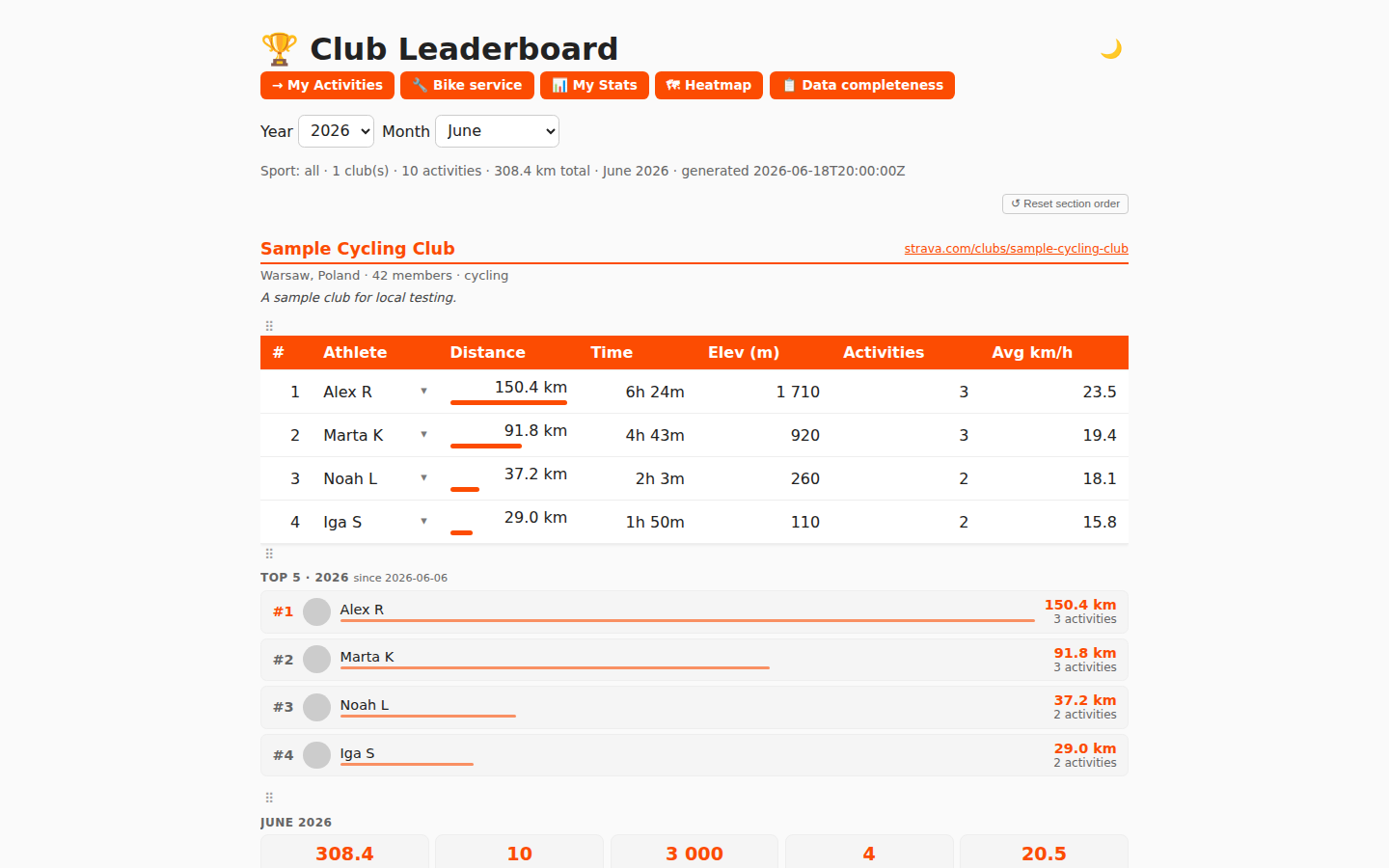 |
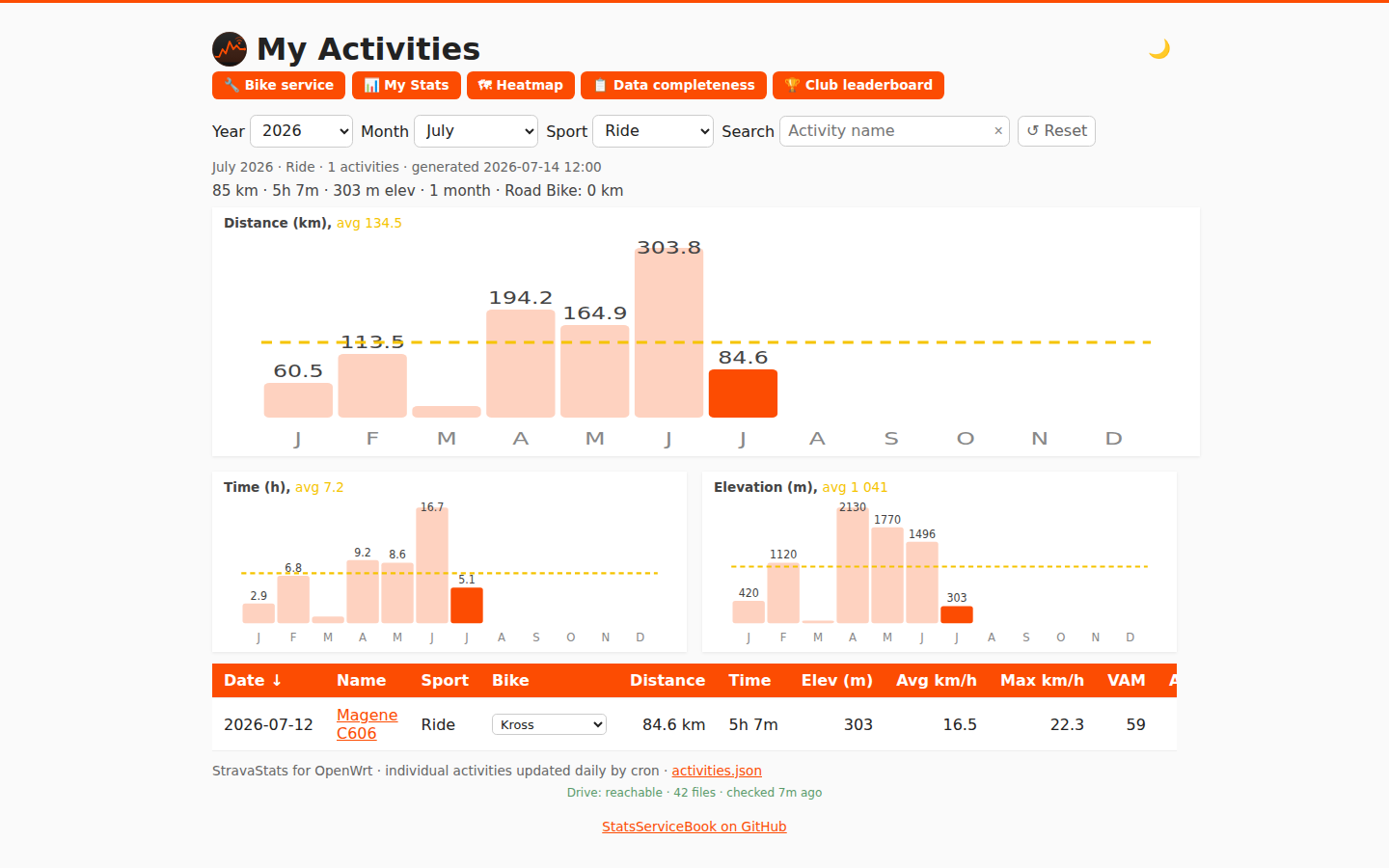 |
| Personal stats | Activity detail (map + splits) | Bike service tracker |
|---|---|---|
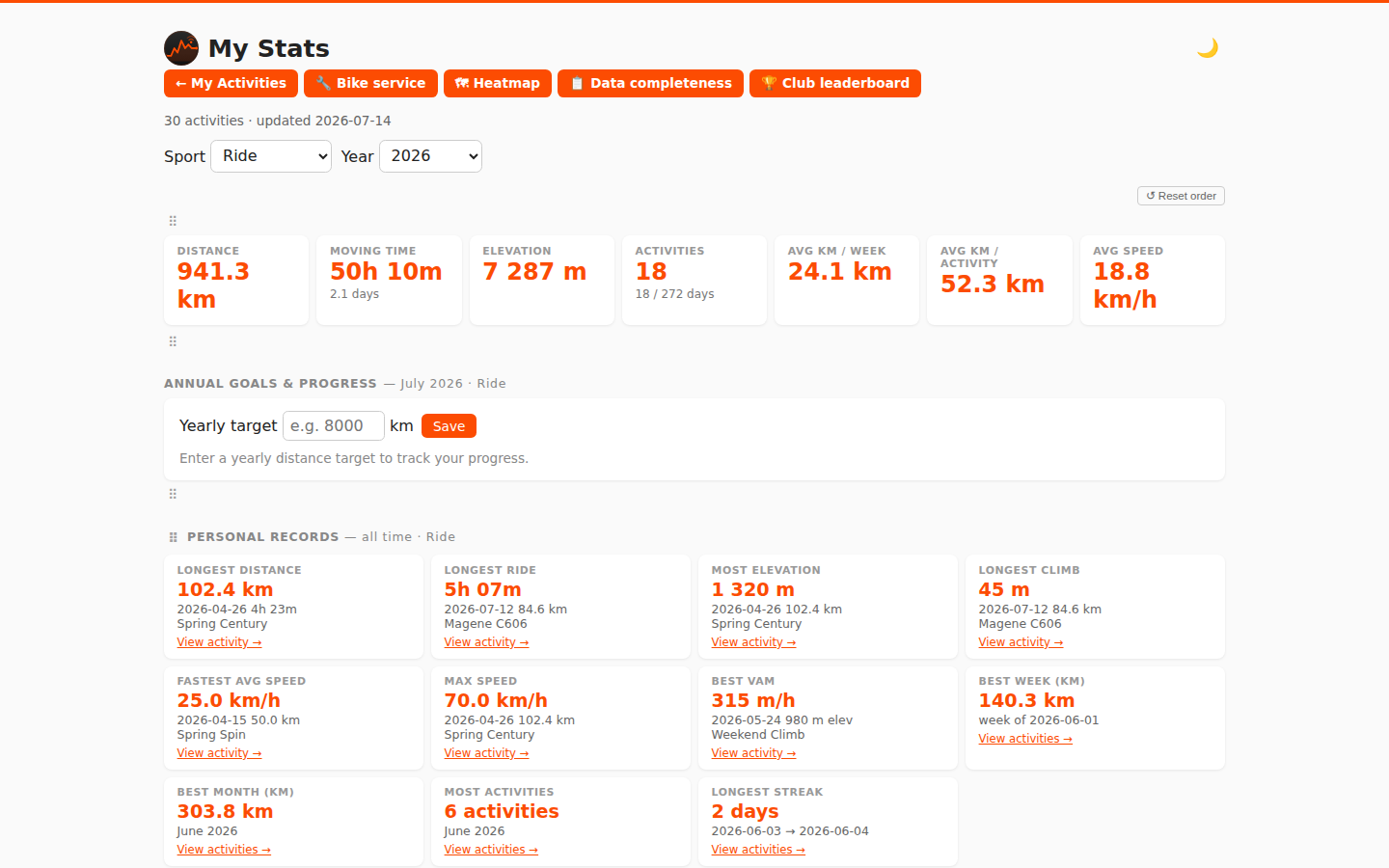 |
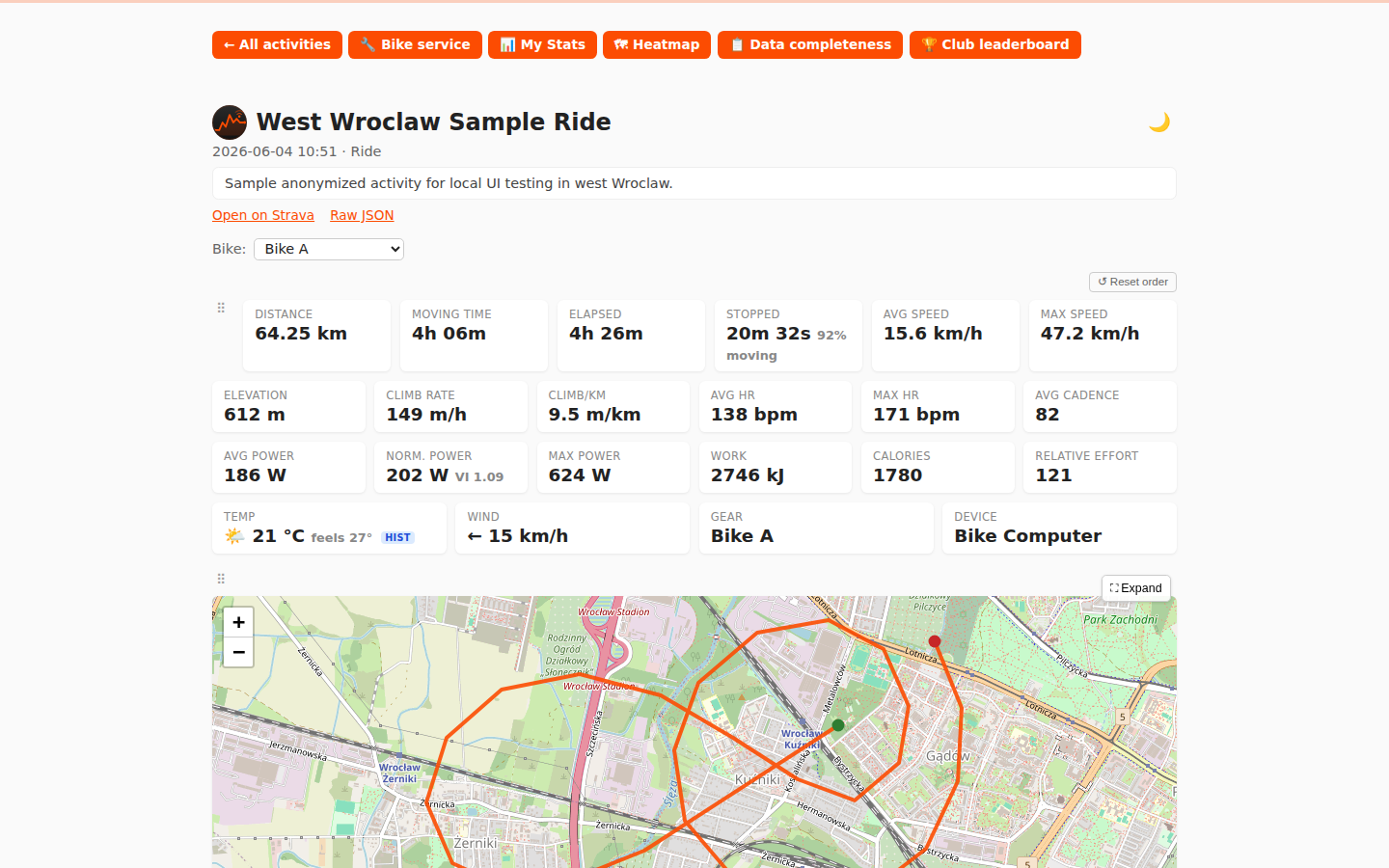 |
 |
| Bike service queue (light) | Bike service queue (dark) |
|---|---|
 |
 |
| Activity heatmap |
|---|
 |
| My Activities (dark) | Personal stats (dark) |
|---|---|
 |
 |
| Activity detail (dark) | Bike service (dark) |
|---|---|
 |
 |
| Club leaderboard (dark) |
|---|
 |
Screenshots generated from sample data via
node test/take-screenshots.mjs(orpowershell -File test/make-screenshots.ps1on Windows).
1. Install on the router (run from the repo root on your PC):
scp -r . root@192.168.1.1:/tmp/strava
ssh root@192.168.1.1 sh /tmp/strava/install.sh
2. Edit the config (choose one data source):
vi /etc/strava-my-activities.conf     # Strava API or scrape mode
# — or —
vi /etc/healthsync-activities.conf    # HealthSync / Google Drive
3. Run once to verify:
strava-my-activities      # (or: healthsync-activities)
strava-leaderboard
A healthy run ends with done.. Any ERROR: line means the run aborted — check credentials.
4. Browse:
- My Activities:
http://<router-ip>/strava/me/ - Data completeness:
http://<router-ip>/strava/me/data-quality.html - Club leaderboard:
http://<router-ip>/strava/
5. Cron is already installed (23:50 leaderboard, 23:55 my-activities, Warsaw time). Check with crontab -l.
For full install options, path variables, and post-install verification see Installation.
The easiest way to run StatsServiceBook on any machine (Linux, Mac, Windows, Raspberry Pi):
# 1. Copy and fill in config template(s):
cp docker/strava-my-activities.conf.example my-activities.conf
# edit my-activities.conf — add CLIENT_ID / CLIENT_SECRET / REFRESH_TOKEN

# Optional: club leaderboard
cp docker/strava-leaderboard.conf.example leaderboard.conf
# edit leaderboard.conf — add CLIENT_ID / CLIENT_SECRET / REFRESH_TOKEN / CLUB_IDS

# Optional: HealthSync / Google Drive (Strava-API-free)
# cp docker/healthsync-activities.conf.example healthsync.conf

# 2. Start:
docker compose up -d

# 3. Open http://localhost/strava/me/
Or without compose:
docker run -d --name statsservicebook \
  -p 80:80 \
  -v "$(pwd)/my-activities.conf:/etc/strava-my-activities.conf:ro" \
  -v statsservicebook_data:/data \
  -e TZ=Europe/Warsaw \
  -e RUN_ON_START=1 \
  jraczek/statsservicebook:latest
Supported architectures: amd64, arm64, arm/v7 (Raspberry Pi).
Full setup, config options, and docker-compose reference: Docker.
Quick preview with sample data — no credentials needed:
podman build -f test/Containerfile -t stravame-test .
podman run --rm -p 8080:8080 stravame-test
# Open http://localhost:8080/strava/me/
Run functional tests:
powershell -ExecutionPolicy Bypass -File .\test\run-tests.ps1The CI workflow publishes the latest browser-side JavaScript coverage report at GitHub Pages, alongside the test reports and 30-day test statistics. It measures first-party JavaScript statements executed while the Playwright functional tests run, including their clicks, filters, and other interactions. Repeated visits to the same page are merged so a statement is counted once and considered covered if any test executes it. This is statement coverage, not a measure of feature correctness; it excludes shell scripts and third-party libraries.
Full instructions for running with real credentials, HealthSync, or Windows WSL: Running-Locally.
- OpenWrt 21.02+ on the router, SSH access as
root - Free space for
curl,jq,ca-bundle(~1–2 MB); use extroot on tight 128 MB flash - A Strava account that is a member of the club you want to rank (for club leaderboard)
- Node.js ≥ 18 and PowerShell Core (
pwsh) for running the test suite locally
| Wiki page | Contents |
|---|---|
| Home | Index of all wiki pages |
| Features | Detailed description of every feature across all five pages |
| Installation | Full install guide, path variables, scheduling, verification |
| Data-Source-Strava-API | Create Strava app, one-time OAuth, token handling |
| Data-Source-Scrape-Mode | My Activities scrape mode, Club leaderboard scrape mode, session cookie |
| Data-Source-HealthSync | Google Drive OAuth, HealthSync setup, Magene FIT, dual-source detection |
| Docker | Docker Hub quick start, config templates, docker-compose, publishing |
| Running-Locally | Docker preview, real-data Docker, WSL, HealthSync local test |
| Email-Notifications | Bike service alerts, monthly/weekly/yearly leaderboard email, cron error alerts, Gmail App Password |
| Upgrading | Binary-only scp deploy, full reinstall, surviving sysupgrade |
| Switching-Data-Sources | API → scrape mode, Strava → HealthSync migration steps |
| Operations | Full file/URL reference, limitations, rate limits |