A React Native bridge module: Document Viewer for files (pdf, png, jpg, xls, doc, ppt, xlsx, docx, pptx etc.)

Changelog:
1.4.0
        - Android Doc Viewer Implementation
$ npm install react-native-doc-viewer --save
$ react-native link react-native-doc-viewer
-
In XCode, in the project navigator, right click
Libraries➜Add Files to [your project's name] -
Go to
node_modules➜react-native-doc-viewerand addRNReactNativeDocViewer.xcodeproj -
In XCode, in the project navigator, select your project. Add
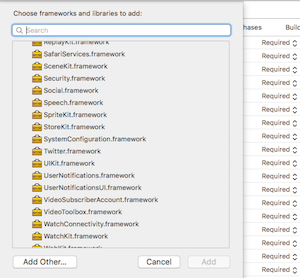
libRNReactNativeDocViewer.ato your project'sBuild Phases➜Link Binary With Libraries -
Linked Frameworks and Libraries must have this 2 Libraries (AssetsLibrary.framework & QuickLock.framework). When not you have to add them.

-
When you Show http Links don't forget to set APP Transport Security Settings -> Allow Arbitrary Loads to YES

- Run your project (
Cmd+R)<
- Open up
android/app/src/main/java/[...]/MainApplication.java
- Add
import com.reactlibrary.RNReactNativeDocViewerPackage;to the imports at the top of the file - Add
new RNReactNativeDocViewerPackage()to the list returned by thegetPackages()method
- Append the following lines to
android/settings.gradle:include ':react-native-doc-viewer' project(':react-native-doc-viewer').projectDir = new File(rootProject.projectDir, '../node_modules/react-native-doc-viewer/android') - Insert the following lines inside the dependencies block in
android/app/build.gradle:compile project(':react-native-doc-viewer')
- In Visual Studio add the
RNReactNativeDocViewer.slninnode_modules/react-native-react-native-doc-viewer/windows/RNReactNativeDocViewer.slnfolder to their solution, reference from their app. - Open up your
MainPage.csapp
- Add
using Com.Reactlibrary.RNReactNativeDocViewer;to the usings at the top of the file - Add
new RNReactNativeDocViewerPackage()to theList<IReactPackage>returned by thePackagesmethod
import OpenFile from 'react-native-doc-viewer';

  //Handle Function Internet
  handlePress = () => {
   OpenFile.openDoc([{
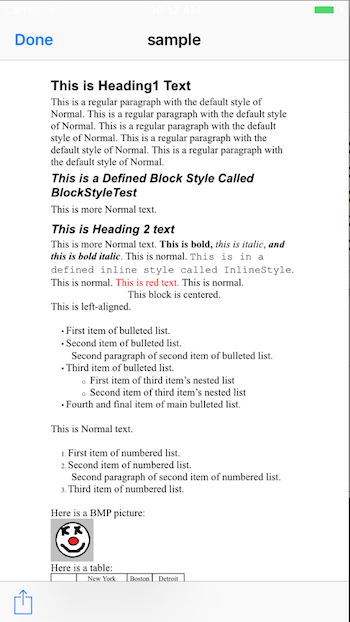
     url:"http://www.snee.com/xml/xslt/sample.doc",
     fileName:"sample"
   }], (error, url) => {
      if (error) {
        console.error(error);
      } else {
        console.log(url)
      }
    })
  }

  //Handle Function Local File
  handlePress = () => {
    OpenFile.openDoc([{
     url:"{Path/to/the/document}",
     fileName:"sample"
   }], (error, url) => {
      if (error) {
        console.error(error);
      } else {
        console.log(url)
      }
    })
  }


   <Button
          onPress={this.handlePress.bind(this)}
          title="Press Me"
          accessibilityLabel="Open the Doc"
        />

- IOS react-native >0.42
- Base64StringtoFile
- Windows Support
Copyright (c) 2017-present, Philipp Hecht philipp.hecht@icloud.com