




Agentic GraphRAG builds schema-defined knowledge graphs from documents and structured data. It stores source text alongside entities and relations, retrieves evidence from the graph's native vector indexes, and can answer questions with citations to that evidence.
A plain vector search finds passages that look like your question. It cannot join a fact in one document to a fact in another. "Who founded the company that Satya Nadella works at?" needs two facts from two places. A graph joins them.
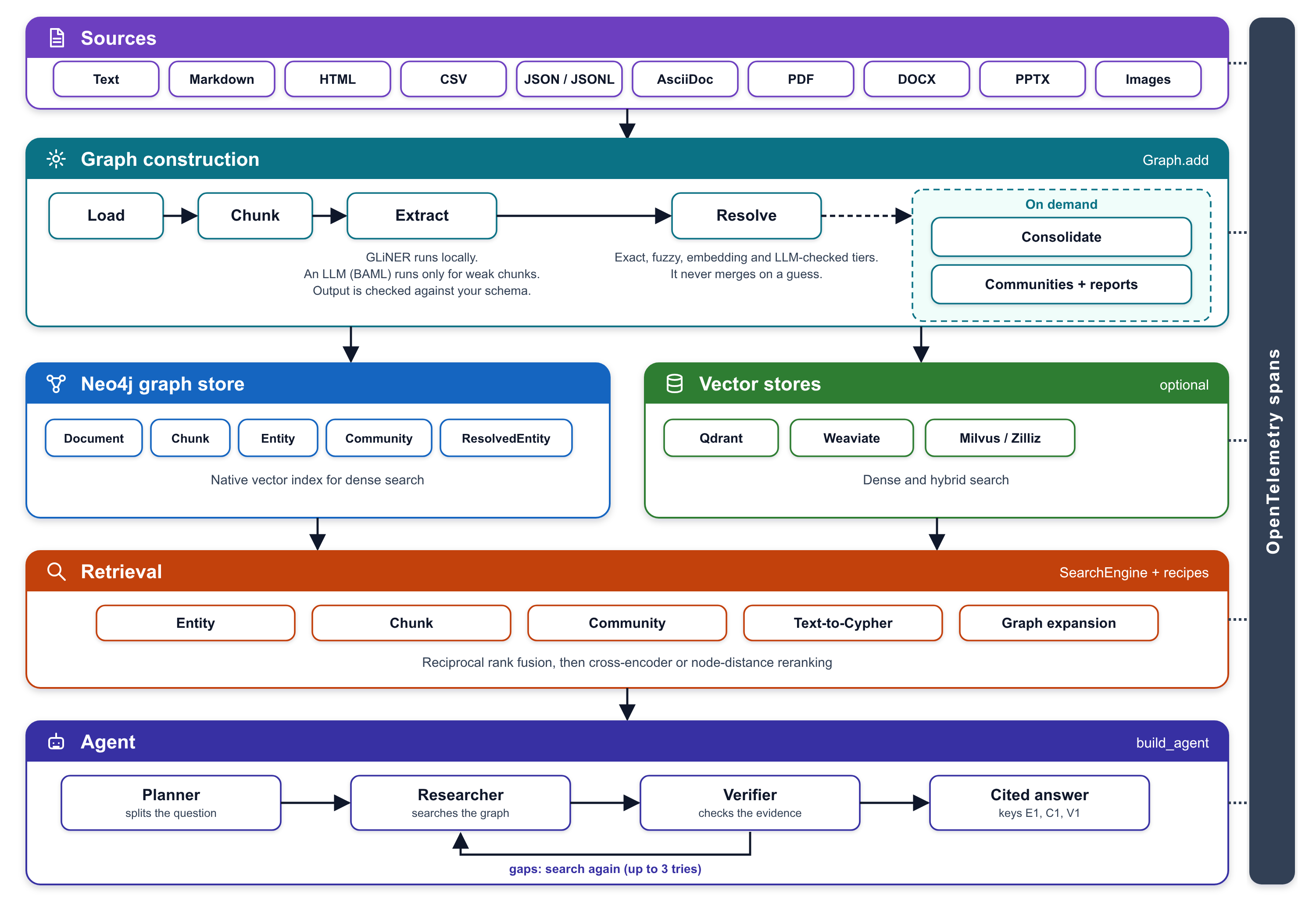
- One ingestion API for raw text, files, directories, globs, and prebuilt documents.
- Structure-aware loading with Docling for rich documents and core readers for text, XML, and records. Sections, tables, and figures go into the graph, and one section-aware chunker packs every format.
- Schema-driven extraction with runtime-defined entity types, relation types, and valid graph patterns.
- Local extraction with GLiNER 2.5. In
hybridmode, pass an LLM extractor toGraphto review selected chunks up to a budget. The local model still runs on every chunk. A graph can be built without an extraction LLM, but GLiNER runs locally and needs its model dependencies. - Tiered entity resolution combining exact, fuzzy, embedding, and LLM-verified matching. An unsure comparison never matches.
- Non-destructive matching. Fuzzy, embedding, and LLM matches write
MATCHESedges and a derivedResolvedEntity. The original entities and their provenance stay in the graph. - Neo4j as the single store for graph data and native vector search.
- Layered retrieval across entities, chunks, community reports, and graph neighborhoods, with rank fusion and reranking.
- Evidence discovery and fetch across active document sources, with citation checks.
- Task-scoped agent that reads only authorized document keys, records task events and decisions, and returns citation-checked answers.
- OpenTelemetry-native observability across loading, chunking, extraction, resolution, storage, retrieval, and agent turns.
The system uses:
- Docling for document parsing and Chonkie to split long paragraphs.
- GLiNER 2.5 for local schema-guided entity and relation extraction.
- BAML for typed LLM functions and provider-independent client routing.
- Neo4j for the property graph and native vector search.
- FastEmbed for dense embeddings, and Sentence Transformers as an optional dense embedder.
- OpenTelemetry for vendor-neutral traces and metrics.
Agentic GraphRAG stores source material, extracted knowledge, and graph summaries in one typed property graph:
(:Document)-[:HAS_CHILD]->(:Section)
(:Section)-[:HAS_CHILD]->(:Section|:Chunk|:Table|:Figure)
(:Table)-[:HAS_CHILD]->(:Chunk)
(:Document)-[:HAS_PART]->(:Section|:Chunk|:Table|:Figure)
(:Source)-[:HAS_DOCUMENT]->(:Document)
(:Chunk)-[:NEXT_CHUNK]->(:Chunk)
(:Chunk)-[:MENTIONED_IN]->(entity)
(entity)-[:<RELATION_TYPE>]->(entity)
(entity)-[:MATCHES]->(entity)
(entity)-[:RESOLVED_AS]->(:ResolvedEntity)
(entity)-[:MEMBER_OF]->(:Community)
An entity node carries its schema type as a label, for example :Person. You can walk from any answer back to its source document.
Documents keep their source URI, format, loader, content hash, and record identity. Text formats use content-based identities. Binary Docling formats use raw-byte hashes. A document holds a tree of sections, tables, and figures. Chunks keep stable links into that tree and source provenance:
A section keeps its heading, depth, and a stable section_key, and it holds no text. Text chunks record character spans plus their heading path, and they are exact slices of the document text. Chunks from PDF and slides record page numbers and bounding boxes. Record formats such as CSV, TSV, JSON, and JSON Lines preserve row identity. A new document version writes a new tree, and the old tree stays as history.
Extraction produces mentions first, not graph nodes. Each mention keeps its source chunk, label, text span, confidence, and extractor provenance. Resolution then decides which mentions name the same thing. Mentions with the same label and the same normalized text share one entity node.
Relations are directed subject-predicate-object triples. The active schema constrains valid source type, relation type, and target type combinations. Validation removes invalid triples before they reach the graph.
A fuzzy, embedding, or LLM match does not rewrite or delete anything. It writes a MATCHES edge with its tier, score, and reason. Agentic GraphRAG then derives one ResolvedEntity for each group of linked entities and links each member to it with RESOLVED_AS. A later run can undo a decision, because the original entities are still there. Retrieval can search resolved entities.
Leiden clustering groups related entities into communities. Graph.detect_communities keeps the broadest groups of two or more entities. A group with enough supporting relations gets an LLM-written report with a title, summary, findings, and a rating from 0 to 10. A smaller group gets a simple report with no LLM call. Community reports provide broad context without forcing retrieval to return every low-level edge.
GraphSchema is a first-class runtime value. It defines:
- entity types and their descriptions.
- relation types and their descriptions.
- valid
(source, relation, target)patterns. - the vocabulary injected into local and LLM extractors.
Load OWL and RDFS Turtle ontologies with load_schema("ontology.ttl") after installing the schema-formats extra. See the OWL and RDFS Turtle import reference.
Use DEFAULT_SCHEMA for general text, or provide a schema for a specific domain. The schema guides extraction and validation, and supplies type information to retrieval.
Write a schema as a short dict, a list of labels or a YAML file. extends builds on the default schema:
from agrag.schema import load_schema

schema = load_schema(
    {
        "extends": "default",
        "entities": [
            {
                "label": "Vendor",
                "description": "An organization that sells to others.",
                "parents": ["Organization"],
            }
        ],
        "relations": ["Vendor-SELLS_TO->Organization"],
    }
)DEFAULT_SCHEMA has nine entity types: Person, Organization, Location, Event, Product, Software, Publication, Dataset, and Project. It has eight relation types: WORKS_FOR, PART_OF, LOCATED_IN, OWNS, AUTHORED, PARTICIPATED_IN, DEPENDS_ON, and SUPPLIES. Each relation allows only the source and target types that it names.
Presets add entity types to a base schema. OPERATIONS adds Facility, Service, and Occupation. LEGAL adds Contract and Regulation. A preset adds types only. The default relations do not accept preset types, so define a relation in your own schema to connect them.
Use extends to build a schema on a base, such as DEFAULT_SCHEMA or a preset. A child type that redeclares a base type must use override. Use exclude to remove base types or relations.
Set EXTRACTION_MODE to choose how the graph reads text. The default is hybrid.
| Mode | What runs on each chunk | Use it when |
|---|---|---|
gliner |
The local GLiNER model. No extraction LLM runs. | You want no extraction LLM cost. |
hybrid |
GLiNER on every chunk, then an LLM on the weakest eligible chunks within the budget. | You have an LLM and want it to review GLiNER's result. |
llm |
An LLM on every chunk that meets min_escalation_words (8 by default). GLiNER does not run. |
You want LLM extraction without GLiNER. The LLM may use a hosted or local endpoint. |
For the default extractors, install extract for gliner, both extract and llm for hybrid, or llm for llm mode. Custom extractors use their own dependencies.
When hybrid has no extraction LLM available, Graph selects GLiNER mode and logs a warning. Graph can build a BAML extractor from environment settings in either hybrid or llm mode, so a configured LLM may be used even when you do not pass llm_extractor. Set EXTRACTION_MODE=gliner to disable LLM extraction explicitly. Check graph.effective_mode to see the selected mode. See Choose an extraction mode for the tradeoffs.
Agentic GraphRAG has two main data flows:
Ingestion turns a source into a document, then into chunks, mentions, a matched graph, and indexes. A query turns a question into a plan, research, verification, and a cited answer.
Graph.add() is the single entry point for adding content. The pipeline has six stages:
- Load: Select a loader by format. Decode or parse the source. Preserve source metadata. Apply
RAISE,SKIP, orQUARANTINEas the error policy for each source. - Chunk: Pack the sections of every document into chunks with one section-aware chunker, using 600 tokens as the packing budget. Tokenizer context around the joined units can add a few tokens past it. A table becomes its own chunks, and a small chunk carries on into the next section.
- Extract: Use the selected extraction mode.
glinerruns GLiNER locally on every chunk;hybridalso sends the weakest eligible chunks to an LLM within the budget;llmsends eligible chunks to an LLM without running GLiNER. Validation drops entities and triples that do not conform to the schema. - Resolve: Apply exact, fuzzy, embedding, and LLM-verified comparison tiers. Ambiguous or failed comparisons do not match.
- Merge: Combine the mentions of exact matches into one entity. Decide each property value and join the chunk ids that mention it. Fuzzy, embedding, and LLM matches are stored as
MATCHESedges, not merged. - Store: Upsert nodes and relations, then populate the Neo4j vector indexes.
Graph combines the LLM result with the local result as a union. An LLM entity with the name of a local entity keeps the local span and score. A chunk is eligible when one entity scores below 0.75, when the local model finds no entities in a chunk of at least eight words, or when an entity has a type with properties. The LLM reads the weakest eligible chunks first, up to 20% of the chunks in a batch by default, and each run reports what it left to the local model. Exact matches use global store-backed lookup. More expensive fuzzy and LLM comparisons run on a smaller candidate set.
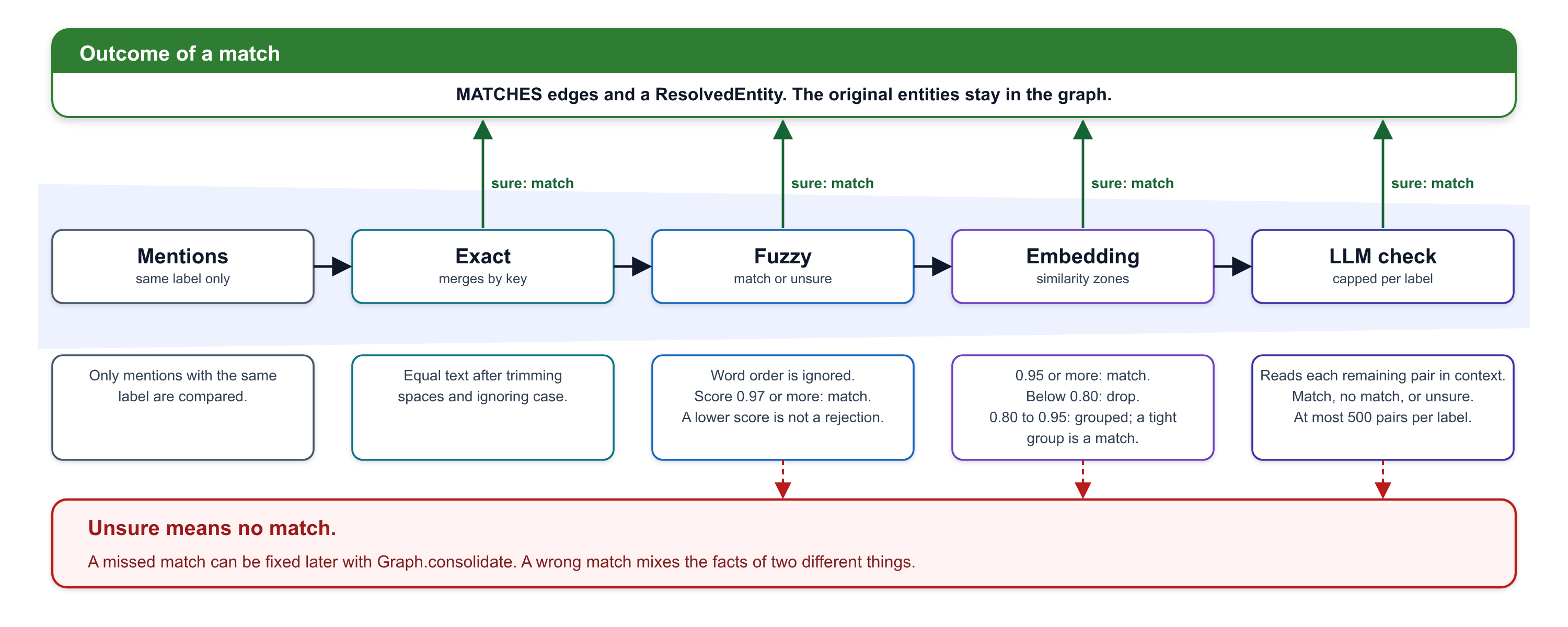
The pipeline compares only mentions with the same label, so a city and a company with the same name stay apart. A wrong match mixes the facts of two things, and a missed match can be fixed later. Uncertain comparisons stay undecided rather than becoming matches or rejections.
Graph.consolidate() provides a separate whole-graph reconciliation pass for duplicates found across ingestion runs. It runs as a dry run by default, so applications can inspect proposed matches before they apply them.
Graph.update() replaces a document that changed, and an unchanged document is a no-op. Graph.delete_document() removes a document from search and prunes entities that lose their last evidence. Both work on a document key, and each runs as one job, so a crash leaves the document whole.
The async Embedder and GraphStore interfaces keep model and database choices outside graph-construction logic.
- Dense embeddings through FastEmbed, with Sentence Transformers as an option.
- Batch-first async APIs with optional content-addressed caching by text and model.
- Dimension checks before collections or indexes accept vectors.
Graph.openraises an error when the embedder does not match the stored vector dimensions.
The Neo4j backend supports local Neo4j and Aura over Bolt, managed read/write transactions, node and relation upserts, constraints, indexes, and native dense vector search. The query builders validate dynamic labels and relation types before they interpolate them into Cypher.
Every entity label, resolved entity, community, and chunk has a Neo4j native vector index. Filters use exact scalar matches, OR within a list value, and AND across keys.
Retrieval composes small search methods into retrievers, runs them concurrently, and fuses their results through data-only recipes.
- Entity retrieval finds entities and resolved entities by dense search and can expand matched seeds with bounded graph traversal.
- Chunk retrieval returns source passages with document and span provenance.
- Community retrieval searches community reports for thematic and corpus-wide questions.
- Graph traversal uses bounded breadth-first search to collect connected evidence.
| Recipe | Search methods | Extra steps |
|---|---|---|
ENTITY |
Entity | none |
CHUNK |
Chunk | none |
HYBRID |
Entity + chunk | none |
HYBRID_RERANKED |
Entity + chunk | Community reports, cross-encoder rerank |
GRAPH_EXPAND |
Entity | Graph walk, community reports |
THEMATIC |
Community | none |
Reciprocal Rank Fusion merges the ranked lists, so no method's score scale takes over. A cross-encoder or graph-distance reranker can then set a new order. A recipe can ignore a failed or empty search branch and still return evidence from the remaining methods.
from agrag.retrieval import HYBRID, SearchEngine

engine = SearchEngine(graph_store=graph_store, embedder=embedder, graph_schema=schema)
results = await engine.search("What treats headaches?", HYBRID)
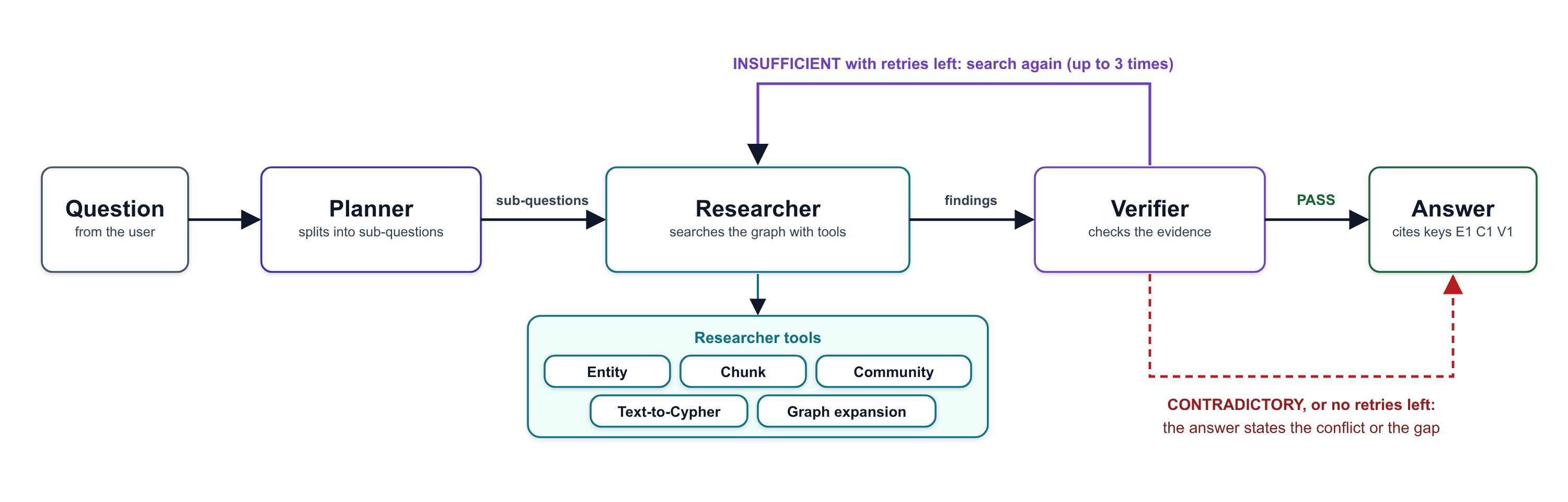
Build an agent with a graph store, embedder, explicit document scope, project identity, and agent identity. Invoke it with a task name and question. The result includes the answer, fetched evidence, invalid citations, and the latest task event sequence. Task events and decisions persist under the project and task names.
BAML defines typed contracts for entity and relation extraction, entity-match verification, community reports, and description summaries. Runtime client registries support a single provider, fallback chains, or round-robin routing. They route across OpenAI, Anthropic, AWS Bedrock, Google AI, Vertex AI, Azure OpenAI, and OpenAI-compatible endpoints. The agent uses an OpenAI-compatible endpoint that you set with LLM_BASE_URL, LLM_API_KEY, and LLM_MODEL_ID.
OpenTelemetry API support is part of the core package. Exporters and the SDK are optional. You pass the tracer, and Agentic GraphRAG never installs a global one. Applications can send traces to any OTLP-compatible backend. Spans cover loading, chunking, extraction, model calls, resolution, storage writes, searches, and agent turns.
Long-running graph builds report bounded, structured stage statistics for ingestion, extraction, resolution, merging, and storage. Failures include the affected item, error type, message, and trace/span IDs. Full detail remains in the trace backend so result objects stay bounded on large corpora.
agrag.eval (the eval extra) holds metrics that score answers, retrieval, extraction, resolution, and agent runs on your own documents and questions. See Score Agentic GraphRAG on your questions.
Agentic GraphRAG requires Python 3.11 or newer.
uv pip install agentic-graphragInstall only the integrations you use:
# Rich documents and local extraction
uv pip install "agentic-graphrag[docling,extract]"

# LLM extraction
uv pip install "agentic-graphrag[llm]"

# Neo4j with OTLP tracing
uv pip install "agentic-graphrag[neo4j,observability]"

# The question-answering agent
uv pip install "agentic-graphrag[agents]"

# Hierarchical community detection
uv pip install "agentic-graphrag[community]"| Extra | Adds |
|---|---|
docling |
The layout and table models for PDF and image files |
extract |
Local GLiNER 2.5 extraction |
llm |
BAML-powered extraction and match verification |
agents |
The LangGraph runtime for the question-answering agent |
embed-local |
Sentence Transformers, to embed with models that the default embedder does not support |
neo4j |
Neo4j graph storage and native vector search |
observability |
OpenTelemetry SDK and OTLP export |
community |
Leiden community detection |
eval |
The DeepEval and AgentEvals metrics in agrag.eval |
You need a Neo4j database, version 5.23 or newer. The free Neo4j Aura tier works, and the full Quickstart shows the setup. Install the extras for this page with uv 0.6.9 or newer. Create and activate a virtual environment, then install the package. Save your credentials as .env in the working directory. The file sets NEO4J_URI, NEO4J_USERNAME, and NEO4J_PASSWORD.
uv venv
source .venv/bin/activate
uv pip install "agentic-graphrag[neo4j,extract,agents]" --torch-backend=autoSave this script as build_graph.py. It needs no LLM key.
The example passes GlinerExtractor directly, so GLiNER always runs. If an extraction LLM is configured in the environment, the default hybrid mode can also use it to review selected chunks. To make the mode explicit and prevent extraction LLM use, set EXTRACTION_MODE=gliner in .env or the shell.
import asyncio

from agrag.common.data_models import EntityType, GraphSchema, RelationType
from agrag.embedding import build_embedder
from agrag.graphdb import build_graph_store
from agrag.ingestion import GlinerExtractor, Graph

schema = GraphSchema(
    name="company-facts",
    version="1",
    entities=[
        EntityType(label="Person", description="A named individual."),
        EntityType(label="Organization", description="A company or institution."),
        EntityType(label="Location", description="A city or country."),
    ],
    relations=[
        RelationType(
            label="FOUNDED",
            description="A person founded an organization.",
            patterns=[("Person", "Organization")],
        ),
        RelationType(
            label="WORKS_AT",
            description="A person works at an organization.",
            patterns=[("Person", "Organization")],
        ),
        RelationType(
            label="HEADQUARTERED_IN",
            description="An organization has its headquarters in a location.",
            patterns=[("Organization", "Location")],
        ),
    ],
)

TEXT = (
    "Satya Nadella works at Microsoft. Bill Gates founded Microsoft. "
    "Microsoft is headquartered in Redmond."
)

async def main() -> None:
    graph_store = build_graph_store("neo4j")
    graph = await Graph.open(
        schema=schema,
        graph_store=graph_store,
        embedder=build_embedder("ibm-granite/granite-embedding-small-english-r2"),
        extractor=GlinerExtractor(),
    )
    try:
        result = await graph.add(text=TEXT, return_chunks=True)
        print("documents:", result.ingestion.documents)
        print("chunks:", len(result.chunks))
        print("entities extracted:", result.extraction.entities_extracted)
        print("relations extracted:", result.extraction.relations_extracted)
    finally:
        await graph_store.close()

if __name__ == "__main__":
    asyncio.run(main())
The script prints the counts below. The first run downloads two models, about 850 MB in total.
documents: 1
chunks: 1
entities extracted: 6
relations extracted: 3
Run the script from the directory that contains build_graph.py and .env:
python build_graph.pyThis step needs an OpenAI-compatible LLM endpoint. Add LLM_BASE_URL, LLM_API_KEY, and LLM_MODEL_ID to .env. Then save this script as ask.py:
import asyncio

from agrag.agents import AgentLLMSettings, build_agent
from agrag.embedding import build_embedder
from agrag.graphdb import build_graph_store

from build_graph import schema

QUESTION = "Who founded the company that Satya Nadella works at?"

async def main() -> None:
    graph_store = build_graph_store("neo4j")
    await graph_store.connect()
    try:
        embedder = build_embedder("ibm-granite/granite-embedding-small-english-r2")
        agent = build_agent(
            graph_store=graph_store,
            embedder=embedder,
            scope=frozenset({"company-notes.md"}),
            project_id="quickstart",
            agent_id="quickstart-agent",
            llm_settings=AgentLLMSettings.from_openai_compatible_env(),
        )
        result = await agent.ainvoke(
            {"task_name": "company-founder", "question": QUESTION}
        )
        print(result["answer"])
        print("evidence ids:", ", ".join(item.evidence_id for item in result["citations"]))
    finally:
        await graph_store.close()

asyncio.run(main())
BAML_LOG=off uv run python ask.pyThe answer varies with your model. This is an example:
Satya Nadella works at Microsoft, which was founded by Bill Gates.
evidence ids: ev_...
The agent needed two facts from two sentences. It joined them through the Microsoft node. Each key points to stored evidence.
Graph.add() accepts exactly one of:
source=: a file, directory, glob, or list of paths.text=: raw text as one document.documents=: prebuiltDocumentobjects.
files = await graph.add(source="./corpus/**/*.md", return_chunks=True)
print(files.ingestion.documents, len(files.chunks))from agrag.loaders import ErrorPolicy
result = await graph.add(
source="./corpus",
error_policy=ErrorPolicy.QUARANTINE,
)
for item in result.ingestion.quarantined_items:
print(item.item_id, item.error_message)RAISE stops the run, SKIP drops the source and counts it, and QUARANTINE sets it aside with the reason.
await graph.update("notes/q3.md", text=new_text)
await graph.delete_document("notes/q3.md")
See the documentation for guides and the generated API reference.
| Format | Extension(s) | Loader |
|---|---|---|
| Plain text and logs | .txt, .log |
Core |
| XML | .xml |
Core |
| Markdown | .md, .markdown |
Docling |
| AsciiDoc | .adoc, .asciidoc |
Docling |
| HTML | .html, .htm |
Docling |
| CSV / TSV | .csv, .tsv |
Core, one document per row or one for the table |
| JSON | .json |
Core, record-aware |
| JSON Lines | .jsonl, .ndjson |
Core, one document per row |
.pdf |
Docling, needs the docling extra |
|
| Word | .docx |
Docling |
| PowerPoint | .pptx |
Docling |
| Excel | .xlsx |
Docling |
| Images | .png, .jpg, .jpeg, .tif, .tiff, .bmp |
Docling, needs the docling extra |
| Chat exports | .json, .jsonl, .ndjson |
Chat loader, which you pass for a single file |
Docling reads every rich format. The core readers keep plain text, XML, and the record formats, so a CSV row keeps its identity. Docling without the docling extra reads Markdown, HTML, AsciiDoc, Word, PowerPoint, and Excel files. The extra adds the layout and table models for PDF and image files.
agrag/
├── common/data_models/   # documents, chunks, schemas, extraction and storage records
├── chunking/             # the section chunker
├── loaders/              # core corpus readers and the Docling loaders
├── ingestion/            # Graph API, extraction, resolution, community detection and pipeline stages
├── embedding/            # dense embedding interfaces
├── graphdb/              # graph-store interface and Neo4j backend
├── cypher/               # validated Cypher builders
├── retrieval/            # search methods, retrievers, recipes and rerankers
├── agents/               # task-scoped agent, tools, and task event handling
├── eval/                 # metrics for answers, retrieval, extraction, resolution and agent runs
├── llm/                  # BAML sources, generated client and provider routing
└── observability.py      # OpenTelemetry helpers

tests/
├── unit/                 # isolated tests with external services mocked
└── integration/          # live backend tests against Docker services
git clone https://github.com/ontogr/agentic-graphrag.git
cd agentic-graphrag
make sync
make lint-check
make lint-typing
make test
Integration tests run against a local Neo4j service:
make dev-services-up
make test-integration
make dev-services-downSee CONTRIBUTING.md for the development workflow, test conventions, and pull request guidelines.
The work below shaped the design of Agentic GraphRAG.
Papers and projects
- Microsoft GraphRAG: hierarchical communities and community reports
- Graphiti: layered graph search and entity-aware retrieval
- Cognee: data pipelines, graph memory, and consolidation
- KG-Gen: knowledge-graph extraction and alias deduplication
- FalkorDB GraphRAG SDK: graph-native retrieval and entity resolution
- Neo4j GraphRAG: Neo4j retrieval and vector integration
- LightRAG: graph and vector retrieval
- PathRAG: relational-path retrieval
- GLiNER: generalist zero-shot information extraction
- BAML, Docling, and Chonkie
This project is licensed under the Apache License 2.0.