
Important
We’re unifying OBS into one hybrid Rust/C/C++ build. Prioritize migrating code to Rust and retiring the C/C++ implementations it replaces. Each completed port becomes part of the application, with compatibility and parity checks supporting the transition.


This is an independent rewrite of the obsproject's obs-studio.
Same obs studio, but without the bugs. AI generated issues and PRs welcome.
Got an idea? Start a conversation.
What OBS-Studio-Rust does differently from upstream OBS Studio, for a user: new features, changed behavior and fixed upstream bugs, by area, with links to the issues and pull requests. See the features ledger.
preview_small.mp4
4.3× faster to the main window and 19% less memory on an NVIDIA streaming rig (#1168, #1170, #1171, #1172).

Ranked by merged PRs only, credited to the original author even when a maintainer re-landed the work (counted once). Updated every 4 hours.
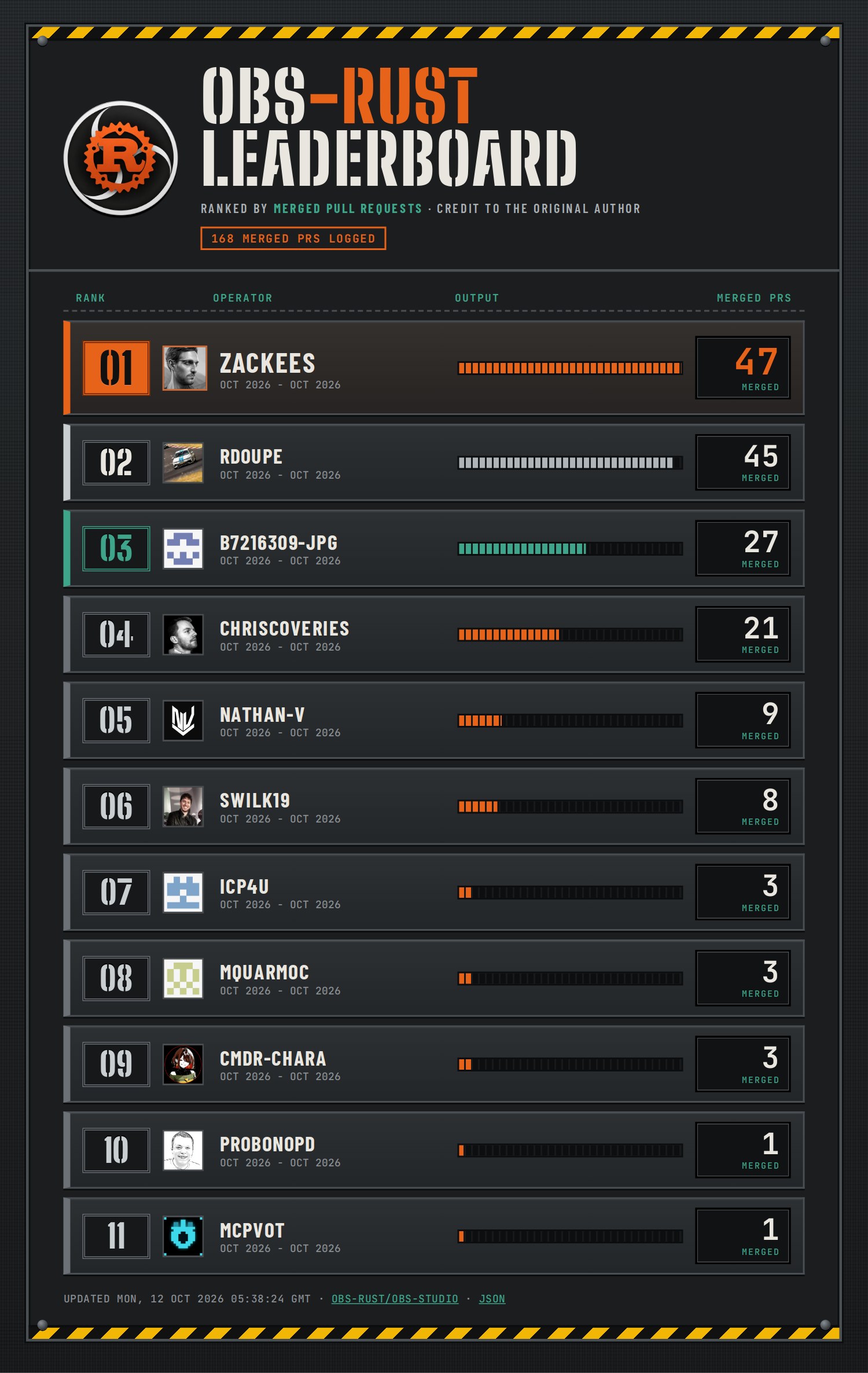
Lots of people and AI agents work on this repo at the same time, so CI is built to do as little repeated work as possible:
- Every pull request gets a quick check. It runs the Rust and C tests on Linux, plus macOS or Windows only when your change touches those platforms. It does not build every app package.
- The full build runs before each release. Once a day, and before anything is published, CI builds and tests everything: every platform, the full app, Flatpak and the release packages. A beta only ships if all of it passes.
- You can prove your change locally first. One command (
ci-lint local-gate run) runs the same Linux checks on your machine and signs your commit. CI sees the signature and skips the checks you already ran. - Builds are cached and shared. Rust builds go through
soldr, which reuses compiled code across branches and machines.
The full guide, with the tools, rules and commands, is in docs/ci-tooling.md. If you're contributing, please read it before you push: it explains how to avoid overloading the shared machines and CI.
Does OBS Rust support all of the plug-ins?
Yes. OBS Rust is fully backwards compatible with OBS Studio — the plug-ins you already have should work as-is. If you find one that doesn't, that's a bug: please file an issue and link it here so we can track it.
How do I install plug-ins for the AppImage?
The AppImage loads plug-ins from the same per-user folders as OBS Studio on Linux, so a plug-in you already installed for your own account is picked up as-is. To add one, unpack its Linux build into either of these folders:
~/.local/share/obs-studio/plugins/<plugin>/, with the module at<plugin>/<plugin>.soand its files under<plugin>/data/(the current layout).~/.config/obs-studio/plugins/<plugin>/, with the module at<plugin>/bin/64bit/<plugin>.soand its files under<plugin>/data/(the older layout that many plug-in downloads still use).
Then restart OBS Rust. Tools → Plugin Manager lists what loaded.
Plug-ins installed system-wide by a distribution package (under
/usr/lib/obs-plugins or /usr/lib/<arch>/obs-plugins) are not loaded.
They were built against that distribution's OBS and libraries, not the ones
inside the AppImage. Use the plug-in's own Linux download instead.
A plug-in with its own Qt windows must be built for a Qt 6 release no newer than the one in the AppImage. If a plug-in sits in one of those folders but doesn't load, run the AppImage from a terminal and the log will say why. Then file an issue as above.
Want to see the original README from OBS Project? Click here.