This is a Free Roland TB-303 clone plugin. A Cmake JUCE port of Robin Schmidt`s Open303 with added features.
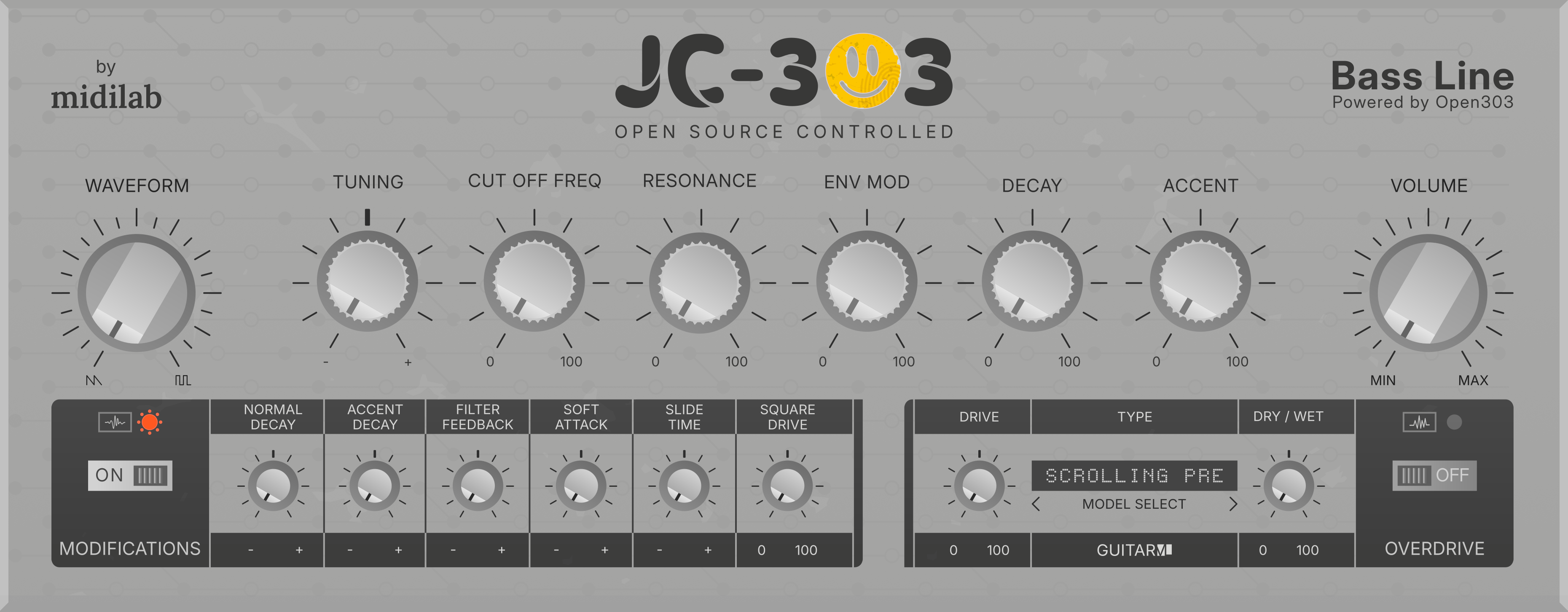
This software is licensed under the GNU General Public License version 3 (GPLv3).
The Open303 engine part of this software is also licensed under the MIT License.
Supports Windows, Linux and MacOS. You may find CLAP, VST3, LV2 and AU formats available to download. For VST2 plugin you need to compile it by your own self using vst2 sdk from Steinberg - vstsdk2.4.
MacOS Universal - Intel and ARM: jc303-macos_universal-plugins.zip
Windows Intel x64: jc303-windows_x64-plugins.zip
Linux Intel x64: jc303-linux_x64-plugins.zip
Linux ARM64: Soon...
The platform zip pack will contain a folder per plugin format, just pick the format you want to install and copy the content of the folder to your OS plugin format folder.
MacOs De-Quarantine: MacOs users needs to de-quarantine plugin before load it into any DAW.
Open a terminal window and do the following
$ sudo xattr -rd com.apple.quarantine /Library/Audio/Plug-Ins/Components/JC303.componentThis de-quarantine example is for AU, please do the same for other formats you'll be using
JC303 ships with a full acid step sequencer ported from Aciduino V2. It is a 16-step monophonic sequencer clocked sample-accurately from the audio thread, playing the built-in 303 engine and sending MIDI out to the host. Note length is the authentic 303 half-step (50%) gate, and slide/tie bridge correctly from the last step back to the first. The sequencer panel and manual below target the midilabv2 GUI theme.
Each of the 16 steps is a column of controls:
| Row | Control | Meaning |
|---|---|---|
step |
LED | Selects the step to edit; also shows the playing step and the active pattern length |
rest |
toggle | Note ON (toggle up) or rest (toggle down) |
accent |
micro-toggle | Step plays with accent |
slide |
micro-toggle | Step slides into the next one |
tie |
micro-toggle | Step ties into the previous note |
Below the grid are the transport buttons (PLAY/STOP, REC, REST, CLEAR, gen), the generative mod knobs, and the on-screen octave keyboard.
- Left-click a step LED to select the step to edit. The selected step blinks; the step currently playing is highlighted. Clicking a step at or beyond the active pattern length snaps the selection to the last active step.
- Note/rest toggle: each step is a note by default; toggle it off to make it a rest, on to re-activate it.
- Accent / Slide / Tie are per-step toggles. A tie carries the previous note over, and handles wrap-around from the last step to the first.
- The keyboard always shows the note of the selected step.
- Right-click any step LED to set the pattern length from 1 to 16 (the clicked step becomes the last step of the pattern). Steps beyond the length are kept but stay silent.
- Length can also be set with the
Lengthitem in theSEQmenu page.
- Click a key to set the note of the selected step.
- Mouse wheel over the keyboard transposes the note of the selected step by one octave per notch (the octave of the keyboard follows the note).
- In record mode the rec cursor is the target for both actions.
Turn REC on to enter serial (step-by-step) entry. The record cursor starts at the currently selected step and advances one step per entered event, wrapping at the pattern length.
- Keyboard: press a key to record its note and advance. Existing accent/slide/tie flags on the step are kept.
- External MIDI: velocity 100 or above records the step with accent; striking a second note while one is still held records a slide (legato); tapping the sustain pedal (CC64, 127 on) records a rest.
RESTbutton: in record mode it records a rest and advances the cursor; outside record mode it turns the selected step into a rest and moves the selection to the next step.CLEARbutton resets the whole track to rests (all accents, slides and ties removed).
The gen button generates a random pattern across all 16 steps using:
| Knob | Range (default) | Meaning |
|---|---|---|
FILL |
0–100 (80) | % chance each step is ON (not a rest) |
ACC |
0–100 (50) | % chance of accent on an ON step |
SLIDE |
0–100 (30) | % chance of slide on an ON step |
TIE |
0–100 (100) | % chance of tie on a rest step |
TONES |
1–12 (4) | Number of pitch classes to snap to (1 = single note) |
LOW |
0–127 (20) | Lowest MIDI note in the random pitch range |
RANGE |
0–127 (48) | Range above LOW of the random pitches |
The sequencer is briefly muted while a pattern is generated so no stray notes play. Generating keeps the pattern length intact but overwrites the steps within it.
PLAY/STOPstarts and stops the sequencer.- The
SEQmenu page in the LCD exposes:- Length — pattern length (1–16).
- Tempo — internal BPM (20–300); active only in
Internalsync mode. - Sync Mode —
Internal(free-running at Tempo),Host(follows the DAW transport position and tempo), orMidi Clock(follows external MIDI Start/Stop/Clock messages). - Start Mode —
Transport(starts on host transport or MIDI Start) orNote Trigger(starts automatically on the first incoming note, even while stopped).
Generate the cmake project build files first for the OS of your choice.
| Variable | Description | Default |
|---|---|---|
| GUI | Select GUI theme interface to use | midilabv2 |
Available themes: midilabv2 | amadeusp | midilab
To change JC303 GUI theme add the following to the first cmake call: -D GUI=midilabv2
To generate an Xcode project, run:
cmake -B build -G Xcode -D CMAKE_OSX_ARCHITECTURES=arm64\;x86_64 -D CMAKE_OSX_DEPLOYMENT_TARGET=10.13The -D CMAKE_OSX_ARCHITECTURES=arm64\;x86_64 flag is required to build universal binaries.
The -D CMAKE_OSX_DEPLOYMENT_TARGET=10.13 flag sets the minimum MacOS version to be supported.
We suggest to install Cygwin with git and a terminal to compile JC303.
Find the PATH of your visual studio compiler and cmake installation and add to your .profile
# Visual Studio 18 / MSVC 14.51
export PATH="$PATH:/cygdrive/c/Program Files/Microsoft Visual Studio/18/Community/Common7/IDE/CommonExtensions/Microsoft/CMake/CMake/bin"
export PATH="$PATH:/cygdrive/c/Program Files/Microsoft Visual Studio/18/Community/VC/Tools/MSVC/14.51.36231/bin/Hostx64/x64"
source .profileTo generate a Visual Studio 2026 (18) project, run:
cmake -B build -G "Visual Studio 18" -A x64Install the dependecies:
sudo apt install build-essential gcc cmake libx11-dev libxrandr-dev libxinerama-dev libxcursor-dev libfreetype6-dev libasound2-devTo generate a Linux CMake project, run:
cmake -B buildTo compiled from the command line, run:
cmake --build build --config ReleaseBuild x86_64 release (default behavior)
docker build --build-arg RELEASE_ARCH=X86_64 -t jc303-linux-builder-x86_64 .Build arm64 release
docker build --build-arg RELEASE_ARCH=ARM64 -t jc303-linux-builder-arm64 .Run – mounts current directory → /jc303
docker run -it --rm -v "$(pwd):/jc303" jc303-linux-builderNo distribution of VST2 plugin binaries is allowed without a license, but if you have the sdk and the license to use it just copy the vstsdk2.4/ SDK folder to the root of this project before run cmake.
Binary release for MacOS, Windows and LinuxGraphical User InterfaceInternal parameters for engine tunning -Inspired on Devilfish ModOverdriveStep Sequencer- Sequencer Patterns
- Preset Support