Releases: microsoft/qdk
Release list
v1.30.0

Below are some of the highlights for the 1.30 release of the QDK.
Adaptive profile capabilities
QIR is the industry standard format that the QDK compiles programs into from various quantum languages (Q#, OpenQASM, Qiskit, etc), and is how programs are sent to quantum computers for execution, such as through Azure Quantum. It is also the format some of the QDK simulators use, such as the Stabilizer and GPU state vector simulators.
QIR specifies different profiles that dictate what instructions it may contain, and the profile may contain optional features. In this release, we have added a number of these "optional" features in the code generation for the "Adaptive" profile.
Several of these features don't directly affect what your code can express, but they can significantly impact performance. For example, by being able to directly express loops (rather than having to unroll them) and calls (rather than having to inline them) compilation time can be greatly reduced and compiled program size significantly decreased. In the most notable cases internally, we observed both improve by orders of magnitude.
One concrete example of a newly supported capability is unbounded loops, such as the "repeat-until-success" pattern. The below is a contrived but minimal example of a "repeat-until-success" loop that now compiles to QIR. (Previously, this would have given a "cannot have a loop with a dynamic condition" error).
@EntryPoint(Adaptive)
operation Main() : Int {
    mutable iterations = 0;
    use qubit = Qubit();

    // Loop until the measurement of the qubit in the Z basis returns One
    repeat {
        iterations += 1;
        Rx(0.1, qubit);
    } until MResetZ(qubit) == One;

    // Return the number of iterations it took to measure the desired state
    iterations
}
The Adaptive capabilities are a work in progress. Please check the wiki page at https://github.com/microsoft/qdk/wiki/QIR for the latest capabilities, limitations, and known issues. As always, please log an issue at https://github.com/microsoft/qdk/issues for any bugs, questions, or feature requests.
New quick-fixes
Several new Quick Fixes have been added this release. The first is to add missing import statements.
import-quickfix.mp4
Another common coding error is to pass a single qubit where a qubit array was expected, such as in Controlled functors.
For example, the code Controlled SX(qs[0], qs[1]); gives an error of "type error: expected Qubit[], found Qubit", and the "Convert to single element array" Quick Fix will change the code to be Controlled SX([qs[0]], qs[1]);, resolving the error.
Simulator loss policies
The noise model that can be applied to quantum simulations now support specifying a "loss policy", which describes the behavior of a two-qubit gate when one of the qubits is lost.
Previously the behavior was always to skip the two-qubit operation if one qubit is marked as "lost". This makes sense, for example, if mathematically you treat a lost qubit as being in the
from qdk.simulation import NoiseConfig, LossPolicy, run_qir
qir = ... # get the compiled program

noise = NoiseConfig()
noise.cz.on_loss   = LossPolicy.SKIP               # if one of the qubits is lost, skip the unitary
noise.cx.on_loss   = LossPolicy.PROPAGATE          # if one of the qubits is lost, lose the other one also
noise.rxx.on_loss  = LossPolicy.DEGRADE            # degrade to a single qubit gate, i.e. rx on the remaining qubit
noise.ryy.on_loss  = LossPolicy.RESIDUAL_S_DAGGER  # apply an S_DAG to the remaining qubits
noise.swap.on_loss = LossPolicy.APPLY_ANYWAY       # if swap is implemented as a relabel, then it still applies

# Works with all simulator types, in any profile.
run_qir(qir, shots=100, noise=noise, type="clifford")
Other notable changes
- Support --editable flag by @billti in 3224
- Bump rand by @billti in 3239
- Add correlated noise sample by @orpuente-MS in 3264
- Fix stale selection in Learning panel by @amcasey in 3265
- Add some tests to validate the qsharp API surface by @ScottCarda-MS in 3270
- Handle missing rparen on call by @amcasey in 3279
- Add
frem,fptoui,uitofpinstructions to QIR simulators by @orpuente-MS in 3268 - Updates to qubit models by @msoeken in 3257
- Add default
dim=2to Cirq QRE qubit managerqallocAPIs by @fedimser with @Copilot in 3293 - Gray out excluded code by @sorin-bolos in 3295
- Add auto-import quickfix for unresolved names by @sorin-bolos in 3294
- feat: supported openqasm support to the playground along with its ast, hir and rir by @Gmin2 in 3289
- Surface multiple solutions for katas that have them by @amcasey in 3275
- Update error span for call argument type mismatch by @amcasey in 3287
- feat(python): load visual circuits directly in Context by @tzh476 in 3291
- add deq language syntax highlight by @yuewuo in 3316
- Update Python API to avoid private types in public signatures by @ScottCarda-MS in 3278
- Fix panic in call expr type inference by @amcasey in 3314
- Rename
Adaptive_RIFLAto justAdaptiveby @swernli in 3338 - Add a code fix for should-have-been-array by @amcasey in 3330
- Track dynamic constants across call boundaries in RCA by @swernli in 3349
- Add initial support for simple IR functions in QIR by @idavis in 3344
- Add a helper to get action of an operation on a state by @fedimser in 3300
- Update service.ts to so that pressing next on the last kata works by @xhaidendsouza in 3354
- Fix for reading
qdk.qir.profilepragma in playground by @swernli in 3371 - Stim compiler by @joao-boechat in 3305
- Added (Majorana) fermions to basic operator types. by @brad-lackey in 3360
- Simplify M to intrinsic def by @idavis in 3381
- Add code fix for double literal without dot by @amcasey in 3352
- Have RCA reject unsafe qubit release from dynamic context by @swernli in 3395
- Add Adaptive target profile completions and OpenQASM pragma/annotation completions by @idavis in 3396
- Update default profile selection. by @idavis in 3399
- Increase adaptive GPU shader max registers by @orpuente-MS in 3402
- Fix pauli noise on qubit registers by @orpuente-MS in 3405
- Add tests for the Stim compiler by @orpuente-MS in 3376
- Workspace links by @billti in 3404
- Fix QIR generation panic on mutable qubit variables by @swernli in 3411
- Types for target modeling (qubit, QECStrategy, Target) and tests by @msoeken in 3414
- Add support for PREPARE block in stim by @joao-boechat in 3409
- Allow adaptive
NeutralAtomDevicesimulation by @orpuente-MS in 3413 - Syntax Highlighting for Stim Grammar by @ScottCarda-MS in 3385
- Support classically controlled gates in Stim by @joao-boechat in 3417
- Add loss policies to
NoiseConfigto express different kinds of behavior on lost qubits by @orpuente-MS in 3302 - Fallback to profile used in init if any during openqasm.compile @swernli in 3436
New Contributors
- @sorin-bolos made their first contribution in 3295
- @Gmin2 made their first contribution in 3289
- @tzh476 made their first contribution in 3291
- @yuewuo made their first contribution in 3316
- @xhaidendsouza made their f...
Contributors


Assets 3
v1.29.0
QDK Learning experience
This release introduces a new learning experience that tightly integrates the QDK developer tools with GitHub Copilot.
With learning content now in the same rich environment used to develop quantum programs, backed by the latest AI models and editor integration from VS Code and GitHub Copilot, you can rapidly switch between learning, experimenting, and developing.
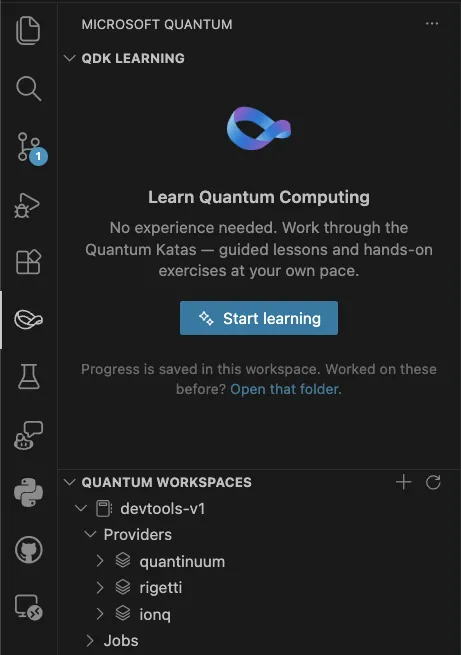
To get started, navigate to the new Microsoft Quantum icon on the activity bar (see next section), and click on Start learning. Copilot will then create a folder structure in your current workspace to track progress, bring up a list of lessons to work through, and help guide you through exercises, answer questions, or explore concepts further.
kata-sm2.mp4
If you need help getting GitHub Copilot configured in VS Code, see the docs at https://code.visualstudio.com/docs/copilot/setup.
This is a new feature and we will continue iterating on the experience. As always, if you have any suggestions or encounter any issues, please log them at https://github.com/microsoft/qdk/issues .
New Microsoft Quantum icon in the VS Code activity bar
In this release we have added a Microsoft Quantum area to the VS Code Activity Bar, identified by the Möbius strip icon. This area contains the new QDK Learning experience outlined above, and is the new home for the Quantum Workspaces container for connecting to Azure Quantum that previously lived in the Explorer view.
Deprecation of the qsharp Python package
With this release we have moved the Python implementation out of the qsharp package and into the qdk package, and marked the qsharp package as deprecated. If you import directly from the qsharp package in Python you will get a warning to use the qdk package and its submodules instead.
Besides the warning, there should be no change in functionality during the transition. We encourage you to update any code that imports directly from qsharp to use this new pattern, as the deprecated package will stop shipping in a future release.
Clifford simulation
When using the Python APIs qdk.qsharp.run or qdk.openqasm.run to run a quantum simulation, you may now pass a type="clifford" argument to indicate that the simulation should run on the Clifford simulator rather than the default sparse simulator.
Clifford simulation scales to a much higher number of qubits, but only supports a restricted set of quantum operations. See the page at https://learn.microsoft.com/en-us/azure/quantum/simulators-overview-qdk for more details.
Isolated Python context
Previously when evaluating or running Q# or QASM code in a Python environment, all interactions occurred in a single global interpreter. This reliance on global state was less than ideal for code that expected a clean environment. This release includes a new qdk.Context API to create a separate quantum interpreter from the global one. The returned context has an API similar to the top level API, e.g.
import qdk

ctx = qdk.Context()
ctx.eval("operation Main() : Result { use q = Qubit(); X(q); MResetZ(q) }")
assert ctx.run("Main()", 2) == [qdk.Result.One, qdk.Result.One]
See the PR at 3208 for more details.
Custom parameters for job submission via VS Code
The Python API to submit jobs to the Azure Quantum service has always had the ability to attach custom parameters with job submission. With this release, we've added the ability to set per-target custom parameters in VS Code, which will then be attached to any job submitted via the Quantum Workspaces tree view or GitHub Copilot tools.
See the PR at 3222 for more details.
Update Python API documentation
The Python API documentation has been cleaned up and refreshed for this release. The improvements should be noticeable both in the Python code editor via IntelliSense, as well as the online documentation at https://learn.microsoft.com/en-us/python/qdk/qdk
Other notable changes
- Provide lhs_span to binop errors when necessary by @joao-boechat in 3185
- Enable Clifford simulation in
qsharp.runby @swernli in 3164 - Optimize H/Rx/Ry in sparse sim by @swernli in 3196
- Fix azure error logging by @joao-boechat in 3197
- Fix debugger error formatting in circuit panel by @joao-boechat in 3191
- Move contents of
qsharppython package toqdkpython package by @ScottCarda-MS in 3192 - Compute runtime of a trace by @msoeken in 3209
- QREv3 neutral atom models by @msoeken in 3211
- Replace deprecated Microsoft.Quantum._ namespace references with Std._ in library tests by @Copilot in 3161
- Added 8T->CCX and cultivation models by @msoeken in 3212
- Add Context API by @fedimser in 3208
- Add array support to QIR bytecode by @orpuente-MS in 3219
- Custom Job Params for Targets by @ScottCarda-MS in 3222
- Improve performance of
OutputRecordingPasswhen processing QIR simulation results by @swernli in 3235 - Make prereqs.py specific about rust version by @amcasey in 3231
- Fix output processing on failed simulation by @swernli in 3237
- Add interactive Quantum Katas learning experience to VS Code extension by @minestarks in 3228
- Manual Memory-Compute qubits by @fedimser in 3204
- Learning panel: click-to-navigate, exercise reset, and layout cleanup by @minestarks in 3249
- Updated source, docstrings, and tests for qdk.magnets.trotter by @brad-lackey in 3226
- Update Python API Doc Strings by @ScottCarda-MS in 3225
New Contributors
Full Changelog: v1.28.0...v1.29.0
Contributors

Assets 3
v1.28.0
Below are some of the highlights for the 1.28 release of the QDK.
Resource Estimation v3
The Quantum Resource Estimation feature has been significantly rewritten to be far more capable of modeling and estimating quantum resource requirements across languages, frameworks, architectures, and modalities.
The new implementation is being rolled out in phases, and this initial release includes the Python APIs. The old QRE Python APIs and the VS Code Estimate CodeLens experience are now marked as deprecated.
For more details on the new APIs and examples of their usage, see the QREv3 wiki page.
Improved simulator capabilities
In this release, we have exposed Python APIs to run QIR directly on the underlying simulators (the CPU state vector, Clifford, and density matrix simulators, and the GPU state vector simulator). The simulators have also been updated to handle programs generated for the "QIR Adaptive Profile", meaning the quantum programs they run may contain mid-circuit measurements, conditional branching, loops, etc.
See the QDK Simulators wiki page for more details.
VS Code extension hosting
The VS Code extension hosting has been updated from being purely a web extension to being run in the local Node.js host when running on a desktop VS Code instance. This fixes issues that could be encountered when running in remote configurations, such as when using WSL. This also lays the groundwork for future work on more agentic flows that require interacting with other local Node.js or Python processes (such as MCP Agents).
Debugger "Break on entry"
The integrated quantum debugger for Q# and OpenQASM used to always break on the first statement when launched. This now defaults to false. This can be configured via launch.json in VS Code, e.g.
{
  "name": "Debug Q# file",
  "type": "qsharp",
  "request": "launch",
  "program": "${workspaceFolder}/samples/algorithms/Grover.qs",
  "stopOnEntry": true
}
Other notable changes
- Simplify debugger breaking by @joao-boechat in #3034
- Introduce QIR v2.1 Profile
Adaptive_RIFLAby @swernli in #3037 - Improvements to Q# library documentation by @filipw in #3083
- Optimize
PreparePureStateDby @swernli in #3048 - Add loop emission to
Adaptive_RIFLAby @swernli in #3038 - Ignore dynamic
Factby @swernli in #3098 - Bump wgpu by @billti in #3100
- add
DecomposeCcxPasstorun_qir_cpuby @orpuente-MS in #3107 - Enable running the VS Code extension host on the workspace (Node.js) by default by @joao-boechat in #3093
- Use separate browser/node entrypoints instead of runtime environment detection by @minestarks in #3121
- Bump quantum-sparse-sim to v0.9.4 by @fedimser in #3122
- RIFLA: Support emission of loops over constant arrays by @swernli in #3101
- Sccarda/python docs update by @ScottCarda-MS in #3131
- Copy sparse simulator into QDK by @swernli in #3137
- Upgrade pyqir to v0.12.3 by @orpuente-MS in #3130
- RIFLA: Support iteration over arrays of qubits by @swernli in #3103
- QRE Update by @msoeken in #3090
- Update Python Docs for
qdkpackage by @ScottCarda-MS in #3144 - Copilot skill file updates by @minestarks in #3154
- Remove legacy Jupyter CodeMirror Q# syntax highlighting injection by @Copilot in #3140
- Fix run command hanging on compile errors for OpenQASM and Q# programs by @minestarks in #3155
- Re-export python simulators from
qdk.simulationby @orpuente-MS in #3145 - Default to OpenQASM semantics on compile by @swernli in #3167
- Align gpu and cpu loss behavior by @orpuente-MS in #3129
- Adaptive Profile support for CPU-full-state and Clifford simulators by @orpuente-MS in #3086
- Sample notebooks for QRE update by @msoeken in #3110
- Add orbital entanglement diagram widget by @nabbelbabbel in #2974
- Add deprecation messages for current QRE by @msoeken in #3170
New Contributors
- @nabbelbabbel made their first contribution in #2974
Full Changelog: v1.27.0...v1.28.0
Contributors


Assets 2
v1.27.0
Below are some of the highlights for the 1.27 release of the QDK.
Local neutral atom simulation for Cirq and Qiskit
You can now run your Cirq and Qiskit circuits on the local neutral atom simulator. The new NeutralAtomSampler (for Cirq) and NeutralAtomBackend (for Qiskit) let you submit circuits and simulate noisy neutral atom hardware locally, including qubit loss modeling.
For Cirq, the sampler implements cirq.Sampler, so it integrates seamlessly with existing Cirq workflows. Results include both a standard Cirq-compatible view (with loss shots filtered out) and raw data with loss markers for more detailed analysis:
from qdk.cirq import NeutralAtomSampler
from qdk.simulation import NoiseConfig

noise = NoiseConfig()
noise.rz.loss = 0.08
result = NeutralAtomSampler(noise=noise, seed=42).run(circuit, repetitions=1000)
For Qiskit, the backend provides a NeutralAtomTarget and transpiles circuits into the native gate set (rz, sx, cz):
from qdk.simulation import NeutralAtomBackend, NoiseConfig

backend = NeutralAtomBackend()
native_circuit = transpile(circuit, backend=backend)
job = backend.run(native_circuit, shots=1000, noise=NoiseConfig())
See the neutral atom simulator sample notebook for a walkthrough.
Updated samples for circuit compatibility
Many of the built-in samples have been updated so they can now generate circuit diagrams and be submitted to Azure Quantum. Previously, some samples used patterns that were incompatible with circuit generation, such as Message calls with dynamic values. These checks have been relaxed, and the samples have been restructured so that Main() is circuit-compatible while validation logic lives in separate @Test() operations. See #2999 for details.
PostSelectZ operation
A new operation, Std.Diagnostics.PostSelectZ, allows a program to force the collapse of a given qubit to a specified state in the computational basis. This is useful in simulation (including simulation for circuit generation) and resource estimation. It is ignored during QIR code generation, so it does not affect hardware execution. See #3017 for details.
Circuit visualization improvements
Classically controlled gate groups can now be expanded and collapsed in circuit diagrams, matching the behavior of other expandable groups. This provides a more consistent interaction model when exploring circuits with complex classical control flow. See #2985 for details.
Other notable changes
- Add support for Adaptive_RIFL QIR programs in GPU simulator by @orpuente-MS in #3039
- Support
NoiseConfigfor Q# and OpenQASM on sparse simulation by @swernli in #3062 - Support explicit seed in
qsharp.runby @swernli in #3065 - Add
qdk-programmingCopilot skill for Q#, OpenQASM and Python by @minestarks in #3058 - Add Optional Data Overlay for MoleculeViewer by @wavefunction91 in #3059
- RCA: Allow updates to mutable variables within a dynamic scope if the variable is also defined within that scope by @swernli in #3053
- OpenQASM: Fix const propagation in bitarray-to-int promotion by @minestarks in #3030
- Add
IntAsDoubleandTruncatesupport in QIR by @swernli in #3024 - Fix collapse/expand issue by @ScottCarda-MS in #3016
- Refactor RCA by @swernli in #2835, #3015
Full Changelog: v1.26.1...v1.27.0
Contributors

Assets 3
v1.26.0
Below are some of the highlights for the 1.26 release of the QDK.
Conditional branches in circuit diagrams
With this release, branches based on measurement results (e.g., if (M(q) == One) { ... }) are now shown in circuit diagrams as classically controlled operations, with a label indicating the measurement result that triggers the branch. This makes it easier to understand the structure of algorithms that involve mid-circuit measurements and classical control flow.
Note that the expression in the condition may result from complex processing on multiple measurement results, and the circuit will trace and correctly show the results involved in the condition, for example:
import Std.Math.PI;
operation Main() : Result {
    use q = Qubit();
    use reg = Qubit[2];

    ApplyToEach(H, reg);
    let num = MeasureInteger(reg);

    if num == 3 {
        Y(q);
    } else {
        Rx(PI() / 4.0, q);
    }

    MResetZ(q)
}
As with other circuit operations or gates, clicking on the box for a conditional branch will navigate to the corresponding source code location.
Quantum state visualizer in the circuit editor
The Quantum Circuit Editor now includes a state visualizer panel that shows the resulting quantum state from running the circuit, with live updates as the circuit is edited. It visualizes the probability density and phase for each basis state. The panel may be collapsed or expanded by clicking on the vertical divider.

Python improvements for language interop
You can now import OpenQASM code and use it directly as a Q# operation via import_openqasm:
from qdk.openqasm import import_openqasm
from qdk import qsharp

import_openqasm("""
    include "stdgates.inc";
    qubit[2] qs;
    h qs[0];
    cx qs[0], qs[1];
""", name="Entangle")

qsharp.eval("{ use qs = Qubit[2]; Entangle(qs); MResetEachZ(qs) }")
# [One, One]
The QDK now also supports passing Q# callables across the Python boundary, enabling advanced coding patterns for composable code. Continuing from the sample above, we can define a Q# operation that takes another operation as an argument, and pass the code we imported from OpenQASM:
qsharp.eval("""
operation TestAntiCorrelation(entangler : Qubit[] => Unit) : Result[] {
    use qs = Qubit[2];
    X(qs[1]);
    entangler(qs);
    MResetEachZ(qs)
}
""")

from qsharp.code import Entangle, TestAntiCorrelation

TestAntiCorrelation(Entangle)
# [Zero, One]
Support for doc comments on struct fields
Doc comments on struct fields are now shown in the hover text for the field in VS Code. See the description in the PR at #2891 for details.
New Table Lookup sample
We added a Hypercube Lookup sample demonstrating usage of the recently added table lookup library. See the extensive comments in the sample's Main.qs file for details.
Other notable changes
- Use 'build' package to build wheels by @idavis in [#2822]#2822
- Introduce a new lint: avoid block namespace by @filipw in [#2862]#2862
- Fix copilot histogram display by @billti in [#2886]#2886
- Show doc comments on hover of struct fields by @swernli in [#2891]#2891
- Creating an explicit namespace with the same name as a callable breaks Python interop by @swernli in [#2896]#2896
- Unresolved names in call expression avoid ambiguous type error by @swernli in [#2892]#2892
- Fix issue with shadowing in
qsharp.codeby @swernli in [#2908]#2908 - CSS updates by @billti in [#2899]#2899
- Fix
**kwargstypehints by @orpuente-MS in [#2884]#2884 - Combine kernels for op application by @billti in [#2898]#2898
- Better feedback on incorrect syntax for qubit allocation by @swernli in [#2897]#2897
- Table lookup sample by @DmitryVasilevsky in [#2910]#2910
- Add QIR noise intrinsic by @orpuente-MS in [#2915]#2915
- Pointing to windows-2025 image on SDLSources stage by @igormasson in [#2918]#2918
- Ket Labels on Results from Azure by @ScottCarda-MS in [#2917]#2917
- Deprecate
borrowkeyword with Lint and Code-Action by @ScottCarda-MS in [#2929]#2929 - [VSCode] Update to latest Quantum DP and CP api-version by @xinyi-joffre in [#2922]#2922
- Atom visualizer improvements by @billti in [#2935]#2935
- Add
load_csv_dirmethod toNoiseConfigclass by @orpuente-MS in [#2928]#2928 - Added CY gate to GPU, CPU and Clifford simulators by @DmitryVasilevsky in [#2927]#2927
- Circuit Editor State Visualization Panel by @ScottCarda-MS in [#2870]#2870
- Allow Passing of Q# callables and closures in Python by @swernli in [#2940]#2940
- Use tagged aggregates in QIR by @swernli in [#2964]#2964
- Change
import_openqasmto hoist qubits into the arguments of the generated Q# operation by @swernli in [#2920]#2920 - Sign vsix before publishing by @idavis in [#2967]#2967
- Get VSCode Extension, Manifest, and Signature files for Publishing by @idavis in [#2969]#2969
- Reset gate and MZ in addition to MResetZ in GPU simulator by @DmitryVasilevsky in [#2939]#2939
- Remove container creation when retrieving linked storage account from the service by @rigidit in [#2968]#2968
- Update azure-quantum Python dependency by @swernli in [#2976]#2976
- [Circuit Diagrams] 1 - RIR debug metadata by @minestarks in [#2942]#2942
- [Circuit Diagrams] 2 - ASCII art changes to render conditionals and complex groups by @minestarks in [#2944]#2944
- [Circuit Diagrams] 3 - SVG rendering changes for classically controlled circuits by @minestarks in [#2945]#2945
- [Circuit diagrams] 4 - Show conditionals in circuits based on RIR debug metadata by @minestarks in [#2943]#2943
- Fix zoom behavior in circuit diagrams by @minestarks in [#2979]#2979
New Contributors
- @igormasson made their first contribution in #2918
- @rigidit made their first contribution in #2968
Full Changelog: v1.25.1...v1.26.0
Contributors


Assets 3
v1.25.1
Below are some of the highlights for the 1.25 release of the QDK.
Branding update
The QDK has been updated to reflect Microsoft's branding for quantum computing, including updating the name of the VS Code extension to "Microsoft Quantum Development Kit" and updating the extension logo to the Mobius strip design.

New simulators
This release includes two new quantum simulators designed to provide high-performance noisy simulation and the ability to model qubit loss, which is an important "noise" consideration for neutral atom quantum hardware.
-
The Clifford simulator efficiently simulates circuits composed of Clifford operations, and can scale to thousands of qubits and run thousands of shots in seconds. This simulator is ideal for simulating error correction codes or other research involving Clifford circuits.
-
The GPU simulator uses GPU acceleration to simulate shots in parallel with high fidelity noise models. By leveraging the parallel processing power of modern GPUs, this simulator can handle wider (up to 27 qubits) and deeper circuits while modeling realistic noise and provide an order of magnitude speed-up over other simulators for certain challenging circuit types. By using a cross-platform GPU library, this simulator works on Windows, macOS, and Linux systems with compatible GPUs. (It will fall back to CPU simulation if no compatible GPU is found.)
Both simulators are currently exposed via the new NeutralAtomDevice Python class, and the noise models can be specified via the NoiseConfig class, both available in the qdk.simulators module. See the Benzene and Carbon sample notebooks for examples of using these simulators.
When running the simulators with qubit loss configured, lost qubits will be indicated in the measurement results with the special Loss result value when using raw labels, or with a - character when using ket labels.

Neutral Atom device visualizer
The NeutralAtomDevice class includes a show_trace method that takes the compiled program and visualizes the execution on an animated representation of a neutral atom device. This allows users to see how qubits are manipulated over time, including gate operations, measurements, and movement. This visualization can help with understanding the unique characteristics of neutral atom hardware, and how programs map to operations on the physical device. See the notebooks mentioned in the prior section for example usage.
nad.mp4
Circuit visualization improvements
In circuit diagrams, loops (for, while, etc.) from the source code are now represented as expandable components. This makes for a more compact and readable diagram, especially for iterative algorithms.
This release also includes other usability improvements to circuit diagrams, including labels at the top of expanded components, the ability to navigate to the call site of an operation by clicking on the corresponding component in the circuit diagram, and automatic expansion of trivial components.
circuits.mp4
Molecule visualizer
A MoleculeViewer class has been added to the collection of widgets (from qdk.widgets import MoleculeViewer) that can display 3D visualizations of molecules using data in .xyz and .cube formats. This is most useful when used in conjunction with the new qdk-chemistry package, which provides advanced tools for quantum chemistry exploration.

TableLookup library
A Table Lookup library has been implemented that provides efficient quantum implementations of table lookup operations. This library can be used to implement oracles for algorithms such as Grover's search, or to load classical data into quantum states for other algorithms. See https://github.com/microsoft/qdk/tree/main/library/table_lookup for the source, and the Configure Q# projects as external dependencies documentation for how to reference libraries in your Q# projects.
Other notable changes
- Update the pip install commands in notebook samples for qdk by @ScottCarda-MS in #2811
- Split OpenQASM into parser and compiler crates by @idavis in #2804
- Removing deps that are no longer needed by @idavis in #2814
- Update PyO3 to v0.27.2 by @orpuente-MS in #2816
- Propagating missing information in logical counts by @msoeken in #2817
- Add debugger visualization for arrays by @idavis in #2812
- Add optional
prune_classical_qubitssetting for circuit generation by @swernli in #2802 - Updated comment to trig functions to mention radians by @DmitryVasilevsky in #2825
- Update RIR reindex pass to avoid using extra qubits due to initial resets by @swernli in #2829
- Circuit diagrams: Show source code links for grouped operations by @minestarks in #2826
- Panic in Language Service: unexpected expr type in assignment by @swernli in #2833
- Prohibit return statements in apply block by @swernli in #2839
- Panic in QIR generation: "only some primitive types are supported" by @swernli in #2831
- Add functor constraint pass to OpenQASM compiler by @orpuente-MS in #2838
- Circuit diagrams: auto-expand all single nested operations by @minestarks in #2842
- Fixed angle adjustment size bug by @filipw in #2845
- Circuit diagrams: Group loops by @minestarks in #2827
- First version of table lookup library by @DmitryVasilevsky in #2834
- Circuit diagrams: Enable group_by_scope by default by @minestarks in #2848
- Circuit diagrams: Add label above expanded groups by @minestarks in #2843
- Support QDK_PYTHON_TELEMETRY environment variable by @minestarks in #2858
- Update branding to Microsoft Quantum by @minestarks in #2857
- Change logo to mobius strip by @billti in #2860
- Move theme logic by @billti in #2861
- Add sims and widgets by @billti in #2863
Full Changelog: v1.23.0...v1.25.1
Contributors
Assets 3
v1.23.0
Below are some of the highlights for the 1.23 release of the QDK.
Full Qiskit 2 support
The qdk python package has been updated to support Qiskit 2 circuit submission to the Azure Quantum service. This is done via the AzureQuantumProvider class to get a backend object that can run both Qiskit v1 and v2 circuits. This allows for a simpler submission of Qiskit circuits to Azure as compared to the older approach that required manual QIR compilation before submission. The resulting job objects also handle parsing of the Qiskit output format. The pattern will look similar to:
provider = AzureQuantumProvider(workspace)
backend = provider.get_backend(target_name)
job = backend.run(circuit, shots, job_name)
counts = job.result().get_counts(circuit)
See the updated Qiskit submission sample notebook for the new supported method of Azure submission with Qiskit 2.
To make sure you get the updated qdk package with this support, please use the command pip install "qdk[azure,qiskit]" --upgrade
Interactive Circuit Diagrams with Source Code Navigation
Circuit diagrams now display clickable source code locations for gates and qubits in VS Code. Click on any operation box to jump directly to where it was called in your Q# or QASM code, or on a qubit label to jump to its declaration site. In Python Jupyter notebooks, source locations can be enabled via qsharp.circuit(source_locations=True) to display hover text with code locations.

Program output in VS Code Terminal
When running a Q# program in VS Code, the output is now displayed in the Terminal instead of the Debug Console, which is more consistent with other VS Code experiences. (When debugging, the output will still be displayed in the Debug Console.)
Fix display of job results listing
Previously, the job results listing in the VS Code "Quantum Workspaces" explorer view was not displaying correctly if the workspace contained a large number of jobs. This has now been fixed.
Minimum Python version is 3.10
The minimum Python version for the QDK packages has been updated to 3.10, as Python 3.9 is now end of life and no longer receiving updates.
Architecture specific macOS packages
With this release we have switched from publishing one Universal wheel for macOS, to shipping two architecture specific wheels (x86_64 and arm64). This should have no visible impact (other than smaller package sizes), but let us know if you encounter any issues.
Full Changelog: v1.22.0...v1.23.0
v1.22.0
Below are some of the highlights for the 1.22 release of the QDK.
Python qdk package is out of preview
With this release, the qdk package on PyPI is now considered stable and out of preview, and is the recommended way to install the QDK for Python users. The package includes a number of 'extras' to add optional functionality, such as Jupyter Notebook support, Azure Quantum integration, and Qiskit interop. For example, to install the QDK with Qiskit, Jupyter and Azure Quantum support:
pip install "qdk[qiskit,jupyter,azure]"
As a shortcut to install all optional functionality, you can also do:
pip install "qdk[all]"
See https://pypi.org/project/qdk/ for more details.
Qiskit 2 support
With this release, the QDK supports both Qiskit 1.x and 2.x releases for converting a Qiskit circuit into QIR and submitting as a job to the Azure Quantum service.
Note that this does not yet support using Azure Quantum
Backendsdirectly from Qiskit 2.x; that functionality is planned for a future release of the azure-quantum Python package.
For an example of submitting a Qiskit circuit by first converting to QIR, see the first sample notebook in the next section.
Sample notebooks for submitting Qiskit, Cirq, and PennyLane programs to Azure Quantum
We have added sample Jupyter Notebooks demonstrating how to submit quantum programs written in Qiskit, Cirq, and PennyLane to the Azure Quantum service. These samples use the qdk Python package to convert the circuits into QIR format, and then submit them as jobs to Azure Quantum.
Spec compliant QIR code generation
In this release we have updated the QIR code generation to be compliant with the QIR specification. This has been tested with the quantum targets available on Azure Quantum, and you should see no difference in behavior when submitting jobs. However if you are using the generated QIR in another toolchain, you may be impacted. See the PR at #2590 for details.
Code action to create parameterless wrappers
A new Code Action has been added to wrap an existing operation in a new operation that takes no parameters. The new operation can be edited to prepare the parameters before calling the existing operation. This allows for easy circuit generation, execution, debugging, etc. via the CodeLens actions on the new operation, as well as quickly turning the wrapper into a unit test.

Azure Quantum job cancellation
Jobs submitted to the Azure Quantum service that have not yet completed can now be cancelled directly from the VS Code "Quantum Workspaces" explorer view. As shown below, when a job is in the Waiting or Running state, a "Cancel Azure Quantum Job" icon is available to the right of the job name. Clicking this icon will prompt for confirmation, and then submit a cancellation request to Azure Quantum.

Other notable changes
- Emit spec compliant QIR by @swernli in #2590
- Improved adjoint Select implementation by @DmitryVasilevsky in #2729
- Code Action for Parameterless Wrappers by @ScottCarda-MS in #2731
- Housekeeping: Tidy up spelling by @ConradJohnston in #2734
- Fix a bug in trivial 1-to-1 distillation unit by @msoeken in #2736
- Enable implementation of
prune_error_budgetin custom estimation API by @msoeken in #2737 - Better
compileerror when missing call toinitby @swernli in #2735 - Sample Notebook for Submitting Qiskit to Azure Quantum using
qdkpython by @ScottCarda-MS in #2739 - Replace Quantinuum H1 with H2 in samples by @swernli in #2747
- Fix Webview and Circuit Editor Left Padding by @ScottCarda-MS in #2748
- Array error messages for comma issues by @joesho112358 in #2744
- Fix OpenQASM
cutarget by @swernli in #2752 - Remove
dump_circuitfrom top-levelqdkpython module by @ScottCarda-MS in #2753 - Cirq Sample Notebook for Azure Submission by @ScottCarda-MS in #2751
- Removed References to the QDK Package being "preview" by @ScottCarda-MS in #2756
- Circuit diagram snapshot tests (includes Node.js upgrade) by @minestarks in #2743
- Add lint warning for ambiguous if-statement followed by unary operator by @swernli in #2759
- Automatic estimation of overhead in memory/compute architecture by @msoeken in #2760
- Enable Qiskit 2.0 support by @idavis in #2754
- Job cancallation by @billti in #2763
- PennyLane Sample Notebook for Azure Submission by @ScottCarda-MS in #2758
- Unit test for over-large address in Select/Unselect by @DmitryVasilevsky in #2765
New Contributors
- @ConradJohnston made their first contribution in #2734
- @joesho112358 made their first contribution in #2744
Full Changelog: v1.21.0...v1.22.0
Contributors


Assets 2
v1.21.0
Below are some of the highlights for the 1.21 release of the QDK.
QDK Python package
With this release we are also publishing a qdk package to PyPI (see https://pypi.org/project/qdk/). This is still in the 'preview' stage as we lock down the API, but the goal is that going forward the QDK will be installed in Python via pip install qdk, with any optional extras needed (e.g. pip install "qdk[jupyter,azure,qiskit]" to add the Jupyter Notebooks, Azure Quantum, and Qiskit integration). Once installed, import from the necessary submodules (e.g. from qdk.openqasm import compile)
Please give it a try and open an issue if you have any feedback.
Complex literals
The Q# language added support for complex literals. For example,
function GetComplex() : Complex {
    3. + 4.i
}
Additionally, Complex values can now be used in arithmetic expressions directly:
let x = 2.0 + 3.0i;
let y = x + (4.0 - 5.0i);
Other notable changes
- Update to latest simulator, new benchmark by @swernli in #2690
- Updated wording in 'complex numbers' kata by @DmitryVasilevsky in #2694
- Fix decomposition for controlled Rxx/Ryy by @swernli in #2699
- Fix panic in RCA when using tuple variables as arguments to a lambda by @swernli in #2701
- Support Complex literals, arithmetic operations by @swernli in #2709
- Fix panic when interpreter has unbound names in Adaptive/Base by @swernli in #2691
- [OpenQASM]: Properly detect zero step in const ranges by @orpuente-MS in #2715
- Short-circuiting expressions produce divergent types that propagate too far by @swernli in #2700
- Initial QDK Python Package by @ScottCarda-MS in #2707
- Extract logical resource counts from a Q# program by @msoeken in #2717
- Fix panic in loop unification pass for short-circuiting expressions by @swernli in #2723
- Support partial evaluation of
IndexRangecalls by @swernli in #2727
Full Changelog: v1.20.0...v1.21.0
Contributors
Assets 2
v1.20.0
Below are some of the highlights for the 1.20 release of the QDK.
QIR target profile selection redesign
In previous releases, the target QIR profile setting for code generation in VS Code was a global setting, and if switching between projects with different target profiles the user would need to remember to change the editor setting each time. This was cumbersome and a common source of confusion.
With this release, the target profile can be set per project. If working on a multi-file project with a qsharp.json manifest file, the target profile can be specified in the manifest file via the "targetProfile" property.
If working in a standalone Q# or OpenQASM file, the target profile can be specified via the @EntryPoint attribute in Q# files, or the qdk.qir.profile pragma in OpenQASM files. For example, to target a Q# file for base profile code generation:
@EntryPoint(Base)
operation Main() : Result[] {
    // ...
}
If submitting a job to the Azure Quantum service, upon submission the target profile will default to the capabilities of the target hardware if not otherwise specified.
See the QDK Profile Selection wiki page for more details and examples.
OpenQASM improvements
- Arrays and complex numbers can now be passed as input and output.
- Qubit aliases and array concatenation are now supported.
- In VS Code, OpenQASM files now support:
- Rename symbol (F2) for user-defined identifiers, gates, functions, etc; built-ins are not renameable.
- Go to Definition (F12) and Find All References (Shift+F12).
- The GitHub Copilot tools for the QDK now support OpenQASM (.qasm) files as well as Q#. You can simulate your program, generate a circuit diagram and generate resource estimates for Q# and OpenQASM programs right from the chat panel.
Python interop improvements
In addition to primitive types, arrays, and tuples, users can now pass Q# structs. For example, the following shows passing a python object to a Q# operation that takes struct:

Complex numbers are also supported, allowing the passing of Python complex literals and variables directly to Q# callables, e.g.
import qsharp

qsharp.eval("""
    import Std.Math.Complex;

    function SwapComponents(c: Complex) : Complex {
        new Complex { Real = c.Imag, Imag = c.Real }
    }
    """)

from qsharp.code import SwapComponents
assert SwapComponents(2 + 3j) == 3 + 2j
For more details on Python and Q# interop see our wiki page.
Richer Copilot help for Q# APIs
In this release, we added a new Copilot tool that can access the documentation generated by all the APIs available in the current project (included the standard library and referenced libraries). This lets Copilot see up-to-date information on the Q# libraries available and how to use them, improving Copilot's working knowledge of Q#. From generated Q# snippets to answering questions about available APIs, Copilot can use this to provide more accurate and up-to-date information.

Language service improvements
Numerous improvements to the language service have been made for correctness and completeness, especially around import and export declarations. The language service now also provides better diagnostics for QIR generation errors. Please log issues if you encounter any problems!
Other notable changes
- Profile Selection Redesign by @ScottCarda-MS in #2636
- Import and export resolution improvements by @minestarks in #2638
- Fix parsing of OPENQASM version statement by @orpuente-MS in #2650
- Fix completions for import and exports by @minestarks in #2640
- Python - Q# UDT interop by @orpuente-MS in #2635
- Fix off-by-one error in stack traces by making line and column numbers 1-based for user display by @Copilot in #2628
- Allow recursive calls to operations that return
Unitby @swernli in #2654 - Fix panic when running .qsc circuit file by @orpuente-MS in #2666
- OpenQASM language service: add rename/definition/references, semantic passes, and VS Code wiring by @idavis in #2656
- Add support for qubit alias decls by @idavis in #2665
- Remove Azure Quantum Credits deprecation message from VS Code extension by @Copilot in #2668
- Support numpy arrays in the Python interop layer by @orpuente-MS in #2671
- Definition, References, Hover, Rename for import/export decls by @minestarks in #2641
- Nicer error messages for QIR generation by @minestarks in #2664
- Improve interface and output for Submit Job Copilot tool by @minestarks in #2673
- Lower duration and stretch by @idavis in #2611
- OpenQASM support for Copilot tools by @minestarks in #2675
- Add support for array concatenation in OpenQASM by @orpuente-MS in #2676
- Copilot Reads Summaries from DocGen Tool by @ScottCarda-MS in #2672
- OpenQASM input and output interop by @idavis in #2678
- Better symbol resolution for OpenQASM LS support by @idavis in #2679
Full Changelog: v1.19.0...v1.20.0