Basic Inventory system for products management
Explore the code »
Table of Contents
This is a simple Inventory system managing API consisting of products that can be manipulated with CRUD operations and these operations are audited to be monitored. Changing in the inventory fires push notification events through integration with firebase to notify the users in charge. Also Added Unit tests to ensure code expected behaviour while applying changes through development process.


-
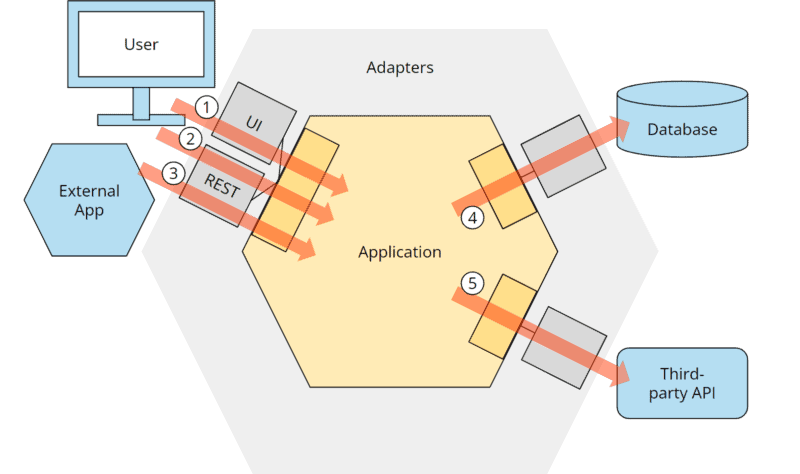
The code architecture follows a common pattern in software development known as Hexagonal Architecture.
-
Also wrapping any external dependency outside the domain layer using adapter design pattern to insure the code extensibility in the future.
-
These patterns promotes separation of concerns and independence of the core business logic from external dependencies.
-
Here's an overview of the layers:
- View Layer:
- Responsible for user interface components.
- Presents data to users and captures user inputs.
- Represented by the controllers and data validations.
- Domain Layer:
- Contains the business logic and business data entities of the application.
- Enforces business rules and encapsulates the core functionality of the application.
- Includes services, DTOs (Data Transfer Objects), and interfaces defining contracts for interactions within the domain.
- Services for the auditing of the products regarding the method that will be used for the auditing, whether it's a database or logging in ELK.
- Interfaces that must be implemented by any data layer repository to access the data persistence layer.
- Data Layer:
- Responsible for data access and storage.
- Connects to databases, external APIs, or any other data source.
- Implements interfaces defined in the domain layer to provide concrete implementations for data access.
- View Layer:
To get a local copy up and running follow these simple example steps.
To run this project locally you need to have on your machine:
- Visual Studio IDE
- DBMS
- Postgres driver installed to run the DB server
- Clone the repo
git clone https://github.com/mansouryoussef286/ProductsInventory.git
- Run the following DB scripts in the dbms
  CREATE TABLE public.products (
 	product_id int4 NOT NULL,
 	"name" varchar(255) NOT NULL,
 	description text NULL,
 	price numeric(10, 2) NOT NULL,
 	quantity int4 NOT NULL,
 	created_at timestamptz NULL DEFAULT CURRENT_TIMESTAMP,
 	updated_at timestamptz NULL DEFAULT CURRENT_TIMESTAMP,
 	CONSTRAINT products_pkey PRIMARY KEY (product_id)
 );

 CREATE TABLE public.audit_logs (
 	table_name varchar(255) NOT NULL,
 	id int4 NOT NULL,
 	old_value text NULL,
 	new_value text NULL,
 	change_date timestamptz NULL DEFAULT CURRENT_TIMESTAMP,
 	operation_type varchar NULL,
 	log_id varchar NOT NULL DEFAULT nextval(0::regclass),
 	CONSTRAINT audit_logs_pk PRIMARY KEY (log_id)
 );
- Run the server from visual studio
- Use swagger link to test the api: https://localhost:44300/swagger
Test the Products Functionality using the Api endpoints
Youssef Mansour - @LinkedIn - mansouryoussef286@gmail.com Project Link: https://github.com/mansouryoussef286/Products-Inventory