


A Home Assistant integration that uses the BuienAlarm API to provide rain forecast data for any location in the Netherlands.
Disclaimer. This is an unofficial community integration. It is not affiliated with or endorsed by BuienAlarm. The brand icons shipped in
custom_components/buienalarm/brand/are generic rain-cloud graphics, not the BuienAlarm trademark.
- Next shower sensor with a human-readable status (Dutch or English)
- Next shower start sensor with
device_class: timestamp - Current shower end sensor with
device_class: timestamp - Rain-intensity threshold sensors (
level_light,level_moderate,level_heavy) with unitmm/h - Configurable through the Home Assistant UI (config flow + options flow)
- Diagnostics support — download a JSON dump of the integration state for troubleshooting, with latitude/longitude redacted automatically
- Multilingual UI — see Translations below for the full list of supported languages and how to contribute
- Companion Lovelace card available as a separate HACS install — see Dashboard card below
For the Dutch version of this README, see installation.md.
- Home Assistant 2024.12 or newer
- Make sure HACS is installed.
- In HACS, open the menu (top right) → Custom repositories.
- Add
https://github.com/lancer73/ha-buienalarmwith category Integration. - Search for BuienAlarm in the HACS store and install it.
- Restart Home Assistant.
- Copy the
custom_components/buienalarm/directory from this repository into your Home Assistantconfig/custom_components/directory. - Restart Home Assistant.
After installation:
- Go to Settings → Devices & services → Add integration.
- Search for BuienAlarm and select it.
- Provide:
- Latitude and Longitude of the location to forecast for
- Scan interval — how often to refresh data (3–60 minutes, default 5)
- Language — Dutch or English
The integration validates the API call before creating the entry, so an invalid location or a connectivity problem is reported immediately.
The scan interval and language can be changed afterwards via the integration card's Configure button. Changes are applied immediately without an HA restart.
A single device is created per configured location, exposing six sensors:
| Sensor (English UI) | Sensor (Dutch UI) | Type | Description |
|---|---|---|---|
| Next shower | Volgende bui | text | Human-readable status, e.g. "14:25 (in 30 minutes)" |
| Next shower start | Start volgende bui | timestamp | When the next shower starts; unknown if none in window |
| Current shower end | Einde huidige bui | timestamp | When the ongoing/upcoming shower ends; unknown if none in window |
| Light threshold | Drempel licht | mm/h | Light-rain threshold reported by the API |
| Moderate threshold | Drempel gemiddeld | mm/h | Moderate-rain threshold |
| Heavy threshold | Drempel zwaar | mm/h | Heavy-rain threshold |
The next-shower sensor exposes these state attributes:
next_rain_forecast— same value as the state, for templatingrain_forecast— list of{precip: mm/h, attime: unix_ts}entries covering the full forecast windowperiod_type—wet(next shower coming),dry(current shower will end), ornan(no transition in window)period_start— clock time string (HH:MM) of the upcoming transition
The
raw_dataattribute that earlier versions exposed has been removed in 1.0.0. The full upstream payload is now available through the Download diagnostics button on the integration card.
Entity IDs are derived from the device name and your locale, so the exact ID depends on which language you picked. Examples:
- English:
sensor.buienalarm_next_shower,sensor.buienalarm_next_shower_start,sensor.buienalarm_current_shower_end,sensor.buienalarm_light_threshold,sensor.buienalarm_moderate_threshold,sensor.buienalarm_heavy_threshold - Dutch:
sensor.buienalarm_volgende_bui,sensor.buienalarm_start_volgende_bui,sensor.buienalarm_einde_huidige_bui,sensor.buienalarm_drempel_licht,sensor.buienalarm_drempel_gemiddeld,sensor.buienalarm_drempel_zwaar
Open Settings → Devices & services → BuienAlarm and click your device to see the entity IDs that were actually created on your install. The YAML examples below assume the English IDs — adjust them for your install.
automation:
  - alias: "Rain warning"
    trigger:
      - platform: state
        entity_id: sensor.buienalarm_next_shower_start
    condition:
      - condition: template
        value_template: "{{ trigger.to_state.state not in ['unknown', 'unavailable'] }}"
    action:
      - service: notify.mobile_app
        data:
          title: "Rain incoming"
          message: >
            Next shower starts at
            {{ as_timestamp(states('sensor.buienalarm_next_shower_start'))
               | timestamp_custom('%H:%M') }}.
The previous "trigger on every state change of the status sensor" pattern still works, but the timestamp sensor is the cleaner trigger because it only fires when an actual transition is detected and never on every text-format update.
A companion Lovelace card is available as a separate HACS install:
lovelace-buienalarm-card.
It pairs with this integration and reads its sensors directly — no
templating or data_generator needed.
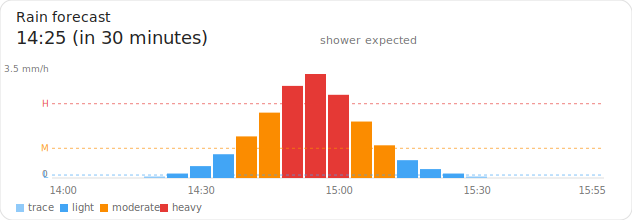
Install it via HACS (Custom repositories → category Dashboard), then add the card from the Lovelace card picker. Minimal YAML:
type: custom:buienalarm-card
next_shower_sensor: sensor.buienalarm_next_shower
light: sensor.buienalarm_light_threshold
moderate: sensor.buienalarm_moderate_threshold
heavy: sensor.buienalarm_heavy_threshold
Full configuration options, screenshots, and YAML examples are in the card's README.
If you'd rather not install another HACS package, the integration's sensors work with any standard Lovelace card. A simple entities card:
type: entities
title: Rain forecast
entities:
  - entity: sensor.buienalarm_next_shower
  - entity: sensor.buienalarm_next_shower_start
  - entity: sensor.buienalarm_current_shower_end
For a chart, the apexcharts-card community card works well too: configure
all series against the next-shower sensor, drive the time axis from its
rain_forecast attribute, and read each threshold value with
hass.states['sensor.buienalarm_light_threshold'].state (and similarly for
moderate/heavy) inside the series' data_generator. The companion card
above does this and more, with a visual editor — recommended unless you
specifically want the apexcharts-card look.
- All API calls are HTTPS with default certificate verification.
- No credentials are required, transmitted, or stored.
- Latitude and longitude are redacted from the diagnostics download.
- The config-entry
unique_idand entry title are based on coordinates rounded to ~110 m and ~1.1 km respectively, so a registry export does not pinpoint your home address. - Existing entries from earlier versions are migrated to the rounded unique_id format automatically on first load.
The integration supports the following languages for state text (the human-readable status of the next-shower sensor, e.g. "in 30 minutes" / "over 30 minuten") and for the Home Assistant UI (entity names, config-flow labels):
nl (Dutch), en (English), fr (French), es (Spanish),
pt (Portuguese, Portugal), pt-BR (Portuguese, Brazil), fy (West
Frisian / Frysk), tr (Turkish), ar (Arabic, Modern Standard),
de (German), de-CH (Swiss German).
The state-text language follows the language config option chosen by the
user. The HA UI labels follow the user's HA UI locale, with a fallback
chain: exact match → base language (e.g. pt-PT → pt, de-AT → de)
→ English.
The translations for every language other than Dutch and English were produced as machine-quality starting points and have not yet been reviewed by native speakers. They are functional, but a native speaker will inevitably notice clumsy phrasing or better word choices.
If you are a native speaker of any of these languages, contributions are warmly welcomed, no matter how small:
- Strings to review live in two places:
custom_components/buienalarm/const.py(theLANGUAGE_STRINGSdict — five state-text strings per language), andcustom_components/buienalarm/translations/<locale>.json(the HA UI translations — about a dozen strings). - Open a pull request with your suggested edits, or open an issue if you'd rather discuss specific phrasing first. Reviews of just one or two strings are valuable too — please don't feel you have to fix every string at once.
- If your language isn't on the list and you'd like to add it, both files take new entries cleanly; an issue or PR to start the conversation is welcome.
de-AT(Austrian German) is not a separate locale. Standard German is used; the few Austria-specific words don't appear in any of these strings. HA UIs configured tode-ATfall through tode.- Moroccan Darija is not included. Morocco's written language is
Modern Standard Arabic, which is available as
ar. Spoken Darija has no commonly-used locale code and no HA support.
Upgrade in place via HACS. On first restart the integration will:
- Migrate the legacy
buienalarm_next_rain_<lat>_<lon>sensor to the new ID scheme — your history is preserved. - Round the entry's
unique_idso coordinates aren't exposed in registry exports. - Bump the entry version from 1 to 2.
If your dashboards reference the raw_data attribute (e.g. an older
apexcharts-card example reading attributes.raw_data.levels.light),
update them to read from the dedicated threshold sensors instead, or
install the companion card which handles this for you.
The status sensor's other attributes (rain_forecast, period_type,
period_start, next_rain_forecast) are unchanged.
See CHANGES.md for the full changelog.
If the integration is not working as expected:
- Open Settings → Devices & services → BuienAlarm → ⋮ → Download diagnostics and inspect the JSON. Latitude, longitude, and any other sensitive fields are redacted.
- Enable debug logging via Settings → Devices & services → BuienAlarm → ⋮ → Enable debug logging, reproduce the issue, then disable debug logging — Home Assistant will offer the log file as a download.
- Verify your internet connection and that the configured coordinates fall within the BuienAlarm coverage area (the Netherlands and immediately surrounding regions).
- Check the Home Assistant log for messages from the
buienalarmlogger.
- lovelace-buienalarm-card — Lovelace card that visualises this integration's sensors. HACS Dashboard category. Optional, but recommended.
This project is licensed under the MIT License — see the LICENSE
file for details.
The BuienAlarm name and any official trademarks belong to their respective owners. This integration is an unofficial client of BuienAlarm's public forecast API.