From nmap output to an actionable, port-aware recon checklist in under 30 seconds.
Offline. Self-hosted. Every engagement export-ready as Markdown.





Paste nmap text / XML / greppable output — or drag in an AutoRecon results/ zip — and every open port becomes a card with pre-filled commands (IP interpolated), HackTricks links, tickable checks, evidence screenshots, and a notes field.
Built for OSCP / HTB students and solo pentesters who currently juggle 8 browser tabs and a scratch Obsidian file per box.
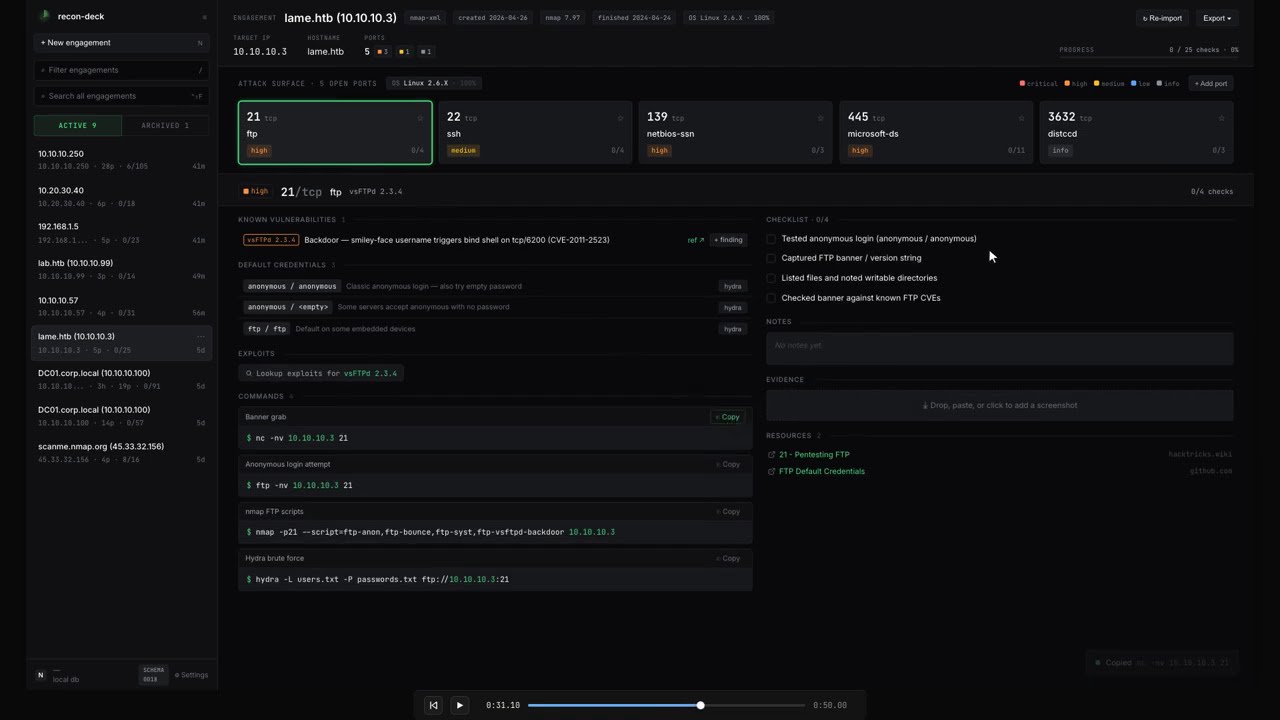
▶ Watch the 50-second demo — paste nmap → drill into a port → tick checks → switch ports.

An engagement view: 28 open ports, KB-matched risk colors, per-port check completion. More screenshots →
# 30-second smoke test — pulls the image, starts on http://localhost:13337
curl -sSL https://raw.githubusercontent.com/kocaemre/recon-deck/main/install.sh | sh| Without it | With it |
|---|---|
| 8 browser tabs per box (HackTricks, payloadsallthethings, gtfobins, …) | One page per port, prefilled commands ready to copy |
Hand-typing nmap -p- -sV boilerplate per service |
KB-driven commands with {IP} / {HOST} / {PORT} / {WORDLIST_*} placeholders |
| Lost track of which checks you ran on box #7 | Tickable checklist + per-port notes saved in SQLite |
| Markdown report = manual copy-paste from notes | One-click export: Markdown / HTML / JSON / SysReptor / PwnDoc / PDF |
| AutoRecon dump → folder spelunking | Drop the zip, every per-port file routed to the right card |
📥 Ingest — nmap text / XML / greppable + AutoRecon zip + manual ports
- Multi-format nmap parser —
-oN,-oX,-oG. Multi-host scans become a host-selector chip in the header - AutoRecon zip import — drag the
results/folder zipped; per-port service files,_manual_commands.txt, gowitness screenshots, patterns / errors logs all routed automatically - Re-import + diff — re-paste a fresh nmap output and the heatmap badges new ports
NEWand previously-open portsCLOSED. Headerscans: Nchip tracks how many imports you've done - Manual ports — heatmap
+ Add portfor services nmap missed (DNS zone transfer, alt banners, etc.)
🎯 Triage — KB-driven port cards, known-vulns, searchsploit, findings catalog
- KB-driven cards — port + service + product/version match shipped YAML KB → tickable checks, prefilled commands, HackTricks links
- Active Directory toolkit —
nxc(netexec), impacket (GetNPUsers,GetUserSPNs,secretsdump), kerbrute, bloodhound-python, PetitPotam, pyWhisker — all wired to the right DC ports (88/135/389/445/464/636/3268/3389/5985) - Known-vulns auto-match —
vsFTPd 2.3.4and friends → vuln + CVE + ref link surfaces on the port card - searchsploit lookup — one-click
searchsploit -t "<product>"per port, cached - Findings catalog — severity / title / description / CVE / evidence refs. One-click
+ findingbutton on KB rows pre-populates the modal
🖼️ Evidence — per-port screenshots, AutoRecon gowitness import, native annotation
- Drag-drop / clipboard-paste screenshots into a per-port evidence pane
- Native HTML5 canvas annotation — Box / Arrow / Pencil / Text tools, 5-color palette, undo stack. Save chains a new evidence row via
parent_evidence_idso the original always survives - AutoRecon gowitness / aquatone PNGs auto-import into the matching port's evidence list
📤 Export — Markdown, JSON, HTML, CSV, SysReptor, PwnDoc, print-to-PDF
- Six export formats plus a print-optimised PDF route
- Markdown ships with Obsidian-compatible frontmatter
- SysReptor JSON + PwnDoc YAML for reporting-tool feeds
- Findings CSV for spreadsheet triage
- Multi-host aware — SysReptor scope and PwnDoc scope list every host; markdown / HTML render one section per host
⌨️ Workflow — command palette, FTS5 search, keyboard shortcuts, sidebar actions
- Command palette (
⌘K) — every UI action lives in the palette: add finding, re-import, settings, delete, exports, print - Cross-engagement search (
⌃⇧F) — FTS5 + BM25, hit rows show host context - Sidebar engagement actions — hover-kebab with rename / duplicate (deep-copy) / delete (shadcn AlertDialog)
- Custom commands + wordlist overrides at
/settings/commandsand/settings/wordlists— your snippets surface alongside KB commands
📚 Knowledge base — YAML KB, in-app editor, hot-reload
- YAML KB — drop entries in
/kb(or wherever you pointkb_user_dir); shipped KB lives underknowledge/ - In-app editor at
/settings/kb— paste, validate against the ZodKbEntrySchema, save under a strict filename allowlist - Hot reload —
fs.watchon shipped + user dirs flips a dirty flag, next request rebuilds. Edit a YAML in your editor, refresh, see your change - In-app editor at
/settings/kb— paste, validate, save (atomic write under a strict[A-Za-z0-9_-]filename allowlist)
🛡️ Safety — migration backup, host-header allowlist, rate limiter, offline-by-default
- Pre-migration snapshots via
VACUUM INTO— boot writesdata/recon-deck.db.backup-pre-NNNNbefore any new migration runs. Failure logs surface a copy-pasteablecprollback line - Post-migration
PRAGMA integrity_check+foreign_key_check— either failing aborts boot - Host-header allowlist middleware — defends DNS-rebinding when the app is reachable on
0.0.0.0 - Per-IP rate limiter on
/api/*— defense-in-depth for the LAN-exposure case - Offline by default — zero outbound HTTP unless the operator opts in to the GitHub release check
🚀 First-run (v2.1.0) — onboarding, sample engagement, update toast
/welcome4-step onboarding — scope · tour · local paths · updates. Seeds theapp_statesingleton with yourlocal_export_dir,kb_user_dir,wordlist_base, and the release-check toggle- Replay onboarding from
/settings → First-run— paths preserved - Sample engagement — "Try sample" on the paste panel inserts a canned 10-port HTB-easy box marked
is_sample = true. Header surfaces aSAMPLEchip + single-click Discard - Notify-only update check (opt-in) — pings
api.github.com/repos/kocaemre/recon-deck/releases/latestonce per session, toasts a "Release notes" link if a newer tag exists. Installs stay manual - Desktop-only viewport guard —
< 1280pxshows a clean "needs a wider screen" explainer
Three ways to run, pick one. All bind to 127.0.0.1:13337 (port picked to dodge the dev-server crowd on 3000/8080), so nothing leaks to your LAN by default; see Exposing to LAN if you need otherwise.
1. One-liner (auto-pulls + starts + opens browser):
curl -sSL https://raw.githubusercontent.com/kocaemre/recon-deck/main/install.sh | sh2. Docker Compose (recommended for persistent setups):
curl -O https://raw.githubusercontent.com/kocaemre/recon-deck/main/docker-compose.yml
docker compose up -d
3. Manual docker run:
docker run -d --name recon-deck -p 127.0.0.1:13337:13337 \
  -v recondeck-data:/data \
  -v recondeck-kb:/kb \
  -e HOSTNAME=0.0.0.0 \
  ghcr.io/kocaemre/recon-deck
Open http://localhost:13337, paste nmap output, see cards. The -p 127.0.0.1:13337:13337 host-side prefix keeps the app loopback-only — see Exposing to LAN for LAN reachability.
For OSCP/HTB students and solo pentesters. Offline. No LLM. Does not run scans — it complements AutoRecon and HackTricks. Think of it as the OSCP-flavored Obsidian for recon: same category as Obsidian, focused on post-scan workflow.
It is NOT a reporting platform, a team tool, a scanner, an AI assistant, or a mobile app. The intent is deliberate and narrow — see ROADMAP.md for the out-of-scope list.
By default, the Quick Start binds to 127.0.0.1 on the host — only your local machine can reach the app. To make recon-deck reachable from another machine on your LAN:
docker run -p 13337:13337 \
  -v recondeck-data:/data \
  -v recondeck-kb:/kb \
  -e HOSTNAME=0.0.0.0 \
  -e RECON_DECK_TRUSTED_HOSTS=192.168.1.10:13337 \
  ghcr.io/kocaemre/recon-deck
Replace 192.168.1.10:13337 with the host:port your LAN clients will use. RECON_DECK_TRUSTED_HOSTS is comma-separated — expand it for every additional host you want to reach the app from.
This activates the host-header allowlist (mitigates DNS rebinding). Requests whose Host: header is not in the allowlist are rejected with HTTP 421 Misdirected Request. See SECURITY.md for the full threat model.
Drop YAML files into /kb/ports/*.yaml (volume-mounted) — they override shipped entries with the same port/service at startup. Schema, denylist, and placeholder syntax in CONTRIBUTING.md.
Bind-mounting a host dir? Container runs as UID 1000 — chown 1000:1000 /path/to/my-kb first, or use a named volume (-v recondeck-kb:/kb) which inherits ownership automatically.
autorecon <target>→ producesresults/<ip>/cd results && zip -r my-target.zip <ip>/- Drag the zip onto the import panel
Server-side unzip routes everything: per-port files (tcp80/…, tcp_22_ssh_*) into the right card, _manual_commands.txt into Manual commands, gowitness/aquatone PNGs into port evidence, log files (_patterns, _errors, _commands) into an engagement warning panel. Multi-IP zips become multi-host engagements (primary inherits full AR data, secondaries get ports + scripts).
One engagement, N hosts (DC + workstations, related boxes, etc.). Hosts chip-switch in the header; heatmap + commands + palette all rescope. Multi-host is detected from XML <host> blocks, text/greppable Nmap scan report for ... boundaries, and AutoRecon multi-IP zips.
Hit Re-import in the engagement header and paste a fresh nmap output. The reconciler:
- Adds new ports (
NEWchip on the heatmap) - Refreshes
last_seen_scan_idfor re-observed ports - Marks ports the new scan didn't see as
closed(CLOSEDchip, dim tile) - Surfaces a
scans: Nchip in the header so you know multi-import diff context applies - Toast:
1 new · 1 closed · 2 unchangedafter import
/settings (footer link in the sidebar) covers:
- Engagement list — inline delete with cascade confirmation
- Wordlists (
/settings/wordlists) — override{WORDLIST_*}placeholders - Custom commands (
/settings/commands) — personal snippets alongside KB commands, scopable by service/port - KB editor (
/settings/kb) — paste, validate, save to your user dir; cache invalidates immediately
Engagement renames are inline on the header (target identity) or via the sidebar kebab (display label). The kebab also exposes Duplicate (deep-copy transaction) and Delete (cascade with confirmation).
Six formats + a print route. All multi-host aware.
| Format | Use |
|---|---|
| Markdown | Obsidian-compatible frontmatter, paste into your vault |
| JSON | Structured dump for scripting |
| HTML | Standalone single-file report, opens offline |
| Findings CSV | Severity / host / port / CVE rows for spreadsheets |
| SysReptor JSON | projects/v1 shape with scope[] |
| PwnDoc YAML | Findings + scope, multi-host aware |
| Print-to-PDF | /report route, Ctrl+P → Save as PDF |
State lives in two volumes — back both up together:
recondeck-data→ SQLite DB (history, evidence, findings, notes)recondeck-kb→ your YAML overrides under/kb
Snapshot to tarball:
docker stop recon-deck
docker run --rm -v recondeck-data:/data -v recondeck-kb:/kb -v "$(pwd)":/out \
  alpine sh -c 'tar -C / -czf /out/recon-deck-$(date +%F).tar.gz data kb'
docker start recon-deck
Restore: stop + rm container, recreate volumes, tar -xzf from inside an alpine container, restart. Migrations re-apply on boot. Pin a specific image tag (ghcr.io/kocaemre/recon-deck:v2.1) for production restores so a :latest jump doesn't surprise you.
Boot also takes a VACUUM INTO 'data/recon-deck.db.backup-pre-NNNN' snapshot before running pending migrations; on failure the log prints a copy-pasteable rollback line. Schema is forward-only — see CONTRIBUTING.md › "Migration safety and recovery" for the full procedure.
Notify-only — no auto-update, no telemetry. Optional release check is opt-in at /settings → First-run.
Docker (easy): the install one-liner is idempotent — re-run it to upgrade. It pulls the new image, removes the prior container (named volumes survive), and starts fresh:
curl -sSL https://raw.githubusercontent.com/kocaemre/recon-deck/main/install.sh | shDocker (manual):
docker pull ghcr.io/kocaemre/recon-deck:latest
docker stop recon-deck && docker rm recon-deck
# re-run docker run from Quick Start; named volumes survive
Local dev: git pull && npm install && npm run dev. Migrations apply at boot.
| Layer | Technology |
|---|---|
| Framework | Next.js 15.5 (App Router) |
| UI | React 19, Tailwind 4, shadcn/ui |
| Persistence | SQLite via Drizzle + better-sqlite3 |
| Parsers | fast-xml-parser (XML), custom regex (text) |
| KB format | YAML via js-yaml, validated by Zod |
| Container | node:22-alpine, multi-stage build |
| License | MIT |
Full version pins live in package.json. The image is a single multi-stage node:22-alpine build — typical pulled size is under ~200 MB.
For local hacking outside the container:
git clone https://github.com/kocaemre/recon-deck
cd recon-deck
npm install
npm run dev
# → http://localhost:13337
Useful scripts:
npm test              # vitest unit tests (parsers + KB schema)
npm run lint:kb       # YAML lint (schema + denylist + URL scheme)
npm run typecheck     # tsc --noEmit
npm run build # production build (output: "standalone")| Env var | Default | Purpose |
|---|---|---|
HOSTNAME |
127.0.0.1 |
Bind address inside the container. Override to 0.0.0.0 for port-map reach. |
PORT |
13337 |
Port the app listens on (also drives the host-header allowlist default). |
RECON_DB_PATH |
/data/recon-deck.db |
SQLite file location. Keep on a mounted volume for persistence. |
RECON_KB_USER_DIR |
/kb |
User KB directory. Onboarding writes this to app_state.kb_user_dir which takes precedence; env var is the fallback. |
RECON_LOCAL_EXPORT_DIR |
(empty) | Engagement header's vscode://file/… link. app_state.local_export_dir wins; this and NEXT_PUBLIC_RECON_LOCAL_EXPORT_DIR are fallbacks. |
RECON_DECK_TRUSTED_HOSTS |
(empty) | Comma-separated extra hosts allowed by the host-header middleware. |
NEXT_TELEMETRY_DISABLED |
1 |
Disables Next.js telemetry. Preserves the offline guarantee. |
See CONTRIBUTING.md for KB rules, PR discipline, and what's in/out of scope.
See SECURITY.md for the threat model, offline guarantee, and default-deny postures.
See CREDITS.md for upstream attribution — HackTricks, AutoRecon, PayloadsAllTheThings, SecLists.
See ROADMAP.md for upcoming candidates, the v2.x future direction, and hard out-of-scope items.
MIT.