ROS 2 package for vision-language model (VLM) based navigation with two modes:
- Exploration Mode: Random exploration with obstacle avoidance and location narration
- Target Object Mode: Search for and navigate towards specific objects
Uses on-device VLMs (like LLaVA) running on your NVIDIA RTX 4060.
Watch the JetBot VLM Navigator in action:
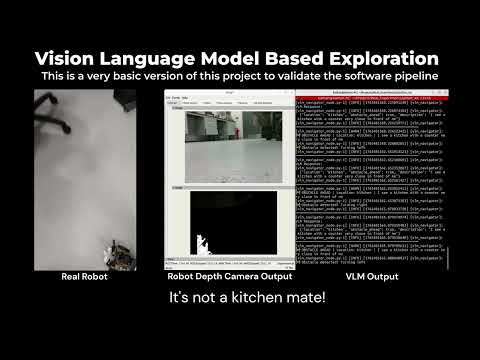
- On-Device VLM: Runs locally on NVIDIA RTX 4060 (no API costs!)
- Two Navigation Modes:
- Exploration: Random exploration with intelligent obstacle avoidance and environmental narration
- Target Object: Find any object using natural language and navigate towards it
- Efficient: Uses 4-bit quantization to fit 7B parameter models in 8GB VRAM
- Discrete Commands: Uses Int32 commands (0-5) with auto-stop safety (0.2s duration)
- Flexible: Explore environments or find specific objects on demand
- GPU: NVIDIA RTX 4060 (8GB VRAM) or better
- RAM: 16GB+ recommended
- Camera: RGB camera publishing to
/camera/color/image_raw - Robot: JetBot or compatible robot with discrete command interface (0-5)
# CUDA Toolkit (if not already installed)
# Check with: nvcc --version
sudo apt-get install nvidia-cuda-toolkit

# Python dependencies
pip install torch torchvision torchaudio --index-url https://download.pytorch.org/whl/cu118
pip install transformers accelerate bitsandbytes sentencepiece protobuf
pip install Pillow opencv-pythonsudo apt-get install ros-${ROS_DISTRO}-cv-bridge ros-${ROS_DISTRO}-image-transport- Clone this package into your ROS 2 workspace:
cd ~/jetbot_ws/src
# Package should already be there- Install Python dependencies:
pip install torch torchvision --index-url https://download.pytorch.org/whl/cu118
pip install transformers>=4.36 accelerate bitsandbytes sentencepiece protobuf- Build the workspace:
cd ~/jetbot_ws
colcon build --packages-select jetbot_vlm_nav
source install/setup.bashThe robot randomly explores the environment while:
- Detecting obstacles that are very close (within 1-2 feet)
- Narrating likely locations (kitchen, hallway, bedroom, etc.)
- Avoiding collisions through intelligent direction changes
# Start exploration mode
ros2 launch jetbot_vlm_nav vlm_navigator.launch.py
Expected Behavior:
- 70% forward movement, 15% left turns, 15% right turns
- Changes direction every 2 seconds
- VLM analyzes scene every 3 seconds
- Immediately turns when close obstacle detected
- Logs location descriptions:
🚶 Exploring forward through kitchen
Customize exploration:
ros2 launch jetbot_vlm_nav vlm_navigator.launch.py \
  explore_duration:=3.0 \
query_interval:=2.0Find and navigate towards a specific object:
# Find and approach a bottle
ros2 launch jetbot_vlm_nav vlm_target_object.launch.py target_object:=bottle# Find a chair
ros2 launch jetbot_vlm_nav vlm_target_object.launch.py target_object:=chair
# Find a person
ros2 launch jetbot_vlm_nav vlm_target_object.launch.py target_object:=person
# Find a cup
ros2 launch jetbot_vlm_nav vlm_target_object.launch.py target_object:=cupCustomize parameters for target object mode:
ros2 launch jetbot_vlm_nav vlm_target_object.launch.py \
  camera_topic:=/camera/image_raw \
  target_object:=bottle \
  query_interval:=1.5 \
stop_distance_threshold:=0.4# Use LLaVA 1.5 (alternative model) - Exploration
ros2 launch jetbot_vlm_nav vlm_navigator.launch.py \
model_name:=llava-hf/llava-1.5-7b-hf
# Use LLaVA 1.5 - Target Object Mode
ros2 launch jetbot_vlm_nav vlm_target_object.launch.py \
model_name:=llava-hf/llava-1.5-7b-hf \
target_object:=bottleThe robot uses discrete Int32 commands published to /jetbot/cmd:
| Command | Value | Description | Duration |
|---|---|---|---|
| STOP | 0 | Stop motors | Immediate |
| FORWARD | 1 | Move forward | 0.2s auto-stop |
| BACKWARD | 2 | Move backward | 0.2s auto-stop |
| TURN_LEFT | 3 | Turn left | 0.2s auto-stop |
| TURN_RIGHT | 4 | Turn right | 0.2s auto-stop |
| SEARCH | 5 | Rotate to search | 0.1s auto-stop |
Note: All movement commands have automatic timeout to ensure safety. The robot driver code handles the auto-stop mechanism.
Edit config/vlm_params.yaml for default exploration parameters:
vlm_explorer:
  ros__parameters:
    model_name: "llava-hf/llava-v1.6-mistral-7b-hf"
    use_4bit: true
    device: "cuda"
    query_interval: 3.0          # Seconds between VLM narrations
    explore_duration: 2.0        # Seconds to move in one direction
    obstacle_keyword: "obstacle" # Keyword for obstacle detection
max_new_tokens: 200 # For descriptive narrationCreate or edit config file for target object parameters:
vlm_target_navigator:
  ros__parameters:
    model_name: "llava-hf/llava-v1.6-mistral-7b-hf"
    use_4bit: true
    target_object: "bottle"
    query_interval: 1.0
    stop_distance_threshold: 0.35
    center_tolerance: 0.15
safety_timeout: 5.0- Image Capture: Subscribes to camera topic
/camera/color/image_raw - VLM Analysis: Every
query_intervalseconds (default: 3s), sends image to VLM - Environment Understanding: VLM determines:
- Current location type (kitchen, hallway, etc.)
- Whether close obstacle is ahead (within 1-2 feet)
- Descriptive narration of the scene
- Navigation: Publishes Int32 commands to
/jetbot/cmd:- Random direction changes every
explore_durationseconds - Immediate turns when close obstacles detected
- 70% forward bias for efficient exploration
- Random direction changes every
- Safety: Auto-stop after 0.2s per command (handled by driver)
- Image Capture: Subscribes to camera topic
/camera/color/image_raw - VLM Processing: Every
query_intervalseconds, sends image to VLM - Object Detection: VLM identifies if target object is present
- Navigation: Publishes Int32 commands to approach the object:
- Rotate (search) if object not found
- Turn to center object in view
- Move forward when centered
- Stop when close enough
- Safety: Auto-stop timers prevent runaway
Subscribed Topics:
/camera/color/image_raw(sensor_msgs/Image): RGB camera feed
Published Topics:
/jetbot/cmd(std_msgs/Int32): Discrete movement commands (0-5)/vlm_nav/status(std_msgs/String): Exploration status and narration
Subscribed Topics:
/camera/color/image_raw(sensor_msgs/Image): RGB camera feed
Published Topics:
/jetbot/cmd(std_msgs/Int32): Discrete movement commands (0-5)/vlm_nav/status(std_msgs/String): Detection status messages
| Parameter | Type | Default | Description |
|---|---|---|---|
camera_topic |
string | /camera/color/image_raw |
Camera image topic |
cmd_topic |
string | /jetbot/cmd |
Command topic (Int32) |
model_name |
string | llava-hf/llava-v1.6-mistral-7b-hf |
HuggingFace VLM model |
use_4bit |
bool | true |
Use 4-bit quantization |
device |
string | cuda |
Device to run model on |
query_interval |
float | 3.0 |
Seconds between VLM queries |
explore_duration |
float | 2.0 |
Seconds to move in one direction |
obstacle_keyword |
string | obstacle |
Keyword for obstacle detection |
max_new_tokens |
int | 200 |
Max tokens for narration |
image_width |
int | 336 |
Image width (LLaVA optimal) |
image_height |
int | 336 |
Image height |
| Parameter | Type | Default | Description |
|---|---|---|---|
camera_topic |
string | /camera/color/image_raw |
Camera image topic |
cmd_topic |
string | /jetbot/cmd |
Command topic (Int32) |
model_name |
string | llava-hf/llava-v1.6-mistral-7b-hf |
HuggingFace VLM model |
use_4bit |
bool | true |
Use 4-bit quantization |
device |
string | cuda |
Device to run model on |
target_object |
string | bottle |
Object to find |
query_interval |
float | 1.0 |
Seconds between VLM queries |
stop_distance_threshold |
float | 0.35 |
Stop when object size > threshold |
center_tolerance |
float | 0.15 |
How centered object needs to be |
safety_timeout |
float | 5.0 |
Safety stop timeout |
max_new_tokens |
int | 150 |
Max tokens for response |
The default configuration uses 4-bit quantization which allows the 7B parameter model to run in ~5-6GB VRAM. If you have memory issues:
- Ensure no other GPU processes are running
- Close unnecessary applications
- Try a smaller model or lower query interval
- Exploration - Faster narration: Decrease
query_interval(e.g., 2.0 seconds) - Exploration - Better efficiency: Increase
query_interval(e.g., 5.0 seconds) - Target Mode - Faster response: Decrease
query_interval(e.g., 0.5 seconds) - Target Mode - Better efficiency: Increase
query_interval(e.g., 2.0 seconds)
The first time you run the node, it will download the VLM model (~13GB for LLaVA-1.6-Mistral-7B). This may take 10-30 minutes depending on your internet speed. Subsequent runs will be much faster.
# Solution 1: Ensure 4-bit quantization is enabled
use_4bit:=true

# Solution 2: Clear GPU memory
nvidia-smi
# Kill any processes using GPU# Set HuggingFace cache directory
export HF_HOME=~/hf_cache
mkdir -p $HF_HOME
# If download fails, try manually:
python -c "from transformers import LlavaNextProcessor; LlavaNextProcessor.from_pretrained('llava-hf/llava-v1.6-mistral-7b-hf')"# Check GPU is being used:
nvidia-smi
# Check CUDA is available in Python:
python -c "import torch; print(torch.cuda.is_available())"- Check
/jetbot/cmdtopic is correct for your robot - Verify JetBot driver is running:
python3 jetbot_driver_code.py - Check camera topic is publishing:
ros2 topic echo /camera/color/image_raw - Check status messages:
ros2 topic echo /vlm_nav/status - Verify commands are being published:
ros2 topic echo /jetbot/cmd
| Model | Size | VRAM (4-bit) | Recommended For |
|---|---|---|---|
llava-hf/llava-v1.6-mistral-7b-hf |
7B | ~6GB | Best overall |
llava-hf/llava-1.5-7b-hf |
7B | ~5GB | Good alternative |
Qwen/Qwen2-VL-7B-Instruct |
7B | ~6GB | Good for complex queries |
# Terminal 1: Start JetBot driver
cd ~/jetbot_ws/src
python3 jetbot_driver_code.py

# Terminal 2: Exploration mode
source ~/jetbot_ws/install/setup.bash
ros2 launch jetbot_vlm_nav vlm_navigator.launch.py

# OR Terminal 2: Target object mode
source ~/jetbot_ws/install/setup.bash
ros2 launch jetbot_vlm_nav vlm_target_object.launch.py target_object:=bottle# GPU usage
watch -n 1 nvidia-smi
# View navigation status
ros2 topic echo /vlm_nav/status
# View commands being sent
ros2 topic echo /jetbot/cmd
# View camera feed (if needed)
ros2 topic hz /camera/color/image_raw# Slower, more methodical exploration
ros2 launch jetbot_vlm_nav vlm_navigator.launch.py \
explore_duration:=4.0 \
query_interval:=2.0
# Faster, more dynamic exploration
ros2 launch jetbot_vlm_nav vlm_navigator.launch.py \
explore_duration:=1.0 \
query_interval:=4.0# Common household objects
ros2 launch jetbot_vlm_nav vlm_target_object.launch.py target_object:="red cup"
ros2 launch jetbot_vlm_nav vlm_target_object.launch.py target_object:="laptop"
ros2 launch jetbot_vlm_nav vlm_target_object.launch.py target_object:="book"
ros2 launch jetbot_vlm_nav vlm_target_object.launch.py target_object:="phone"┌─────────────┐
│ Camera │
└──────┬──────┘
│ /camera/color/image_raw
▼
┌─────────────────────────────┐
│ VLM Explorer Node │
│ ┌──────────────────────┐ │
│ │ Latest Image Only │ │
│ │ (No Queue) │ │
│ └────────┬─────────────┘ │
│ │ │
│ ┌────────▼─────────────┐ │
│ │ On-Device VLM │ │ NVIDIA RTX 4060
│ │ Every 3 seconds │ │ 4-bit Quantization
│ │ (LLaVA/Qwen) │ │ ~4GB VRAM
│ └────────┬─────────────┘ │
│ │ │
│ ┌────────▼─────────────┐ │
│ │ Location Detection │ │
│ │ Obstacle Detection │ │
│ │ (Close proximity) │ │
│ └────────┬─────────────┘ │
│ │ │
│ ┌────────▼─────────────┐ │
│ │ Random Exploration │ │
│ │ Controller │ │
│ │ - 70% forward │ │
│ │ - 15% left/right │ │
│ │ - Obstacle avoidance │ │
│ └────────┬─────────────┘ │
└───────────┼─────────────────┘
│ /jetbot/cmd (Int32: 0-5)
▼
┌──────────┐
│ JetBot │──┐
│ Driver │ │ Auto-stop
└──────────┘ │ 0.2s timeout
│ │
▼ ▼
┌──────────────┐
│ Robot │
└──────────────┘
┌─────────────┐
│   Camera    │
└──────┬──────┘
       │ /camera/color/image_raw
       ▼
┌─────────────────────────────┐
│  VLM Target Navigator       │
│  ┌──────────────────────┐   │
│  │  Latest Image Only   │   │
│  └────────┬─────────────┘   │
│           │                 │
│  ┌────────▼─────────────┐   │
│  │  On-Device VLM       │   │ NVIDIA RTX 4060
│  │  (LLaVA/Qwen)        │   │ 4-bit Quantization
│  └────────┬─────────────┘   │
│           │                 │
│  ┌────────▼─────────────┐   │
│  │ Object Detection     │   │
│  │ Target Matching      │   │
│  └────────┬─────────────┘   │
│           │                 │
│  ┌────────▼─────────────┐   │
│  │  Navigation          │   │
│  │  Controller          │   │
│  │  - Search/Rotate     │   │
│  │  - Center on target  │   │
│  │  - Approach          │   │
│  └────────┬─────────────┘   │
└───────────┼─────────────────┘
            │ /jetbot/cmd (Int32: 0-5)
            ▼
      ┌──────────┐
      │  JetBot  │──┐
      │  Driver  │  │ Auto-stop
      └──────────┘  │ 0.2s timeout
            │       │
            ▼       ▼
      ┌──────────────┐
      │    Robot     │
      └──────────────┘
Apache-2.0
Kalhan Boralessa (kalhan.munasingarachchige2023@my.ntu.ac.uk)
- Built on HuggingFace Transformers
- Uses LLaVA vision-language models
- Optimized for NVIDIA RTX GPUs
- JetBot discrete command interface with auto-stop safety