English | Русский
The most efficient, reliable, and developer-friendly way to use the Yandex API.
Actor page: apify.com/johnvc/Scrape-Yandex Input schema: apify.com/johnvc/Scrape-Yandex/input-schema
The Yandex API runs a Yandex search for any query and returns clean, structured JSON. Each page of results comes back with organic listings (title, link, snippet, position, sitelinks), paid ads, knowledge graph entity cards, inline image panels, and inline video panels, plus per-page metadata. It supports 15+ Yandex domains, 19 languages, and region targeting across 123,000+ locations, with automatic pagination and safe-search controls.
- Python 3.11 or higher
- An Apify account and API key (get a free key here)
-
Clone the repository
git clone https://github.com/johnisanerd/Apify-Yandex-Search-Scraper.git cd Apify-Yandex-Search-Scraper -
Install dependencies with UV
# Install UV if you do not have it:
curl -LsSf https://astral.sh/uv/install.sh | sh

# Install project dependencies:
uv sync
-
Configure your API key
cp .env.example .env
# Edit .env and add your Apify API key
# Get your free API key at: https://apify.com?fpr=9n7kx3
-
Run the example
uv run python yandex-scraper.py
export APIFY_API_TOKEN="your_api_key_here"
uv run python yandex-scraper.pyFull results-page coverage. One call returns the whole Yandex results page as structured data: organic listings, paid ads, knowledge graph entity cards, inline image panels, and inline video panels. You get the entire page, not just the organic links.
Built for Russian-speaking and CIS markets. Target 15+ Yandex domains (yandex.com, yandex.ru, yandex.com.tr, and more), 19 languages, and any of 123,000+ region IDs. That makes it practical for SEO, competitive intelligence, and brand monitoring across Russia, Eastern Europe, Central Asia, and beyond.
Predictable, pay-per-use pricing. Billing is per run plus per page processed, with no monthly rental. You pay for the searches you actually make, and you control cost directly with the page limit.
Clean, consistent JSON. Every page is a structured dataset item with the same shape, so you parse results once and reuse the code across queries, domains, and languages.
Easy to automate. Call it from Python in a few lines, or load it as an MCP tool so assistants like Claude and Cursor can run Yandex searches for you on demand.
- Keyword search across Yandex with full results-page extraction
- Domain localization across 15+ Yandex domains
- Language targeting with 19 supported languages
- Region targeting with 123,000+ location IDs (the
lrparameter) - Safe search and typo correction controls, plus automatic multi-page pagination
- Structured organic results with title, link, snippet, position, displayed link, date, and sitelinks
- Rich result blocks: ads, knowledge graph, inline images, inline videos
- Per-page metadata with domain, language, location, and pagination details
- Consistent JSON shape across every query
- Per-page billing so larger searches stay transparent
A single-page search for one keyword. This is the cheapest way to try the API.
{
  "text": "machine learning",
  "yandex_domain": "yandex.com",
  "max_pages": 1
}A Russian-domain search with Russian language, a region ID, more results per page, and two pages.
{
  "text": "машинное обучение",
  "yandex_domain": "yandex.ru",
  "lang": "ru",
  "lr": 225,
  "groups_on_page": 20,
  "family_mode": 1,
  "max_pages": 2
}Yandex supports a native date-range operator inside the query text. Append date:YYYYMMDD..YYYYMMDD to text to limit results to a time window. No extra parameters needed.
{
  "text": "climate news date:20260317..20260417",
  "yandex_domain": "yandex.com",
  "lang": "en",
  "max_pages": 1
}| Parameter | Type | Required | Default | Description |
|---|---|---|---|---|
text |
string |
Yes | - | The search query. Supports Yandex operators such as date:YYYYMMDD..YYYYMMDD. |
yandex_domain |
string |
No | yandex.com |
Yandex domain, e.g. yandex.ru, yandex.com.tr, yandex.kz (15+ supported). |
lang |
string |
No | en |
Language code, e.g. ru, en, tr, de (19 supported); null for unspecified. |
lr |
integer |
No | (domain default) | Region ID, e.g. 225 = Russia, 84 = United States, 149 = Belarus. 123,000+ IDs; see the Actor page for the full table. |
max_pages |
integer |
No | 2 |
Maximum pages to fetch (0 = no limit). |
groups_on_page |
integer |
No | 10 |
Results per page (1 to 20). |
family_mode |
integer |
No | 1 |
Safe search: 0 = off, 1 = moderate, 2 = strict. |
fix_typo |
boolean |
No | true |
Auto-correct spelling errors in the query. |
output_file |
string |
No | (none) | Optional filename to save results; auto-generated if omitted. |
A representative dataset item for the query Apple. Each page of results is one dataset item; arrays and some fields are trimmed here for readability.
{
  "text": "Apple",
  "yandex_domain": "yandex.com",
  "lang": "en",
  "lr": "84",
  "page_number": 1,
  "search_domain": "yandex.com",
  "search_domain_description": "United States",
  "search_language": "en",
  "search_language_description": "English",
  "search_location": "84",
  "total_results_found": 10,
  "pages_processed": 1,
  "total_pages": 1,
  "max_pages_set": 1,
  "results_per_page": 10,
  "pagination_limit_reached": true,
  "pagination_stopped_by_limit": true,
  "organic_results": [
    {
      "position": 1,
      "title": "Apple",
      "link": "https://www.apple.com/",
      "displayed_link": "apple.com",
      "snippet": "Apple Payments Services LLC, a subsidiary of Apple Inc., is a service provider of Goldman Sachs Bank USA for Apple Card and Savings accounts."
    },
    {
      "position": 3,
      "title": "Apple Inc. - Wikipedia",
      "link": "https://en.m.wikipedia.org/wiki/Apple_Inc.",
      "displayed_link": "en.m.wikipedia.org",
      "snippet": "Apple Inc. is an American multinational corporation and technology company headquartered in Cupertino, California, in Silicon Valley."
    }
  ],
  "ads_results": [],
  "knowledge_graph": [
    {
      "title": "Apple Inc.",
      "description": "American multinational technology company headquartered in Cupertino, California.",
      "source": { "name": "en.wikipedia.org" }
    }
  ],
  "inline_images": [],
  "inline_videos": []
}You can load the Yandex API as an MCP tool so assistants call it for you. The MCP server URL preloads just this one Actor:
https://mcp.apify.com/?tools=actors,docs,johnvc/Scrape-Yandex
Authenticate with OAuth in the browser when offered, or with your Apify API token (the same APIFY_API_TOKEN used by the Python example). Get a token at https://console.apify.com/settings/integrations and a free Apify account at https://apify.com?fpr=9n7kx3 .
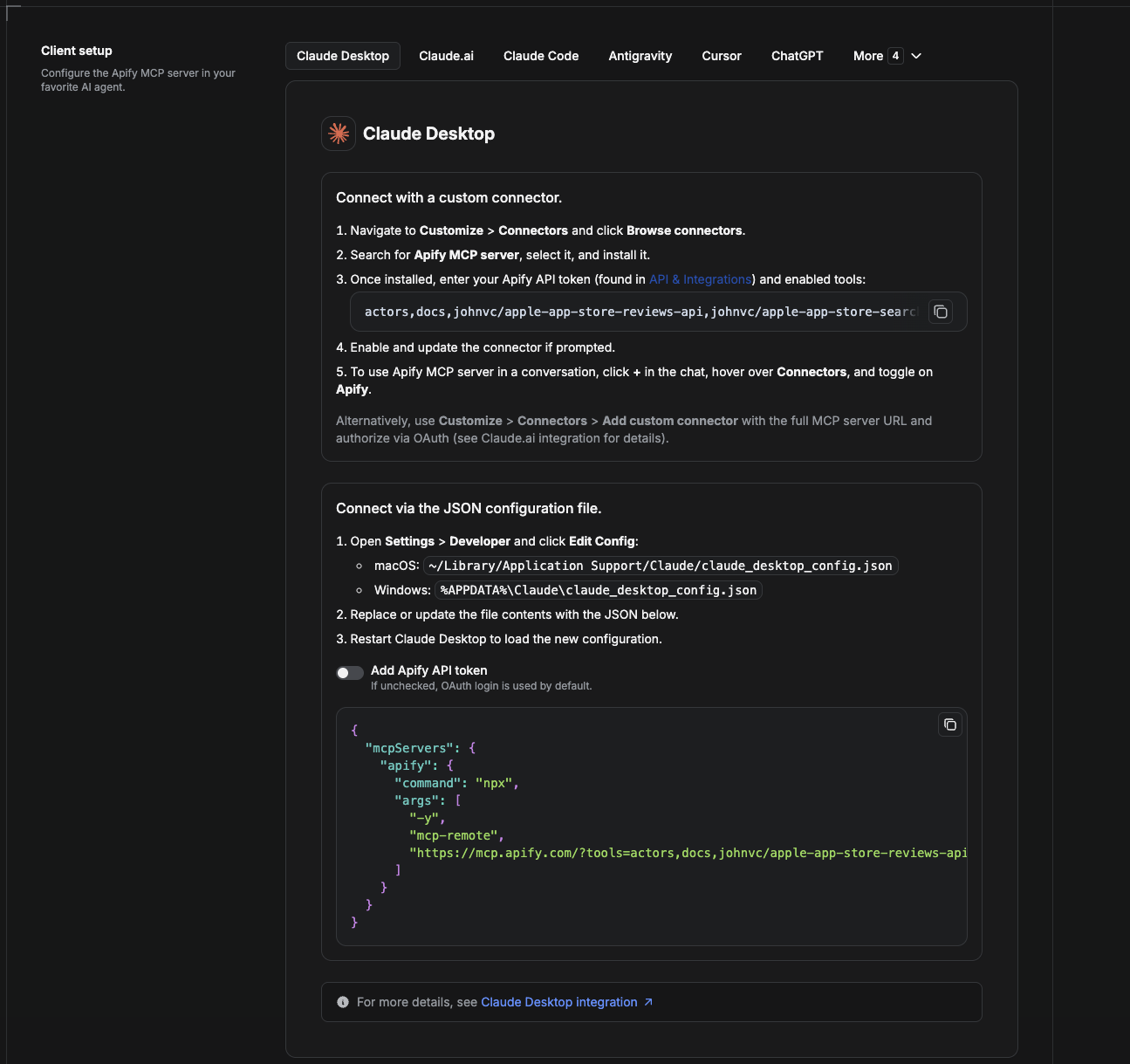
Cowork is the desktop app's automation mode. To give it the Yandex API as a tool, add the Apify MCP server as a connector.
- Open the Claude desktop app and go to Settings → Connectors (or Settings → Developer → Edit Config to edit
claude_desktop_config.jsondirectly).- macOS:
~/Library/Application Support/Claude/claude_desktop_config.json - Windows:
%APPDATA%\Claude\claude_desktop_config.json
- macOS:
- Add the Apify MCP server, preloaded with only this Actor:
{
  "mcpServers": {
    "apify": {
      "command": "npx",
      "args": [
        "-y",
        "mcp-remote",
        "https://mcp.apify.com/?tools=actors,docs,johnvc/Scrape-Yandex"
      ]
    }
  }
}- Restart the app. When Cowork first calls the tool, complete the OAuth prompt in your browser, or add your Apify API token in the connector settings to skip OAuth.
- In a Cowork chat, confirm the tool is available and ask it to run the Yandex API.
Download the desktop app and start a free trial: https://claude.ai/referral/uIlpa7nPLg More help: https://docs.apify.com/platform/integrations/claude-desktop
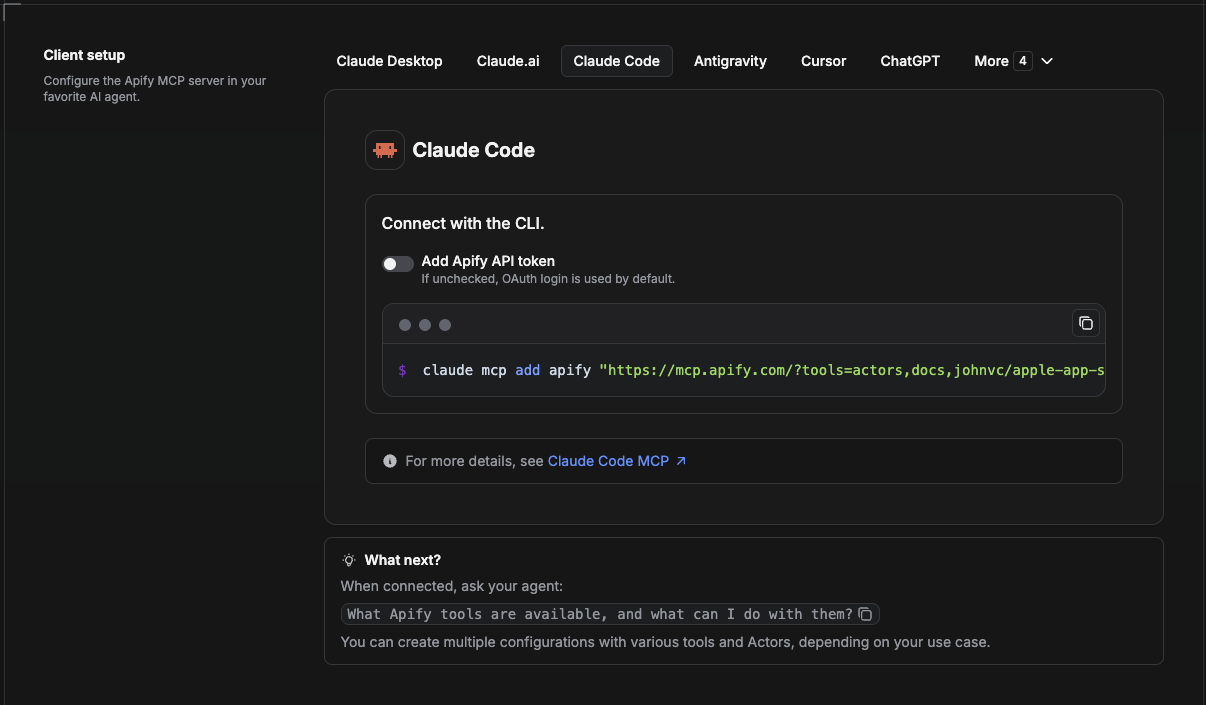
Claude Code is the command-line tool. Add the Actor's MCP server with one command:
claude mcp add --transport http apify \
  "https://mcp.apify.com/?tools=actors,docs,johnvc/Scrape-Yandex"
To use a token instead of browser OAuth:
claude mcp add --transport http apify \
  "https://mcp.apify.com/?tools=actors,docs,johnvc/Scrape-Yandex" \
  --header "Authorization: Bearer YOUR_APIFY_TOKEN"
Then verify with claude mcp list, or run /mcp inside a session. Ask Claude Code to call the Yandex API.
Try Claude Code free: https://claude.ai/referral/uIlpa7nPLg Claude Code MCP docs: https://code.claude.com/docs/en/mcp
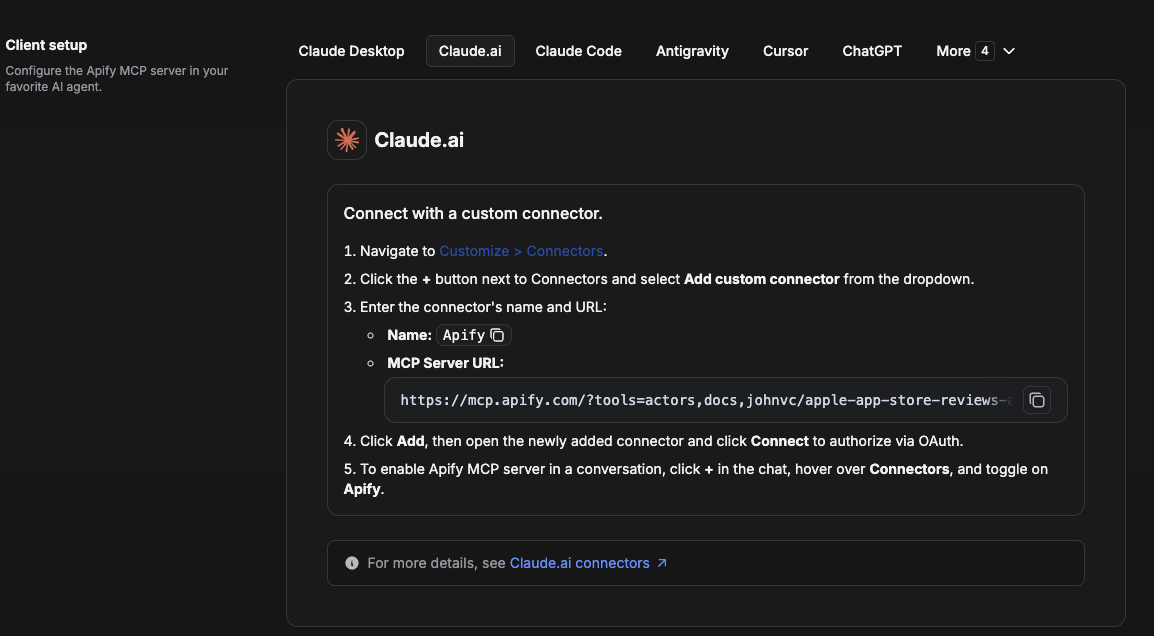
On claude.ai you add Apify as a connector, then enable just this Actor's tool.
- Go to Settings → Connectors → Browse connectors and search for Apify MCP server. Install it (enable or update if prompted).
- When connecting, authenticate with your Apify API token, and enable the tool
johnvc/Scrape-Yandex. - In any chat, open + → Connectors and turn on Apify.
- Alternatively, choose Add custom connector and paste the full MCP URL
https://mcp.apify.com/?tools=actors,docs,johnvc/Scrape-Yandex, using OAuth when prompted. - Ask Claude to run the Yandex API.
Open Claude on the web: https://claude.ai
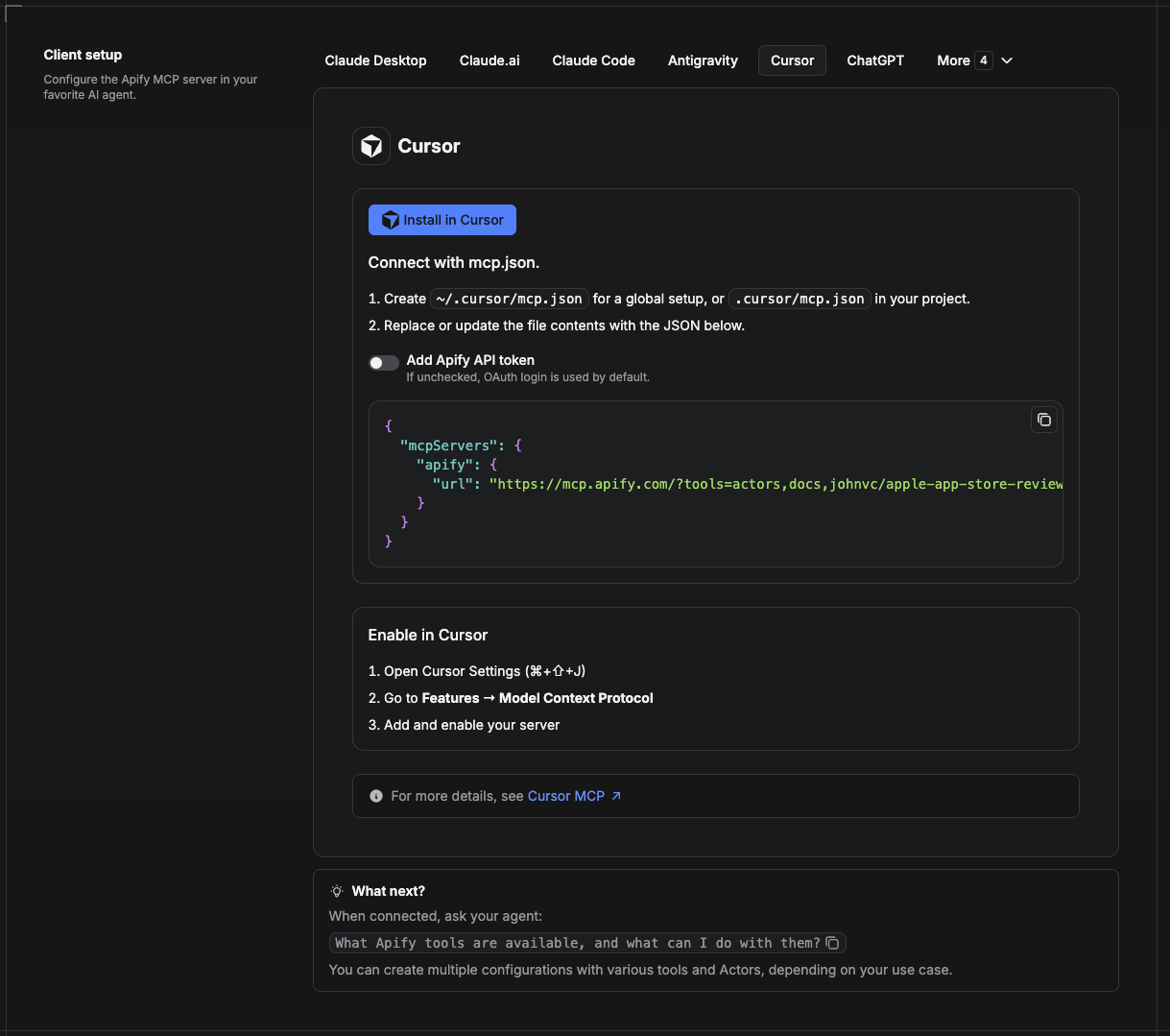
Cursor reads MCP servers from a project file at .cursor/mcp.json.
- In your project, create
.cursor/mcp.json:
{
  "mcpServers": {
    "apify": {
      "url": "https://mcp.apify.com/?tools=actors,docs,johnvc/Scrape-Yandex"
    }
  }
}- If you prefer token auth over browser OAuth, add a header:
{
  "mcpServers": {
    "apify": {
      "url": "https://mcp.apify.com/?tools=actors,docs,johnvc/Scrape-Yandex",
      "headers": { "Authorization": "Bearer YOUR_APIFY_TOKEN" }
    }
  }
}- Open Cursor → Settings → MCP and confirm the apify server is connected (green dot).
- In Composer or Chat, ask Cursor to call the Yandex API.
New to Cursor? Get it here: https://cursor.com/referral?code=XQP4VBLI3NNX
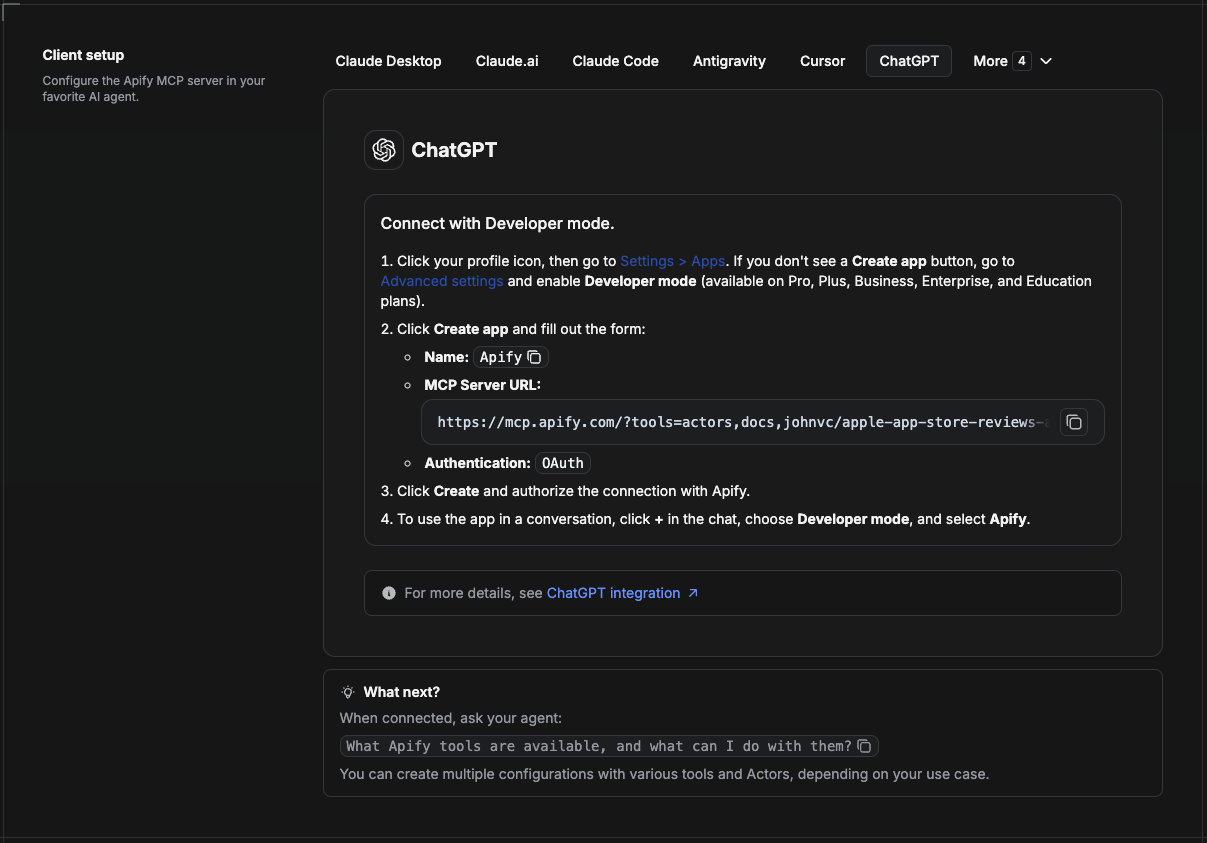
ChatGPT connects to the Apify MCP server through Developer mode (available on ChatGPT Pro, Plus, Business, Enterprise, and Education plans).
- Click your profile icon, then go to Settings > Apps. If you do not see a Create app button, open Advanced settings and enable Developer mode.
- Click Create app and fill out the form:
- Name: Apify
- MCP Server URL:
https://mcp.apify.com/?tools=actors,docs,johnvc/Scrape-Yandex - Authentication: OAuth
- Click Create and authorize the connection with Apify.
- To use the app in a conversation, click + in the chat, choose Developer mode, and select Apify.
More help: https://docs.apify.com/platform/integrations/mcp
Use the Yandex API to power your search and SEO workflows with reliable, structured results.
Last Updated: 2026.06.09