The purpose of this project is to allow access to your servers hosted in your home/office when you dont have a public IP.
Requirements:
- Domain name
- Google cloud linux instance to install VPN server, HAPROXY and NGINX (I use cheapest one around 5 dlls a month), this will be called node-1
- Local home/office linux server or container to handle requests to HAPROXY and NGINX I use one with dual NIC one for VPN and one for local traffic.
- Separate router/server/container with DNSMASQ installed to provide DHCP assgnment and domain resolution (This will allow to resolve internal requests from node-2)
- A configured VPN, I use wireguard as it is the easiest to install server in node-1 client in node-2.
With this project node-1 and node-2 you can achieve the connection and be able to access all your resources from outside.
Below is the general infraestructure diagram.
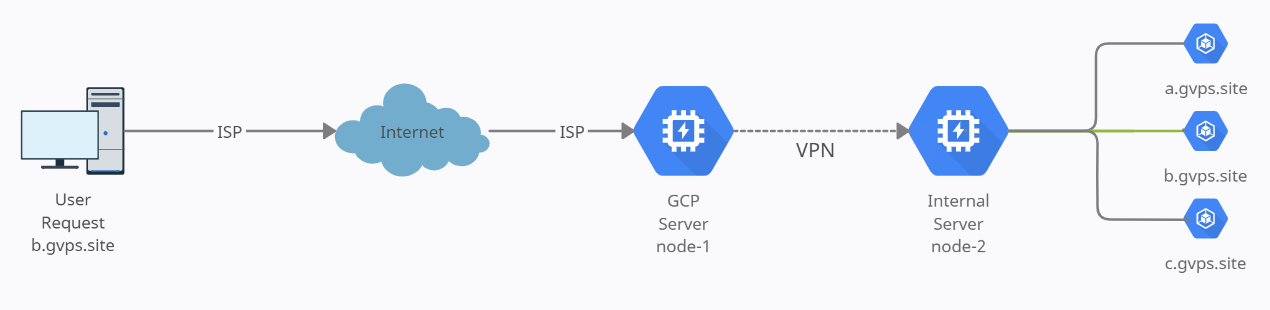
A user request site https://b.gvps.site
- DNS find the record and redirect to google cloud servers
- Compute instance receives the request
- Request is redirected to node-2 server
- Node-2 verifies the request is valid and redirect to internal LAN server
Process explanation - internal
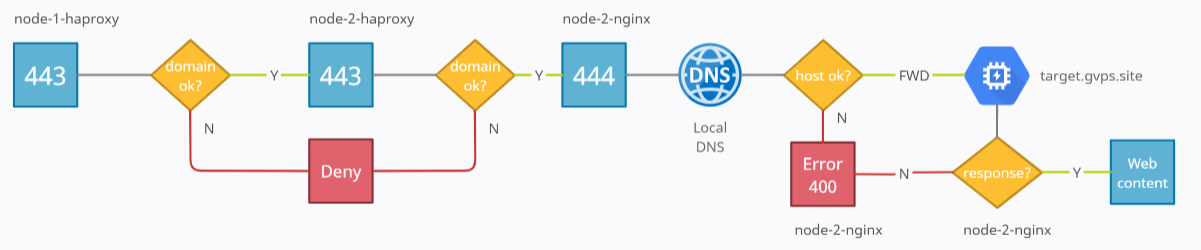
- Request arrives to node-1 port 443
- HAProxy receives request, it checks if it is a valid domain according to the config
- If YES forwards the traffic to node-2-haproxy else denies access.
- Request arrives to node-2 port 443
- HAProxy receives request, it checks if it is a valid domain according to the config
- If YES forwards the traffic to node-2-nginx port 444 else denies access.
- NGINX receives request at port 444 (Alternate to not use already bind port 443 from HAPROXY (Same server))
- NGINX sends the hostname and domain to DNS to receive internal IP (DNSMASQ has a DHCP with all the internal IP's used)
- If DNS finds a match it will resolve the host to the internal IP
- NGINX forwards the request to the internal host
- If connection is succesful it will dispplay the web content, else it will return a 400 error handled by node-2-nginx