



A powerful, client-side tool that converts JPG/PNG images into multiple, responsive-ready WebP formats. Built with a focus on workflow efficiency and SEO best practices, this tool allows you to generate different sizes for srcset implementation from a single source image, all within your browser.
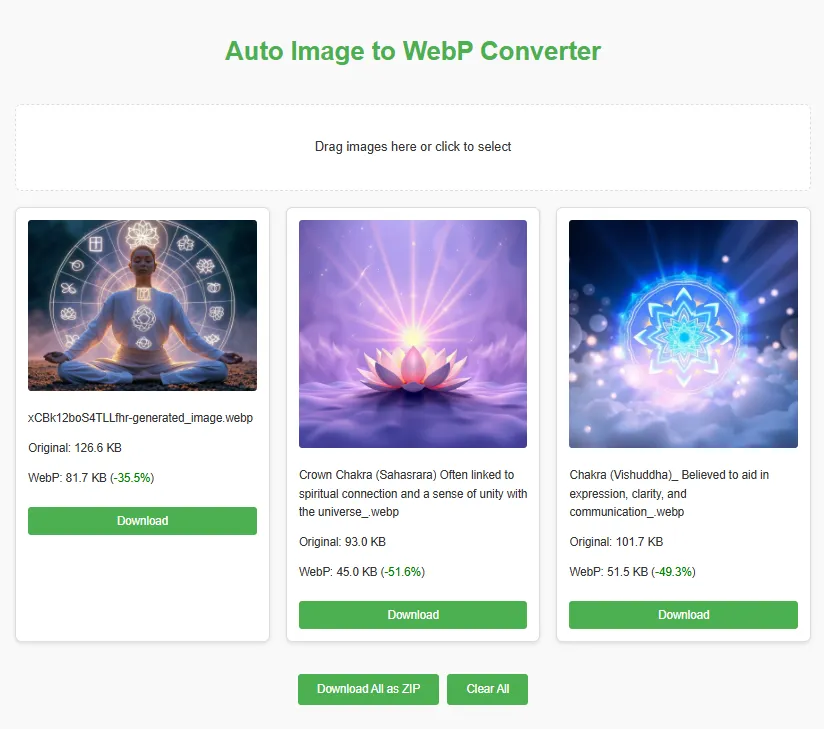
Try it out here: https://jasonbra1n.github.io/image-to-webp-converter/
- Responsive Size Generation: Automatically generates multiple widths (e.g., 480px, 800px, 1200px) for perfect
srcsetimplementation. - Adjustable Quality: Fine-tune file size vs. visual fidelity with a real-time quality slider.
- Force Aspect Ratio: Crop or fit images to specific aspect ratios (Square, 16:9, etc.) with Cover, Contain, and Fill modes.
- Custom Width Input: Specify your own comma-separated list of widths for conversion.
- SEO & Performance Focused: Includes educational resources on improving Core Web Vitals with responsive images.
- Multi-Image Support: Process one or many images via drag-and-drop or file selection.
- Offline Capable: Works entirely offline with local dependencies, perfect for secure or low-connectivity environments.
- Clean Interface: Settings are tucked away in a modal overlay to keep the workspace clutter-free.
- Client-Side Processing: All conversions happen in the browser, ensuring privacy and eliminating server dependency.
- Grouped Output: Generated images are neatly grouped by their original source file.
- Export Options: Export file lists in JSON, XML, Markdown, or HTML formats, and get a
manifest.jsonautomatically in your ZIP download. - Flexible Downloads: Download individual files or a complete ZIP archive.
To run this converter locally:
-
Clone the repository:
git clone https://github.com/jasonbra1n/image-to-webp-converter.git
-
Open `index.html` in a web browser. No build steps or server required—just pure HTML, CSS, and JavaScript!
- JSZip (v3.10.1): For ZIP file creation.
Included in the lib/ directory for offline support.
Embed this converter in your webpage with an iframe:
<iframe src="https://jasonbra1n.github.io/image-to-webp-converter/" width="500" height="600" frameborder="0" style="border: none;"></iframe>- Size: Recommended dimensions are 500px wide by 600px tall, based on the converter’s content.
- Responsiveness: The design adjusts automatically to narrower containers.
- Customization: Fork the repo to tweak styles, quality settings, or add features.
- Configure Settings: Click the Gear Icon to open the settings overlay. Select your target output widths, aspect ratios, and adjust the quality slider.
- Upload Images: Drag JPG/PNG images into the drop zone or click to select files.
- Review Results: Watch as multiple WebP versions are generated for each source image.
- Download: Download individual files or click "Download All as ZIP" to get a complete archive.
- Clear: Use the "Clear All" button to start fresh.
Contributions are welcome! Check out the CONTRIBUTING.md file for guidelines and the ROADMAP.md for planned features.
This project is licensed under the MIT License—see the LICENSE file for details.