
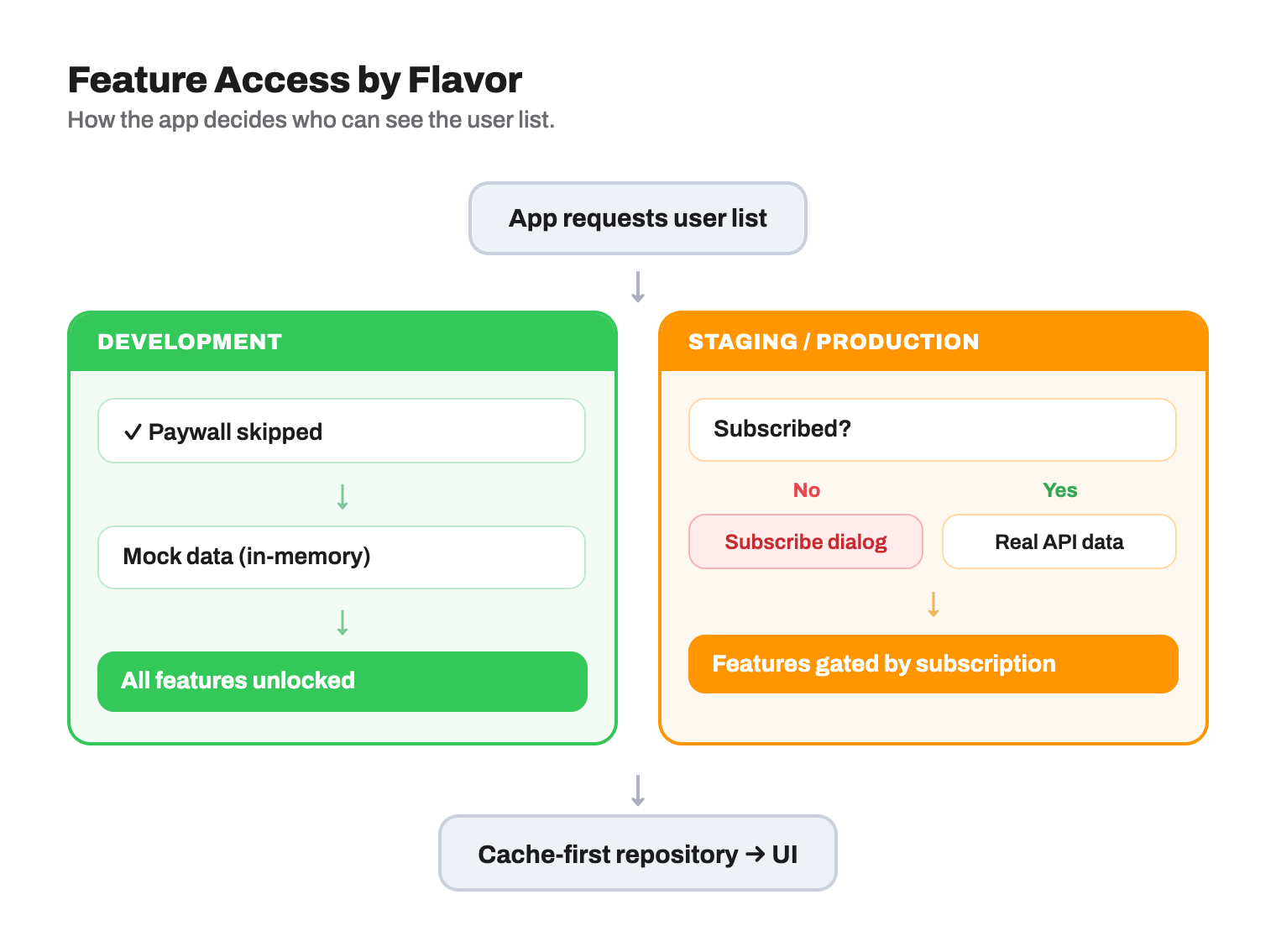
UserRepository is resolved by DI (get_it + injectable) into a different chain per flavor — the cubit and use case never know which chain they got. Development skips the subscription check entirely; staging/production gate every call behind it. Both chains funnel through the same cache-first repository, and the cache is filled from either mock data (development) or the real API (staging/production).
Clean Architecture, conceptualized by Robert C. Martin, offers a structured approach to organizing applications by breaking them down into modules, each serving a distinct purpose. Its core principle revolves around dividing an application into three primary layers:
- Presentation Layer: This layer's primary role is to present data to users and manage their input. It should remain devoid of any business logic and maintain simplicity as a fundamental principle.
- Domain Layer: The hub of business logic within the application. It defines use cases and embodies the essence of the application's functionality. Importantly, it operates independently of other layers, facilitating isolated testing.
- Data Layer: Responsible for data operations, this layer handles data retrieval and storage. It remains detached from the domain layer, focusing solely on data access and persistence concerns.
Clean Architecture's central tenet is preserving these well-defined layers to enhance application maintainability, scalability, and testability, while also enabling smoother code evolution.

The concentric circles within the image represent the different areas within the software. The closer to the center, the higher level the software becomes. The sole principle behind Clean Architecture is the Dependency Rule: code dependencies can only point inwards.
- Modularity and Maintainability: Encourages separation of concerns, making the codebase more modular and easier to maintain.
- Testability: Separation of the domain layer allows for comprehensive unit testing of business logic.
- Flexibility and Scalability: Easier to adapt and scale. Components within a layer can be replaced or upgraded without affecting the entire system.
- Code Reusability: Promotes reuse of components, especially in the domain layer.
- Reduced Dependency Hell: Discourages high-level layers from having direct dependencies on lower-level layers.
While Clean Architecture is a broad approach, this project follows a customized structure optimized for Flutter:

The heart of the application, encapsulating business rules and use cases.
Entity Fundamental concepts within the domain.
@freezed
abstract class UserEntity with _$UserEntity {
  const factory UserEntity({
    required String name,
    required String email,
    required String address,
    required String city,
    required double latitude,
    required double longitude,
  }) = _UserEntity;
}
UseCase Application-specific operations.
@singleton
class GetUserListUseCase with BaseUseCase<List<UserEntity>> {
  GetUserListUseCase(this._userRepository);

  final UserRepository _userRepository;

  @override
  Future<List<UserEntity>> execute() => _userRepository.getUserList();
}
Repository Interface Abstractions that define the contract for data access.
abstract class UserRepository {
  Future<List<UserEntity>> getUserList();
  Future<UserEntity> getUserById({required String userId});
}Manages data-related operations, including storage and communication with external sources.
Data Source Origins of data (e.g., APIs via Retrofit).
@RestApi()
@singleton
abstract class UserRemoteDataSource {
  @factoryMethod
  factory UserRemoteDataSource(
    @Named(DioClientType.unauthenticated) Dio dio,
  ) = _UserRemoteDataSource;

  @GET('/users')
  Future<List<UserResponseModel>> getUserList();
}
Repository Implementation Implements the domain repository interface and handles data mapping.
@Singleton(as: UserRepository)
class UserRepositoryImpl extends UserRepository {
  UserRepositoryImpl(this._remoteDataSource);

  final UserRemoteDataSource _remoteDataSource;

  @override
  Future<List<UserEntity>> getUserList() async {
    final userList = await _remoteDataSource.getUserList();
    return userList.toUserEntities();
  }
}
Response Objects & Mapper Data structures for API responses and extensions to map them to domain entities.
extension UserResponseMapper on List<UserResponseModel> {
  List<UserEntity> toUserEntities() {
    return map(
      (userResponse) => UserEntity(
        name: userResponse.name ?? '',
        email: userResponse.email ?? '',
        address: userResponse.address?.street ?? '',
        city: userResponse.address?.city ?? '',
        latitude: double.parse(userResponse.address?.geo?.lat ?? '0'),
        longitude: double.parse(userResponse.address?.geo?.lng ?? '0'),
      ),
    ).toList();
  }
}Responsible for UI rendering and handling user interactions using the BLoC/Cubit pattern.
Communication (Cubit)
@injectable
class UserCubit extends Cubit<UserState> {
  UserCubit(this._getUserListUseCase) : super(const UserState());

  final GetUserListUseCase _getUserListUseCase;

  Future<void> getUserList() async {
    try {
      emit(state.copyWith(status: const BaseStatus<UserState>.loading()));
      final userList = await _getUserListUseCase.execute();
      emit(state.copyWith(userList: userList, status: const BaseStatus.success()));
    } on DioException catch (e) {
      emit(state.copyWith(status: BaseStatus.failure(e.error as ResponseError)));
    }
  }
}This project contains 3 flavors:
- development
- staging
- production
To run the desired flavor:
# Development
$ flutter run --flavor development --target lib/main_development.dart

# Staging
$ flutter run --flavor staging --target lib/main_staging.dart

# Production
$ flutter run --flavor production --target lib/main_production.dartTo get started with the project, run the following commands:
flutter pub get
dart run build_runner build --delete-conflicting-outputs
Then, run the setup script to configure the environment:
# Make the script executable
chmod +x ./setup.sh

# Run the setup
./setup.shUnit tests live under test/, mirroring the lib/ layer structure so each
layer is verified in isolation by mocking the layer beneath it — exactly what
the Clean Architecture boundaries are designed to enable.
test/
├── core/error/            # ResponseError mapping & hardening
├── data/repository_impl/  # repositories (mocked DataSourceFactory + data sources)
├── domain/use_cases/      # use cases (mocked repositories)
└── presentation/          # cubits (mocked use cases)
The suite uses flutter_test +
mocktail. No real network, storage, or DI
container is touched — every collaborator is mocked.
# All tests
flutter test

# A single file
flutter test test/presentation/user_cubit_test.dart

# By name
flutter test --plain-name "maps response models to domain entities"

# With coverage (writes coverage/lcov.info)
flutter test --coverage
To turn coverage into a browsable HTML report (requires lcov):
genhtml coverage/lcov.info -o coverage/html && open coverage/html/index.html1. Mock the dependency below the unit under test:
class MockUserRepository extends Mock implements UserRepository {}2. Use case / repository — stub and verify delegation & mapping:
test('getUserList maps response models to domain entities', () async {
  when(() => dataSource.getUserList()).thenAnswer((_) async => response);

  final result = await repository.getUserList();

  expect(result.first.name, 'John');
  verify(() => factory.createUserDataSource()).called(1);
});
3. Cubit — assert the emitted state sequence (stream expectations):
test('emits loading then success', () async {
  when(() => useCase.execute()).thenAnswer((_) async => users);
  final cubit = UserCubit(useCase, logger);

  expectLater(
    cubit.stream,
    emitsInOrder([
      predicate<UserState>((s) => s.status.isLoading),
      predicate<UserState>((s) => s.status.isSuccess),
    ]),
  );

  await cubit.getUserList();
  await cubit.close();
});
When using argument matchers like
any()with a custom type, register a fallback once insetUpAll:registerFallbackValue(const LoginEntity(email: '', pin: ''));
Tip: run the mock flavor (
development) to exercise flows end-to-end without a backend — theDataSourceFactoryswaps in mock data sources.
All branches must follow the format:
feat/<feature-name>
fix/<bug-name>
refactor/<refactor-name>
chore/<task-name>
All commits should follow the Conventional Commit format:
type: Short description (at least 3 characters)
Allowed types: feat, fix, refactor, chore, docs, style, test, perf, ci, build,
wip,
revert
Example:
feat: add localization support
fix: correct padding on lunch card
To add new text for localization, run the provided script:
./l10n_generator.sh- Specify the type as
textwhen prompted. - Access localized text in your code using:
context.l10n.text./create_feature.sh feature_nameThis command automatically generates all required files for a new feature, following Clean
Architecture principles, including the domain, data, and presentation layers.
It also wires the new data source into the flavor-based Abstract Factory, so the
development flavor gets the mock and staging/production get the Retrofit client,
adds the route to app_router.dart, then runs build_runner and flutter analyze.
Not every feature needs all three layers. Pass options to scaffold a subset:
| Command | What you get |
|---|---|
./create_feature.sh order |
Full stack: entity, repository, use case, response model, remapper, mock + remote data sources, factory wiring, cubit, screen |
./create_feature.sh order --no-data-source |
Domain + data + UI, but no data source and no factory changes — the repository impl returns in-memory sample data (marked with a TODO) so DI still resolves |
./create_feature.sh profile --ui-only |
Presentation only: screen, portrait/landscape views, cubit + state, route |
./create_feature.sh about --ui-only --no-cubit |
Static screen only, like SettingsScreen |
./create_feature.sh order --layers=domain,data |
No UI |
./create_feature.sh order --skip-build |
Skip pub get / build_runner / analyze (useful when scaffolding several features in a row) |
Run ./create_feature.sh --help for the full list.
Every mode ships working sample data so the screen is alive as soon as it is generated:
loading spinner → ~2s delay → list of items. The delay lives in a single _delay
constant per generated file (ManMockDataSource, the in-memory ManRepositoryImpl, or
the --ui-only cubit) — change or delete it when you plug in real work.
Picking
--layers=domain,presentationleaves the repository without an implementation, soinjector<GetOrderListUseCase>()throws at runtime until you add one. The script warns when you do this; use--no-data-sourceif you want a feature that runs immediately without an API.