The elegance of MS Paint meets the user-friendliness of Vim wrapped in the performance of JavaScript.
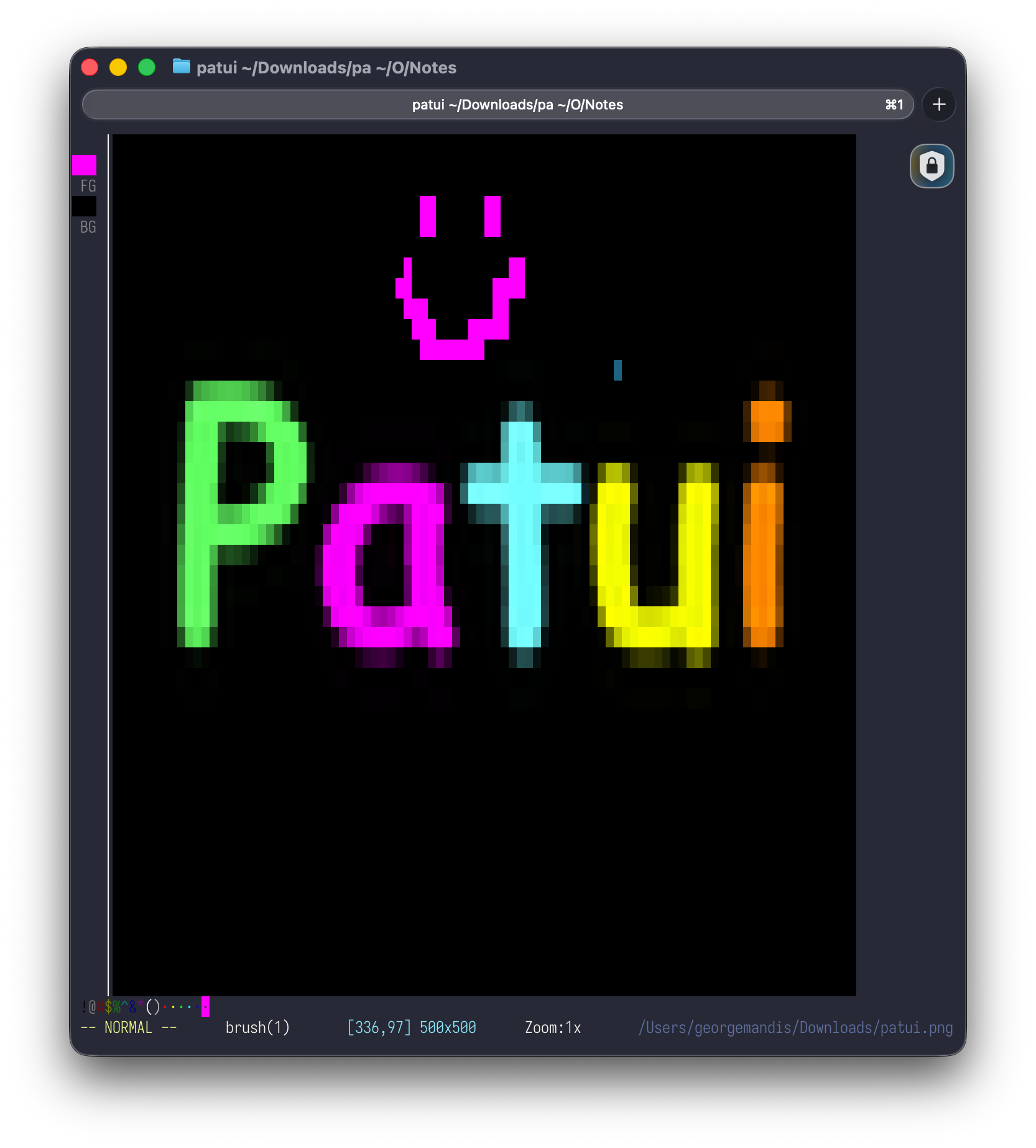
A terminal-based image editor with Vim-style modal controls. Load images (PNG, JPEG, or URLs) and render them as colored block characters in your terminal. Paint, erase, fill, type text, apply retro filters, and export your work as PNG, ANSI art, or plain text.
PaTUI: sounds like "patooey" — because that's what your images will look like.
brew install georgemandis/tap/patuiscoop bucket add georgemandis https://github.com/georgemandis/scoop-bucket
scoop install patuibun install# Load a local image
patui mona.png
# Load from URL
patui https://example.com/image.png
# Start with blank canvas (sized to your terminal)
patui
# CLI options
patui --help # Show usage
patui --version # Show version
patui --new 200x100 # Start with 200x100 blank canvasIf running from source, replace patui with bun src/index.tsx.
| Mode | Enter | Exit | Behavior |
|---|---|---|---|
| Normal | Esc | — | Navigate, edit, zoom, undo/redo |
| Paint | i |
Esc | Movement applies the active tool continuously |
| Text | t |
Esc (commits) | Type characters rendered onto the image |
| Command | : |
Esc or Enter | Text commands for file I/O, filters, settings |
All navigation commands accept a numeric prefix (e.g., 5j moves down 5 rows).
| Key | Action |
|---|---|
| h/j/k/l or arrows | Move cursor |
gg |
Go to top-left |
G |
Go to bottom |
0 or ^ |
Start of row |
$ |
End of row |
W |
Jump to next color boundary |
B |
Jump to previous color boundary |
| Ctrl+D | Half page down |
| Ctrl+U | Half page up |
+ / = |
Zoom in |
- |
Zoom out |
| Key | Action |
|---|---|
| b | Brush |
| e | Eraser |
| f | Fill (bucket) |
| c | Eyedropper (color picker) |
| t | Enter Text mode |
| Space / Enter | Apply tool at cursor |
| Key | Action |
|---|---|
x |
Delete pixel at cursor (e.g., 5x deletes 5) |
dd |
Delete (clear) current row |
5dd |
Delete 5 rows |
dG |
Delete from cursor row to bottom |
dgg |
Delete from top to cursor row |
D |
Delete from cursor to end of row |
yy |
Yank (copy) current row |
5yy |
Yank 5 rows |
p |
Paste yanked rows at cursor |
X |
Swap foreground/background colors |
u |
Undo |
| Ctrl+R | Redo |
Press t to enter text mode. Characters you type are rasterized onto the source image at the cursor position using the current foreground color.
- Font size scales with brush size (
:set brush 5for larger text) - Backspace removes the last character
- Enter commits the current line and moves the cursor down
- Escape commits and returns to Normal mode
| Key | Action |
|---|---|
! @ # $ % ^ & * ( ) |
Select palette color 1-10 |
:color N |
Select any palette color 1-16 |
The bottom bar shows all 16 colors. Active color is highlighted. Eyedropper picks appear in the recent colors section.
Commands also accept CSS color names: :color red, :set fg navy, :set bg tomato. All 148 CSS named colors are supported.
| Command | Action |
|---|---|
:o <file-or-url> |
Open image file or URL |
:new [W H] |
New blank canvas (defaults to terminal size) |
:w <file> |
Export (.png, .jpg, .ans, .txt) |
:wc |
Copy ANSI art to clipboard |
:wq [file] |
Export PNG and quit |
:q or :q! |
Quit |
:set zoom N |
Set zoom level |
:set brush N |
Set brush size (NxN) |
:set brush W,H |
Set brush size (WxH, e.g. 3,1) |
:set fg <name-or-N> |
Set foreground color (CSS name or 1-16) |
:set bg <name-or-N> |
Set background color (CSS name or 1-16) |
:color <name-or-N> |
Select foreground color (CSS name or 1-16) |
:%s/blue/red/g |
Replace all blue pixels with red (exact) |
:%s/~blue/red/g |
Replace blue-family pixels with red (fuzzy) |
:goto X Y or :g X Y |
Jump to source pixel (supports 50% for percentages) |
:gray |
Toggle grayscale filter |
:palette <name> |
Limit colors (cga, gameboy, websafe) |
:dither |
Toggle Floyd-Steinberg dithering |
:reset |
Clear all filters |
:help |
Full-screen help (scrollable) |
Filters apply live on the canvas and are included in exports. All filter changes are undoable.
- Grayscale (
:gray) — luminance-based desaturation - Palette limiting (
:palette cga|gameboy|websafe) — quantize to retro color palettes - Dithering (
:dither) — Floyd-Steinberg error diffusion (use with a palette) - Reset (
:reset) — remove all filters
| Extension | Format |
|---|---|
.png / .jpg |
Image file (block pixels, terminal aspect ratio) |
.ans |
ANSI art with true-color escape codes |
.txt |
Plain block characters, no color |
:wc |
ANSI art copied to clipboard |
┌─────────────────────────────────────────────┐
│ PaTUI                                        │
├────┬────────────────────────────────────────┤
│ [B]│                                        │
│ [E]│                                        │
│ [F]│         Canvas Area                    │
│ [C]│                                        │
│    │                                        │
│ FG │                                        │
│ BG │                                        │
├────┴────────────────────────────────────────┤
│ !@#$%^&*()······  [recent colors]           │
├─────────────────────────────────────────────┤
│ -- NORMAL --  brush(1)  [x,y] WxH  Zoom:1x │
└─────────────────────────────────────────────┘
Piping image data via stdin is not currently supported. Ink (the React-for-terminals framework) requires a TTY on stdin for raw mode keyboard input, and there's no reliable cross-platform way to reclaim the terminal after consuming piped data — Bun's tty.ReadStream on /dev/tty doesn't work for reading, and all re-exec/PTY-allocation approaches we've tried have issues. For now, save to a file first:
# Instead of: curl https://example.com/image.png | patui
# Do this:
curl -o /tmp/image.png https://example.com/image.png && patui /tmp/image.png

# Or just pass the URL directly:
patui https://example.com/image.png- Visual/selection mode (rectangle select, copy/paste, move regions)
- Line and shape tools (rectangle, circle, line)
- Layers
- Custom color picker (RGB/HSL input)
- Mouse support
- Resize canvas
- GIF export
- Bun — runtime and package manager
- TypeScript
- Ink — React for terminal UIs
- sharp — image processing, crop/resize, text rasterization
- zustand — state management
MIT