




by FASHN AI
Virtual try-on model that generates photorealistic images directly in pixel space without requiring segmentation masks.
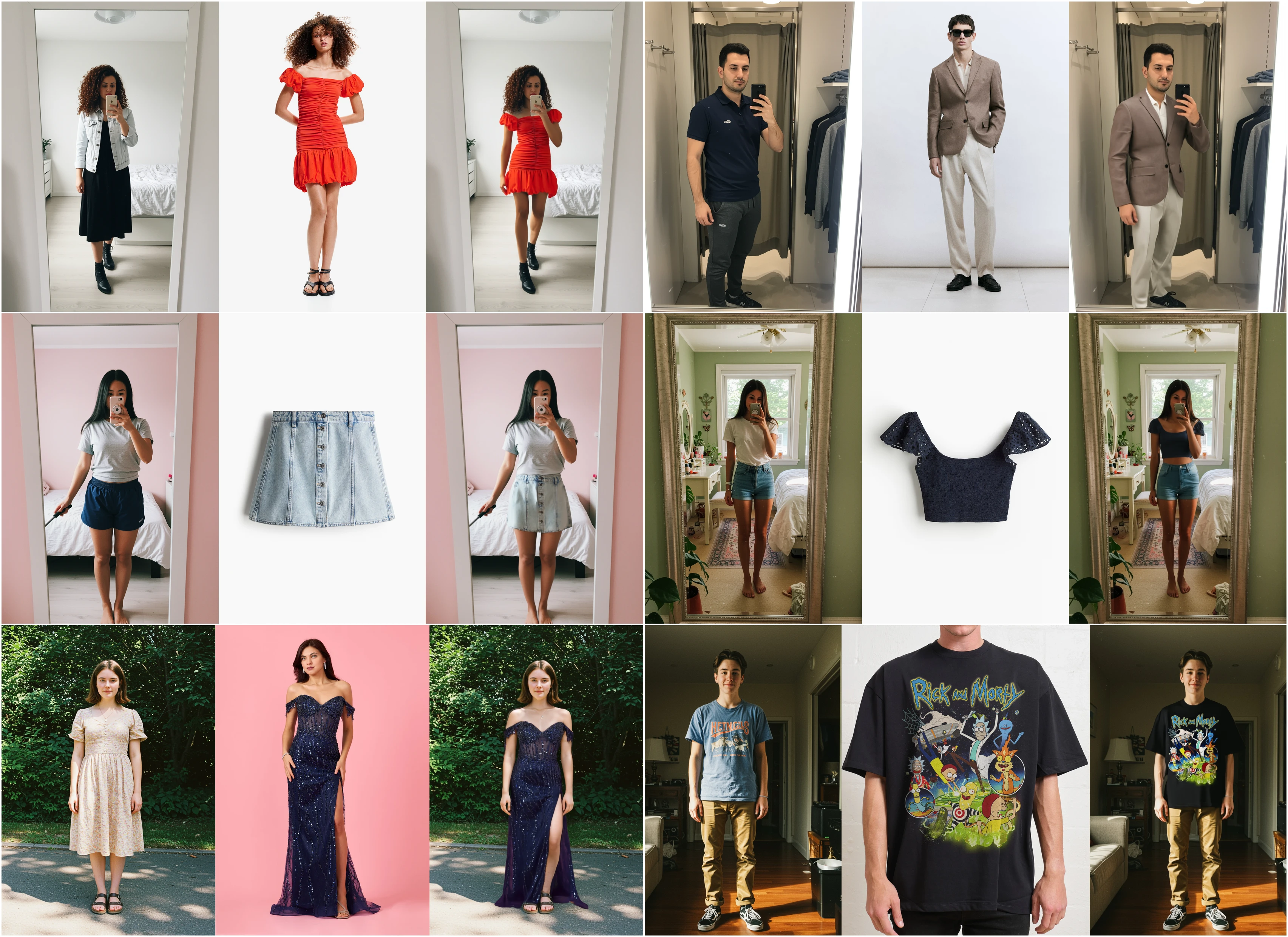
This repo contains minimal inference code to run virtual try-on with the FASHN VTON v1.5 model weights. Given a person image and a garment image, the model generates a photorealistic image of the person wearing the garment. Supports both model photos and flat-lay product shots as garment inputs.
We recommend using a virtual environment:
git clone https://github.com/fashn-AI/fashn-vton-1.5.git
cd fashn-vton-1.5
python -m venv .venv && source .venv/bin/activate
pip install -e .
Note: Installation includes onnxruntime-gpu for GPU-accelerated pose detection. Ensure CUDA is properly configured on your system. For CPU-only environments, replace with the CPU version:
pip uninstall onnxruntime-gpu && pip install onnxruntimeDownload the required model weights (~2 GB total):
python scripts/download_weights.py --weights-dir ./weightsThis downloads:
model.safetensors— TryOnModel weights from HuggingFacedwpose/— DWPose ONNX models for pose detection
Note: The human parser weights (~244 MB) are automatically downloaded on first use to the HuggingFace cache folder. Set HF_HOME to customize the location.
from fashn_vton import TryOnPipeline
from PIL import Image

# Initialize pipeline (automatically uses GPU if available)
pipeline = TryOnPipeline(weights_dir="./weights")

# Load images
person = Image.open("examples/data/model.webp").convert("RGB")
garment = Image.open("examples/data/garment.webp").convert("RGB")

# Run inference
result = pipeline(
    person_image=person,
    garment_image=garment,
    category="tops",  # "tops" | "bottoms" | "one-pieces"
)

# Save output
result.images[0].save("output.png")python examples/basic_inference.py \
--weights-dir ./weights \
--person-image examples/data/model.webp \
--garment-image examples/data/garment.webp \
--category topsNote: The pipeline automatically uses GPU if available. The try-on model weights are stored in bfloat16 and will run in bf16 precision on Ampere+ GPUs (RTX 30xx/40xx, A100, H100). On older hardware or CPU, weights are converted to float32.
See examples/basic_inference.py for additional options.
| Category | Description |
|---|---|
tops |
Upper body: t-shirts, blouses, jackets |
bottoms |
Lower body: pants, skirts, shorts |
one-pieces |
Full body: dresses, jumpsuits |
FASHN provides a suite of fashion AI APIs including virtual try-on, model generation, image-to-video, and more. See the docs to get started.
If you use FASHN VTON v1.5 in your research, please cite:
@article{bochman2026fashnvton,
  title={FASHN VTON v1.5: Efficient Maskless Virtual Try-On in Pixel Space},
  author={Bochman, Dan and Bochman, Aya},
  journal={arXiv preprint},
  year={2026},
  note={Paper coming soon}
}Apache-2.0. See LICENSE for details.
Third-party components:
- DWPose (Apache-2.0)
- YOLOX (Apache-2.0)
- fashn-human-parser (License)