
Noise-canceling context and long-term memory for your AI agent. Stop paying Claude to read 10,000 lines of terminal noise like a headphone for AI agent
🇺🇸 English | 🇯🇵 日本語 | 🇨🇳 简体中文 | 🇸🇦 العربية | 🇮🇩 Bahasa Indonesia | 🇻🇳 Tiếng Việt | 🇰🇷 한국어






Up to 85% less tokens · Cross-Session Memory · ~40% faster · Zero hallucination triggers
Every AI coding assistant has two massive problems.
1. They read everything.
Build logs.
Docker logs.
CI logs.
Progress bars.
ANSI colors.
Thousands of tokens... to find one line. Claude isn't expensive. Your terminal is.
2. They forget everything.
Every time you restart Cursor, or switch from Claude Code to Windsurf, your agent gets amnesia. You have to re-explain the project goal. You have to remind them of the same framework gotchas over and over again.
OMNI fixes both.
Problem 1: Your terminal drowns out the signal
Without OMNI: 10,000 lines of "Downloading...", "Extracting...", and warnings. AI reads everything.
With OMNI: Package conflict. Node 20 required.
Without OMNI: 4,500 lines of unchanged execution plans.
With OMNI: The 3 resources that failed IAM permissions.
Without OMNI: Endless cache hits, layer hashes, and download progress bars.
With OMNI: Missing dependency libpq-dev at layer 12.
Without OMNI: 500 passing tests and verbose setup logs.
With OMNI: Only the 2 failed assertions and their stack traces.
Without OMNI: 300 lines of compiling dependencies and warnings.
With OMNI: The exact line where the borrow checker failed.
Without OMNI: Thousands of successful health checks and normal traffic logs.
With OMNI: The crash loop and panic stack trace.
Without OMNI: Formatting tweaks, generated lockfiles, and whitespace changes.
With OMNI: Only the core business logic changes.
Without OMNI: Pages of standard output from passing packages.
With OMNI: The single nil pointer dereference.
Without OMNI: Megabytes of "Downloading from maven central".
With OMNI: Compilation error in UserService.java.
Without OMNI: Resolution logs and wheel building outputs.
With OMNI: Dependency conflict with numpy.
Without OMNI: 2,000 chunk asset lists and build times.
With OMNI: Missing module resolution in App.tsx.
Without OMNI: Entire rendered YAML output of all templates.
With OMNI: Pod scheduling failure due to missing secret.
Without OMNI: "ok" and "skipped" statuses for 50 servers.
With OMNI: The single "failed" task on web-03.
Without OMNI: Complete workflow logs including environment setup.
With OMNI: Only the specific step that exited with code 1.
Problem 2: Your agent forgets everything overnight
Without OMNI: "Please re-explain the project structure, the auth module is broken, and we use Postgres not MySQL."
With OMNI: The agent already knows. It picks up where you left off.
Without OMNI: Agent hits the same framework gotcha it already solved yesterday because it has no memory.
With OMNI: The fix is already stored. omni recall surfaces the exact solution in under 10ms.
Without OMNI: New IDE, new agent, zero context. You're starting from scratch.
With OMNI: Session summary is injected automatically. New agent is immediately up to speed.
The code you don't send to the AI is just as important as the code you do.
When you feed an AI megabytes of terminal noise, it suffers from context bloat—hallucinating fixes for the wrong warnings and burning your API budget on irrelevant output.
When you restart an agent and it has no memory, you lose hours re-establishing context that should have been preserved automatically.
OMNI solves both, invisibly:
- Less noise → lower cost, faster responses, zero hallucination triggers.
- Persistent memory → no more re-explaining your project, no more repeating fixes.
- One install → works silently with every agent you already use.
Because OMNI removes the noise before the AI even sees it, the impact is immediate:
- Token Reduction: 70% to 90% less tokens per command.
- Speed: ~40% faster Time-To-First-Token (TTFT).
- Cost: ~$35 USD saved per developer/month against flagship models.
- Accuracy: Higher first-try resolution rates because the AI is focused.
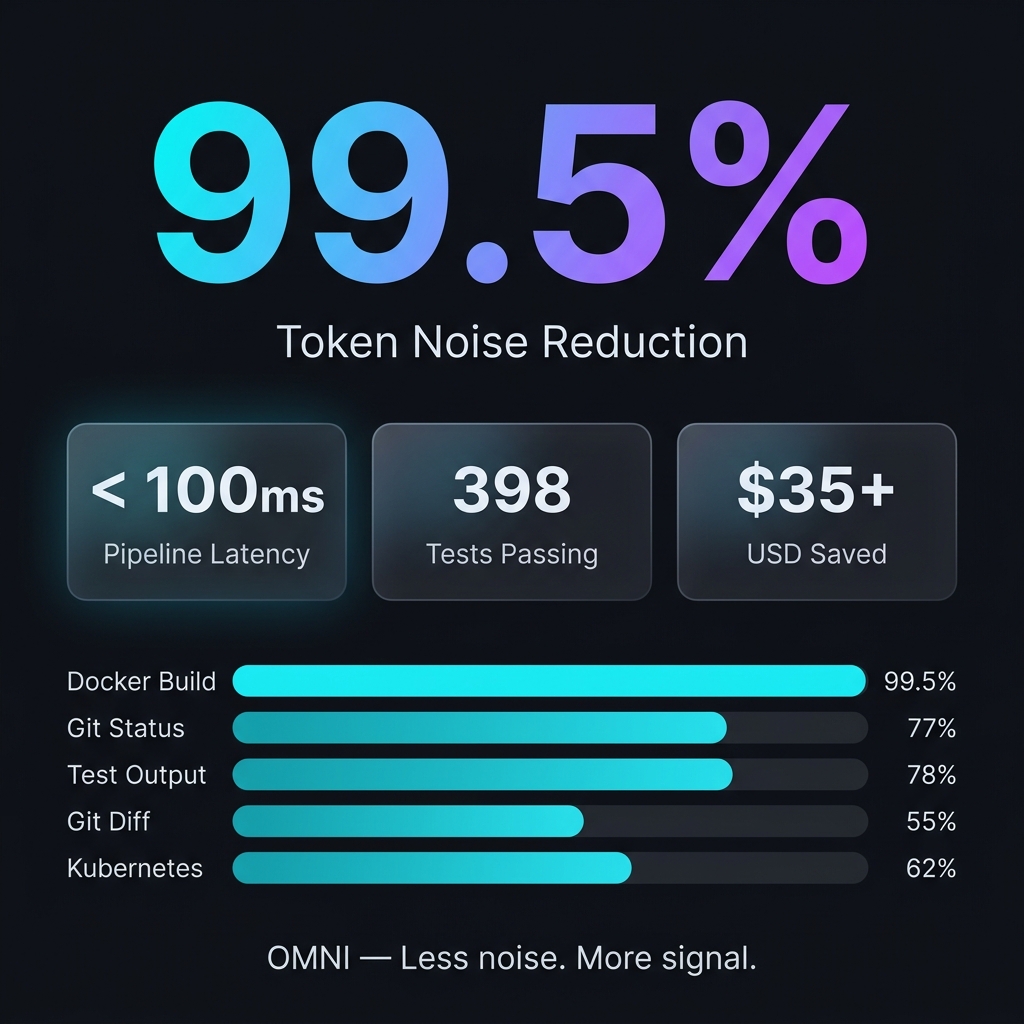
OMNI is built in Rust for zero-overhead execution and ruthless efficiency. Here are the actual benchmarks measured on the release binary:
| Command / Context | Input Size | Output Size | Token Savings | Impact on AI |
|---|---|---|---|---|
docker build (multi-stage) |
9.2 KB | 49 bytes | 99.5% | Eliminates caching noise; AI instantly sees the real build error. |
cargo test (large suite) |
16.5 KB | 4.3 KB | 78.0% | Strips hundreds of "ok" tests; AI focuses only on the failures and stack traces. |
git status (dirty) |
496 bytes | 113 bytes | 77.2% | Removes clean files and hints; keeps only modified/untracked files. |
kubectl get pods |
840 bytes | 762 bytes | 10.0% | Selectively surfaces CrashLoopBackOff/Error pods, skipping healthy ones. |
git diff (multi-file) |
397 bytes | 220 bytes | 50.0% | Preserves hunks with changes, dropping excessive context lines. |
- Pipeline Latency: < 100ms (end-to-end, including binary startup)
- All-Time Savings: 97.3% token reduction across average development sessions.
- ROI: $35+ USD saved per developer/month (measured against flagship models).
To see your own actual token savings, just run omni stats after a few days of usage.
Omni is incredibly easy to set up. It natively integrates into your terminal.
macOS / Linux:
# 1. Install via Homebrew
brew install fajarhide/tap/omni

# 2. Setup Omni (Interactive Menu for Claude, VS Code, OpenCode, Codex, Antigravity)
omni init

# 3. Verify it's working
omni doctor

# 4. Or auto-fix any issues
omni doctor --fix

# 5. Check Current Status
omni init --status
Universal Installer (macOS / Linux / WSL):
curl -fsSL omni.weekndlabs.com/install | bashWindows (PowerShell):
irm omni.weekndlabs.com/install.ps1 | iexOMNI works seamlessly with the agentic tools you already use. It intercepts their terminal executions automatically.
- Claude Code
- Cursor
- Windsurf
- Roo Code
- OpenAI Codex
- Antigravity CLI
OMNI isn't just a terminal filter—it's a cure for AI amnesia.
If you've ever worked with an AI agent for more than an hour, you know the pain of context loss. You restart the agent, and suddenly it forgets what you were working on. It forgets the project goal. It starts making the exact same mistakes it made yesterday because it forgot the repository's undocumented quirks.
OMNI's Memory OS runs silently in the background to solve this:
- Stop Re-Explaining the Goal (
omni goal): Set your North Star objective once. OMNI will relentlessly remind the agent of this exact priority on every single prompt, preventing it from drifting off-task. - Never Lose Your Train of Thought (Session Continuity): If Cursor crashes or you switch to Claude Code, OMNI instantly injects a compressed summary of your last session. The new agent knows exactly which files were hot and what the last active error was, picking up right where you left off.
- Teach It Once (
omni remember): Stop fixing the same hallucination. Agents can save project-specific rules, gotchas, and architecture decisions directly into OMNI's local SQLite backend. When they get stuck later, they automatically pull the exact answer back out via semantic search.
Your agent gets smarter about your codebase every single day, and you never have to repeat yourself again.
Omni operates purely locally using a deterministic Read → Guard → Score → Collapse → Distill → Persist pipeline.
flowchart LR
    Command[Raw Tool Output] --> Hook[Omni Hook]
    Hook --> Score[Scorer Engine]
    Score -->|Critical=1.0, Noise=0.1| Distill[Content Distiller]
    Distill --> Clean[Clean Context]
    Command --> SQLite[(RewindStore SQLite)]
If the AI really needs the dropped noise, OMNI's local SQLite RewindStore keeps the full uncompressed log safely hashed, allowing the agent to retrieve it anytime.

Built in Rust for imperceptible latency.
- Pipeline Latency: < 10ms overhead.
- Memory: Operates via efficient streams, keeping memory usage flat even on 20,000-line logs.
- Fail Open: If OMNI panics, it fails silently and passes the raw output through. It will never crash your host agent.
# Development
cargo build --release
cargo test --all
make fmt && make clippyDoes Omni permanently delete my logs?
No. The raw logs are compressed and stored locally in the SQLite RewindStore. The AI receives a hash and can retrieve the full log if needed.
Will this slow down my terminal?
No. OMNI is written in Rust and executes the distillation pipeline in under 10ms.
Can I add my own filters?
Yes. You can teach OMNI to strip noise specific to your internal tools using TOML:
# ~/.omni/signals/custom.toml
[filters.my_tool]
match_command = "^internal-tool\\b"
strip_lines_matching = ["^DEBUG", "syncing..."]This is a passion project built for the era of Agentic AI. Whether you're here to save money on tokens, test out free models, or help build the ultimate agentic toolbelt, contributions are always welcome!
- Development: Want to build from source? Run
make ciandcargo build. Read our CONTRIBUTING.md for details. - License: MIT License
