A Home Assistant integration with live departure boards for stops of the Prague Integrated Transport (PID): metro, trams, buses, trains, ferries and the Petřín funicular. Data come from the Golemio API and include real-time delays, cancellations and service alerts.
Each departure board is one stop platform and becomes a device in Home Assistant. Any number of boards can be added.
| Device page | Sensor attributes |
|---|---|
 |
 |
- Home Assistant 2024.11 or newer
- A free Golemio API key: sign up here

Download PID Departure Boards in HACS and restart Home Assistant.
Copy the custom_components/pid_departures folder into the custom_components folder of your Home Assistant configuration and restart Home Assistant.

Or go to Settings → Devices & services → Add integration and search for PID Departure Boards. Fill in:
| Field | Description |
|---|---|
| API key | Your Golemio API key. For further boards it is prefilled from the first one. |
| Number of departures | How many upcoming departures the board shows, each as its own entities. |
| Stop | The stop and platform, e.g. Palmovka A. Type to search. Each platform of a stop is a separate board. |
| Number of calendar events | How many upcoming departures the calendar shows. 0 turns the calendar events off. |
| Walking time offset (minutes) | Shows only departures you can still reach: with 5, departures leaving in the next five minutes are skipped. A negative value also shows departures that have just left (up to 30 minutes). |
Each stop platform can be added only once.
The number of departures, the number of calendar events and the walking time offset can be changed at any time with Configure on the board in Settings → Devices & services → PID Departure Boards. The board reloads with the new settings and keeps its device and entities; departure entities above the new number are removed.
When the API key stops working, Home Assistant asks to re-authenticate the board in Settings → Devices & services. Enter a new key there and the board reloads, no need to remove it.
Each departure board is a device with these entities. n is the number of the departure, 1 is the next one.
| Entity | Type | Description |
|---|---|---|
| Next route name (n) | sensor | Line of the n-th departure, e.g. 188 or B. All details are in its attributes, see below. |
| Next departure time (n) | sensor | Expected departure time of the n-th departure, delay included. |
| Vehicle at stop | calendar | On while a vehicle is at the stop. The calendar lists the upcoming departures as events. |
| Infotext | binary sensor | On when PID publishes a service alert for the stop; the text is in its attributes (text, text_en). |
| Wheelchair accessible | binary sensor | Whether the stop is wheelchair accessible. |
| Stop name, Platform, Zone, Stop location (latitude / longitude) | sensor | Information about the stop (diagnostic). |
| Updated | sensor | Time of the last successful update (diagnostic). |
The data are updated once a minute.
The Next route name sensors carry all data of their departure as attributes:
| Attribute | Description |
|---|---|
route_name, route_type |
Line and transport type (tram, metro, train, bus, ferry, funicular, trolleybus). |
trip_headsign |
Destination of the trip. |
departure_time_sched, departure_time_est |
Scheduled and expected departure time. |
arrival_time_sched, arrival_time_est |
Scheduled and expected arrival time. |
is_delay_avail, delay_sec |
Whether real-time data are available, and the delay in seconds. |
is_at_stop, is_canceled |
Vehicle standing at the stop; trip cancelled. |
is_night, is_regional, is_substitute |
Night line; regional line; substitute service. |
is_wheelchair_accessible, is_air_conditioned |
Vehicle features. |
stop_platform |
Platform code the departure leaves from. |
train_number |
Train number, for trains. |
last_stop_name, last_stop_id |
Last stop the vehicle passed. |
trip_id, trip_direction, stop_id |
GTFS identifiers. |
latitude, longitude |
Location of the stop, so the departure is shown on the map. |
- All entities of a board are unavailable while the API cannot be reached; they recover with the next successful update.
- When the API returns fewer departures than configured, e.g. late at night, the departure entities without a departure are unavailable until there are enough departures again.
For the dashboard there is a dedicated card in a separate repository, PID Departures Card. It shows a live departure board with countdowns, delays, cancellations and service alerts, can merge several platforms of a stop into one list, and is installed through HACS.
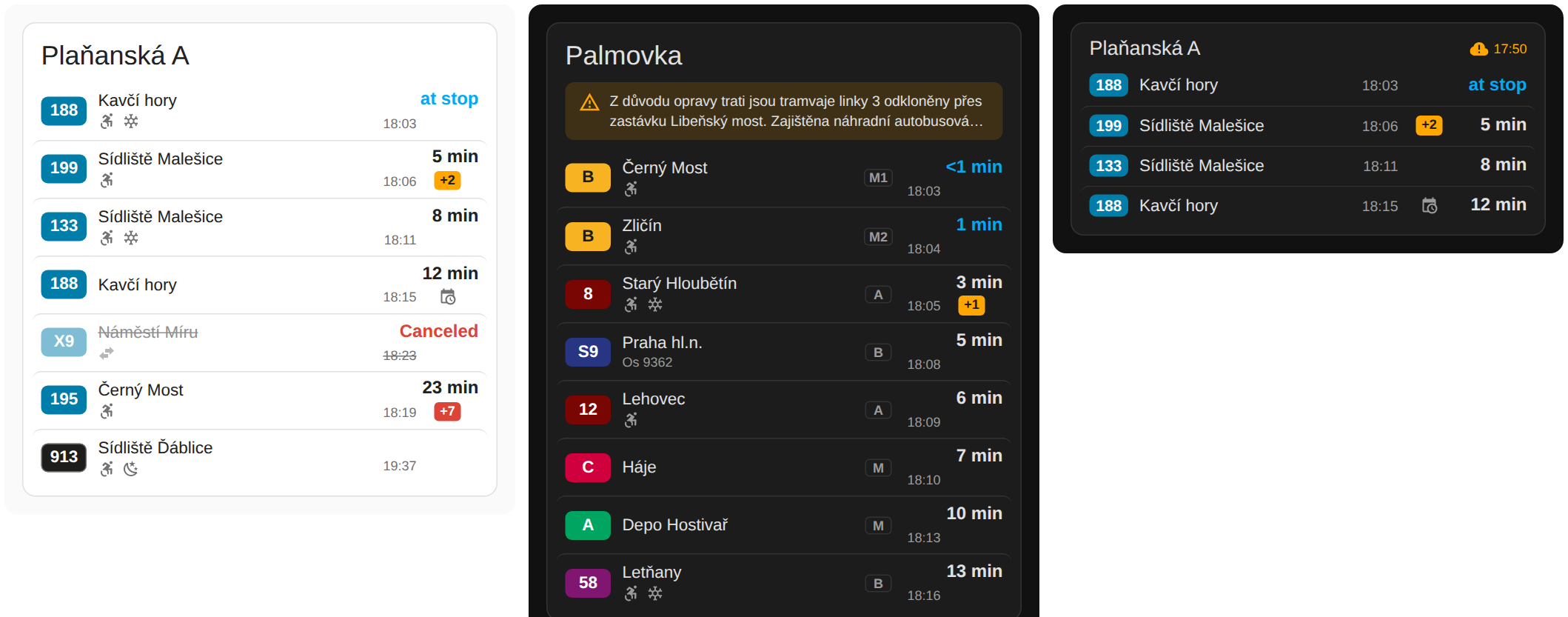
The repo also includes an example card based on Flex-table-card (card.yaml).
Just modify the headline and the departure entity name - number in the name shall be replaced by * to include all departures.

Version 3 needs Home Assistant 2024.11 or newer. Existing boards keep their devices, entities and settings, and there is nothing to change. New in version 3: options can be changed with Configure, an expired API key can be replaced without removing the board, and a failed update no longer leaves old departures on display.
-
Settings → System → Repairs → ⋮ → System information shows whether the Golemio API can be reached from Home Assistant.
-
To see the API requests and responses, enable debug logging on the integration (Settings → Devices & services → PID Departure Boards → ⋮ → Enable debug logging), or in
configuration.yaml:logger: logs: custom_components.pid_departures: debug
-
Report problems in the issues.