

Structured hypothesis tree reasoning for AI agents — with real-time browser visualization.
Agents decompose problems into hypothesis trees, gather evidence, eliminate dead ends systematically, and corroborate surviving hypotheses — all visible live in your browser.
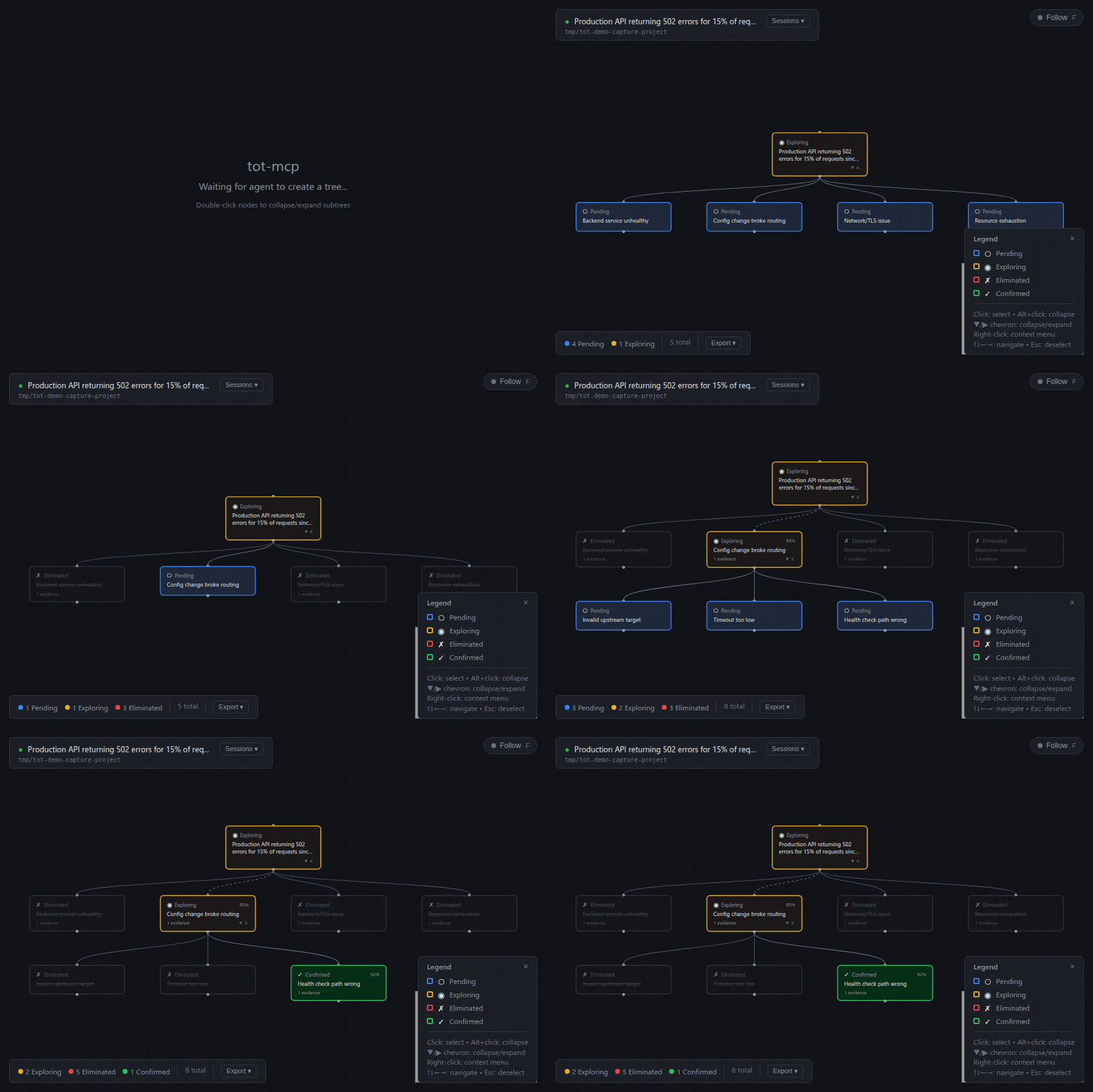
AI agents tackling complex investigations tend to reason linearly — they follow the first plausible lead, get stuck in rabbit holes, and lose track of what they've already considered. Tree of Thought reasoning fixes this by maintaining a structured hypothesis tree that agents explore systematically.
   Linear reasoning                      Tree of Thought
   ─────────────────                     ────────────────────
   guess A                                  Problem
     ↓ commit                              /   |   \
   act on it                              A    B    C
     ↓ didn't help                        ✗    ▼    ▼
   guess B                                    B1 B2  …
     ↓ commit                                 ✗   ✓
   act on it
     ↓ didn't help                         Eliminate by refutation;
   …                                       corroborate the survivor.
The clearest concrete example is debugging: competing causes for a failure, evidence gathered for each, dead ends eliminated until a root cause survives. The same shape applies to other domains — medical differential diagnosis, intelligence analysis, and scientific inquiry.
tot-mcp is an MCP server that gives agents this structured reasoning capability with:
- Hypothesis trees — decompose problems into competing hypotheses at multiple levels
- Evidence tracking — typed evidence (supports/refutes/neutral) attached to each hypothesis
- Systematic elimination — mark dead ends with documented reasoning
- Live visualization — watch the tree build in real-time in your browser (the URL is reported by
get_status) - Decomposition guidance — structural checks flag sibling overlap, missing coverage, and uneven abstraction levels
- Adaptive signals — tool responses prompt agents to seek refuting evidence and avoid confirmation bias
/plugin marketplace add derekkinzo/tot
/plugin install tot-mcp
The plugin's SessionStart hook runs npm install and builds the bundled
MCP server on first launch and again whenever a plugin update changes
packages/server/package.json. The first run takes about a minute; later
runs are no-ops.
Because the first build runs while Claude Code is already starting, the
tot MCP server won't connect on that same launch — the server binary is
still being built. Once the build finishes (about a minute), reconnect it
with /mcp → Reconnect, or simply restart Claude Code again. Subsequent
launches connect immediately, since the build is then a no-op.
The build output is written to the plugin's persistent data directory
(${CLAUDE_PLUGIN_DATA}) so it survives plugin updates.
Clone the repo, build, and register the path with your client:
git clone https://github.com/derekkinzo/tot.git
cd tot
npm install
npm run build
The build emits an executable at packages/server/dist/cli.js. Add to your
client's MCP configuration:
{
  "mcpServers": {
    "tot": {
      "command": "node",
      "args": ["/absolute/path/to/tot/packages/server/dist/cli.js"]
    }
  }
}
Call the get_status tool after creating a tree; its response ends with a
Visualization: http://localhost:<port> line. Open that URL to see the live
tree. Each MCP server instance picks its own free port at startup.
- Node.js 20.11 or later (enforced by
enginesinpackage.json; the plugin's install hook also checks) - npm
- For the manual install path: a working MCP-capable client (Cursor, Kiro, Cline, etc.)
| Tool | Purpose |
|---|---|
create_tree |
Start a new reasoning session with a problem statement |
decompose |
Split a hypothesis into sibling sub-hypotheses comparable along one axis |
add_hypothesis |
Add a missed hypothesis to the tree |
add_evidence |
Attach supporting/refuting/neutral evidence |
eliminate_hypothesis |
Mark a hypothesis as a dead end (with reason) |
corroborate_hypothesis |
Mark a surviving hypothesis as corroborated (provisionally retained) |
set_out_of_scope |
Mark a branch terminal without investigating it (no refutation claimed) |
get_tree |
View the current tree structure |
get_status |
Progress summary + stagnation detection |
validate_decomposition |
Check structural properties of a decomposition |
The repository ships markdown definitions under skills/, agents/, and
hooks/ for Claude Code users who want guided workflows on top of the raw
MCP tools. Point Claude Code at the cloned directory to load them.
| Slash command | Purpose |
|---|---|
/tot |
Open the live tree visualization for the current project in the browser |
/tot-reason |
Full structured reasoning workflow — domain investigation, decomposition, evidence gathering, elimination |
/tot-inspect |
View current tree state, progress, and visualization |
/tot-export |
Generate a Markdown investigation report from a completed tree |
/tot-dashboard |
Open the live dashboard in the browser (URL reported by get_status) |
| Agent | Purpose |
|---|---|
hypothesis-challenger |
Stress-tests a hypothesis from multiple angles, surfacing assumptions and missing alternatives |
evidence-reviewer |
Audits evidence for directness, source diversity, and diagnosticity |
decomposition-evaluator |
Advises on decomposition structure: sibling overlap, coverage, level of abstraction, testability. Emits advisory categories, not pass/fail. |
Hooks under hooks/hooks.json build the bundled MCP server on first
session and after plugin updates (SessionStart), surface a hint when
Bash output looks like a failure pattern (PostToolUse), and announce
active reasoning sessions on resume.
- Agent calls
create_treewith a problem statement - Agent calls
decomposeto break it into competing hypotheses - For each hypothesis, the agent gathers evidence to refute it
- Hypotheses that fail the evidence test are eliminated
- Surviving hypotheses are decomposed further (deeper levels)
- When a hypothesis has survived the refutation tests applied to it, it is corroborated (Popper) — provisional retention, not verification
The tool responses guide the agent through this process — prompting for refuting evidence, flagging confirmation bias, and suggesting discriminating tests.
Each MCP server instance starts an in-process web server on an OS-assigned
port and reports the URL in the get_status tool response
(Visualization: http://localhost:<port>). The browser UI shows:
- Live tree updates via Server-Sent Events (no polling)
- Color-coded status — pending (blue), exploring (yellow), eliminated (dimmed), corroborated (green)
- Path highlighting — click a node to see the path from root
- Evidence detail panel — click any node to see all attached evidence
- Follow mode — auto-tracks agent activity (press F to toggle)
- Export — download tree as Markdown
Each reasoning tree is saved as an append-only JSON file under your home directory, grouped by project:
~/.tot/projects/<project-id>/sessions/<sessionId>.jsonl
Trees persist across restarts — reopen a project and its sessions are still
there. To store them somewhere else, set the TOT_DATA_DIR environment
variable to any directory (it otherwise defaults to $XDG_STATE_HOME/tot,
then ~/.tot).
Run tot-mcp status from a project to see where that project's trees live and
list its recent sessions.
This tool implements concepts from:
- Bacon, F. (1620). Novum Organum — inductive method and systematic elimination of false causes
- Mill, J. S. (1843). A System of Logic — methods of agreement, difference, and elimination for causal inference
- Popper, K. R. (1959). The Logic of Scientific Discovery — falsification-first approach; corroboration as provisional retention
- Mackie, J. L. (1965). Causes and Conditions. American Philosophical Quarterly, 2(4), 245–264 — INUS conditions for compound causation
- Heuer, R. J. (1999, 2005). Psychology of Intelligence Analysis — Analysis of Competing Hypotheses (ACH) methodology
- cf. Chamberlin, T. C. (1890). The Method of Multiple Working Hypotheses. Science, 15(366) — entertaining several competing hypotheses simultaneously
- cf. Platt, J. R. (1964). Strong Inference. Science, 146(3642) — crucial-experiment design for hypothesis discrimination
- Yao, S. et al. (2023). Tree of Thoughts: Deliberate Problem Solving with Large Language Models. NeurIPS 2023. arXiv:2305.10601
- Lightman, H. et al. (2023). Let's Verify Step by Step. arXiv:2305.20050 — process supervision
MIT