Full-stack property rental platform inspired by Airbnb. Features user authentication, CRUD operations for listings, review system, image uploads via Cloudinary, and interactive maps. Built with Node.js, Express, MongoDB, and EJS.
Live Demo: wanderlust-ljm7.onrender.com
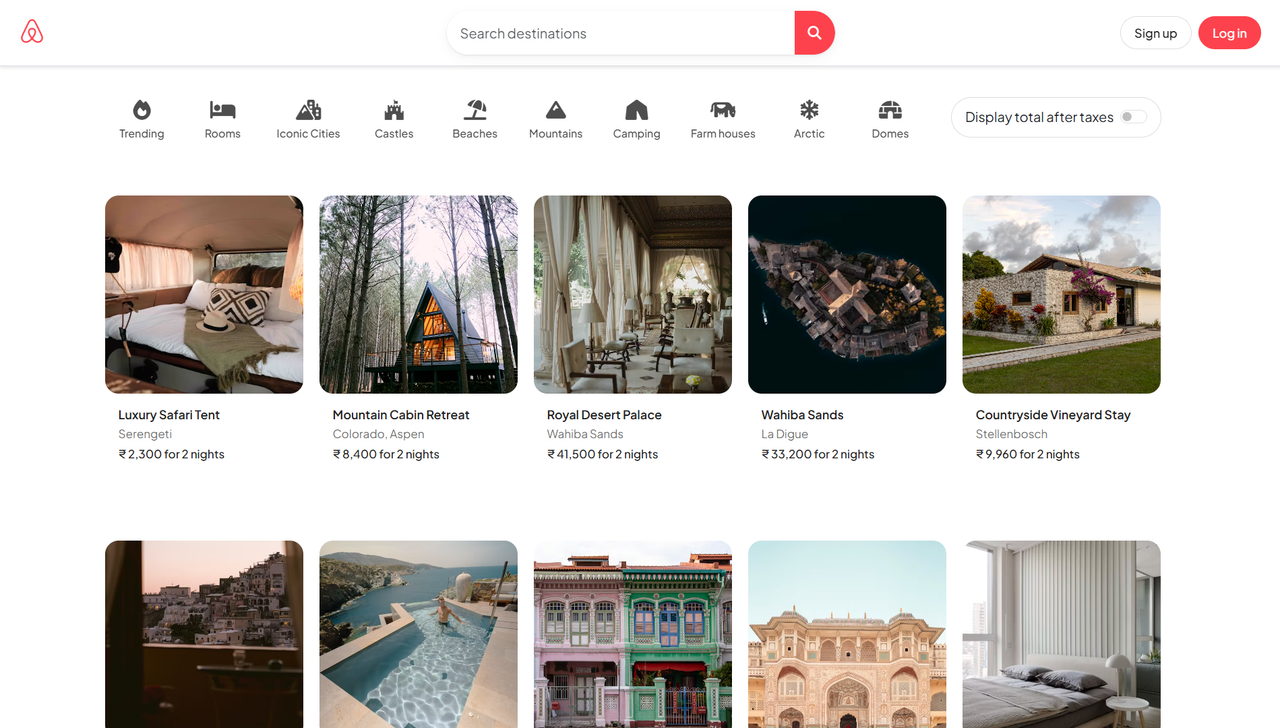
-
Property Listings Management
- Create, read, update, and delete property listings
- Image upload and management via Cloudinary
- Interactive property cards with hover effects
- Responsive horizontal scrolling layout
-
User Authentication & Authorization
- Secure user registration and login with Passport.js
- Session management with MongoDB store
- Protected routes and ownership verification
- Automatic login after registration
-
Review System
- Star-based rating system (1-5 stars)
- Create and delete reviews (with ownership validation)
- Horizontal scrollable review cards
- User-specific review management
-
Interactive Maps
- OpenStreetMap integration via Leaflet
- Automatic geocoding with Nominatim API
- Location markers on property pages
- Fallback coordinates for failed geocoding
-
Modern UI/UX
- Responsive design for all screen sizes
- Mobile-optimized navigation and layouts
- Smooth animations and transitions
- Category filters for property browsing
- Tax toggle functionality (desktop and mobile)
- Runtime: Node.js (v22.14.0)
- Framework: Express.js (v4.21.2)
- Database: MongoDB with Mongoose ODM (v8.16.4)
- Authentication: Passport.js with Local Strategy
- Session Store: connect-mongo (v5.1.0)
- Validation: Joi (v17.13.3)
- Template Engine: EJS (v3.1.10) with ejs-mate
- CSS Framework: Bootstrap 5.3.6
- Icons: Font Awesome 6.7.2
- Maps: Leaflet.js with MapTiler tiles
- Fonts: Google Fonts (Plus Jakarta Sans)
- Image Storage: Cloudinary (v1.41.3)
- Database Hosting: MongoDB Atlas
- Application Hosting: Render
- Geocoding: OpenStreetMap Nominatim API
- File Uploads: Multer (v2.0.2) with Cloudinary storage
- Environment Variables: dotenv (v17.2.0)
- Flash Messages: connect-flash (v0.1.1)
- HTTP Method Override: method-override (v3.0.0)
Before running this project, ensure you have:
- Node.js (v22.14.0 or higher)
- MongoDB Atlas account
- Cloudinary account
- Basic understanding of JavaScript and Express.js
git clone https://github.com/darxh/wanderlust.git
cd wanderlustnpm installCreate a .env file in the root directory:
# MongoDB Configuration
ATLASDB_URL=your_mongodb_atlas_connection_string

# Cloudinary Configuration
CLOUD_NAME=your_cloudinary_cloud_name
CLOUD_API_KEY=your_cloudinary_api_key
CLOUD_API_SECRET=your_cloudinary_api_secret

# Session Secret
SECRET=your_session_secret_key

# Port Configuration (optional)
PORT=8080

# Environment
NODE_ENV=developmentTo seed the database with sample data:
node init/index.jsNote: Update the owner field in init/index.js with a valid user ID from your database.
Development Mode:
npm run devProduction Mode:
npm startThe application will be available at: http://localhost:8080
wanderlust/
├── controllers/         # Route controllers
│   ├── listings.js      # Listing CRUD operations
│   ├── reviews.js       # Review management
│   └── users.js         # User authentication
├── models/              # Mongoose schemas
│   ├── listing.js       # Property listing model
│   ├── review.js        # Review model
│   └── user.js          # User model with passport-local-mongoose
├── routes/              # Express route definitions
│   ├── listing.js       # Listing routes
│   ├── review.js        # Review routes
│   └── user.js          # Authentication routes
├── views/               # EJS templates
│   ├── layouts/         # Layout templates
│   ├── includes/        # Reusable partials (navbar, footer, flash)
│   ├── listing/         # Listing views (index, show, new, edit)
│   └── users/           # Authentication views (login, signup)
├── public/              # Static assets
│   ├── css/             # Stylesheets
│   └── js/              # Client-side JavaScript
├── init/                # Database initialization
├── utils/               # Utility functions
│   ├── ExpressError.js  # Custom error class
│   └── wrapAsync.js     # Async error handler
├── middleware.js        # Custom middleware
├── schema.js            # Joi validation schemas
├── cloudConfig.js       # Cloudinary configuration
├── app.js               # Application entry point
└── package.json         # Project dependencies
- Users register with username, email, and password
- Passwords are hashed using passport-local-mongoose
- Sessions are stored in MongoDB for persistence
- Protected routes redirect to login if not authenticated
- Client selects image file
- Multer processes the upload
- Image is sent to Cloudinary
- URL and filename are stored in MongoDB
- Location string is sent to Nominatim API
- Coordinates are retrieved and stored as GeoJSON
- Fallback to India's center coordinates if geocoding fails
- Leaflet displays the location on an interactive map
- Users must be logged in to leave reviews
- Star ratings (1-5) with visual feedback
- Only review authors can delete their reviews
- Reviews are displayed in horizontal scrolling cards
- Responsive Grid Layout: Adapts from 1 column (mobile) to 5 columns (desktop)
- Sticky Navigation: Category filters and tax toggle remain accessible
- Smooth Animations: Hover effects, transitions, and transform animations
- Card-Based Design: Modern, clean aesthetic with shadow effects
- Accessibility: Proper ARIA labels and semantic HTML
- Password hashing with bcrypt (via passport-local-mongoose)
- Session-based authentication with httpOnly cookies
- CSRF protection through session validation
- Input validation with Joi schemas
- Owner-only authorization for listing modifications
- Author-only authorization for review deletions
GET /listings- View all listingsGET /listings/new- New listing form (protected)POST /listings- Create listing (protected)GET /listings/:id- View single listingGET /listings/:id/edit- Edit form (owner only)PUT /listings/:id- Update listing (owner only)DELETE /listings/:id- Delete listing (owner only)
POST /listings/:id/reviews- Create review (protected)DELETE /listings/:id/reviews/:reviewId- Delete review (author only)
GET /signup- Signup formPOST /signup- Create accountGET /login- Login formPOST /login- Authenticate userGET /logout- End session
- Implement search functionality
- Add functional category filters
- Implement pagination for listings
- Add booking system with date selection
- Integrate payment gateway
- Add user profiles and favorites
- Implement email verification
- Add password reset functionality
- Create admin dashboard
- Add multi-image upload for listings
Darshan
- GitHub: @darxh
- Live Demo: wanderlust-ljm7.onrender.com
- Bootstrap - UI framework
- Font Awesome - Icon library
- Leaflet - Interactive maps
- Cloudinary - Image hosting
- MongoDB Atlas - Database hosting
- OpenStreetMap - Map data and geocoding
Built with care and curiosity using Node.js, Express, MongoDB, and EJS ❤️