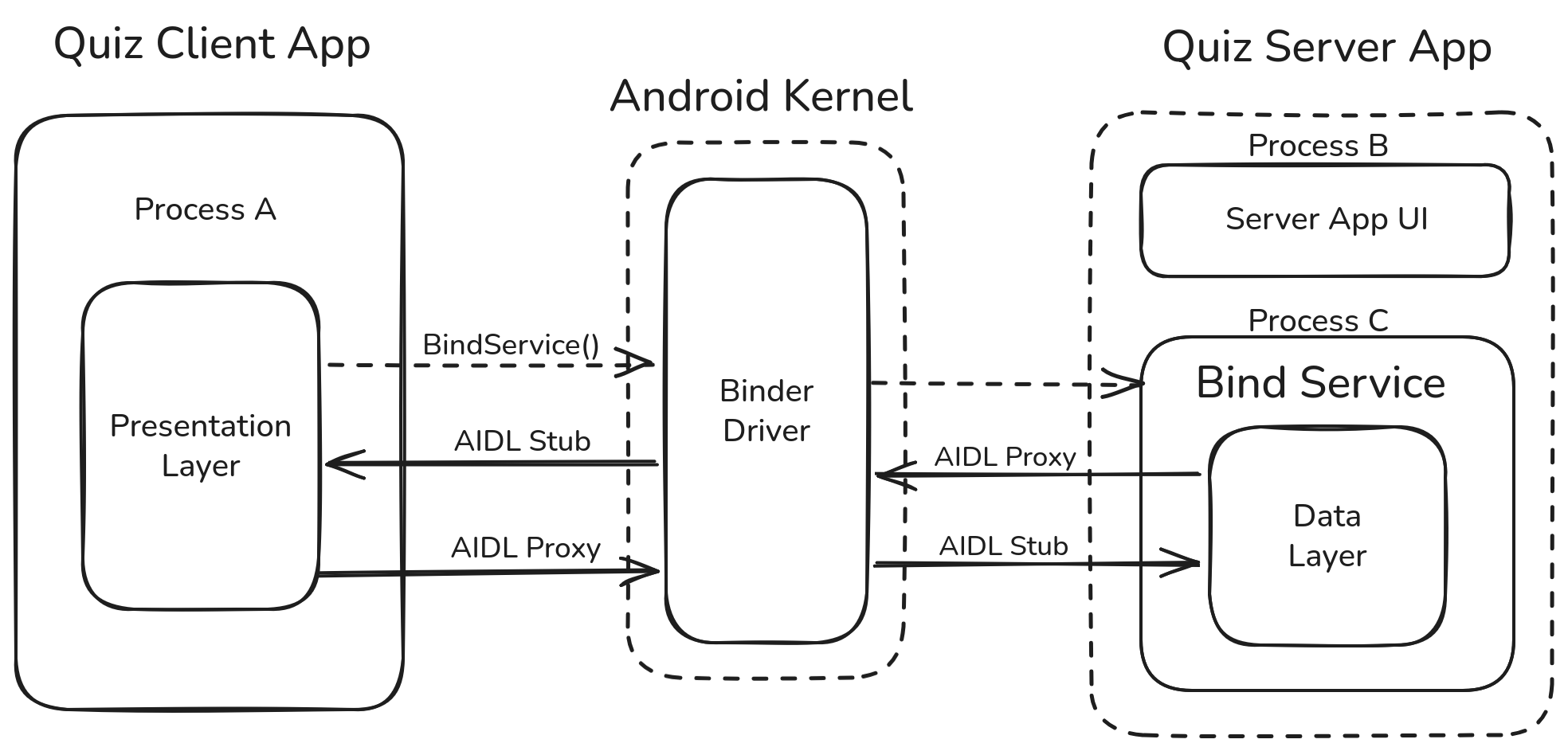
QuizApp Client is a modern Android application built using Jetpack Compose. It serves as a frontend interface for a quiz system, where the quiz data and logic are managed by a separate QuizApp Server application. The two apps communicate seamlessly using AIDL (Android Interface Definition Language) for Inter-Process Communication (IPC).
- Dynamic Quiz Interface: Fetches and displays quiz questions and answers in real-time from the server.
- Inter-Process Communication (IPC): Utilizes AIDL to bind to a remote service, register callbacks, and receive updates.
- State Management: Implements a robust state machine (
Initial,Loading,Success,Error) to handle various application states. - Modern UI/UX: Built entirely with Jetpack Compose and Material 3, featuring:
- Edge-to-edge support.
- Responsive navigation with a Bottom Navigation Bar.
- Smooth transitions between Quiz and Result screens.
- Resilience: Automatically detects if the Server app is installed and handles connection exceptions gracefully.
- Language: Kotlin
- UI Framework: Jetpack Compose (Material 3)
- Navigation: Navigation Compose
- Architecture: MVVM (ViewModel, StateFlow)
- IPC: AIDL (Android Interface Definition Language)
- Lifecycle: Lifecycle Runtime KTX (collectAsStateWithLifecycle)
presentation.ui.screens: Contains the main UI components (MainActivity,MainScreen,QuizScreen,ResultScreen).presentation.model: Defines the data models and UI state wrappers.contract: Contains theQuizContractwhich defines the constants used for IPC (Action strings, Package names).aidl: The.aidlfiles defining the interface between Client and Server.
- Check Installation: Upon starting, the app checks if the Quiz Server is installed via
PackageManager. - Bind Service: If installed, it binds to the server's service using the intent action
com.darshan.miskin.ACTION_START_QUIZ. - Register Callbacks: Once connected, it registers a callback interface (
IQuizCallBackInterface) to receive notifications likeonQuizLoadedoronQuizComplete. - Quiz Flow:
- User clicks on the 'Start Quiz' Button.
- Server is notified to Fetch Quiz Data from remote Api.
- The server pushes the first question.
- The user selects an answer, and the client requests the
nextQuestion()from the server. - Results are tracked locally in the client as the quiz progresses.
To use this application, you must have the QuizApp Server installed on the same device.