












|

|
Stanford REAP × CoPaper.AI · an academic–industrial AI toolkit for empirical research
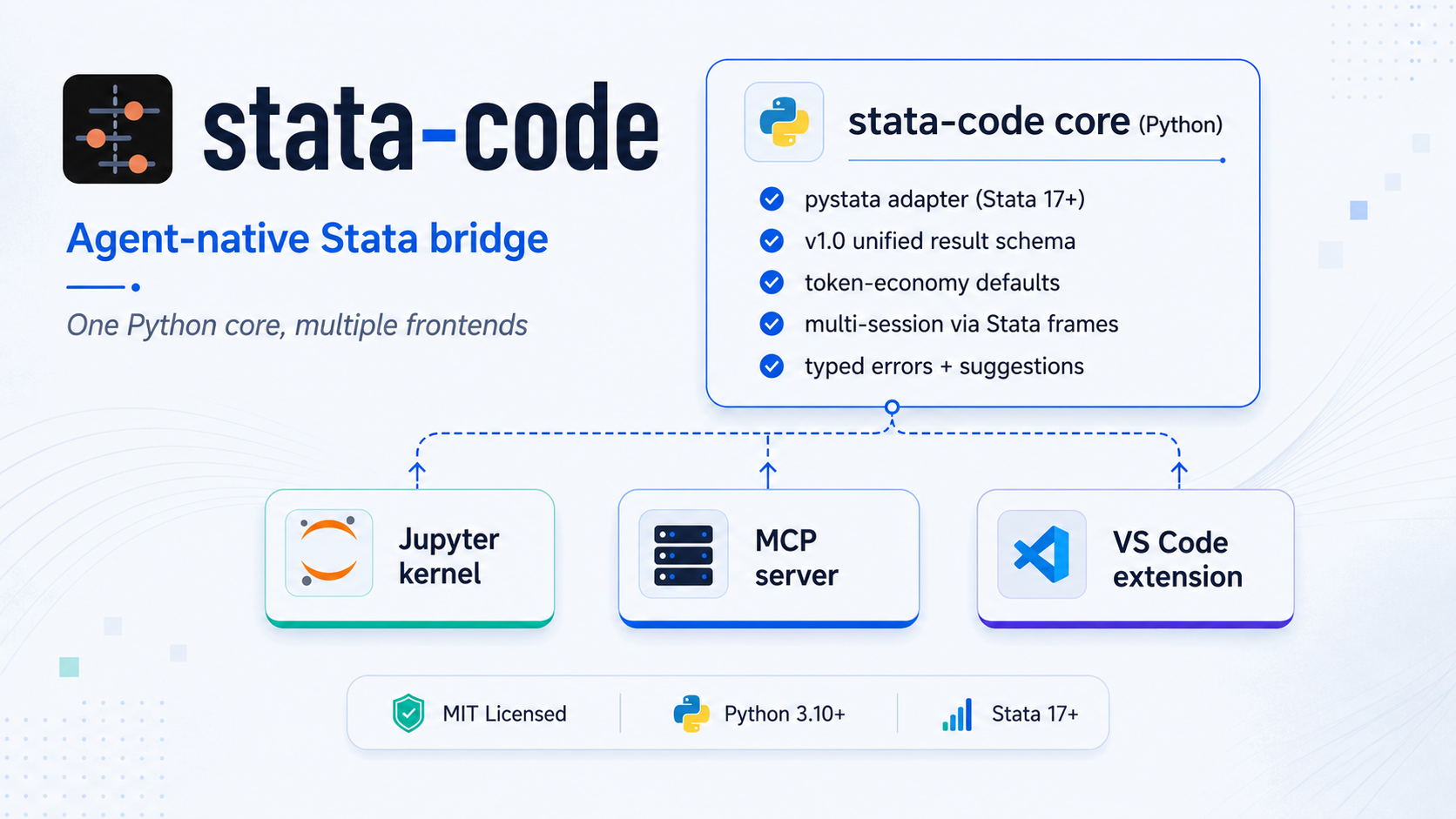
Agent-native Stata bridge — one Python core, multiple frontends.
stata-code lets you drive Stata from modern environments: an LLM agent (Claude Code, Cursor, Claude Desktop), a Jupyter notebook, or a VS Code editor session. All frontends share one Python core and return a stable, structured, agent-friendly result schema.
For empirical economists. Drive Stata in plain language: run DiD, IV, RDD, and publication-ready esttab tables in one conversation — then cross-check each estimate across Stata and Python so you only trust results that agree (the Cunningham cross-package robustness check).
Try it in 60 seconds with Claude Code — no global install needed:
claude mcp add stata-code --scope user -- uvx --from "stata-code[mcp]" stata-code-mcpThen just ask:
"Using
data/cfps_panel.dta, run a two-way fixed-effects regression of monthly wage on the treatment (controls:age age2 edu industry), then test heterogeneous effects with Callaway-Sant'Anna, and export anesttabtable."
stata-code writes the do-file, runs it, returns the table, and interprets the result — and can re-estimate the same ATT with StatsPAI to confirm the two stacks agree. These workflows ship as one-call MCP prompts (did_event_study, iv_2sls, rdd, publication_table, cross_validate_did) backed by an on-demand recipe library.
Why stata-code: MIT-licensed · ships as an MCP server, a bundled agent skill, a Jupyter kernel, and a VS Code extension · one structured, token-economy result schema (typed errors, native r() / e()) · cross-stack validation with StatsPAI for the Cunningham check.
                    ┌────────────────────────────────────────┐
                    │     stata-code core (Python)           │
                    │                                        │
                    │   • pystata adapter (Stata 17+)        │
                    │   • v1.0 unified result schema         │
                    │   • token-economy defaults             │
                    │   • multi-session via Stata frames     │
                    │   • typed errors + suggestions         │
                    └────────────────────────────────────────┘
                       ↑              ↑              ↑
              ┌────────┴────┐  ┌──────┴─────┐  ┌────┴────────────┐
              │  Jupyter    │  │  MCP       │  │  VS Code        │
              │  kernel     │  │  server    │  │  extension      │
              └─────────────┘  └────────────┘  └─────────────────┘
Status: v0.8 (June 2026) — the core, MCP server, Jupyter kernel, and VS Code extension work end-to-end against Stata 18 MP. The test suite covers schema, runner, MCP, kernel, notebook, run-index, subprocess-pool, and VS Code modules; CI also checks linting, type safety, schema generation, package metadata, and VSIX packaging. License: MIT.
Three workflows the current tree explicitly supports for end users and agents:
- Run Stata code from a Jupyter notebook.
pip install "stata-code[kernel]"+stata-code-kernel install --userregisters a Stata kernel that the Jupyter Notebook UI, JupyterLab, and the VS Code Jupyter extension all pick up by name. Cells render Stata logs, graphs, and warnings inline (the kernel logo bundled since v0.5 makes it appear in VS Code's kernel picker too). See As a Jupyter Kernel. - Optional agent "fix and rerun" loop.
stata_runreturns typederror.kind/line/contextplussuggestionson every failure. By default Claude Code only reports diagnostics — but if you explicitly say "fix this and rerun until it passes", the agent uses the same fields to edit your.dofile and re-callstata_rununtil the run is green. The repair loop is opt-in: failed runs are diagnostics first, not automatic rewrite permission. See Error Recovery in Agent Workflows. - Economist workflow guides. The bundled skill and cookbook now cover
modern DiD, IV/weak-IV, RDD, table export, data-MCP handoff, and
cross-stack parity audits.
stata-coderuns and audits the Stata leg; R, Python, and official data MCPs remain separate tools with explicit handoff files and source metadata. Seeskills/stata-code/references/andexamples/.
The Stata AI / agent tooling landscape is fragmented; see References-tools.md:
- Existing MCP servers (SepineTam/stata-mcp, tmonk/mcp-stata) are AGPL-3.0, which is not a fit for closed-source or commercial integration.
- The popular VS Code AI extension (hanlulong/stata-mcp) is MIT, but it bundles the MCP server inside the extension, making standalone reuse awkward.
- Each tool wraps
pystatawith its own result shape, so agents have to special-case each integration. - Many existing tools were designed for humans first and then bolted onto MCP; they often dump long logs and base64 graph blobs into every reply, burning tokens by default.
stata-code is designed to fill that gap:
- MIT-licensed, with no copyleft contagion.
- One shared result schema for every frontend: SCHEMA.md.
- Agent-native by default: typed errors, structured
r()/e(), log refs, graph refs, and suggestion seeds. - One core, multiple frontends: Jupyter kernel, MCP server, and VS Code extension.
For the project's clean-room policy around AGPL/GPL Stata projects, see LICENSE-POLICY.md.
Requirements: Stata 17+ (with pystata shipped by Stata) and Python 3.10+.
# from PyPI
pip install stata-code

# with the MCP server and Jupyter kernel extras
pip install "stata-code[mcp,kernel]"

# or from source (editable install for development)
git clone https://github.com/brycewang-stanford/stata-code.git
cd stata-code
pip install -e ".[mcp,kernel]"
Naming note. The PyPI distribution is
stata-code(hyphen), but the Python import isstata_code(underscore — Python identifiers can't contain hyphens). Same convention asscikit-learn→import sklearn. So:pip install stata-code,from stata_code import run.
Note: pystata is not on PyPI; it ships with Stata. stata-code auto-discovers it on macOS at /Applications/Stata/utilities/pystata and at equivalent Linux / Windows paths. If your install is elsewhere, add it to PYTHONPATH before importing.
Verify the local setup with the read-only doctor:
stata-code doctor
stata-code doctor --json          # machine-readable output
stata-code doctor --no-stata-probe # skip live Stata initialization
stata-code doctor --workspace /path/to/project --no-user-config-scan
The doctor reports the package/Python version, MCP and Jupyter extras, pystata
discovery, console scripts on PATH, common project/user MCP client config
files, client/VS Code configuration hints, and a best-effort Stata
version/edition probe. It never edits shell, Stata, Claude, Cursor, or VS Code
config.
See examples/ for end-to-end cookbook entries: basic regression, DiD, graphs, multi-session, and large matrices.
The package-level run() / execute() API uses the same subprocess-backed
runner as the MCP server, so long calls honor timeout_ms and pystata
stdout redirection stays isolated from the caller process.
from stata_code import run

r = run("sysuse auto, clear")
r = run("regress mpg weight")

if r.ok:
    print(r.results.e.scalars["r2"])           # 0.6515 (native float)
    print(r.results.e.macros["cmd"])           # "regress"
    b = r.results.e.matrices["b"]
    print(dict(zip(b.cols, b.values[0])))      # {"weight": -0.006, "_cons": 39.44}
else:
    print(r.error.kind, r.error.message)       # ErrorKind.VARNAME_NOT_FOUND, "..."
    for s in r.error.suggestions:
print("hint:", s.action) # "Did you mean `mpg`?"After pip install "stata-code[mcp]", the stata-code-mcp binary is on your PATH. You can wire it into Claude Code, Cursor, Claude Desktop, or any other MCP-compatible client.
If you have not installed Claude Code yet, see anthropics/claude-code.
The fastest way is the claude mcp add CLI. Pick a scope based on how widely you want stata-code available:
# user scope — install once, available in every Claude Code workspace on this machine
claude mcp add stata-code --scope user -- stata-code-mcp

# local scope — only for the current workspace (your local Claude config, not committed)
claude mcp add stata-code --scope local -- stata-code-mcp

# project scope — written into ./.mcp.json so collaborators on this repo share it
claude mcp add stata-code --scope project -- stata-code-mcp
Then launch claude and type /mcp to confirm stata-code shows up with its 18 tools (stata_run, stata_info, get_log, search_log, get_graph, get_matrix, inspect_data, install_package, list_sessions, cancel_session, reset_session, notebook_outline, notebook_get_cell, notebook_locate, notebook_edit_cell, notebook_insert_cell, notebook_delete_cell, list_runs).
stata_run does not rewrite the source .do file or change code on its own. It executes the submitted Stata code, so that code may still create logs, graphs, tables, or other outputs as usual. When Stata fails, stata_run returns typed diagnostics (error.kind, error.message, error.line, error.context) plus best-effort suggestions. That supports two distinct Claude Code workflows:
- For "run this do-file" or "verify this code", Claude can report the failure and suggested next steps without changing source files.
- For "fix this and rerun until it passes", Claude can use the same structured error fields to edit the
.dofile, callstata_runagain, and iterate.
If you want the repair loop, say so explicitly. Otherwise, treat failed runs as diagnostics first, not as automatic permission to rewrite code.
If you prefer not to pip install stata-code globally, run it ephemerally through uv:
claude mcp add stata-code --scope user -- uvx --from "stata-code[mcp]" stata-code-mcpuvx will resolve and cache stata-code on first launch. Note: pystata is not on PyPI, so it still has to be locatable on the host. The runner adds the standard Stata install path (e.g. /Applications/Stata/utilities/pystata on macOS) to sys.path automatically; if your Stata lives elsewhere, set PYTHONPATH in the env block.
This repository also ships a Claude Code plugin manifest (.claude-plugin/). Once you've added the marketplace to your Claude Code config, two commands wire up both the MCP server and the agent skill that teaches Claude the v1.0 result schema:
claude plugin marketplace add brycewang-stanford/stata-code
claude plugin install stata-code
The plugin registers the stata-code MCP server and installs the stata-code skill so Claude branches on error.kind, calls get_log(ref) lazily, and uses the notebook-edit tools without you re-explaining them every session.
Most non-Claude-Code MCP clients accept the same JSON snippet. Drop it into the client's MCP config file:
| Client | Config file |
|---|---|
| Claude Desktop | macOS: ~/Library/Application Support/Claude/claude_desktop_config.json; Windows: %APPDATA%\Claude\claude_desktop_config.json |
| Cursor | ~/.cursor/mcp.json (user) or <workspace>/.cursor/mcp.json (project) |
| Windsurf | ~/.codeium/windsurf/mcp_config.json |
| Cline (VS Code) | settings: cline.mcpServers |
| Continue | ~/.continue/config.json under experimental.modelContextProtocolServers |
| Antigravity / generic | ~/.claude/mcp.json or whatever the client documents |
{
  "mcpServers": {
    "stata-code": {
      "command": "stata-code-mcp"
    }
  }
}
Or, when the binary is not on PATH, run it as a module:
python -m stata_code.mcpWhen stata-code-mcp lives inside a project virtualenv (recommended for reproducibility), point the client at the absolute path:
{
  "mcpServers": {
    "stata-code": {
      "command": "/abs/path/to/.venv/bin/stata-code-mcp"
    }
  }
}
For uvx-only setups, set "command": "uvx" and "args": ["--from", "stata-code", "stata-code-mcp"].
If stata_run reports adapter_crash with worker emitted non-JSON: '\n',
upgrade to stata-code>=0.6.4, then restart the MCP client so it launches a
fresh server process. Also check that the client is resolving the expected
stata-code-mcp binary; project virtualenv installs should use the absolute
.venv/bin/stata-code-mcp path instead of relying on a global PATH entry.
If an OpenAI-backed client reports API Error: 400 Invalid schema for function 'mcp__stata-code__notebook_insert_cell' and mentions a top-level oneOf,
upgrade to stata-code>=0.6.5, then restart the MCP client. Older server
processes keep advertising the stale schema until they are restarted.
The MCP server registers 18 tools:
| Tool | Purpose |
|---|---|
stata_run |
Execute Stata code and return a v1.0 RunResult JSON |
stata_info |
Report Stata edition, version, and capabilities |
get_log |
Fetch the full log behind a log:// ref |
search_log |
Search matching lines inside a stored log:// payload |
get_graph |
Fetch graph bytes behind a graph:// ref (ImageContent) |
get_matrix |
Fetch matrix payloads behind a matrix:// ref |
inspect_data |
Run describe + codebook and return compact dataset metadata |
install_package |
Install an SSC or explicit net install package and verify it resolves |
list_sessions |
Enumerate live sessions |
cancel_session |
Cancel a session; the subprocess-backed path terminates in-flight runs and short-circuits pending ones |
reset_session |
Drop a session's data |
notebook_outline |
Compact per-cell index of a .ipynb (cell_id, type, preview) |
notebook_get_cell |
One cell's full source plus a token-economic outputs summary |
notebook_locate |
Find cells by snippet / regex / pasted error text |
notebook_edit_cell |
Atomically replace one cell's source (preserves id, clears outputs) |
notebook_insert_cell |
Insert a new cell with a fresh nbformat 4.5+ UUID |
notebook_delete_cell |
Remove a cell by id |
list_runs |
Query run-bundle manifests (filter by notebook / cell_id / session / since / ok, page with limit / offset) |
For modern MCP clients, these tools now return structured results through
structuredContent with outputSchema metadata, while still keeping the
serialized JSON text block for older clients. The server also exposes MCP
resources:
| Resource | Purpose |
|---|---|
stata://schema/run-result |
JSON Schema for stata_run structured output |
stata://server/capabilities |
Server instructions, tools, and resource templates |
stata://sessions |
Current subprocess-backed Stata sessions |
log://... |
Full log text from a truncated stata_run result |
graph://... |
Captured graph image bytes |
matrix://... |
Deferred large matrix payloads |
MCP prompts are available for common agent workflows:
run_do_file_and_report, debug_stata_error,
fix_and_rerun_until_passes, replication_audit,
plan_cross_stack_parity_audit, data_mcp_to_stata_handoff,
summarize_estimation_results, run_notebook_cell_and_report,
fix_and_rerun_notebook_cell, did_event_study, iv_2sls, rdd,
publication_table, and cross_validate_did.
stata-code ships a Jupyter kernel as part of the Python package — there is no separate "Jupyter plugin" in the JupyterLab extension marketplace. Installation is two steps: pip install the package with the kernel extra, then register the kernelspec with Jupyter.
Prerequisites: Stata 17+ installed locally with a valid license (the kernel calls Stata via pystata), and Python 3.10+ with jupyter/jupyterlab already on the same environment.
# 1. Install stata-code with the kernel extra (pulls in ipykernel)
pip install "stata-code[kernel]"

# 2. Register the kernelspec into Jupyter's user data dir
stata-code-kernel install --user
# Or, equivalently:
# python -m stata_code.kernel install --user
Verify the kernel is registered:
jupyter kernelspec list
# should include an entry named `stata`
Then open Jupyter Notebook / JupyterLab (or a .ipynb in VS Code), pick Stata in the kernel selector, and run Stata commands in cells. Logs, graphs, and warnings render inline.
JupyterLab's Extension Manager only installs front-end JS extensions, so it cannot install a kernel —
pip installplus theinstall --userstep above is the only supported path.
The companion extension is on the Marketplace as brycewang-stanford.stata-code-vscode. It spawns stata-code-mcp as a child process and adds syntax highlighting, an Outline view for **# sections and program define blocks, code-lens "Run cell" and "Run section" actions on .do files, a seven-view sidebar (sessions / last result / data variables / run history / logs / graphs / outputs) — including an agent-native equivalent of Stata's Variables window and an Outputs panel that surfaces the esttab tables and export files each run writes to disk — status-bar indicators, completions, help lookup, conservative variable rename, and inline diagnostics from the v1.0 typed errors.
# from the VS Code CLI
code --install-extension brycewang-stanford.stata-code-vscode
Or open the Extensions sidebar in VS Code and search stata-code. The extension is also available from Open VSX so Cursor, Windsurf, and other VS Code-compatible editors can install it without going through the Microsoft Marketplace.
On first activation the extension probes for stata-code-mcp on PATH (and in any workspace .venv / venv). If nothing resolves, it shows a one-time install hint with the exact pip install "stata-code[mcp]" command — choose Don't show again to silence it for the installed extension version.
If the extension or an MCP client cannot find the server, run
stata-code doctor --no-stata-probe in the same Python environment. It reports
whether stata-code-mcp is on PATH and suggests absolute-path or
python -m stata_code.mcp fallbacks for GUI clients whose PATH differs from
your shell. It also reads common MCP config files in the current workspace and
user config directories so you can see whether a client is already wired to
stata-code.
The extension recognizes two complementary structural markers inside .do files. Either can be mixed in the same file; they do not conflict.
| Marker | Purpose | Example |
|---|---|---|
* %% [title] |
Cell boundary. Each marker gets a ▶ Run Cell code-lens; "Run Cell" submits the lines between this marker and the next one. Compatible with the Jupyter-style cell convention used by kylebutts/vscode-stata. |
* %% 02 model fit |
**# title … **###### title |
Section heading, 1–6 levels deep. Each heading gets a ▶ Run Section code-lens and contributes to the Outline view. "Run Section" submits the heading through the next equal- or higher-level heading, matching the hierarchical execution model from ZihaoVistonWang.stata-all-in-one. |
**## DiD specification |
program define … end blocks are also surfaced in the Outline, nested under whichever section contains them.
The extension still requires the MCP extra on your system Python (pip install "stata-code[mcp]"), so that stata-code-mcp resolves on PATH and can import the MCP SDK. Stata 17+ and a valid Stata license are required as for any other frontend.
A typical stata_run response is about 10x smaller than servers that dump logs and images directly. Three design choices drive this:
- Logs return
head+tail+refby default. Full logs are fetched on demand viaget_log(ref). A Stata regression log can be about 6,000 tokens;stata-codereturns about 600 by default. - Graphs return refs, not inline base64. A 30 KB PNG can become about 50,000 base64 tokens; returning a ref avoids that unless the agent actually needs the bytes.
- Errors are typed. Agents can check
err.kind == "varname_not_found"instead of regex-parsing English logs.
For example, a misspelled variable returns a structured error:
{
  "ok": false,
  "rc": 111,
  "error": {
    "kind": "varname_not_found",
    "varname": "mpgg",
    "line": 3,
    "context": {
      "before": ["use auto"],
      "failing": "summarize mpgg",
      "after": []
    },
    "suggestions": [
      {"action": "Did you mean `mpg`?", "command": "describe"}
    ]
  }
}
The full schema is in SCHEMA.md.
stata_code/
├── core/
│   ├── _runtime.py    # process-singleton pystata wrapper
│   ├── _refs.py       # LRU ref store for log/graph/matrix payloads
│   ├── schema.py      # Pydantic v2 models for the v1.0 result schema
│   ├── errors.py      # rc → ErrorKind mapping + suggestion seeds
│   ├── runner.py      # in-process execute(); collects everything via sfi
│   └── _pool.py       # subprocess workers for public API / MCP hard timeouts
├── mcp/
│   └── server.py      # MCP server (18 tools)
└── kernel/
    └── kernel.py      # Jupyter kernel
runner.py is the only place that directly talks to pystata. The public Python API and MCP server route calls through _pool.py, whose workers call runner.execute() in an isolated subprocess; the Jupyter kernel uses the in-process runner for notebook interactivity.
| stata-code | SepineTam/stata-mcp | hanlulong/stata-mcp | nbstata | |
|---|---|---|---|---|
| License | MIT | AGPL-3.0 | MIT | GPL-3.0 |
| Standalone MCP | ✓ | ✓ | bundled with VS Code | — |
| Jupyter kernel | ✓ | — | — | ✓ |
| Unified result schema | ✓ (SCHEMA.md) | per-tool | per-tool | per-tool |
| Token-economy defaults | ✓ (log refs, graph refs) | — | — | — |
| Typed errors + suggestions | ✓ (31 kinds) | — | — | — |
| Multi-session | ✓ (Stata frames) | partial | — | — |
| Mature ecosystem | early | ✓ (statamcp.com, cookbook) | ✓ (11k installs) | ✓ |
stata-code is the younger, MIT-licensed, agent-native alternative in this problem space. Among the AGPL options, SepineTam's stata-mcp is currently more mature; stata-code is aimed at cases where copyleft contagion is unacceptable and agents need structured results.
- v1.0 result schema (SCHEMA.md)
pystata-based runner with native-typedr(),e(), and matrices- Multi-session via Stata frames (
session_idaccepts[A-Za-z0-9_-]+; ids such asmodel-aare mapped to private legal frame names internally while the public id is echoed back) - Per-line error attribution: line number, context, commands_executed
- Graph capture:
png/svg/pdfwith ref store and source-command attribution - Log truncation with ref store
- Warning extraction: 5 categories + generic notes
- 31-kind error taxonomy with canonical suggestions
- MCP server: 18 tools, including notebook navigation / search / atomic edits, the run-bundle index (
list_runs), log grep (search_log), dataset inspection (inspect_data), and package installation (install_package) - Jupyter kernel: rewired to the v1.0 pipeline, kernel logos bundled
- Matrix size cap +
get_matrix(ref)for large matrices (>10k cells) - Subprocess-backed hard timeout and cancellation for the public Python API and MCP server:
timeout_ms,cancel(session_id), and MCPcancel_session - Per-cell repair loop on
.ipynbvianotebook_outline/notebook_get_cell/notebook_edit_cellwith optimistic-concurrencyexpected_sourceguards andorigin_cell_idecho onRunResult - Persistent run bundles +
list_runsquery overmanifest.jsonfiles (filter by cell / origin / session / since / ok; page with limit / offset) - Read-only
stata-code doctor/verifydiagnostics for package version, extras,pystatadiscovery, console scripts, client hints, and optional live Stata version probing - Economist workflow layer: skill references and examples for modern DiD, IV/weak-IV, RDD, table export, data-MCP handoff, and cross-stack parity audits
- JSON Schema artifact auto-generated from
schema.py:schema/run_result.schema.json - VS Code extension published to the Marketplace as
brycewang-stanford.stata-code-vscode: syntax highlighting, section outline/navigation, code-lens cell and section runners, seven-view sidebar (sessions / last result / data variables / run history / logs / graphs / outputs), status bar, completions, conservative variable rename, diagnostics, MCP child-process spawn - Clean-room license policy (LICENSE-POLICY.md)
- Console fallback for Stata 11–16, re-implemented against the v1.0 schema
- Decide whether to move the Jupyter kernel from the direct in-process runner to the subprocess pool, or keep documenting the current interactivity-first tradeoff
- Extra VS Code polish: extension-host end-to-end tests, first-run diagnostics, and command palette UX
- v1.0 — Stable schema, broader Stata edition coverage
See SCHEMA.md §7 for explicitly out-of-scope items.
pip install -e ".[dev,mcp,kernel]"
pytest                              # full suite, including Stata tests when Stata is available
pytest -m "not stata_required"      # CI subset; no Stata needed
pytest -m "stata_required" -v       # real-Stata integration tests only
The stata_required marker tags the real-Stata integration tests. CI uses pytest -m "not stata_required" so it does not collect them. Locally without Stata, those tests skip cleanly with the "pystata / Stata 17+ not available" message.
- Read LICENSE-POLICY.md before opening a PR.
- Add a one-line acknowledgement to your first PR description; the template is in the policy file.
- Tests are required for any new schema field or runner behavior.
The code is licensed under MIT. LICENSE-POLICY.md explains how this project relates to other Stata projects.
Stata is a registered trademark of StataCorp LLC. This project is independent and not affiliated with or endorsed by StataCorp.
The Stata tooling landscape that this project builds on and learns from is surveyed in References-tools.md. All listed projects retain their own licenses and authorship; please consult each repository before reuse.
|
|
|
 Visit copaper.ai |
 WeChat: CoPaper.AI |
Maintained by CoPaper.AI, incubated at Stanford REAP / SCCEI · AI Assistant for Empirical Research