Additional vector icons for Home Assistant, to better represent Philips Hue bulbs and fixtures. Inspired by the Hue icons in the iOS app, and for personal use only, this repo also features custom vectors created specifically by the author for Hue fixtures and groups that aren't represented by the 'official' icon set.
Hass-hue-icons-integration is derived from my front end plugin hass-hue-icons and share icons with that repo.



This is the recommended way to install hass-hue-icons as an integration. Hass-hue-icons is a default repository for HACS. To install:
- Load HACS (installation instructions are here).
- Select
Integrationsto see the list of downloaded and new repositories. - Click the
triple dotbutton (normally top right). - Choose
Custom Repositories - In the
Repositorybox typehttps://github.com/arallsopp/hass-hue-icons-integration - Choose the category
IntegrationandADDthis. - Return to HACS integrations, and download
hass-hue-icons-integration - Restart Home Assistant
- Click this:
- OR: Go to your integrations configuration, click Add Integration and find
hass-hue-icons-integration
- OR: Go to your integrations configuration, click Add Integration and find

- Copy the contents of
custom_components/hass-hue-icons-integrationinto a<Home Assistant Config>/custom_components/hass-hue-icons-integrationfolder. - Restart Home Assistant
- Click this:
- OR: Go to your integrations configuration, click Add Integration and find
hass-hue-icons-integration
- OR: Go to your integrations configuration, click Add Integration and find
- Click this:
- If you've been running the front end plugin of hass-hue-icons, please remove it before installing the integration, along with any entry in configuration.yaml
- In your entity editor, specify an icon as
hue:icon-name - If you set
state_color: truein your card, you'll see the icons get colorised based upon the current RGB setting.
title: My Room
state_color: true
type: entities
entities:
  - entity: light.my_wall_light
    name: My Wall Light
    icon: hue:wall-spot
hass-hue-icons-integration includes 71 Hue icons modelled upon the Hue iOS app for personal use
| Icon | Name | Icon | Name |
|---|---|---|---|
 |
hue:bloom |  |
hue:bollard |
 |
hue:bridge-v1 |  |
hue:bridge-v2 |
 |
hue:bulb-candle |  |
hue:bulb-classic |
 |
hue:bulb-filament |  |
hue:bulb-flood |
 |
hue:bulb-group |  |
hue:bulb-spot |
 |
hue:bulb-sultan |  |
hue:ceiling-round |
 |
hue:ceiling-square |  |
hue:desk-lamp |
 |
hue:dimmer-switch |  |
hue:double-spot |
 |
hue:downstairs |  |
hue:floor-lantern |
 |
hue:floor-shade |  |
hue:floor-spot |
 |
hue:go |  |
hue:iris |
 |
hue:lightstrip |  |
hue:motion-sensor |
 |
hue:outdoor-motion-sensor |  |
hue:pendant-long |
 |
hue:pendant-round |  |
hue:play-bar |
 |
hue:plug |  |
hue:recessed-ceiling |
 |
hue:recessed-floor |  |
hue:room-attic |
 |
hue:room-balcony |  |
hue:room-bathroom |
 |
hue:room-bbq |  |
hue:room-bedroom |
 |
hue:room-carport |  |
hue:room-closet |
 |
hue:room-computer |  |
hue:room-dining |
 |
hue:room-driveway |  |
hue:room-front-door |
 |
hue:room-games |  |
hue:room-garage |
 |
hue:room-guestroom |  |
hue:room-gym |
 |
hue:room-hallway |  |
hue:room-kids |
 |
hue:room-kitchen |  |
hue:room-laundry |
 |
hue:room-living |  |
hue:room-lounge |
 |
hue:room-nursery |  |
hue:room-office |
 |
hue:room-other |  |
hue:room-outdoors |
 |
hue:room-pool |  |
hue:room-porch |
 |
hue:room-recreation |  |
hue:room-stairs |
 |
hue:room-storage |  |
hue:room-studio |
 |
hue:room-terrace |  |
hue:room-toilet |
 |
hue:single-spot |  |
hue:table-shade |
 |
hue:table-wash |  |
hue:upstairs |
 |
hue:wall-lantern |  |
hue:wall-shade |
 |
hue:wall-spot |
hass-hue-icons includes 198 custom icons designed by the author for specific hue fixtures and bulb combinations that aren't represented by the 'official' icon set. Each of these has been hand drawn in Illustrator and proposed in response to a community request.
| Icon | Name | Icon | Name |
|---|---|---|---|
 |
hue:adore-alt |  |
hue:adore-mirror |
 |
hue:adore |  |
hue:amarant |
 |
hue:amaze-alt |  |
hue:amaze |
 |
hue:aura-group |  |
hue:aura |
 |
hue:beyond-down |  |
hue:beyond-solid |
 |
hue:beyond-up |  |
hue:beyond |
 |
hue:bloom-group |  |
hue:bulb-classic-hung |
 |
hue:bulb-classic-off |  |
hue:bulb-filament-alt-hung |
 |
hue:bulb-filament-alt |  |
hue:bulb-filament-candle |
 |
hue:bulb-filament-hung |  |
hue:bulb-golfball-e14 |
 |
hue:bulb-group-bollard-3 |  |
hue:bulb-group-bollard |
 |
hue:bulb-group-candle-lightstrip |  |
hue:bulb-group-candle |
 |
hue:bulb-group-ceiling-round |  |
hue:bulb-group-ceiling-square |
 |
hue:bulb-group-centura-round |  |
hue:bulb-group-centura |
 |
hue:bulb-group-classic-hung |  |
hue:bulb-group-classic |
 |
hue:bulb-group-filament-alt-filament-hung |  |
hue:bulb-group-filament-alt-hung |
 |
hue:bulb-group-filament-alt |  |
hue:bulb-group-filament-candle |
 |
hue:bulb-group-filament-filament-alt-hung |  |
hue:bulb-group-filament-filament-alt |
 |
hue:bulb-group-filament-go |  |
hue:bulb-group-filament-hung |
 |
hue:bulb-group-filament-spot |  |
hue:bulb-group-filament-sultan |
 |
hue:bulb-group-filament |  |
hue:bulb-group-go-filament |
 |
hue:bulb-group-go-sultan |  |
hue:bulb-group-golfball-e14 |
 |
hue:bulb-group-lightstrip-v |  |
hue:bulb-group-lightstrip |
 |
hue:bulb-group-pillar-impress-3 |  |
hue:bulb-group-pillar-impress-short |
 |
hue:bulb-group-pillar-impress |  |
hue:bulb-group-pillar-turaco-short-tall |
 |
hue:bulb-group-spot |  |
hue:bulb-group-sultan-go |
 |
hue:bulb-group-sultan-lightstrip-off |  |
hue:bulb-group-sultan-lightstrip |
 |
hue:bulb-group-sultan-spot-off |  |
hue:bulb-group-sultan-spot |
 |
hue:bulb-par-38 |  |
hue:bulb-spot-off |
 |
hue:bulb-sultan-off |  |
hue:button |
 |
hue:ceiling-aurelle-circle |  |
hue:ceiling-aurelle-rect |
 |
hue:ceiling-aurelle |  |
hue:ceiling-being |
 |
hue:ceiling-beyond-alt |  |
hue:ceiling-beyond |
 |
hue:ceiling-buckram-three |  |
hue:ceiling-buckram-two |
 |
hue:ceiling-buckram |  |
hue:ceiling-buratto-four |
 |
hue:ceiling-buratto-three |  |
hue:ceiling-buratto-two |
 |
hue:ceiling-buratto |  |
hue:ceiling-cher-semiflush |
 |
hue:ceiling-explore |  |
hue:ceiling-fair-semiflush |
 |
hue:ceiling-fair |  |
hue:ceiling-flourish-pendant |
 |
hue:ceiling-flourish |  |
hue:ceiling-flush-circular |
 |
hue:ceiling-fugato-four-alt |  |
hue:ceiling-fugato-four |
 |
hue:ceiling-fugato-three-alt |  |
hue:ceiling-fugato-three |
 |
hue:ceiling-fugato-two-alt |  |
hue:ceiling-fugato-two |
 |
hue:ceiling-infuse |  |
hue:ceiling-muscari |
 |
hue:ceiling-rect |  |
hue:ceiling-still |
 |
hue:ceiling-surimu |  |
hue:ceiling-xamento |
 |
hue:centris-three |  |
hue:centris-two |
 |
hue:centris |  |
hue:centura-round |
 |
hue:centura-two |  |
hue:centura |
 |
hue:daylo-wall |  |
hue:ensis-up |
 |
hue:ensis |  |
hue:floor-lantern-group |
 |
hue:floor-lantern-off |  |
hue:flourish-alt |
 |
hue:flourish |  |
hue:friends-of-hue-20042LEDSWACDMG-BLRFR |
 |
hue:friends-of-hue-arke-round |  |
hue:friends-of-hue-arke |
 |
hue:friends-of-hue-eikon |  |
hue:friends-of-hue-flat-p-alt |
 |
hue:friends-of-hue-flat-p |  |
hue:friends-of-hue-iq-flush |
 |
hue:friends-of-hue-iq-pendant |  |
hue:friends-of-hue-retrotouch-black-chrome |
 |
hue:friends-of-hue-retrotouch-black-plain |  |
hue:friends-of-hue-retrotouch-white-chrome |
 |
hue:friends-of-hue-retrotouch-white-plain |  |
hue:friends-of-hue-rigel |
 |
hue:friends-of-hue-senic |  |
hue:go-group |
 |
hue:go-off |  |
hue:gradient-lightstrip-wrap |
 |
hue:gradient-lightstrip |  |
hue:gradient-tube-long |
 |
hue:gradient-tube-short |  |
hue:liane |
 |
hue:lightstrip-off |  |
hue:lightstrip-tv-alt |
 |
hue:lightstrip-tv-off |  |
hue:lightstrip-tv |
 |
hue:lightstrip-wrap |  |
hue:lily-two |
 |
hue:lily-xl |  |
hue:lily |
 |
hue:logo-alt |  |
hue:logo |
 |
hue:motion-sensor-temperature |  |
hue:outdoor-motion-sensor-temperature |
 |
hue:pedestal-econic |  |
hue:pendant-being |
 |
hue:pendant-cher |  |
hue:pendant-long-up |
 |
hue:pendant-muscari |  |
hue:phoenix-pendant |
 |
hue:phoenix-plafond |  |
hue:phoenix-semiflush |
 |
hue:phoenix-table |  |
hue:pillar-impress-short |
 |
hue:pillar-impress |  |
hue:pillar-nyro |
 |
hue:pillar-spot-double |  |
hue:pillar-spot |
 |
hue:pillar-tuar |  |
hue:pillar-turaco-short |
 |
hue:pillar-turaco-tall |  |
hue:play-bar-three |
 |
hue:play-bar-two |  |
hue:play-bar-v-alt |
 |
hue:play-bar-v-two-in |  |
hue:play-bar-v-two-out |
 |
hue:play-bar-v-two |  |
hue:play-bar-v |
 |
hue:plug-eu |  |
hue:plug-uk |
 |
hue:sana-alt |  |
hue:sana |
 |
hue:signe-gradient-floor |  |
hue:signe-gradient-table |
 |
hue:signe |  |
hue:socket-eu |
 |
hue:socket-uk |  |
hue:socket-us |
 |
hue:sync-box-alt |  |
hue:sync-box |
 |
hue:tap |  |
hue:wall-appear-group |
 |
hue:wall-appear |  |
hue:wall-attract |
 |
hue:wall-econic-lantern-base |  |
hue:wall-econic-lantern-top |
 |
hue:wall-econic-lantern |  |
hue:wall-econic |
 |
hue:wall-flood |  |
hue:wall-fuzo-h |
 |
hue:wall-fuzo |  |
hue:wall-impress-narrow |
 |
hue:wall-impress |  |
hue:wall-lucca-alt-below |
 |
hue:wall-lucca-alt |  |
hue:wall-lucca |
 |
hue:wall-nyro |  |
hue:wall-resonate |
 |
hue:wall-switch-module |  |
hue:wall-tuar |
 |
hue:wall-turaco |  |
hue:wellner-solid |
 |
hue:wellner |  |
hue:wellness |
Your light or bulb group not there? Let me know what's missing by raising a Custom Icon Request. I accept icon requests for hue and friends of hue fixtures, bulbs, switches, and infrastructure.
- If the icon you want isn't related to hue, its likely I won't add it to this repo.
- However, if you have an svg file you'd like to use, you can do this locally by adding it to
<Home Assistant Config>/my_icons/. You will have to create this directory before use. - Use your icon by typing
my:into the icon chooser, followed by the filename without the extension
With view icons and state color applied. Play bars are offline.
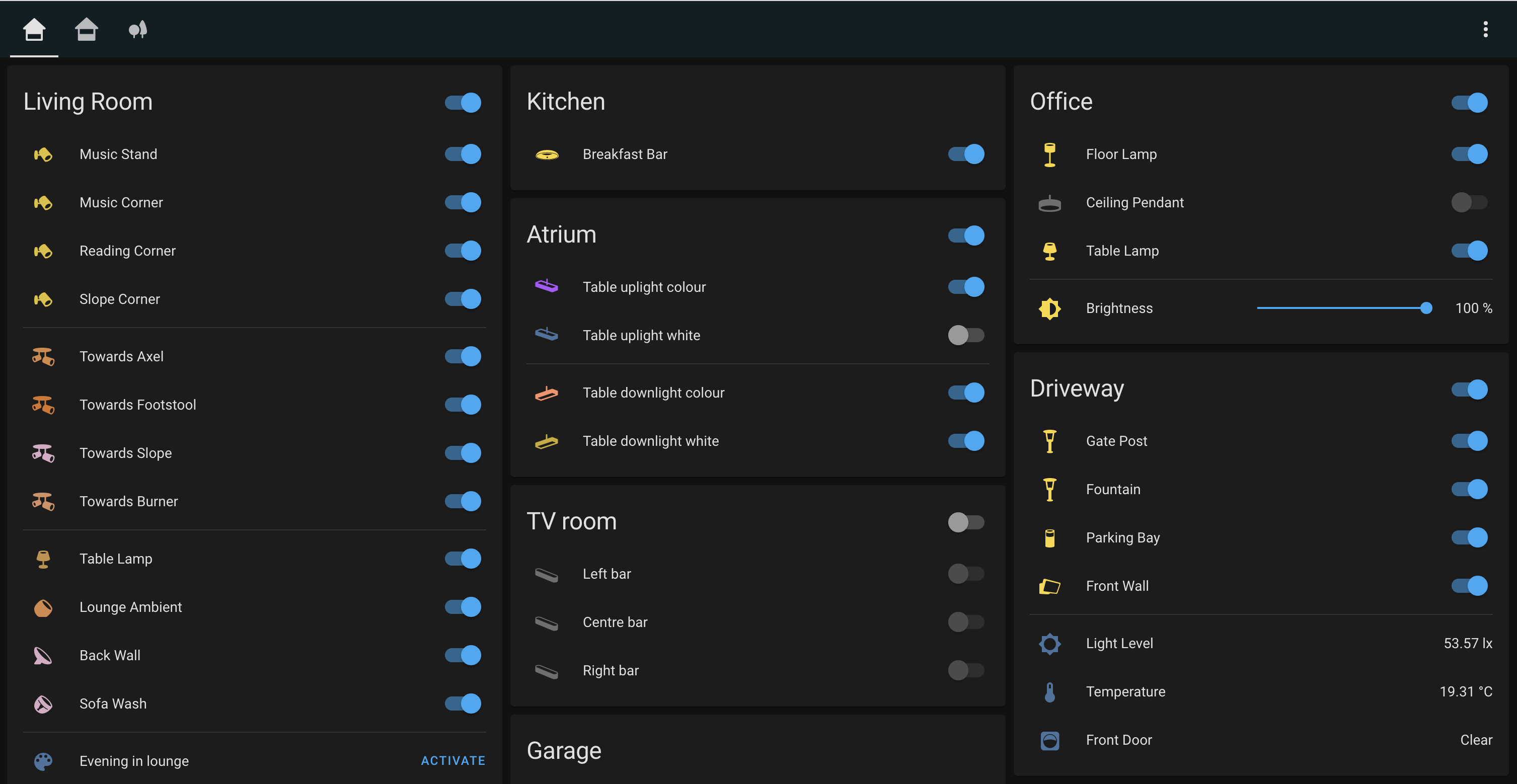
Hass Hue Icons uses the new 'keywords' functionality to help you find specific fixtures. Try searching for 'pendant' or 'switch'.
There's a thread over at the home assistant forums that tracks this repo.
If you cannot see the new icons, or you get an empty box where you're expecting an icon, flush your network cache.
I periodically update hass-hue-icons-ttf.zip file in a zip at the original repo. Thanks to @nagyrobi for the suggestion.
- @hulkhaugen and @thomasloven for the techniques. Be sure to check out thomas' amazing list of integrations
- @ludeeus for the installation guidance.
- Everyone who has helped make this repo so broad by raising an Icon Request.
www.unikkontakt.dk has been given rights to use the custom hass-hue icons in their icon database, allowing you to create unique, beautiful and functional overprinted switches that reflect your smart home.
Ønsker du at bruge disse ikoner på dine fysiske kontakter og trykknapper? www.unikkontakt.dk er blevet tildelt rettigheder til at bruge custom hass-hue ikonerne i deres ikon-database, som gør det muligt for dig at designe unikke, flotte og funktionelle kontakter med printede ikoner, som matcher dit smart home.
This work is licensed under a Creative Commons Attribution-NonCommercial-ShareAlike 4.0 International License. I do this for fun, without charge, and to give back to the community. You may remix, tweak, and build upon this work non-commercially, as long as you credit the original author, provide a link to the license, and indicate if any changes were made. You may do so in any reasonable manner, but not in any way that suggests the licensor endorses you or your use unless agreed. If you remix, transform or build upon the material, you must distribute your contributions under the same or compatible license as the original.