





mcpc is a command-line client for the Model Context Protocol (MCP)
that maps MCP operations to intuitive commands for interactive shell use, scripting, and AI agents.
mcpc is your new Swiss Army knife for MCP. It's great for manual inspection and debugging of MCP servers,
as well as for agents to leverage all modern MCP capabilities through the most universal
coding interface: the UNIX shell.
Key features:
- 🔧 Full MCP support - HTTP/stdio transports, instructions, tools, async tasks, resources, prompts, ...
- 🔄 Persistent sessions - Keep multiple stateful connections alive simultaneously.
- 🗺️ Progressive tool discovery - Find relevant MCP tools on the fly to save tokens and increase accuracy.
- 🔌 Code mode - JSON output composes with
jq,xargs, and shell pipelines for MCP workflows as shell scripts. - 🔒 Secure - Full OAuth 2.1 support with CMID and DCR, uses OS keychain for credentials storage.
- 🤖 AI sandboxing - Proxy MCP server connections to protect credentials from AI-generated code.
- 🪶 Lightweight - Minimal dependencies, works on Mac/Win/Linux, doesn't use LLMs on its own.
- 💸 Agentic payments - Experimental support for the x402 protocol on Base.
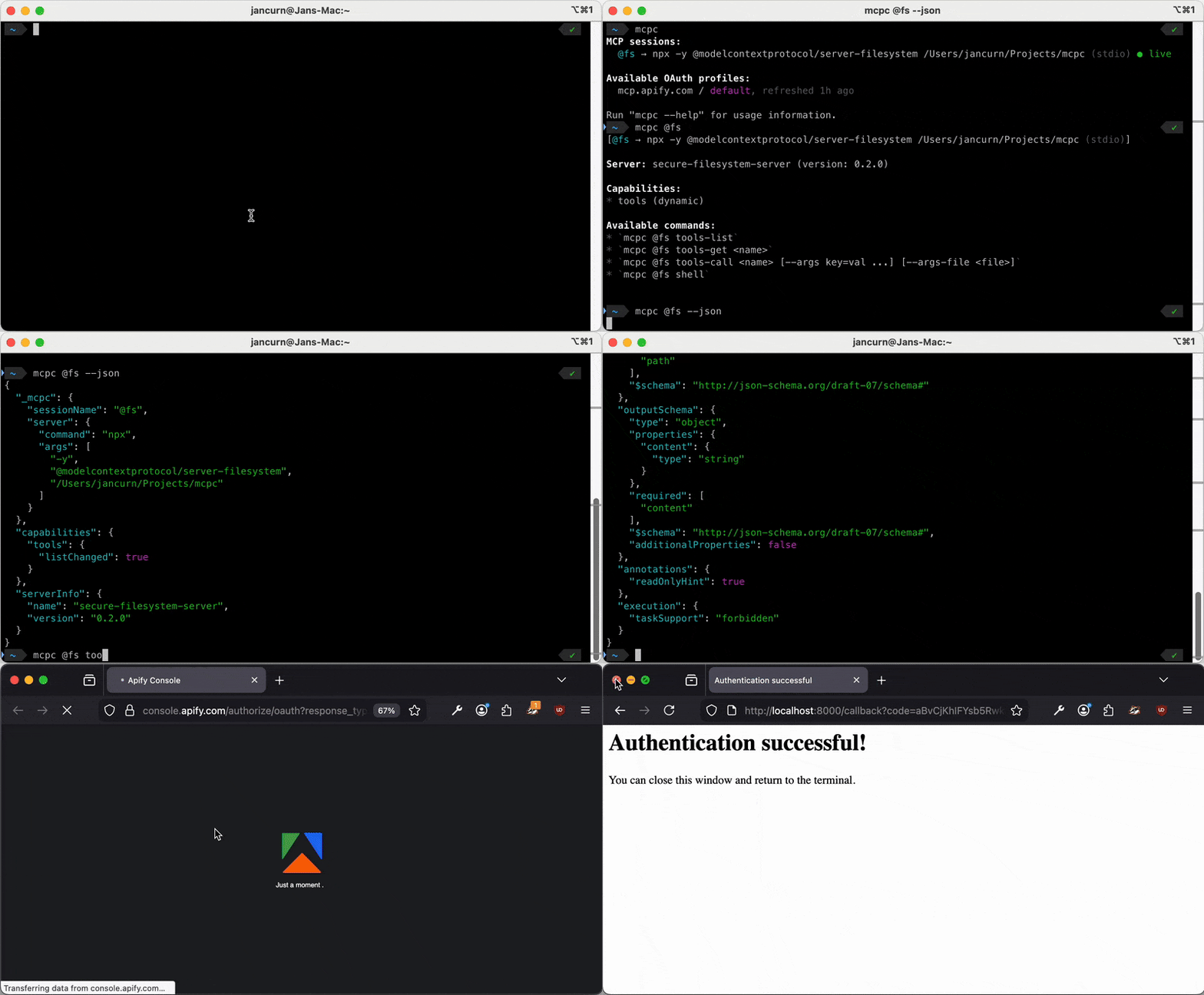
- Motivation
- Install
- Quickstart
- Usage
- Sessions
- Authentication
- MCP proxy
- AI agents
- Agentic payments (x402)
- MCP support
- Configuration
- Security
- Errors
- Development
- Related work
- License
Many AI agents misuse MCP. They treat tools as prompt-time function calls, repeatedly injecting tool definitions and results into the context. Tokens get wasted, context rots, the agent gets slower and less reliable, and popular conclusion that: "MCP sucks, CLIs are better".
mcpc challenges that narrative. It maps every MCP operation to an intuitive CLI command that
agents pick up from --help alone. Any agent with shell access gets full MCP support without
wiring up dozens of MCP functions. Just one Bash() tool, and mcpc handles the rest:
  ┌──────────┐         Bash()         ┌──────────┐           MCP          ┌────────────┐
  │ AI agent │  ────────────────────► │   mcpc   │  ────────────────────► │ MCP server │
  └──────────┘                        └──────────┘    Sessions, OAuth,    └────────────┘
                                                      Tools, Resources,
                                                      Prompts, Tasks,
                                                      x402, ...
CLI is the perfect local interface between agents and MCP, while MCP remains the standard remote interface for server discovery, authentication, payments, and access control. The two aren't exclusive – they're complementary.
As a bonus, the same mcpc configuration, OAuth profiles, and live sessions can be shared across
many AI agents on the same machine. Authenticate once, reuse everywhere.
npm install -g @apify/mcpc

# Or with Bun
bun install -g @apify/mcpc
Linux: credentials use the OS keychain via the Secret Service API.
GNOME/KDE desktops work out of the box. On headless/CI systems, mcpc falls back to a
file-based store (~/.mcpc/credentials, mode 0600).
To force the keychain on headless systems, install libsecret + gnome-keyring
(via apt-get, dnf, or pacman) and run:
dbus-run-session -- bash -c "echo -n 'password' | gnome-keyring-daemon --unlock && mcpc ..."# List all active sessions and saved authentication profiles
mcpc
# Login to remote MCP server and save OAuth credentials for future use
mcpc login mcp.apify.com
# Create a persistent session and interact with it
mcpc connect mcp.apify.com @test
mcpc @test # show server info
mcpc @test tools-list
mcpc @test tools-call search-actors keywords:="website crawler"
mcpc @test shell
# Use JSON mode for scripting
mcpc --json @test tools-list
# Use a local MCP server package (stdio) referenced from config file
mcpc connect ./.vscode/mcp.json:filesystem @fs
mcpc @fs tools-listUsage: mcpc [<@session>] [<command>] [options]
Universal command-line client for the Model Context Protocol (MCP).
Commands:
connect <server> [@session] Connect to an MCP server and start a new named @session
close <@session> Close a session
restart <@session> Restart a session (losing all state)
shell <@session> Open interactive shell for a session
login <server> Interactively login to a server using OAuth and save profile
logout <server> Delete an OAuth profile for a server
clean [resources...] Clean up mcpc data (sessions, profiles, logs, all)
grep <pattern> Search tools and instructions across all active sessions
x402 [subcommand] [args...] Configure an x402 payment wallet (EXPERIMENTAL)
help [command] [subcommand] Show help for a specific command
Options:
--json Output in JSON format for scripting
--verbose Enable debug logging
--profile <name> OAuth profile for the server ("default" if not provided)
--timeout <seconds> Request timeout in seconds (default: 300)
--max-chars <n> Truncate output to n characters (ignored in --json mode)
--insecure Skip TLS certificate verification (for self-signed certs)
-v, --version Output the version number
-h, --help Display help
MCP session commands (after connecting):
<@session> Show MCP server info, capabilities, and tools overview
<@session> grep <pattern> Search tools and instructions
<@session> tools-list List all server tools
<@session> tools-get <name> Get tool details and schema
<@session> tools-call <name> [arg:=val ... | <json> | <stdin]
<@session> prompts-list
<@session> prompts-get <name> [arg:=val ... | <json> | <stdin]
<@session> resources-list
<@session> resources-read <uri>
<@session> resources-subscribe <uri>
<@session> resources-unsubscribe <uri>
<@session> resources-templates-list
<@session> tasks-list
<@session> tasks-get <taskId>
<@session> tasks-result <taskId>
<@session> tasks-cancel <taskId>
<@session> logging-set-level <level>
<@session> ping
Run "mcpc" without arguments to show active sessions and OAuth profiles.
Run "mcpc --json" to get the same data as `{ sessions: [...], profiles: [...] }`.
With no arguments, mcpc lists all active sessions and saved OAuth profiles:
# List all sessions and OAuth profiles (also in JSON mode)
mcpc
mcpc --json

# Show command help or version
mcpc --help
mcpc --version

# Clean stale sessions and old log files
mcpc cleanThe connect, login, and logout commands accept a <server> argument in these formats:
- Remote URL (e.g.
mcp.apify.comorhttps://mcp.apify.com) — scheme defaults tohttps:// - Config file entry (e.g.
~/.vscode/mcp.json:filesystem) —file:entry-namesyntax
All MCP commands go through a named session created with connect:
# Connect to a remote server and create a session
mcpc connect mcp.apify.com @apify
mcpc @apify tools-list
mcpc @apify tools-call search-apify-docs query:="What are Actors?"

# Connect to a local server via config file entry
mcpc connect ~/.vscode/mcp.json:filesystem @fs
mcpc @fs tools-list
mcpc @fs tools-call list_directory path:=/
See MCP feature support for details about all supported MCP features and commands.
The tools-call and prompts-get commands accept arguments as positional parameters after the tool/prompt name:
# Key:=value pairs (auto-parsed: tries JSON, falls back to string)
mcpc @session tools-call <tool-name> greeting:="hello world" count:=10 enabled:=true
mcpc @session tools-call <tool-name> config:='{"key":"value"}' items:='[1,2,3]'

# Force string type with JSON quotes
mcpc @session tools-call <tool-name> id:='"123"' flag:='"true"'

# Inline JSON object (if first arg starts with { or [)
mcpc @session tools-call <tool-name> '{"greeting":"hello world","count":10}'

# Read from stdin (automatic when no positional args and input is piped)
echo '{"greeting":"hello","count":10}' | mcpc @session tools-call <tool-name>
cat args.json | mcpc @session tools-call <tool-name>
Auto-parsing rules for key:=value: valid JSON keeps its type
(count:=10 → number, enabled:=true → boolean, cfg:='{"k":"v"}' → object); anything
else is a string (greeting:=hello → "hello"). Force a string literal with JSON quotes:
id:='"123"'. Inline JSON is detected when the first arg starts with { or [. Stdin is
read when no positional args are given and input is piped.
Pitfalls: no spaces around := (use query:=hello world, not query := ...); quote
the whole argument when it contains shell expansions ("query:=${VAR}"). For complex
inputs, prefer piping JSON via stdin.
mcpc provides an interactive shell for discovery and testing of MCP servers.
mcpc @apify shellShell commands: help, exit/quit/Ctrl+D, Ctrl+C to cancel.
Arrow keys navigate history (saved to ~/.mcpc/history).
mcpc grep searches tools, resources, and prompts across all active sessions or within a single session:
# Search tools and server instructions in all active sessions
mcpc grep "search"

# Search within a single session
mcpc @apify grep "actor"

# Search resources and prompts instead of the default tools and instructions
mcpc grep "config" --resources --prompts

# Regex search
mcpc grep "search|find" -E

# Case-sensitive search (default is case-insensitive)
mcpc grep "Search" --case-sensitive

# Limit results
mcpc grep "e" -m 5

# JSON output for scripting
mcpc grep "actor" --json
By default, grep searches only tools. Use --resources or --prompts to search those types
(combine with --tools to include tools too). Sessions that are crashed or unavailable are shown
with their status rather than silently skipped.
The grep command is useful for dynamic tool discovery,
also called Tool search tool by Anthropic
or Dynamic context discovery by Cursor.
Rather than loading all tools into AI agent's context, the agent can use grep to discover the right tool
for the job, and only load the relevant tools into the context when needed to reduce token usage and improve accuracy.
By default, mcpc prints output in Markdown-ish text format with colors, making it easy to read by both humans and AIs.
With --json option, mcpc always emits only a single JSON object (or array), to enable scripting.
For all MCP commands, the returned objects are always consistent with the
MCP specification.
On success, the JSON object is printed to stdout, on error to stderr.
Note that --json is not available for shell, login, and mcpc --help commands.
MCP is a stateful protocol:
clients and servers negotiate protocol version and capabilities, and then communicate within a persistent session.
To support these sessions, mcpc can start a lightweight bridge process that maintains the connection and state.
This is more efficient than forcing every MCP command to reconnect and reinitialize,
and enables long-term stateful sessions.
The sessions are given names prefixed with @ (e.g. @apify),
which then serve as unique reference in commands.
# Create a persistent session
mcpc connect mcp.apify.com @apify

# List all sessions and OAuth profiles
mcpc

# Run MCP commands in the session
mcpc @apify tools-list
mcpc @apify shell

# Restart the session (kills and restarts the bridge process)
mcpc @apify restart    # or: mcpc restart @apify

# Close the session, terminates bridge process
mcpc @apify close      # or: mcpc close @apify

# ...now session name "@apify" is forgotten and available for future use
Session metadata is saved in ~/.mcpc/sessions.json, authentication tokens
in the OS keychain. The bridge process keeps the session alive with periodic pings
and auto-reconnects on network failures or its own crashes (10s cooldown on failed retries).
Session states:
| State | Meaning |
|---|---|
🟢 live |
Bridge process running and server responding |
🟡 connecting |
Initial bridge startup in progress (mcpc connect) |
🟡 reconnecting |
Bridge crashed or lost auth; auto-reconnecting in the background |
🟡 disconnected |
Bridge process running but server unreachable; auto-recovers when server responds |
🟡 crashed |
Bridge process crashed or was killed; auto-reconnects in the background |
🔴 unauthorized |
Server rejected authentication (401/403) or token refresh failed; re-run login then restart |
🔴 expired |
Server rejected session ID (404); requires restart |
mcpc never removes sessions automatically — failed ones stay flagged with a recovery hint
in the error message. Use mcpc @apify restart to kill the bridge and open a fresh
MCP-Session-Id, or mcpc @apify close to remove the session entirely.
mcpc supports all standard MCP authorization methods.
For local servers (stdio) or remote servers (Streamable HTTP) which do not require credentials,
mcpc can be used without authentication:
mcpc connect mcp.apify.com @test
mcpc @test tools-listFor remote servers that require a Bearer token (but not OAuth), use the --header flag to pass the token.
All headers are stored securely in the OS keychain for the session, but they are not saved as reusable
OAuth profiles. This means --header needs to be provided whenever
running a one-shot command or connecting new session.
# Create session with Bearer token (token saved to keychain for this session only)
mcpc connect https://mcp.apify.com @apify --header "Authorization: Bearer ${APIFY_TOKEN}"

# Use the session (Bearer token is loaded from keychain automatically)
mcpc @apify tools-listFor OAuth-enabled remote MCP servers, mcpc implements the full OAuth 2.1 flow with PKCE as
mandated by the MCP authorization spec:
WWW-Authenticate 401 challenges, Protected Resource Metadata and authorization server metadata
discovery, all three client registration approaches,
resource indicators (RFC 8707), and automatic
refresh-token rotation.
The OAuth authentication always needs to be initiated by the user calling the login command,
which opens a web browser with login screen. mcpc never opens the web browser on its own.
The OAuth credentials to specific servers are securely stored as authentication profiles - reusable credentials that allow you to:
- Authenticate once, use credentials across multiple commands or sessions
- Use different accounts (profiles) with the same server
- Manage credentials independently from sessions
Key concepts:
- Authentication profile: Named set of OAuth credentials for a specific server (stored in
~/.mcpc/profiles.json+ OS keychain) - Session: Active connection to a server that may reference an authentication profile (stored in
~/.mcpc/sessions.json) - Default profile: When
--profileis not specified,mcpcuses the authentication profile nameddefault
Example:
# Login to server and save 'default' authentication profile for future use
mcpc login mcp.apify.com

# Use named authentication profile instead of 'default'
mcpc login mcp.apify.com --profile work

# Create two sessions using the two different credentials
mcpc connect mcp.apify.com @apify-personal
mcpc connect mcp.apify.com @apify-work --profile work

# Both sessions now work independently
mcpc @apify-personal tools-list  # Uses personal account
mcpc @apify-work tools-list      # Uses work account

# Re-authenticate existing profile (e.g., to refresh or change scopes)
mcpc login mcp.apify.com --profile work

# Delete "default" and "work" authentication profiles
mcpc logout mcp.apify.com
mcpc logout mcp.apify.com --profile workWhen logging in, mcpc supports all three OAuth client registration approaches defined in the
MCP authorization spec,
picking the one the authorization server advertises in its OAuth metadata:
| Approach | mcpc login flags |
|---|---|
| Pre-registration | --client-id (and optional --client-secret) |
| Client ID Metadata Documents (CIMD) | default (or --client-metadata-url <url>) |
| Dynamic Client Registration (DCR) | fallback (or force with --no-client-metadata-url) |
mcpc ships with a hosted Client ID Metadata Document
so every installation presents the same client identity to CIMD-capable authorization servers.
When the authorization server advertises client_id_metadata_document_supported: true, the CIMD
URL is used as the client_id; otherwise mcpc falls back to Dynamic Client Registration.
# Default: mcpc's hosted CIMD is used automatically (no flags needed).
mcpc login mcp.apify.com

# Pre-registered OAuth client (public or confidential) — skips CIMD.
mcpc login mcp.example.com --client-id <id> [--client-secret <secret>]

# Custom CIMD: override the default with your own hosted document.
mcpc login mcp.example.com --client-metadata-url https://example.com/my-client.json

# Disable CIMD: force Dynamic Client Registration even if the server supports CIMD.
mcpc login mcp.example.com --no-client-metadata-url
See the MCP authorization spec for details on each approach and the format of Client ID Metadata Documents.
When connecting, mcpc picks one auth source based on the flags you pass — explicit flags
always win over stored profiles, and credentials are never silently downgraded. If a profile
is missing, expired, or invalid, mcpc fails with an error that includes the right
mcpc login command to recover.
| Flag | Behavior |
|---|---|
--header "Authorization: ..." |
Use explicit header; skip OAuth auto-detection. Cannot combine with --profile. |
--profile <name> |
Require the named profile to exist. |
--no-profile |
Connect anonymously even if a default profile exists. |
--x402 |
Skip OAuth auto-detection; use x402 payments instead. Combine with --profile to use both. |
| (none) | Use default profile if it exists; otherwise connect anonymously. |
Config file headers (from --config) apply to servers loaded from that file.
# Default: 'default' profile if it exists, else anonymous
mcpc connect mcp.apify.com @apify-personal

# Specific profile (fails if missing)
mcpc connect mcp.apify.com @apify-work --profile work

# Explicit bearer token (no profile)
mcpc connect mcp.apify.com @apify --header "Authorization: Bearer ${APIFY_TOKEN}"

# Skip default profile, connect anonymously
mcpc connect mcp.apify.com @apify-anon --no-profile

# x402 micropayments instead of OAuth
mcpc connect mcp.apify.com @apify --x402For stronger isolation, mcpc can expose an MCP session under a new local proxy MCP server using the --proxy option.
The proxy forwards all MCP requests to the upstream server but never exposes the original authentication tokens to the client.
This is useful when you want to give someone or something MCP access without revealing your credentials.
See also AI sandboxes.
# Human authenticates to a remote server
mcpc login mcp.apify.com

# Create authenticated session with proxy server on localhost:8080
mcpc connect mcp.apify.com @open-relay --proxy 8080

# Now any MCP client can connect to proxy like to a regular MCP server
# The client has NO access to the original OAuth tokens or HTTP headers
# Note: localhost/127.0.0.1 URLs default to http:// (no scheme needed)
mcpc connect localhost:8080 @sandboxed
mcpc @sandboxed tools-call search-actors keywords:="web scraper"

# Optionally protect proxy with bearer token for better security (stored in OS keychain)
mcpc connect mcp.apify.com @secure-relay --proxy 8081 --proxy-bearer-token secret123
# To use the proxy, caller needs to pass the bearer token in HTTP header
mcpc connect localhost:8081 @sandboxed2 --header "Authorization: Bearer secret123"
Proxy options for connect command:
| Option | Description |
|---|---|
--proxy [host:]port |
Start proxy MCP server. Default host: 127.0.0.1 (localhost only) |
--proxy-bearer-token <token> |
Requires Authorization: Bearer <token> header to access the proxy MCP server |
Security model:
- Localhost by default:
--proxy 8080binds to127.0.0.1only, preventing network access - Tokens hidden: Original OAuth tokens and/or HTTP headers are never exposed to proxy clients
- Optional auth: Use
--proxy-bearer-tokento add another layer of security - Explicit opt-in: Proxy only starts when
--proxyflag is provided
Binding to network interfaces:
# Localhost only (default, most secure)
mcpc connect mcp.apify.com @relay --proxy 8080

# Bind to all interfaces (allows network access - use with caution!)
mcpc connect mcp.apify.com @relay --proxy 0.0.0.0:8080

# Bind to specific interface
mcpc connect mcp.apify.com @relay --proxy 192.168.1.100:8080
When listing sessions, proxy info is displayed prominently:
mcpc
# @relay → https://mcp.apify.com (HTTP, OAuth: default) [proxy: 127.0.0.1:8080]mcpc is designed for CLI-enabled AI agents like Claude Code or Codex CLI, supporting both
interactive tool calling and code mode.
Tool calling mode - Agents call mcpc commands to dynamically explore and interact with MCP servers,
using the default text output. This is similar to how MCP connectors in ChatGPT or Claude work,
but CLI gives you more flexibility and longer operation timeouts.
# Discover available tools
mcpc @server tools-list

# Get tool schema
mcpc @server tools-get search

# Call a tool
mcpc @server tools-call search query:="hello world"
Code mode - Once agents understand the server's capabilities, they can write shell
scripts that compose multiple mcpc commands with --json output — see
Scripting below. This can be
more accurate and use
fewer tokens than tool calling for complex workflows. Pair with
schema validation to catch breaking changes early.
Use --json for machine-readable output (stdout on success, stderr on error).
JSON output of all MCP commands follows the MCP specification strictly.
# Chain tools across sessions
mcpc --json @apify tools-call search-actors keywords:="scraper" \
  | jq '.content[0].text | fromjson | .items[0].id' \
  | xargs -I {} mcpc @apify tools-call get-actor actorId:="{}"

# Batch operations
for tool in $(mcpc --json @server tools-list | jq -r '.[].name'); do
  mcpc --json @server tools-get "$tool" > "schemas/$tool.json"
done
For a complete example script, see docs/examples/company-lookup.sh.
The tools-get and tools-call commands support --schema to validate a tool's schema against an expected snapshot. This helps detect breaking changes early in scripts and CI:
# Save expected schema
mcpc --json @apify tools-get search-actors > expected.json

# Validate without calling (read-only check)
mcpc @apify tools-get search-actors --schema expected.json

# Validate before calling (fails if schema changed incompatibly)
mcpc @apify tools-call search-actors --schema expected.json keywords:="test"
Available schema validation modes (--schema-mode):
compatible(default)- Input schema: new optional fields OK, required fields must have the same type.
- Output schema: new fields OK, removed required fields cause error.
strict- Both input and output schemas must match exactly, including all fields, types, and descriptionsignore- Skip validation completely (YOLO)
To ensure AI coding agents don't perform destructive actions or leak credentials, it's always a good idea to run them in a code sandbox with limited access to your resources.
The proxy MCP server feature provides a security boundary for AI agents:
- Human creates authentication profile:
mcpc login mcp.apify.com --profile ai-access - Human creates session:
mcpc connect mcp.apify.com @ai-sandbox --profile ai-access --proxy 8080 - AI runs inside a sandbox: If sandbox has access limited to
localhost:8080, it can only interact with the MCP server through the@ai-sandboxsession, without access to the original OAuth credentials, HTTP headers, ormcpcconfiguration.
This ensures AI agents operate only with pre-authorized credentials, preventing unauthorized access to MCP servers. The human controls which servers the AI can access and with what permissions (OAuth scopes).
IMPORTANT: Beware that MCP proxy will not make an insecure MCP server secure. Local stdio servers will still have access to your local system, and HTTP servers to provided auth credentials, and both can easily perform destructive actions or leak credentials on their own, or let MCP clients do such actions. Always use only trusted local and remote MCP servers and limit their access to the necessary minimum.
To help Claude Code use mcpc, you can install this Claude skill:
⚠️ Experimental. This feature is under active development and may change.
mcpc has experimental support for the x402 payment protocol,
which enables AI agents to autonomously pay for MCP tool calls using cryptocurrency.
When an MCP server charges for a tool call (HTTP 402), mcpc automatically signs a USDC payment
on the Base blockchain and retries the request — no human intervention needed.
This is entirely opt-in: existing functionality is unaffected unless you explicitly pass the --x402 flag.
- Server returns HTTP 402 with a
PAYMENT-REQUIREDheader describing the price and payment details. mcpcparses the header, signs an EIP-3009TransferWithAuthorizationusing your local wallet.mcpcretries the request with aPAYMENT-SIGNATUREheader containing the signed payment.- The server verifies the signature and fulfills the request.
For tools that advertise pricing in their _meta.x402 metadata, mcpc can proactively sign payments
on the first request, avoiding the 402 round-trip entirely.
mcpc stores a single wallet in ~/.mcpc/wallets.json (file permissions 0600).
You need to create or import a wallet before using x402 payments.
# Create a new wallet (generates a random private key)
mcpc x402 init

# Or import an existing wallet from a private key
mcpc x402 import <private-key>

# Show wallet address and creation date
mcpc x402 info

# Remove the wallet
mcpc x402 remove
After creating a wallet, fund it with USDC on Base (mainnet or Sepolia testnet) to enable payments.
You can manually sign a payment from a server's PAYMENT-REQUIRED header using x402 sign.
This is useful for pre-signing payments or integrating with tools outside of mcpc.
# Sign a payment using the base64-encoded PAYMENT-REQUIRED header
mcpc x402 sign <base64-payment-required>

# Override the amount (in USD, e.g. 2.50 = $2.50)
mcpc x402 sign <base64-payment-required> --amount 2.50

# Override the expiry (in seconds from now)
mcpc x402 sign <base64-payment-required> --expiry 7200

# Combine overrides and use JSON output
mcpc x402 sign <base64-payment-required> --amount 1.00 --expiry 3600 --json
Options:
| Option | Description |
|---|---|
--amount <usd> |
Override the payment amount in USD (e.g. 0.50 for $0.50) |
--expiry <seconds> |
Override the payment expiry in seconds from now (e.g. 3600) |
The command outputs the signed PAYMENT-SIGNATURE header value and an MCP config snippet
that can be used directly with other MCP clients.
Pass the --x402 flag when connecting to a session or running direct commands:
# Create a session with x402 payment support
mcpc connect mcp.apify.com @apify --x402

# The session now automatically handles 402 responses
mcpc @apify tools-call expensive-tool query:="hello"

# Restart a session with x402 enabled
mcpc @apify restart --x402
When --x402 is active, a fetch middleware wraps all HTTP requests to the MCP server.
If any request returns HTTP 402, the middleware transparently signs and retries.
| Network | Status |
|---|---|
| Base Mainnet | ✅ Supported |
| Base Sepolia testnet | ✅ Supported |
mcpc is built on the official MCP SDK for TypeScript and supports most MCP protocol features.
- stdio: Direct bidirectional JSON-RPC communication over stdio server from the config file.
- Streamable HTTP: Fully supported.
- HTTP with SSE (deprecated): Legacy mode, not supported.
The bridge process manages the full MCP session lifecycle:
- Performs initialization handshake (
initialize→initialized) - Negotiates protocol version and capabilities
- Fetches server-provided
instructions - Maintains persistent HTTP connections with bidirectional streaming, or stdio bidirectional pipe to subprocess
- Handles
MCP-Protocol-VersionandMCP-Session-Idheaders automatically - Handles multiple concurrent requests
- Recovers transparently from network disconnections and bridge process crashes
| Feature | Status |
|---|---|
| 📖 Instructions | ✅ Supported |
| 🔧 Tools | ✅ Supported |
| 💬 Prompts | ✅ Supported |
| 📦 Resources | ✅ Supported |
| 📝 Logging | ✅ Supported |
| 🔔 Notifications | ✅ Supported |
| 📄 Pagination | ✅ Supported |
| 🏓 Ping | ✅ Supported |
| ⏳ Async tasks | ✅ Supported |
| 📁 Roots | 🚧 Planned |
| ❓ Elicitation | 🚧 Planned |
| 🔤 Completion | 🚧 Planned |
| 🤖 Sampling | ❌ Not applicable (no LLM access) |
MCP servers can provide instructions describing their capabilities and usage. These are displayed when you connect to a server or run the help command:
# Show server info, capabilities, and instructions (both commands behave the same)
mcpc @apify
mcpc @apify help

# JSON mode
mcpc @apify --json
In JSON mode, the resulting object adheres
to InitializeResult object schema,
and includes the _mcpc field with relevant server/session metadata.
{
  "_mcpc": {
    "sessionName": "@apify",
    "profileName": "default",
    "server": {
      "url": "https://mcp.apify.com"
    },
    "notifications": {
      "tools": { "listChangedAt": "2026-01-01T00:42:58.049Z" }
    }
  },
  "protocolVersion": "2025-06-18",
  "capabilities": {
    "logging": {},
    "prompts": {},
    "resources": {},
    "tools": { "listChanged": true }
  },
  "serverInfo": {
    "name": "apify-mcp-server",
    "version": "1.0.0"
  },
  "instructions": "Apify is the largest marketplace of tools for web scraping..."
}List, inspect, and call server-provided tools:
# List available tools (only names and attributes - useful for dynamic discovery)
mcpc @apify tools-list

# List available tools (full details including input/output args and description)
mcpc @apify tools-list --full

# Get tool schema with full details
mcpc @apify tools-get search-actors

# Call a tool with arguments
mcpc @apify tools-call search-actors keywords:="web scraper"

# Pass complex JSON arguments
mcpc @apify tools-call create-task '{"name": "my-task", "options": {"memory": 1024}}'

# Load arguments from stdin
cat data.json | mcpc @apify tools-call bulk-importList and retrieve server-defined prompt templates:
# List available prompts
mcpc @apify prompts-list

# Get a prompt with arguments
mcpc @apify prompts-get analyze-website url:=https://example.comAccess server-provided data sources by URI:
# List available resources
mcpc @apify resources-list

# Read a resource
mcpc @apify resources-read "file:///config.json"

# Subscribe to resource changes (in shell mode)
mcpc @apify resources-subscribe "https://api.example.com/data"

# List resource templates
mcpc @apify resources-templates-listWhen connected via a session, mcpc automatically handles list_changed
notifications for tools, resources, and prompts.
The bridge process tracks when each notification type was last received.
In shell mode, notifications are displayed in real-time.
The timestamps are available in JSON output of mcpc @session --json under the _mcpc.notifications
field - see Server instructions.
mcpc supports server logging settings (logging/setLevel) and log messages (notifications/message).
Log messages are printed to bridge log or stderr, subject to verbosity level.
You can instruct MCP servers to adjust their logging level
using the logging-set-level command:
# Set server log level to debug for detailed output
mcpc @apify logging-set-level debug

# Reduce server logging to only errors
mcpc @apify logging-set-level error
Note that this sets the logging level on the server side. The actual log output depends on the server's implementation.
MCP servers may return paginated results for list operations
(tools-list, resources-list, prompts-list, resources-templates-list).
mcpc handles this automatically and always fetches all available pages using the nextCursor
token - you always get the complete list without manual iteration. Keep it simple.
Sessions automatically send periodic pings to keep the connection alive and detect failures early. Send a ping to check if a server connection is alive:
# Ping a session and measure round-trip time
mcpc @apify ping
mcpc @apify ping --jsonMCP servers can execute tools as async tasks
that run in the background and report progress. mcpc supports the full task lifecycle:
# Call a tool as a task (waits for completion, shows progress spinner)
mcpc @apify tools-call long-running-job input:="data" --task

# Start a task and return immediately with the task ID
mcpc @apify tools-call long-running-job input:="data" --detach

# List active tasks
mcpc @apify tasks-list

# Check task status
mcpc @apify tasks-get <taskId>

# Get the task result (blocks until the task reaches a terminal state)
mcpc @apify tasks-result <taskId>

# Cancel a running task
mcpc @apify tasks-cancel <taskId>
With --task, the CLI shows a progress spinner with elapsed time, server status messages,
and progress notifications. Press ESC during execution to detach and get the task ID
for later retrieval. With --detach, the task starts and returns the task ID immediately.
Use tasks-result <taskId> to fetch the final CallToolResult payload once the task
completes.
tools-list and tools-get show task support annotations per tool:
[task:optional], [task:required], or [task:forbidden].
You can configure mcpc using a config file, environment variables, or command-line flags.
Precedence (highest to lowest):
- Command-line flags (including
--configoption) - Environment variables
- Built-in defaults
mcpc supports the "standard"
MCP server JSON config file, compatible with Claude Desktop, VS Code, and other MCP clients.
Use the file:entry syntax to reference a server from a config file:
# Open a session to a server specified in the Visual Studio Code config
mcpc connect .vscode/mcp.json:apify @my-apify
mcpc @my-apify tools-list
Example MCP config JSON file:
{
  "mcpServers": {
    "apify": {
      "url": "https://mcp.apify.com",
      "headers": {
        "Authorization": "Bearer ${APIFY_TOKEN}"
      }
    },
    "filesystem": {
      "command": "npx",
      "args": ["-y", "@modelcontextprotocol/server-filesystem", "/tmp"],
      "env": {
        "DEBUG": "mcp:*"
      }
    },
    "local-package": {
      "command": "node",
      "args": ["/path/to/server.js"]
    }
  }
}
Server configuration properties:
For Streamable HTTP servers:
url(required) - MCP server endpoint URLheaders(optional) - HTTP headers to include with requeststimeout(optional) - Request timeout in seconds
For stdio servers:
command(required) - Command to execute (e.g.,node,npx,python)args(optional) - Array of command argumentsenv(optional) - Environment variables for the process
Note: Stdio servers inherit only a minimal env whitelist from the shell (
PATH,HOME,SHELL, …). Other vars —NODE_EXTRA_CA_CERTS,HTTPS_PROXY,SSL_CERT_FILE, etc. — must be forwarded explicitly via theenvblock using${VAR_NAME}. Anything the server writes to stderr is captured to~/.mcpc/logs/bridge-<session>.logwith a[server stderr]prefix, and the tail is appended to the error message ifmcpc connectfails, so you can see why a stdio server failed to start.
Environment variable substitution:
Config files support environment variable substitution using ${VAR_NAME} syntax:
{
  "mcpServers": {
    "secure-server": {
      "url": "https://mcp.apify.com",
      "headers": {
        "Authorization": "Bearer ${APIFY_TOKEN}",
        "X-User-ID": "${USER_ID}"
      }
    }
  }
}mcpc saves its state to ~/.mcpc/ directory (unless overridden by MCPC_HOME_DIR), in the following files:
~/.mcpc/sessions.json- Active sessions with references to authentication profiles (file-locked for concurrent access)~/.mcpc/profiles.json- Authentication profiles (OAuth metadata, scopes, expiry)~/.mcpc/wallets.json- x402 wallet data (file permissions0600)~/.mcpc/bridges/- Unix domain socket files for each bridge process~/.mcpc/logs/bridge-*.log- Log files for each bridge process- OS keychain - Sensitive credentials (OAuth tokens, bearer tokens, client secrets)
MCPC_HOME_DIR- Directory for session and authentication profiles data (default is~/.mcpc)MCPC_VERBOSE- Enable verbose logging (set to1,true, oryes, case-insensitive)MCPC_JSON- Enable JSON output (set to1,true, oryes, case-insensitive)HTTPS_PROXY/https_proxy/HTTP_PROXY/http_proxy- Proxy URL for outbound connections (e.g.http://proxy.example.com:8080);HTTPS_PROXYtakes precedenceNO_PROXY/no_proxy- Comma-separated list of hostnames/IPs to bypass the proxy (e.g.localhost,127.0.0.1)
You can clean up the mcpc state and data using the clean command:
# Safe non-destructive cleanup: remove expired sessions, delete old orphaned logs
mcpc clean

# Clean specific resources
mcpc clean sessions    # Kill bridges, delete all sessions
mcpc clean profiles    # Delete all authentication profiles
mcpc clean logs        # Delete all log files

# Nuclear option: remove everything
mcpc clean all # Delete all sessions, profiles, logs, and socketsmcpc follows MCP security best practices.
MCP enables arbitrary tool execution and data access - treat servers like you treat shells:
- Use least-privilege tokens/headers
- Only use trusted servers!
- Audit tools before running them
| What | How |
|---|---|
| OAuth tokens | Stored in OS keychain, never on disk |
| HTTP headers | Stored in OS keychain per-session |
| Bridge credentials | Passed via Unix socket IPC, kept in memory only |
| Process arguments | No secrets visible in ps aux |
| x402 private key | Stored in wallets.json (0600 permissions) |
| Config files | Contain only metadata, never tokens |
| File permissions | 0600 (user-only) for all config files |
- HTTPS enforced for remote servers (auto-upgraded from HTTP)
- OAuth callback binds to
127.0.0.1only - Credentials never logged, even in verbose mode
See AI sandboxes for details.
mcpc provides clear error messages for common issues:
- Connection failures: Displays transport-level errors with retry suggestions
- Session timeouts: Automatically attempts to reconnect or prompts for session recreation
- Invalid commands: Shows available commands and correct syntax
- Tool execution errors: Returns server error messages with context
- Bridge crashes: Detects and cleans up orphaned processes, offers restart
0- Success1- Client error (invalid arguments, command not found, etc.)2- Server error (tool execution failed, resource not found, etc.)3- Network error (connection failed, timeout, etc.)4- Authentication error (invalid credentials, forbidden, etc.)
To see what's happening, enable detailed logging with --verbose.
mcpc --verbose @apify tools-listThis causes mcpc to print detailed debug messages to stderr.
The background bridge processes log to ~/.mcpc/logs/bridge-@<session>.log.
The main mcpc process doesn't save log files, but supports verbose mode.
mcpc automatically rotates log files: keep last 10MB per session, max 5 files.
"Cannot connect to bridge"
- Bridge may have crashed. Try:
mcpc @<session-name> tools-listto restart the bridge - Check bridge is running:
ps aux | grep -e 'mcpc-bridge' -e '[m]cpc/dist/bridge' - Check socket exists:
ls ~/.mcpc/bridges/
"Session not found"
- List existing sessions:
mcpc - Create new session if expired:
mcpc @<session-name> closeandmcpc connect <server> @<session-name>
"Authentication failed"
- List saved OAuth profiles:
mcpc - Re-authenticate:
mcpc login <server> [--profile <name>] - For bearer tokens: provide
--header "Authorization: Bearer ${TOKEN}"again
The initial version of mcpc was developed and launched by Jan Curn of Apify
with the help of Claude Code, during late nights over Christmas 2025 in North Beach, San Francisco.
See CONTRIBUTING for development setup, architecture overview, and contribution guidelines.
| Tool | Lang | Stars | Contrib / Commits | Active | Tools | Resources | Prompts | Tasks | Code mode | Sessions | OAuth | Stdio | HTTP | Tool search | x402 | LLM |
|---|---|---|---|---|---|---|---|---|---|---|---|---|---|---|---|---|
| apify/mcpc | TS | ~590 | 8 / ~640 | ✅ | ✅ | ✅ | ✅ | ✅ | ✅ | ✅ | ✅ | ✅ | ✅ | ✅ | ✅ | — |
| steipete/mcporter | TS | ~4.4k | 29 / ~650 | ✅ | ✅ | — | — | — | ✅ | ✅ | ✅ | ✅ | ✅ | — | — | — |
| knowsuchagency/mcp2cli | Python | ~2.1k | 11 / ~91 | ✅ | ✅ | ✅ | ✅ | — | ✅ | ✅ | ✅ | ✅ | ✅ | ✅ | — | — |
| IBM/mcp-cli | Python | ~2.0k | 24 / ~790 | ✅ | ✅ | ✅ | ✅ | — | ✅ | ✅ | ✅ | ✅ | ✅ | — | — | ✅ |
| f/mcptools | Go | ~1.6k | 15 / ~175 | ✅ | ✅ | ✅ | — | ✅ | — | — | ✅ | ✅ | — | — | — | |
| philschmid/mcp-cli | TS | ~1.1k | 3 / ~30 | ✅ | — | — | — | ✅ | ✅ | — | ✅ | ✅ | ✅ | — | — | |
| adhikasp/mcp-client-cli | Python | ~670 | 6 / ~110 | ✅ | ✅ | ✅ | — | — | — | — | ✅ | — | — | — | ✅ | |
| thellimist/clihub | Go | ~670 | 1 / ~60 | ✅ | ✅ | — | — | — | — | — | ✅ | ✅ | ✅ | ✅ | — | — |
| wong2/mcp-cli | JS | ~430 | 4 / ~63 | ✅ | ✅ | ✅ | — | — | — | ✅ | — | ✅ | — | — | — | |
| mcpshim/mcpshim | Go | ~58 | 1 / ~13 | ✅ | ✅ | — | — | — | ✅ | ✅ | ✅ | — | ✅ | ✅ | — | — |
| evantahler/mcpx | TS | ~32 | 2 / ~100 | ✅ | ✅ | ✅ | ✅ | ✅ | ✅ | — | ✅ | ✅ | ✅ | ✅ | — | — |
| EstebanForge/mcp-cli-ent | Go | ~15 | 3 / ~46 | ✅ | ✅ | — | — | — | ✅ | ✅ | — | ✅ | ✅ | ✅ | — | — |
Legend: ✅ = supported,
Notes:
- thellimist/clihub is a code generator that compiles MCP tools into standalone CLI binaries, rather than a runtime client (HN discussion).
- knowsuchagency/mcp2cli also supports OpenAPI specs directly and uses a custom TOON encoding for token-efficient tool schemas.
- IBM/mcp-cli and mcp-client-cli integrate an LLM (Ollama, OpenAI, etc.) for chat-style interaction, while the other tools are pure CLI clients.
These resources describe the "code mode" pattern (replacing many tool definitions with search + execute) and dynamic tool discovery:
- Code mode - Anthropic's blog post on code execution with MCP
- Code mode at Cloudflare - Cloudflare's implementation of the code mode pattern
- Advanced tool use - Anthropic's engineering post on tool search
- Claude tool search - Claude platform docs
- Dynamic context discovery - Cursor's approach to dynamic tool discovery
- cmcp (~27 stars, Rust) - MCP proxy aggregating servers behind
search()+execute() - cloudflare-mcp (~124 stars, TS) - MCP server for the Cloudflare API using code mode
- infinite-mcp (Python) - Meta-MCP server that exposes 1000+ pre-indexed MCP servers via semantic search and dynamic tool discovery
- mcpGraph - MCP server that orchestrates directed graphs of MCP tool calls
Apache-2.0 - see LICENSE for details.