                    dP            dP                           dP
                    88            88                           88
88d888b. .d8888b. d8888P .d8888b. 88d888b. .d8888b. .d8888b. d8888P
88'  `88 88ooood8   88   Y8ooooo. 88'  `88 88'  `88 88'  `88   88
88    88 88.  ...   88         88 88    88 88.  .88 88.  .88   88
dP    dP `88888P'   dP   `88888P' dP    dP `88888P' `88888P'   dP
Purpose: Docker and Kubernetes network troubleshooting can become complex. With proper understanding of how Docker and Kubernetes networking works and the right set of tools, you can troubleshoot and resolve these networking issues. The netshoot container has a set of powerful networking troubleshooting tools that can be used to troubleshoot Docker networking issues. Along with these tools come a set of use-cases that show how this container can be used in real-world scenarios.
Network Namespaces: Before starting to use this tool, it's important to go over one key topic: Network Namespaces. Network namespaces provide isolation of the system resources associated with networking. Docker uses network and other type of namespaces (pid,mount,user..etc) to create an isolated environment for each container. Everything from interfaces, routes, and IPs is completely isolated within the network namespace of the container.
Kubernetes also uses network namespaces. Kubelets creates a network namespace per pod where all containers in that pod share that same network namespace (eths,IP, tcp sockets...etc). This is a key difference between Docker containers and Kubernetes pods.
Cool thing about namespaces is that you can switch between them. You can enter a different container's network namespace, perform some troubleshooting on its network's stack with tools that aren't even installed on that container. Additionally, netshoot can be used to troubleshoot the host itself by using the host's network namespace. This allows you to perform any troubleshooting without installing any new packages directly on the host or your application's package.
-
Container's Network Namespace: If you're having networking issues with your application's container, you can launch
netshootwith that container's network namespace like this:$ docker run -it --net container:<container_name> akyumurkov/netshoot -
Host's Network Namespace: If you think the networking issue is on the host itself, you can launch
netshootwith that host's network namespace:$ docker run -it --net host akyumurkov/netshoot -
Network's Network Namespace: If you want to troubleshoot a Docker network, you can enter the network's namespace using
nsenter. This is explained in thensentersection below.
You can easily deploy netshoot using Docker Compose using something like this:
version: "3.6"
services:
  tcpdump:
    image: akyumurkov/netshoot
    depends_on:
      - nginx
    command: tcpdump -i eth0 -w /data/nginx.pcap
    network_mode: service:nginx
    volumes:
      - $PWD/data:/data

  nginx:
    image: nginx:alpine
    ports:
      - 80:80
-
if you want to debug using an ephemeral container in an existing pod:
$ kubectl debug mypod -it --image=akyumurkov/netshoot -
if you want to spin up a throw away pod for debugging.
$ kubectl run tmp-shell --rm -i --tty --image akyumurkov/netshoot -
if you want to spin up a container on the host's network namespace.
$ kubectl run tmp-shell --rm -i --tty --overrides='{"spec": {"hostNetwork": true}}' --image akyumurkov/netshoot -
if you want to use netshoot as a sidecar container to troubleshoot your application container
   $ cat netshoot-sidecar.yaml
   apiVersion: apps/v1
   kind: Deployment
   metadata:
       name: nginx-netshoot
       labels:
           app: nginx-netshoot
   spec:
   replicas: 1
   selector:
       matchLabels:
           app: nginx-netshoot
   template:
       metadata:
       labels:
           app: nginx-netshoot
       spec:
           containers:
           - name: nginx
           image: nginx:1.14.2
           ports:
               - containerPort: 80
           - name: netshoot
           image: akyumurkov/netshoot
           command: ["/bin/bash"]
           args: ["-c", "while true; do ping localhost; sleep 60;done"]

   $ kubectl apply -f netshoot-sidecar.yaml
     deployment.apps/nginx-netshoot created

   $ kubectl get pod
NAME                              READY   STATUS    RESTARTS   AGE
nginx-netshoot-7f9c6957f8-kr8q6   2/2     Running   0          4m27s

   $ kubectl exec -it nginx-netshoot-7f9c6957f8-kr8q6 -c netshoot -- /bin/zsh
                       dP            dP                           dP
                       88            88                           88
   88d888b. .d8888b. d8888P .d8888b. 88d888b. .d8888b. .d8888b. d8888P
   88'  `88 88ooood8   88   Y8ooooo. 88'  `88 88'  `88 88'  `88   88
   88    88 88.  ...   88         88 88    88 88.  .88 88.  .88   88
   dP    dP `88888P'   dP   `88888P' dP    dP `88888P' `88888P'   dP

   Welcome to Netshoot! (github.com/akyumurkov/netshoot)


   nginx-netshoot-7f9c6957f8-kr8q6 $
To easily troubleshoot networking issues in your k8s environment, you can leverage the Netshoot Kubectl Plugin (shout out to Nebojsa Ilic for creating it!). Using this kubectl plugin, you can easily create ephemeral netshoot containers to troubleshoot existing pods, k8s controller or worker nodes. To install the plugin, follow these steps.
Sample Usage:
# spin up a throwaway pod for troubleshooting
kubectl netshoot run tmp-shell

# debug using an ephemeral container in an existing pod
kubectl netshoot debug my-existing-pod

# create a debug session on a node
kubectl netshoot debug node/my-node
Network Problems
Many network issues could result in application performance degradation. Some of those issues could be related to the underlying networking infrastructure(underlay). Others could be related to misconfiguration at the host or Docker level. Let's take a look at common networking issues:
- latency
- routing
- DNS resolution
- firewall
- incomplete ARPs
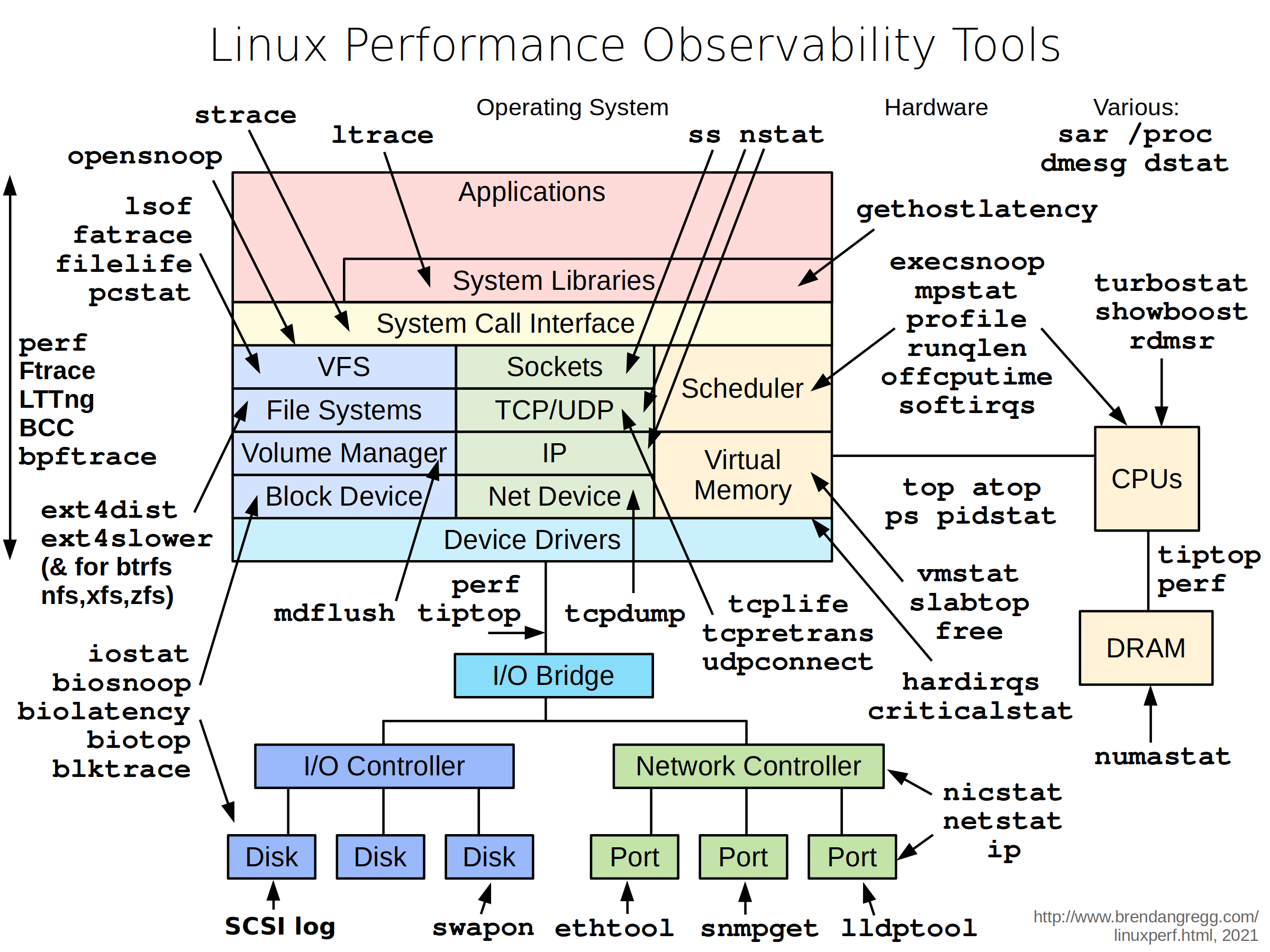
To troubleshoot these issues, netshoot includes a set of powerful tools as recommended by this diagram.
Included Packages: The following packages are included in netshoot.
apache2-utils \
bash \
bind-tools \
bird \
bridge-utils \
busybox-extras \
conntrack-tools \
curl \
dhcping \
dig \
drill \
ethtool \
file \
fping \
grpcurl \
iftop \
iperf \
iperf3 \
iproute2 \
ipset \
iptables \
iptraf-ng \
iputils \
ipvsadm \
httpie
jq \
libc6-compat \
liboping \
ltrace \
mtr \
net-snmp-tools \
netcat-openbsd \
nftables \
oh-my-zsh \\\\\
ngrep \
nmap \
nmap-nping \
nmap-scripts \
openssl \
py3-pip \
py3-setuptools \
scapy \
socat \
speedtest-cli \
openssh \
strace \
tcpdump \
tcptraceroute \
trippy \
tshark \
util-linux \
vim \
git \
zsh \
websocat \
swaks \
perl-crypt-ssleay \
perl-net-ssleay \
postgresql-client \
tmux \
postgresql \
mysql
Purpose: test networking performance between two containers/hosts.
Example:
$ docker network create -d bridge perf-test
$ docker run -d --rm --net perf-test --name perf-test-a nicolaka/netshoot iperf -s -p 9999
$ docker run -it --rm --net perf-test --name perf-test-b nicolaka/netshoot iperf -c perf-test-a -p 9999
tcpdump is a powerful and common packet analyzer that runs under the command line. It allows the user to display TCP/IP and other packets being transmitted or received over an attached network interface.
$ docker run -it --net container:perf-test-a nicolaka/netshoot
/ # tcpdump -i eth0 port 9999 -c 1 -Xvv
Purpose: netstat is a useful tool for checking your network configuration and activity.
$ docker run -it --net container:perf-test-a nicolaka/netshoot
/ # netstat -tulpn
nmap ("Network Mapper") is an open source tool for network exploration and security auditing. It is very useful for scanning to see which ports are open between a given set of hosts.
$ docker run -it --privileged nicolaka/netshoot nmap -p 12376-12390 -dd 172.31.24.25
Purpose: iftop does for network usage what top does for CPU usage. It listens to network traffic on a named interface and displays a table of current bandwidth usage by pairs of hosts.
$ docker run -it --net container:perf-test-a nicolaka/netshoot iftop -i eth0
Purpose: drill is a tool to designed to get all sorts of information out of the DNS.
$ docker run -it --net container:perf-test-a nicolaka/netshoot drill -V 5 perf-test-bs