Your CI, always running. Self-healing.


Stitch parses your CI configuration (GitLab CI, GitHub Actions, Bitbucket Pipelines), runs the jobs on your machine, and when something fails, hands the error to an AI agent that fixes it. Feedback in seconds, not minutes. No API keys. Zero config by default, with an optional .stitch.yml for per-repo defaults.
Prerequisite: an agent CLI installed and logged in. Either Claude Code (npm i -g @anthropic-ai/claude-code) or OpenAI Codex CLI (npm i -g @openai/codex). Stitch shells out to whichever you have.
npx stitch-agent doctor                 # check your setup
npx stitch-agent run claude --dry-run   # see what would run
npx stitch-agent run claude             # run + fix failures
Or install globally:
npm install -g stitch-agent
stitch run claude
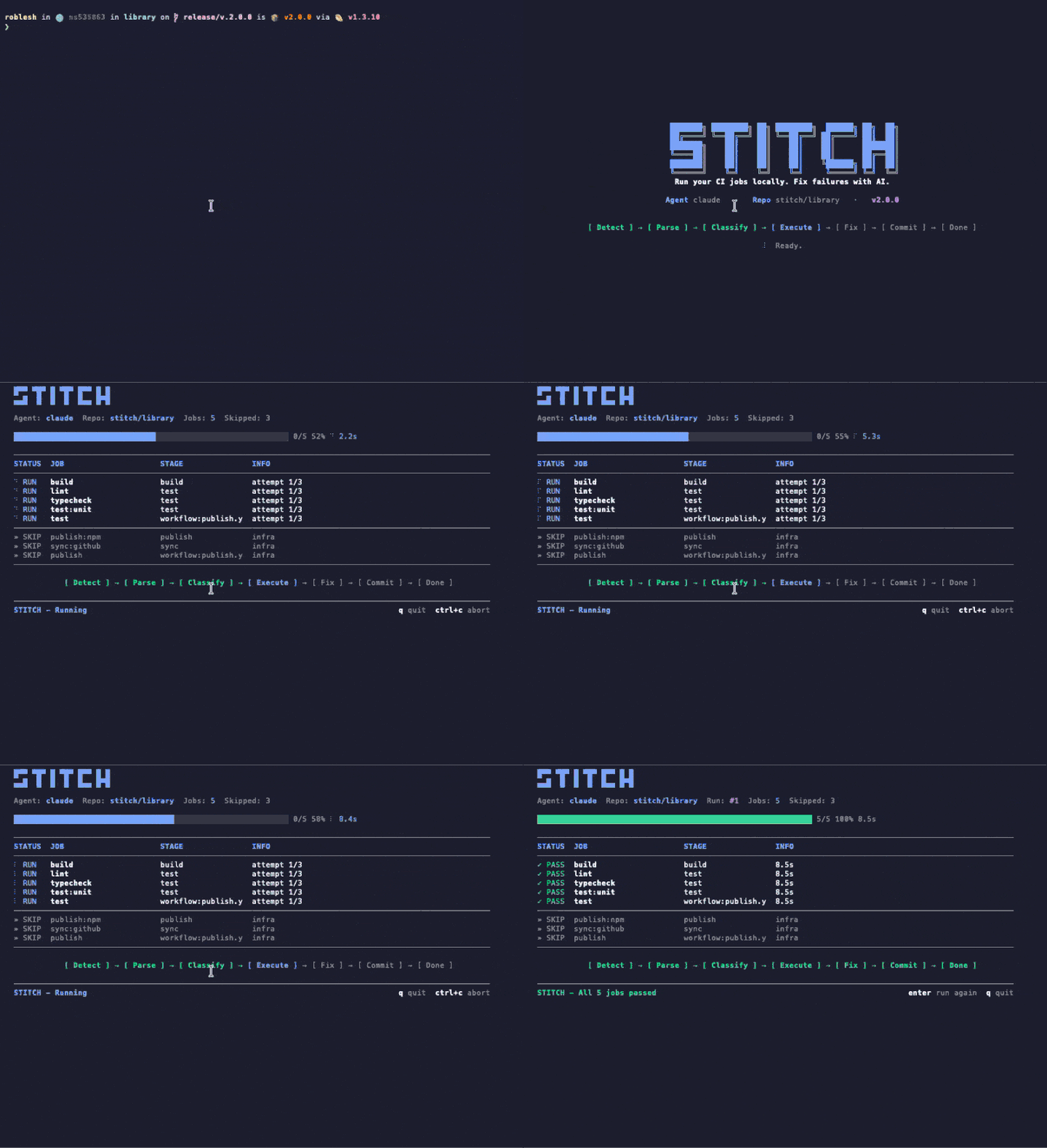
Live run. One command. Stitch parses your CI config, runs verify jobs locally, hands failures to Claude Code or Codex, and re-verifies the fix. All of it streams into a single terminal window: pipeline stepper at the top, live job table in the middle, driver panel showing what the agent is actually doing at the bottom.
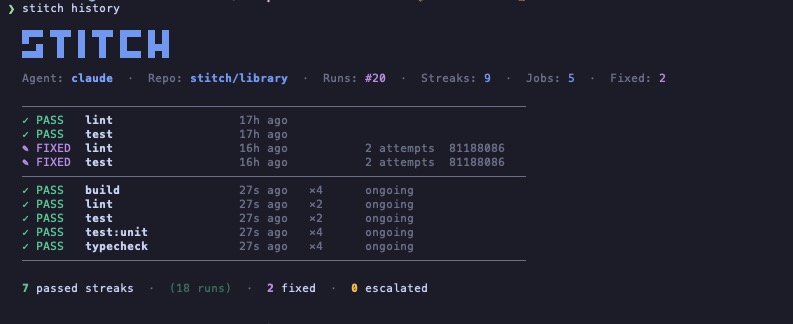
Run history. Every run is recorded. PASS streaks show verify jobs that keep working on their own, FIXED entries record when the agent resolved a failure (with attempt count and commit), and escalations the agent could not resolve are surfaced, not hidden. No dashboard, no account. Just a file on your machine.
stitch run claude
  |
  |- parses .gitlab-ci.yml / .github/workflows/*.yml / bitbucket-pipelines.yml
  |- filters jobs (skips deploy, publish, docker-build)
  |- runs each job locally (subprocess with timeout)
  |
  |- job passes? next job
  |- job fails?
  |    |- spawns the AI agent CLI with the error log
  |    |- agent investigates and edits files
  |    |- re-runs the job to verify the fix
  |    |- repeat up to --max-attempts
  |
  |- reports results with a live TUI
Uses your existing CLI subscription (Claude Pro, ChatGPT Plus). Zero config by default; optional .stitch.yml for per-repo defaults (see Configuration).
Stitch ships with a Claude Code skill. Install it once and Claude validates your code on its own, without you asking.
The skill is wired to four moments where broken code tends to leak out:
- Before every push. Ask Claude to push, commit, or open a PR, and Stitch runs first. If anything fails, Claude stops and tells you before the commit leaves your machine.
- At the end of a task. When Claude finishes implementing a feature, fixing a bug, or refactoring, it runs Stitch as the last step before declaring the work done.
- Before marking a todo complete. If a TodoWrite item touches code a pipeline would check, Claude runs Stitch first.
- When switching context. If you pivot to a different change, Claude runs Stitch on the previous one so nothing broken is left behind.
It also auto-triggers on natural-language mentions like "validate this", "check my code", "run the CI", "fix the pipeline", "CI is failing", "pre-push check". You can still invoke it explicitly with /stitch.
Install from a local clone:
ln -s "$(pwd)/skills/stitch" ~/.claude/skills/stitchInstall from a global npm install:
ln -s "$(npm root -g)/stitch-agent/skills/stitch" ~/.claude/skills/stitchAfter that, open Claude Code in any repo with a CI config and start working. You should not need to mention Stitch by name again.
What Stitch actually does, end to end:
- Three CI platforms out of the box. Parses
.gitlab-ci.yml,.github/workflows/*.yml, andbitbucket-pipelines.ymlfrom the same CLI. No rewrite, no wrapper, no YAML translation layer. - Parallel execution by design. Jobs run concurrently during the detection phase, so your wall-clock time is
max(job_i)instead ofsum(job_i). Your 4-job pipeline takes as long as your slowest job, not all four added together. - Fail-fast when you want it.
--fail-fastcancels in-flight jobs the moment one fails, then hands that single failure to the agent to fix. No waiting for the other 3 jobs to finish before the fix-loop can start. - Batch AI fixes. When multiple jobs fail, Stitch sends all the failures to the agent in a single call. The agent sees the failures together, which means one fix can resolve correlated errors (a broken type that breaks both lint and typecheck, a missing import that breaks tests and build). One invocation, one edit pass, fewer tokens, fewer seconds.
- Re-verify, don't just re-report. After the agent edits, Stitch re-runs the previously failed jobs to prove the fix actually worked. Up to
max_attemptsper job, configurable per repo. - Pluggable agent CLI. Works with Claude Code, Codex, and whatever you have a subscription for. No Anthropic or OpenAI API key required; Stitch just shells out to the agent you already pay for.
- Native Claude Code skill. Ships with a Claude Code skill. Install it once and Claude validates your code on its own: before every push, at the end of a task, before marking a todo complete, and when switching context. No command, no prompt, no flag. See Claude Code integration.
- Live TUI. OpenTUI-based terminal interface with per-job progress, logs on demand, and stage grouping. Renders on any terminal; no ANSI flicker.
- Auto commit and push on green. When the fix-loop lands, Stitch commits the change with a sensible message and pushes to the remote, so the CI fix closes the loop on its own. Opt out with
--no-pushorpush: falsein.stitch.yml. - Watch mode. Re-runs your CI on every save, with a debounce you control. Runs the full fix loop and auto-commits the green result, just like a normal
stitch run. - Zero-install-friendly.
npx stitch-agent run claudeworks without installing anything globally. No Python, no Docker, no account. - JSON output for pipelines.
--output jsongives you a machine-readable report if you want to wrap Stitch inside a larger tool. - Prefix-match job filtering.
--jobs testpicks uptest,test:unit,test-e2e,test_fastwith separator awareness, so you do not need to list every variant. - Optional per-repo config.
.stitch.ymlsets defaults (agent, max attempts, push policy, include/exclude job lists). CLI flags still win. When the file is absent, behavior is unchanged. - Auto-gitignore on startup. Stitch ensures
.stitch/and.stitch.lockare listed in your repo's.gitignoreso its history files and watch lockfile never get committed by accident, especially in watch mode where auto-commit is on.
Other tools fix CI failures with AI. None of them work like Stitch.
| Stitch | Gitar | Nx Cloud | Dagger + AI | |
|---|---|---|---|---|
| Uses your existing CI config | Yes | No | No | No |
| Runs jobs locally | Yes | Cloud only | Cloud only | Containers |
| Pluggable AI agent | Any CLI agent | Built-in only | Built-in only | Built-in only |
| Requires new infra | No | SaaS account | Nx monorepo | Dagger SDK |
| Native Claude Code integration | Yes, ships with a skill | No | No | No |
| Pricing | Free (MIT) | From $20/user/mo | Nx Cloud plan | Free (OSS) |
Gitar and Nx Cloud are cloud platforms. They intercept failures in remote CI, fix them, and push commits to your PR. Powerful, but you need their platform, and every fix attempt costs a remote CI cycle.
Dagger can run locally, but you rewrite your pipelines in their SDK. It does not read your existing .gitlab-ci.yml or GitHub Actions workflows.
Stitch takes the CI config you already have, runs it on your machine in seconds, and hands failures to whichever AI agent CLI you prefer. No vendor lock-in, no rewrite, no waiting for remote runners.
stitch run claude                          # run all runnable jobs
stitch run                                 # agent from .stitch.yml (else: claude)
stitch run claude --jobs lint,test         # only lint + test (prefix match)
stitch run claude --dry-run                # show what would run
stitch run claude --output json            # machine-readable output
stitch run claude --max-attempts 1         # report only, no fix attempts
stitch run claude --fail-fast              # stop after first failure
stitch run codex                           # use OpenAI Codex CLI instead
stitch doctor                              # diagnose your setup
stitch doctor --output json                # machine-readable diagnostics
stitch history                             # show recent runs (streak-compacted)
stitch history --job lint --limit 20       # filter and limit
stitch history --output json               # machine-readable
Agents:
claude- Claude Code CLI. Uses your Claude subscription.codex- OpenAI Codex CLI. Uses your ChatGPT subscription.
Debugging:
STITCH_DEBUG=1- print the stack trace when Stitch exits on an unexpected error.
Re-runs your CI whenever you stop editing for a few seconds. Runs the full fix loop and auto-commits green results, just like a normal stitch run.
stitch run claude --watch --jobs lint,test
stitch run claude --watch --debounce 5     # custom quiet window
Between runs, press Enter (or r) to re-run immediately without waiting for a file change. During a run, Ctrl+C aborts the current run and returns to watch idle; press q to exit fully.
If a previous Stitch run crashed or was killed, Stitch reclaims the watch lock automatically on the next start. No manual cleanup needed.
On startup, Stitch makes sure your repo's .gitignore excludes .stitch/ (history files) and .stitch.lock (watch lockfile). Without this, the auto-commit step in watch mode can pick up Stitch's own internal files and pollute your history. Stitch only appends what is missing under a # Stitch (auto-added) marker; existing entries are left alone, and the file is created if absent.
After each successful iteration, Stitch commits the agent's edits with fix(stitch): <jobs> and pushes, honoring push: true/false in .stitch.yml and the --no-push flag. If the working tree has uncommitted changes when Stitch starts, it prints a one-line warning on stderr and skips auto-commit for that session to avoid stepping on work in progress.
Stitch automatically skips jobs named deploy*, publish*, release*, docker-build*, docker-push*, pages*, upload*, stitch*.
Use --jobs to run only specific jobs:
stitch run claude --jobs lint,test,typecheckPrefix matching: --jobs test matches test, test:unit, test-e2e, test_fast.
Every run records its outcome to .stitch/history.jsonl (and a small .stitch/history-head.json index). Consecutive identical results for the same job are compacted into a single entry with a runs counter, so 100 green runs cost one line, not a hundred. A streak only flushes when the result changes (status, attempts, or first error line). Fixes are never collapsed: every successful AI fix gets its own entry with the commit SHA.
The history files are safe to commit. They sync naturally across machines with the rest of the repo. The log rotates after 5,000 entries (one backup kept).
stitch history                # latest 50 streaks + ongoing
stitch history --job test     # only one job
stitch history --output json # for scriptsDrop a .stitch.yml (or .stitch.yaml) at your repo root to set per-repo defaults. Every field is optional, and CLI flags always win over the file (flag > config > default). If the file is absent, behavior is identical to today.
agent: claude              # claude | codex
max_attempts: 3
push: true                 # auto-push after a successful fix
jobs:
  include: [lint, test, typecheck]   # prefix-match allowlist
  exclude: [deploy, publish]         # prefix-match blocklist
classification: llm        # llm | none  (none = run every parsed job)
See .stitch.example.yml for the full annotated template. Unknown fields are rejected, so typos surface immediately.
MIT