
An always free, always open-source fork of wmail maintained by a volunteer community.


The missing desktop client for Gmail & Google Inbox. Bringing the Gmail & Google Inbox experience to your desktop in a neatly packaged app
Download releases (all platforms)
Raise an issue or request a feature
Feeling brave and want to build from source? Here's what you need to do
Firstly you need to get an OAuth client ID and secret from Google. Visit https://console.developers.google.com to get started. You'll need to setup your OAuth Client ID and enable the Gmail, Google+ and Identity Toolkit APIs.
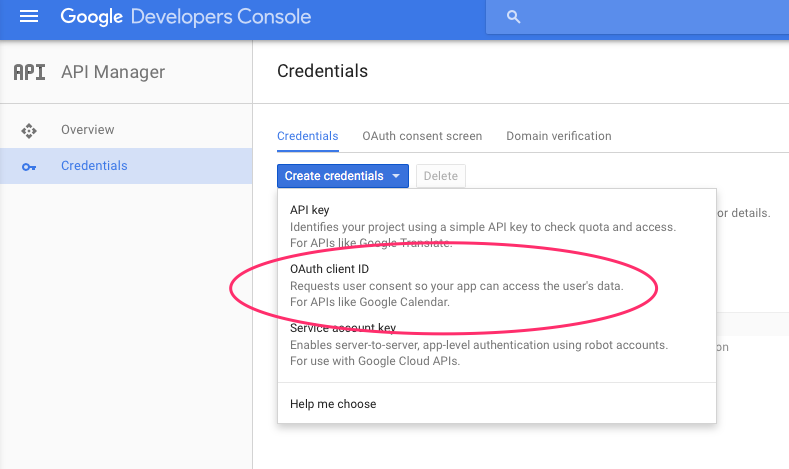
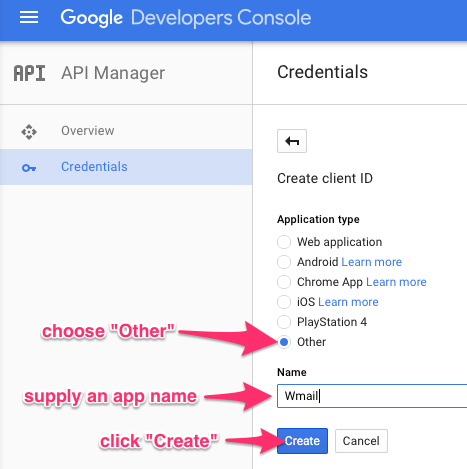
To create OAuth client ID & secret, under "API Manager", choose "Create Credentials", then "OAuth client ID". For "Application type", select "Other", and choose some name for the application, as described in these screenshots:
Next create src/shared/credentials.js with your Google client ID and secret like so...
module.exports = Object.freeze({
	GOOGLE_CLIENT_ID : '<Your google client id>',
	GOOGLE_CLIENT_SECRET: '<Your google client secret>'
})
Then run the following...
npm install webpack -g
npm run-script install-all
npm start
To package builds. (Note packaging osx builds can only be done from osx)
brew install msitools
npm install
npm rebuild
npm run-script package