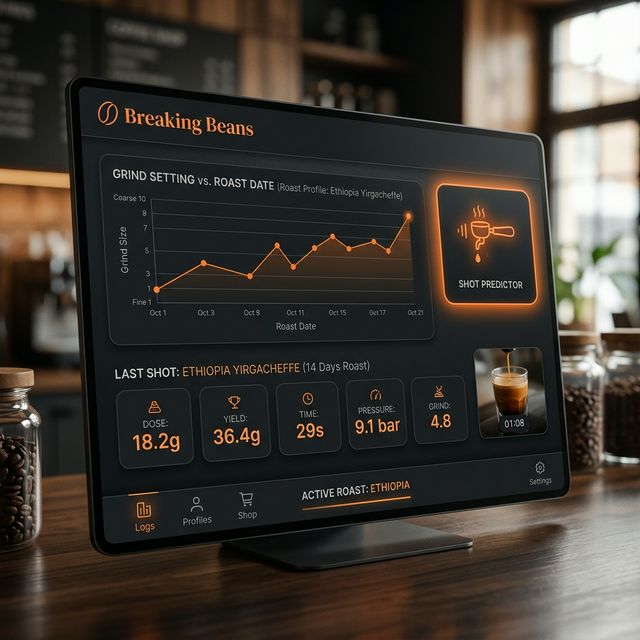
The sovereign Home Assistant espresso journal & management engine. |



Breaking Beans is a standalone Home Assistant integration designed to master the end-to-end espresso workflow. It handles relational coffee inventory, gear maintenance, and a precise brewing journal with predictive intelligence.
- Sovereignty: 100% local, no cloud dependencies.
- Precision: Relational data model prevents statistical skew between bean purchases.
- Intelligence: Heuristic shot predictor that learns from your personal taste profile and bean aging.
Breaking Beans uses a relational structure to ensure that your statistics remain accurate even when you brew the same bean variety across multiple purchases.
graph TD
    A[Master Bean Profile] -- "template for" --> B[Active Batch]
    B -- "decrements stock" --> C[Brew Journal Entry]
    D[Grinder Profile] -- "tracks wear" --> C
    E[Machine Profile] -- "tracks shots" --> C
    C -- "feedback loops" --> F[Shot Predictor]
    F -- "suggests settings" --> B
- Relational Bean Management: Define "Bean Origins" once. Track every unique "Batch" purchase separately ($/kg, weight, roast date).
- Auto-Inventory Management: Automatically decrements your bean stock in grams based on logged shots.
- Hardware Maintenance Entities:
- Grinder: Tracks total throughput (kg) with "Clean Me" thresholds.
- Machine: Tracks total shots with "Backflush" alerts.
- Advanced Brew Journal: Edit past mistakes effortlessly. Reverting or modifying an old shot will automatically recalculate your exact bean inventory and grinder throughput.
- Choked Shot Tracking: Toggle choked shots to set yield to 0g and visually flag it in history, feeding valuable negative feedback to your dial-in workflow.
- Dial-In Shot Toggle: Mark calibration shots to prevent them from skewing your long-term averages while still decrementing inventory and tracking gear wear.
- Shot Prediction Engine: Suggests grind setting, dose, and yield based on:
- Last 7 shots analysis of the exact batch, fluidly falling back to cross-batch memory of the same "master bean" if the current bag is new.
- Degassing Factor: Adjusts finer as beans age (-0.05 setting per week).
- Palate Feedback: Analyzes your Acidity/Bitterness ratings to fine-tune extraction.
- Extraction Analytics Module: Advanced data visualization tracking your absolute "Sweet Spot", featuring a dynamic Grinder Setting Bubble Chart with choke overlays and a Human Factor Consistency Heatmap.
- Mobile-First Card: A bespoke Lovelace UI (compiled LitElement) featuring a stacked metric-chip design. Includes a "Show All History" expansion for deep dives into your brewing log.
- Open HACS -> Integrations.
- Custom Repositories (top right) -> Path:
TheRealSlimSchaali/breaking-beans-> Category: Integration. - Download and Restart Home Assistant.
- Settings -> Devices & Services -> Add Integration -> Breaking Beans.
Since it is a local storage integration, it starts empty. Set it up using Service Calls:
breaking_beans.add_grinder: Specify model and cleaning threshold.breaking_beans.add_machine: Specify model and backflush threshold.
breaking_beans.add_bean_option: Create a master profile (e.g., "Halo Beriti").
breaking_beans.add_bean_batch: Register the specific bag you just opened. Provide thebean_idfrom step 1.
Since this is an integration-type repository, you must manually register the cards as resources in your Home Assistant.
- Go to Settings -> Dashboards.
- Click the three dots (top right) -> Resources.
- Add a new resource:
- URL:
/breaking_beans/www/breaking-beans-card.js - Type:
JavaScript Module
- URL:
You can now add the following custom cards to any Lovelace view:
Standard card for inventory overview and quick shot logging.
type: custom:breaking-beans-cardIntelligence card for getting grind and dose recommendations.
type: custom:breaking-beans-predictor-cardVisualize extraction correlations, target zones, and consistency heatmaps.
type: custom:breaking-beans-analytics-cardSupported languages: 🇬🇧 English, 🇩🇪 Deutsch, 🇫🇷 Français, 🇮🇹 Italiano, 🇪🇸 Español.
Apache License 2.0. Developed by @TheRealSlimSchaali.
Developed with ❤️ for the coffee community.