
A production-ready Three-Tier Web Application built using React.js, Node.js, Docker, AWS ECS Fargate, Application Load Balancer (ALB), Auto Scaling, CloudWatch Monitoring, and GitHub Actions CI/CD.
This project demonstrates modern cloud-native deployment, container orchestration, and DevOps automation practices using AWS services.
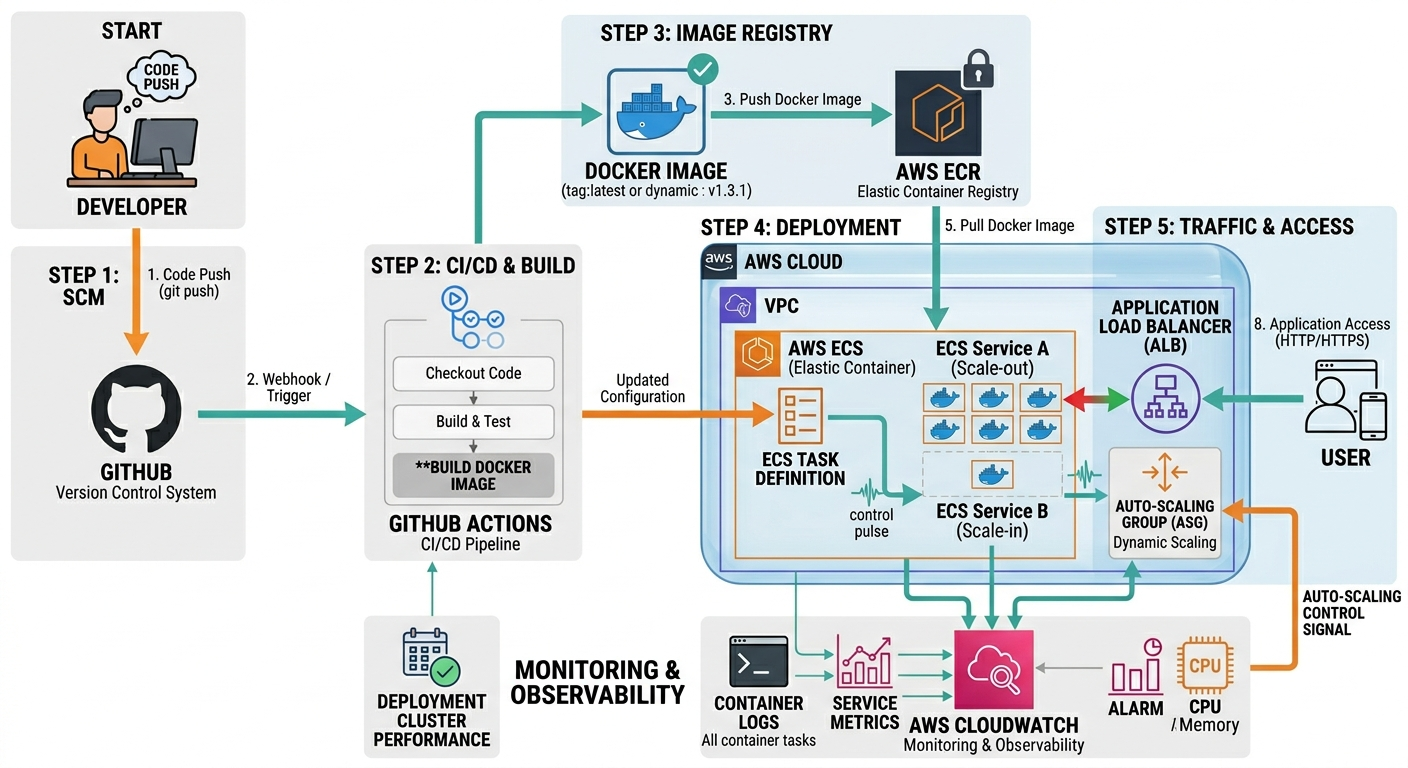
This project follows a scalable Three-Tier Architecture:
- Presentation Layer → React Frontend
- Application Layer → Node.js Backend API
- Data Layer → Database Layer
The complete infrastructure is containerized and deployed using AWS cloud services.
                          ┌────────────────────┐
                          │     End Users      │
                          └─────────┬──────────┘
                                    │
                                    ▼
                     ┌──────────────────────────┐
                     │  Application Load        │
                     │  Balancer (ALB)          │
                     └─────────┬────────────────┘
                               │
                ┌──────────────┴──────────────┐
                │                             │
                ▼                             ▼
      ┌──────────────────┐        ┌──────────────────┐
      │ React Frontend   │        │ Node.js Backend  │
      │ ECS Fargate Task │        │ ECS Fargate Task │
      └─────────┬────────┘        └─────────┬────────┘
                │                            │
                └────────────┬───────────────┘
                             ▼
                  ┌────────────────────┐
                  │      Database      │
                  │    (Data Layer)    │
                  └────────────────────┘
- React.js
- JavaScript
- Axios
- Nginx
- Node.js
- Express.js
- Docker
- Docker Compose
- GitHub Actions
- AWS ECS Fargate
- AWS ECR
- Application Load Balancer (ALB)
- AWS Auto Scaling
- AWS CloudWatch
- AWS IAM
- Three-Tier Architecture
- Dockerized Frontend & Backend
- Automated CI/CD Pipeline
- ECS Fargate Deployment
- Application Load Balancer Integration
- Auto Scaling Support
- CloudWatch Monitoring & Logging
- Zero-Downtime Deployment
- Scalable Infrastructure
- Production-Ready DevOps Workflow
| AWS Service | Purpose |
|---|---|
| Amazon ECS | Container orchestration |
| AWS Fargate | Serverless container hosting |
| Amazon ECR | Docker image storage |
| Application Load Balancer | Traffic distribution |
| AWS Auto Scaling | Dynamic scaling |
| Amazon CloudWatch | Monitoring and logs |
| AWS IAM | Access management |
This project follows a complete DevOps CI/CD workflow for deploying a containerized Three-Tier Application on AWS using Docker, Amazon ECS Fargate, Application Load Balancer, Auto Scaling, CloudWatch, and GitHub Actions.
- Build React frontend application
- Create UI components
- Configure API integration
- Build Node.js backend API
- Create routes and controllers
- Configure database connection
- Create Dockerfile for frontend
- Create Dockerfile for backend
docker build -t frontend ./frontend
docker build -t backend ./backendThe developer pushes the latest code to the GitHub repository.
git push origin mainGitHub Actions automatically starts the CI/CD workflow.
- Install dependencies
- Build frontend & backend
- Build Docker images
- Authenticate with AWS
- Push images to Amazon ECR
- Deploy updated containers to ECS
The CI/CD pipeline pushes Docker images to Amazon ECR repositories.
docker push <ecr-repository-url>- Create ECS Cluster
- Create ECS Task Definitions
- Create ECS Services
- Configure Application Load Balancer
- Configure Security Groups
- Configure Target Groups
GitHub Actions updates ECS services using:
aws ecs update-service --force-new-deploymentAmazon ECS Fargate launches updated frontend and backend containers automatically.
Application Load Balancer distributes traffic between frontend and backend services.
/→ Frontend Service/api/*→ Backend Service
AWS Auto Scaling automatically adjusts ECS tasks based on:
- CPU utilization
- Memory utilization
- Traffic load
This ensures:
- High availability
- Scalability
- Better performance
Amazon CloudWatch monitors:
- ECS task logs
- CPU usage
- Memory usage
- Container health
- Application metrics
The deployed application becomes accessible through the Application Load Balancer DNS URL.
Application Load Balancer URL
Develop Frontend & Backend
            ↓
Containerize Application
            ↓
Push Code to GitHub
            ↓
GitHub Actions Triggered
            ↓
Build Docker Images
            ↓
Push Images to Amazon ECR
            ↓
Deploy Containers to ECS Fargate
            ↓
ALB Routes Traffic
            ↓
Auto Scaling Handles Load
            ↓
CloudWatch Monitoring
            ↓
Application Goes Live