FlowDesk AI is a customer request management and AI classification platform. It collects customer messages from web and messaging channels, stores them in PostgreSQL, processes them with an AI worker, and exposes a secure dashboard for tracking requests, status updates, audit history, and internal notes.
🎥 Demo video: https://youtu.be/K5jCOjCkI-0
🌐 Live app: https://flowdesk-ai-4h1.pages.dev/
Telegram bot: https://t.me/Flow_Desk_AI_BOT
- JWT authentication with access and refresh tokens
- Admin and agent role-based access control
- Request ingestion via REST API, Telegram webhook, and WhatsApp webhook
- AI request classification using Gemini
- Redis-backed BullMQ queue for async processing
- Real-time updates with Socket.IO
- Request audit trail and internal notes
- PostgreSQL storage via Prisma ORM
- Frontend: React, Vite, Tailwind CSS, Socket.IO client
- Backend: Node.js, Express, Prisma ORM, BullMQ, Socket.IO
- Database: PostgreSQL
- Cache / Queue: Upstash Redis
- AI integration: Gemini / Google Generative AI SDK
- Auth & security: JWT, refresh tokens, role-based access
- Hosting: Cloudflare Pages (frontend), Render (backend), Render DB, Upstash Redis
- Messaging integrations: Telegram webhook, WhatsApp webhook
backend/
  Dockerfile
  index.js
  package.json
  prisma/
  src/
    config/
    controllers/
    middleware/
    queues/
    routes/
    services/
    utils/
    webhooks/
    workers/
frontend/
  Dockerfile
  package.json
  src/
    api/
    hooks/
    pages/
    App.jsx
    main.jsx
docker-compose.yml
README.md
FlowDesk AI uses a distributed web architecture with separate frontend, backend, storage, and worker components.
- Frontend: Cloudflare Pages deployment serves the React/Vite UI.
- Backend API: Render-hosted Express server handles authentication, request CRUD, webhooks, and Socket.IO events.
- Database: Render managed PostgreSQL stores users, requests, events, and notes.
- Queue & cache: Upstash Redis powers BullMQ job queueing, caching, and worker coordination.
- Worker: Backend classification worker processes queued requests asynchronously and enriches data with AI classification results.
- Integrations: Telegram and WhatsApp webhooks ingest external customer messages into the system. The Telegram webhook is powered by the bot at https://t.me/Flow_Desk_AI_BOT.
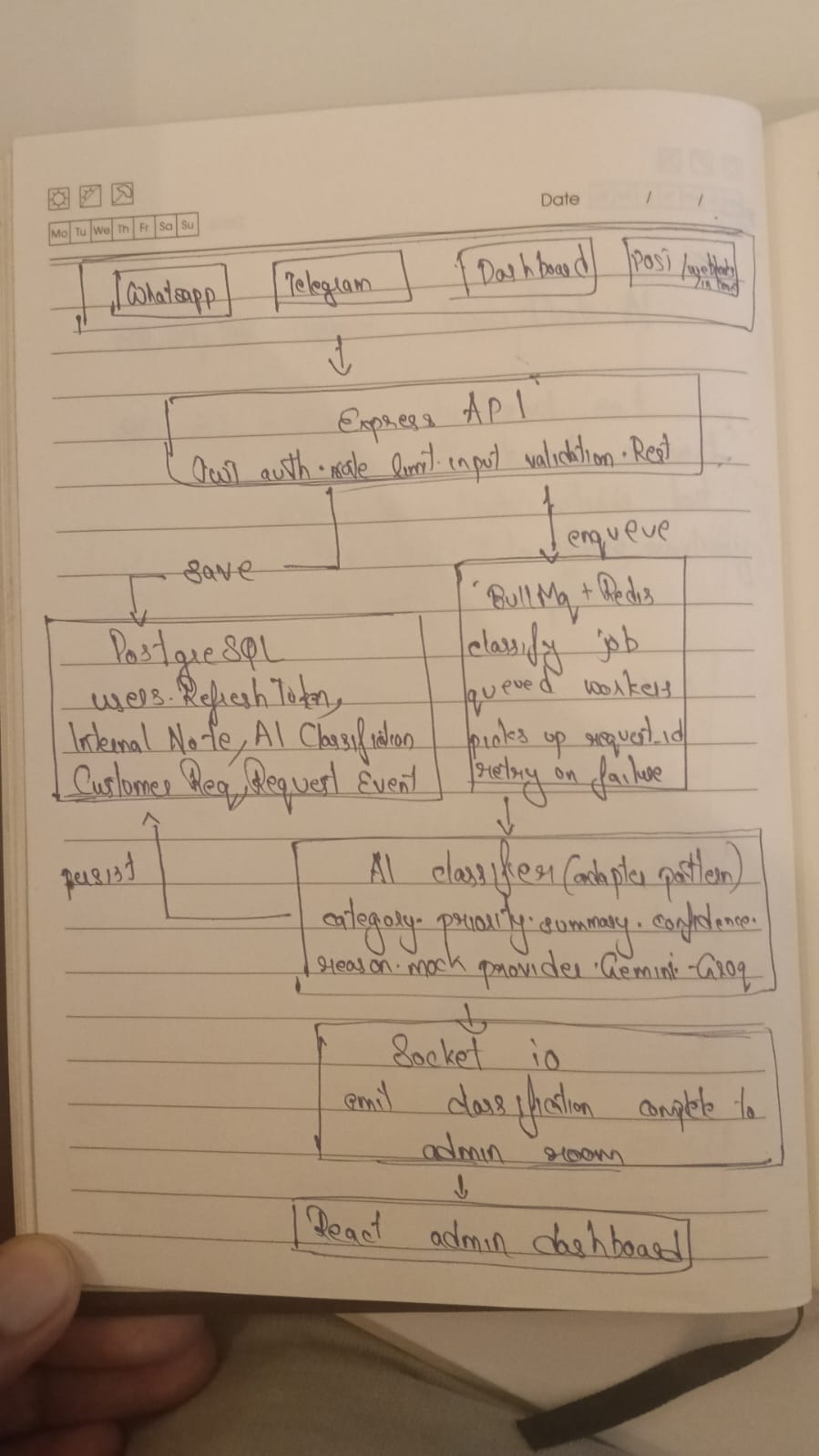
Diagram: https://drive.google.com/file/d/1dH7kJ9T-GUFWrINoIBpIfvskmJS33q6N/view?usp=sharing
- Built a secure role-based request management system for admins and agents.
- Implemented asynchronous AI classification with BullMQ and Redis to keep the API responsive.
- Integrated webhook ingestion for Telegram and WhatsApp with request normalization.
- Added real-time updates through Socket.IO so dashboard data stays live.
- Handled session refresh and secure token management across frontend/backend boundaries.
- Designed the system to run locally with Docker or in production using Render, Cloudflare Pages, and Upstash.
- Node.js 20+
- npm
- PostgreSQL
- Redis
- Docker (optional, for containerized local development)
cd backend
npm install
cd ../frontend
npm install- Configure backend environment in
backend/.env - Generate Prisma client, migrate the database, and verify the schema
cd backend
npx prisma generate
npx prisma migrate dev --name init
npx prisma db pull- Confirm the database schema and connection by opening Prisma Studio:
npx prisma studio- Start backend and frontend in separate terminals
# Terminal 1
cd backend
npm run dev

# Terminal 2
cd frontend
npm run devTo boot the full stack using Docker Compose:
docker-compose up --buildThis starts:
- PostgreSQL on
localhost:5433 - Redis on
localhost:6379 - Backend on
http://localhost:8000 - Frontend on
http://localhost
Build and push your container images with:
docker push rahilralu/flowdesk-ai-frontend:tagname
docker push rahilralu/flowdesk-ai-backend:tagname
Replace tagname with your release tag.
Create backend/.env with safe values and do not commit secrets.
Required variables:
PORT=8000
DATABASE_URL=postgresql://user:password@localhost:5433/flow_desk_ai
REDIS_URL=redis://localhost:6379
ACCESS_TOKEN_SECRET=your_access_token_secret
REFRESH_TOKEN_SECRET=your_refresh_token_secret
BACKEND_URL=http://localhost:8000
FRONTEND_URL=http://localhost:5173
TELEGRAM_WEBHOOK_SECRET=your_telegram_webhook_secret
Optional variables for integrations:
GEMINI_API_KEY=your_gemini_api_key
TELEGRAM_BOT_TOKEN=your_telegram_bot_token
TWILIO_ACCOUNT_SID=your_twilio_account_sid
TWILIO_AUTH_TOKEN=your_twilio_auth_token
TWILIO_WHATSAPP_NUMBER=whatsapp:+1234567890
ADMIN_EMAIL=admin@example.comPOST /api/auth/login— sign in and receive access tokenPOST /api/auth/refresh— refresh access token using a secure cookiePOST /api/auth/logout— log out and revoke refresh token
POST /api/requests— create a new customer requestGET /api/requests— list requestsGET /api/requests/:id— fetch request detailsPATCH /api/requests/:id/status— update request statusPOST /api/requests/:id/notes— add an internal noteDELETE /api/requests/:id/notes/:noteId— delete an internal noteDELETE /api/requests/:id— delete a request
POST /webhooks/telegram— ingest Telegram messagesPOST /webhooks/whatsapp— ingest WhatsApp messages
The AI classification worker processes queued requests separately from the API server.
cd backend
npm run workerThis project is deployed using:
- Backend: Render
- PostgreSQL: Render managed database
- Redis: Upstash
- Frontend: Cloudflare Pages
Recommended production process:
- Deploy backend to Render and connect it to Render PostgreSQL.
- Configure Upstash Redis and set
REDIS_URL. - Deploy frontend to Cloudflare Pages and point it to the Render backend URL.
- Use secure production secrets for
ACCESS_TOKEN_SECRET,REFRESH_TOKEN_SECRET, and webhook tokens.
npm run dev— development server with nodemonnpm start— production servernpm run worker— start request classification worker
npm run dev— start Vite development servernpm run build— build production assetsnpm run preview— preview the production buildnpm run lint— run ESLint
- Backend uses Express, Socket.IO, Prisma, BullMQ, Redis, and Twilio/Telegram integrations.
- Frontend uses React, Vite, Tailwind CSS, and Socket.IO client.
- The worker processes classification jobs separately from the API server.
- Webhooks are supported for Telegram and WhatsApp ingestion.
Watch the project overview and walkthrough:
This project is released under the MIT License.
See the LICENSE file for full terms.