


A small, typed helper for rectangular regions of interest (ROI) in NumPy images: one dataclass to crop, measure, move, and resize.
For image-analysis code that passes ROIs around as four loose integers: RoiRectangle keeps the
bounds together and gives you the slice, size, center and shifted or resized copies.
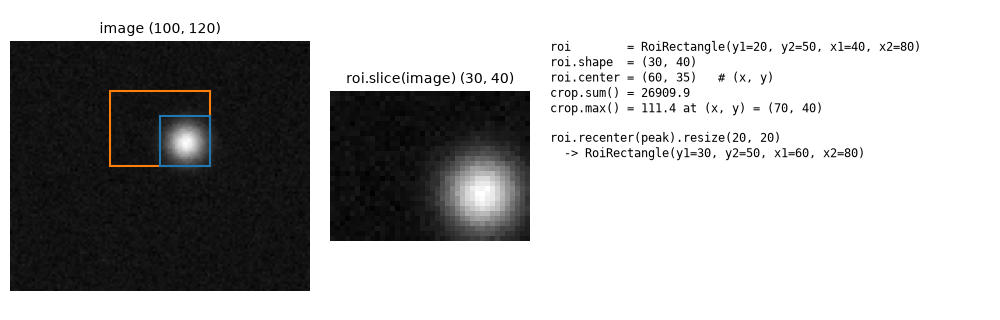
A 100×120 sample image (Gaussian spot plus noise). Orange: roi; blue: the ROI recentered on
the brightest pixel of the crop and resized to 20×20. Script: examples/readme_figure.py.
pip install roi-rectangleTo check the install without touching your environment (needs uv); it exits non-zero if the quickstart values are wrong:
uv run --no-project --with roi-rectangle python -c 'from roi_rectangle import RoiRectangle as R; r = R(y1=30, y2=80, x1=20, x2=70); assert (r.shape, r.center, r.area) == ((50, 50), (45, 55), 2500)'uv run --no-project --with roi-rectangle python -c 'from roi_rectangle import RoiRectangle as R; r = R(y1=30, y2=80, x1=20, x2=70); assert (r.shape, r.center, r.area) == ((50, 50), (45, 55), 2500)'import numpy as np
from roi_rectangle import RoiRectangle
image = np.arange(100 * 120).reshape(100, 120)
roi = RoiRectangle(y1=30, y2=80, x1=20, x2=70) # rows [30, 80), cols [20, 70)
print(roi.shape, roi.center, roi.area) # (50, 50) (45, 55) 2500
crop = roi.slice(image) # same as image[30:80, 20:70]
print(crop.shape) # (50, 50)
roi2 = roi.recenter((60, 40)).resize(10, 20) # methods return new ROIs
print(roi2) # RoiRectangle(y1=30, y2=50, x1=55, x2=65)
print(image[roi2.get_slices()].shape) # (20, 10)RoiRectangle(y1, y2, x1, x2) is a dataclass. Intervals are half-open: [y1, y2) and [x1, x2).
y2 or x2 may be None, meaning the region extends to the image edge on that axis.
A ValueError is raised if y2 < y1 or x2 < x1.
| Member | Description |
|---|---|
width, height, shape, area |
Size properties (shape is (height, width)); None for unbounded axes. |
center |
(x, y) center, rounded down; None if any axis is unbounded. |
move(dx, dy) |
New ROI shifted by (dx, dy). |
recenter((x, y)) |
New ROI of the same size centered at (x, y). |
resize(width, height) |
New ROI with the given size around the same center. |
slice(image) |
image[..., y1:y2, x1:x2]; works on stacks with leading axes. |
get_slices() |
(slice(y1, y2), slice(x1, x2)) for indexing. |
to_tuple(), from_tuple(t) |
Convert to/from (y1, y2, x1, x2). |
Coordinates are passed to NumPy unchanged: an ROI past the bottom or right edge is clipped by NumPy, while negative coordinates count from the end of the axis.
If you use this package in your work, please cite it using the metadata in CITATION.cff.
MIT. See LICENSE.