


🌐 Español · English · Português
Administrador visual (Python + tkinter, sin dependencias externas) para crear y controlar un servidor dedicado de Torrente On-Line (Virtual Toys, 2004). Visual manager (Python + tkinter, no external dependencies) to create and control a Torrente On-Line dedicated server.
Basado en la versión server 1.1d
Repositorio / Repository: https://github.com/Lahrenheit/dedicatedtol
Proyecto fan, no afiliado con Virtual Toys. / Fan project, not affiliated with Virtual Toys.
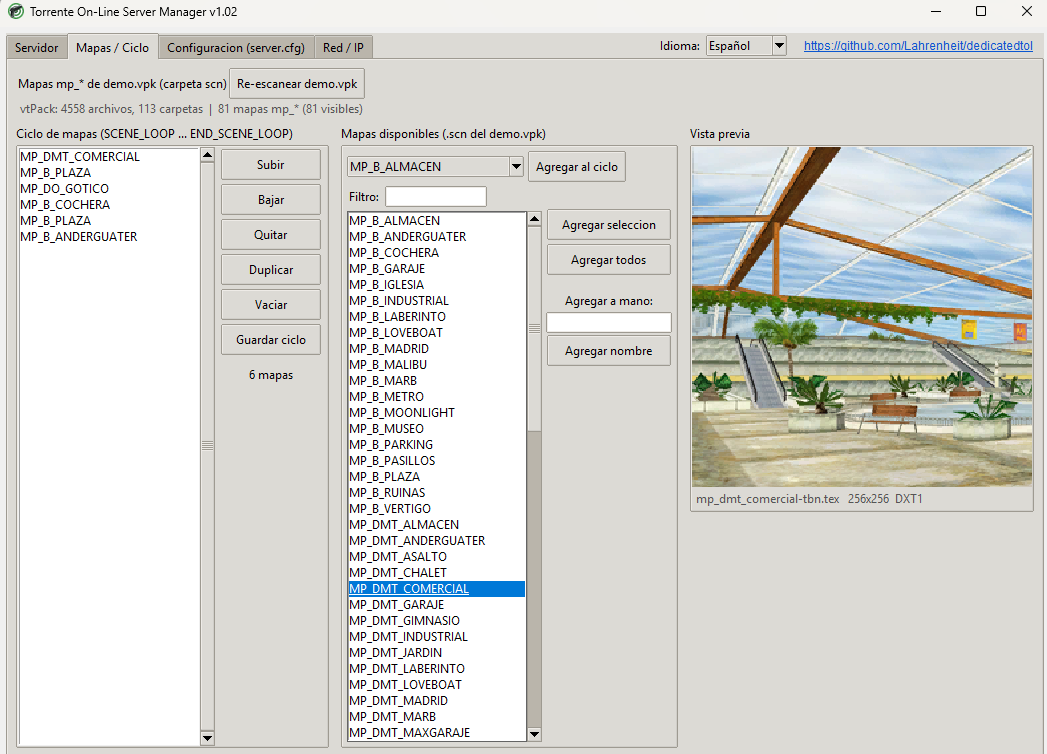
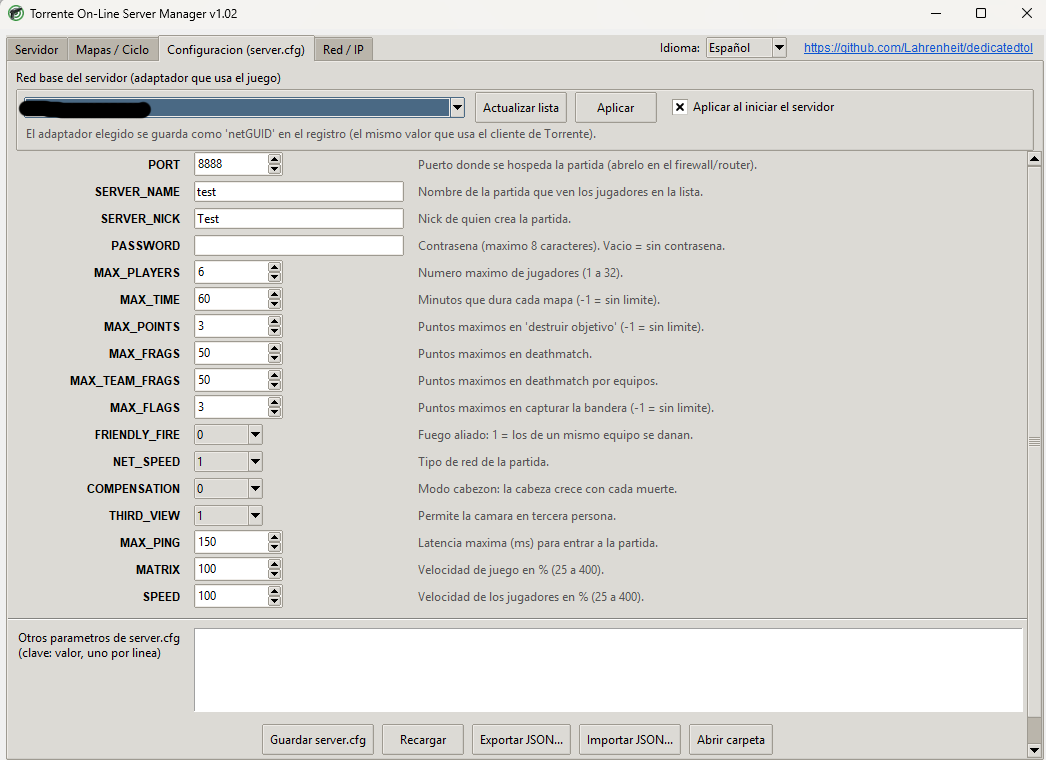
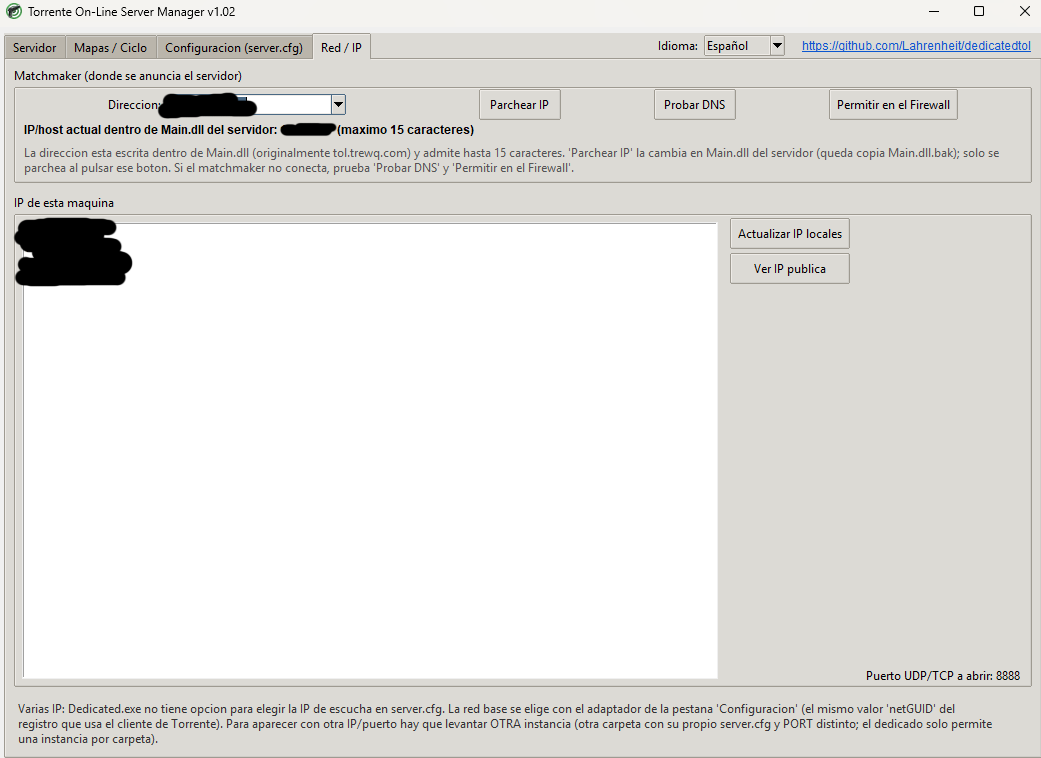
Vista previa del programa:
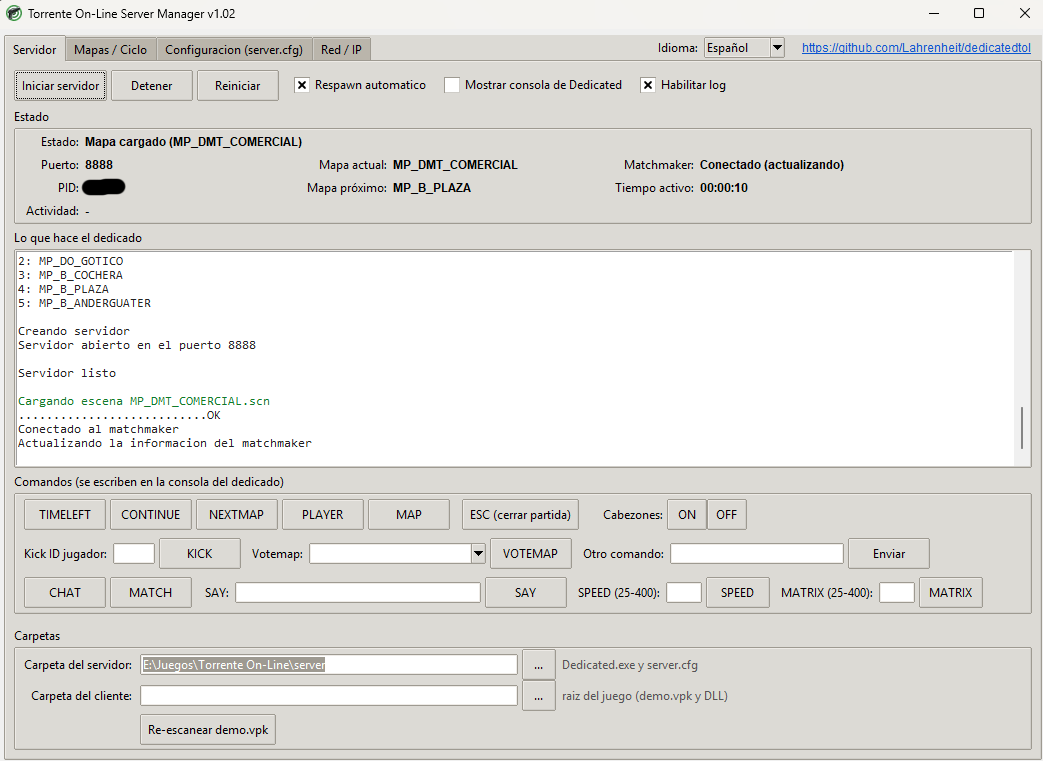
- Servidor: inicia, detiene y reinicia
Dedicated.exe(igual que el.batoriginal:respawn.exe dedicated.exedesde la carpeta del servidor), con respawn automático.- Panel de Estado: estado, puerto, mapa actual, mapa próximo, estado del matchmaker, PID y tiempo activo.
- Registro de lo que escribe el dedicado y botones para sus comandos:
TIMELEFT,CONTINUE,NEXTMAP,PLAYER,MAP,KICK,VOTEMAP,HEADMODE,SAY,SPEED,MATRIX,CHAT,MATCHy un campo para cualquier otro comando.
- Mapas / Ciclo: edita el
SCENE_LOOPdeserver.cfgcon los mapasmp_*que hay en la carpetascndedemo.vpk(en mayúsculas) y muestra la vista previa (texs\<mapa>-tbn.tex). Solo aparecen los mapas que tienen imagen. - Configuración (server.cfg): todos los parámetros (puerto, nombre, contraseña, jugadores, tiempos, puntos, fuego aliado, etc.) con validación, importar/exportar JSON y selección de la red base del servidor.
- Red / IP: cambia la dirección del matchmaker dentro de
Main.dll(botón Parchear IP), prueba el DNS, crea la regla del firewall y muestra las IP locales y la pública. - Idiomas: español, português e English (selector arriba a la derecha).
- Windows (el servidor y el cliente de Torrente On-Line son de Windows).
- Python 3.8 o superior con tkinter (incluido en el instalador oficial de Python), o el
.execompilado. - Una carpeta del servidor dedicado de Torrente On-Line (
Dedicated.exe,respawn.exe,vtserver.dll,server.cfg,comun\bin\release). - Torrente On-Line instalado.
python tol_server_manager.py- En la pestaña Servidor, abajo, indica la carpeta del servidor y la carpeta del cliente (donde está
demo.vpk). - En Mapas / Ciclo arma el ciclo y pulsa Guardar ciclo; en Configuración ajusta los parámetros y pulsa Guardar server.cfg.
- Elige la red base (Configuración) y, si hace falta, el matchmaker (Red / IP).
- Pulsa Iniciar servidor.
- Parchear IP: solo cambia
Main.dllcuando pulsas ese botón (máximo 15 caracteres; dejaMain.dll.bak). - Ruta de datos: sin la opción
-p,Dedicated.exelee la carpeta dedemo.vpkdel registro (HKLM\SOFTWARE\Virtual toys\Torrente on-line, valorpath); el manager la iguala a la carpeta del cliente al iniciar (puede pedir permisos de administrador). - Red base: se guarda como
netGUIDen el mismo registro que usa el cliente. El juego, al no ejecutarse como administrador, guarda su propia copia en elVirtualStoredel usuario; el manager actualiza ambas. - La configuración del manager se guarda en
tol_manager.json, junto al programa.
- Script:
tol_server_manager.py, modo Window Based (hide the console). - Icono: elígelo en el campo Icon; la ventana usa el mismo. También puedes dejar un
icon.icojunto al.exe.
- La interfaz y el enlace con la consola de Dedicated (lectura de pantalla y envío de teclas) dependen de Windows; en otros sistemas solo se puede editar
server.cfgy ver los mapas. - El dedicado original puede perder alguna tecla al recibir comandos; el manager reenvía cada tecla hasta ver que apareció en la consola.
- Si el matchmaker no conecta: prueba Probar DNS, Permitir en el Firewall, y revisa la red base.
- Server: start, stop and restart
Dedicated.exethe same way the original.batdoes (respawn.exe dedicated.exefrom the server folder), with automatic respawn.- Status panel: state, port, current map, next map, matchmaker status, PID and uptime.
- Live log of the dedicated server plus buttons for its commands:
TIMELEFT,CONTINUE,NEXTMAP,PLAYER,MAP,KICK,VOTEMAP,HEADMODE,SAY,SPEED,MATRIX,CHAT,MATCH, and a free command box.
- Maps / Cycle: edit the
SCENE_LOOPinserver.cfgusing themp_*maps found in thescnfolder ofdemo.vpk(uppercase), with a preview (texs\<map>-tbn.tex). Only maps that have a preview are listed. - Settings (server.cfg): every parameter (port, name, password, players, time, points, friendly fire, …) with validation, JSON import/export and server base network selection.
- Network / IP: change the matchmaker address inside
Main.dll(Patch IP button), test DNS, create the firewall rule, show local and public IPs. - Languages: Español, Português and English (selector at the top right).
- Windows.
- Python 3.8+ with tkinter (included in the official installer), or the compiled
.exe. - A Torrente On-Line dedicated server folder (
Dedicated.exe,respawn.exe,vtserver.dll,server.cfg,comun\bin\release). - Torrente On-Line installed
python tol_server_manager.py- On the Server tab (bottom), set the server folder and the client folder (the one containing
demo.vpk). - Build the cycle in Maps / Cycle and press Save cycle; adjust the parameters in Settings and press Save server.cfg.
- Pick the base network (Settings) and, if needed, the matchmaker (Network / IP).
- Press Start server.
- Patch IP only changes
Main.dllwhen you press that button (15 characters max; leavesMain.dll.bak). - Data path: without
-p,Dedicated.exereads thedemo.vpkfolder from the registry (HKLM\SOFTWARE\Virtual toys\Torrente on-line, valuepath); the manager sets it to the client folder on start (it may ask for administrator rights). - Base network is stored as
netGUIDin the same registry key the client uses. Because the game runs without administrator rights, it keeps its own copy in the user'sVirtualStore; the manager updates both. - Manager settings are saved in
tol_manager.jsonnext to the program.
- Script:
tol_server_manager.py, Window Based (hide the console). - Icon: choose it in the Icon field; the window uses the same one. You can also drop an
icon.iconext to the.exe.
- The console link (screen reading and key sending) is Windows-only; elsewhere you can only edit
server.cfgand browse maps. - The original dedicated server may drop keystrokes; the manager resends each key until it shows up in the console.
- If the matchmaker does not connect: try Test DNS, Allow in Firewall, and check the base network.
Administrador visual (Python + tkinter, sem dependências externas) para criar e controlar um servidor dedicado de Torrente On-Line.
- Servidor: inicia, para e reinicia o
Dedicated.execomo o.batoriginal, com painel de estado (incluindo o próximo mapa), log e botões para os comandos do dedicado. - Mapas / Ciclo: edita o
SCENE_LOOPcom os mapasmp_*dodemo.vpke mostra a pré-visualização (texs\<mapa>-tbn.tex). - Configuração (server.cfg): todos os parâmetros, importar/exportar JSON e escolha da rede base do servidor.
- Rede / IP: altera o endereço do matchmaker no
Main.dll, testa o DNS e cria a regra do firewall. - Idiomas: Español, Português, English.
Requisitos: Windows e Python 3.8+ com tkinter (ou o .exe compilado). Uso: python tol_server_manager.py, depois indique a pasta do servidor e a pasta do cliente (onde está o demo.vpk).