
Your data changed. DataSemver tells you whether that is a patch, a minor or a breaking release.





DataSemver compares two versions of a CSV, JSON or Parquet dataset, classifies every difference it finds according to a configurable rule set, and returns the semantic version bump plus a ready-to-commit changelog entry. It is a CLI first, a Python library second, and it needs no schema registry, no database and no service running.
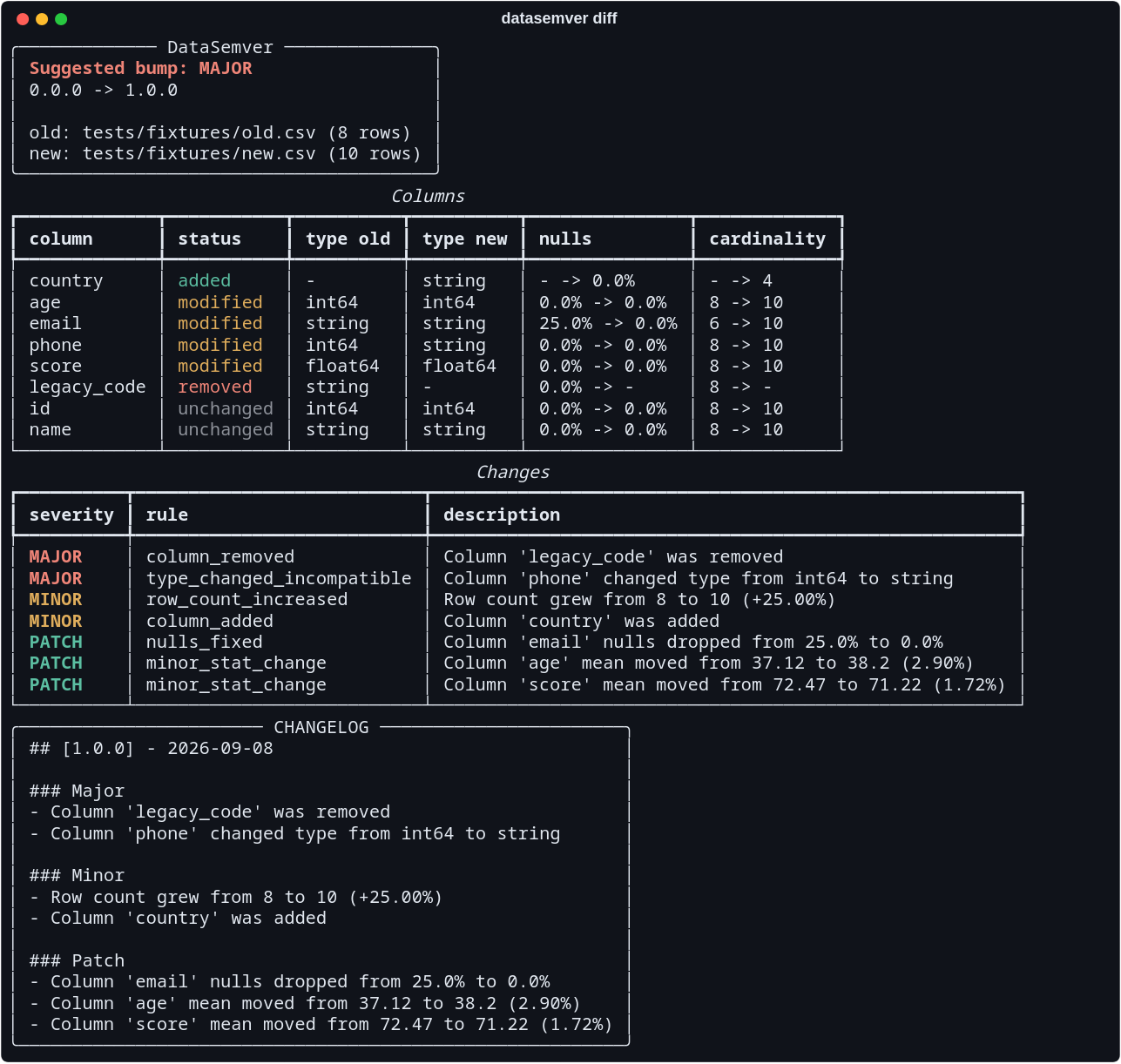
datasemver diff tests/fixtures/old.csv tests/fixtures/new.csv — a removed column and an
int64 that became a string make this a breaking release.
- Why
- Installation
- Quick start
- Demo
- Semantic versioning for data
- Command reference
- Engines
- Workbooks
- Databases
- DVC
- Rows, not just shape
- Stored profiles
- Recording the version
- Configuration: rules in YAML
- Python API
- GitHub Action
- Web dashboard
- Project structure
- Changelog
- Contributing
- License
Code has SemVer, and data does not. A dropped column, a phone number that turned into a string, a distribution that quietly shifted: all of them break downstream consumers, and all of them usually ship as "updated the dataset". DataSemver makes that impact explicit and reviewable, so a dataset release can be discussed the same way a library release is.
From PyPI:
pip install datasemverAs a standalone command, without touching your environment:
pipx install datasemverFrom source, for development or to run the dashboard:
git clone https://github.com/IzanVil/datasemver.git
cd datasemver
python -m venv .venv
source .venv/bin/activate
pip install -e ".[dev]"| Extra | Installs | For |
|---|---|---|
| (none) | pandas, pyarrow, pydantic, pyyaml, typer, rich |
The library and the datasemver command |
dev |
pytest, pytest-cov, httpx |
Running the test suite and measuring coverage |
sql |
sqlalchemy, psycopg2, pymysql |
Reading a database table |
exe |
pyinstaller |
Building a standalone executable |
excel |
openpyxl |
Reading .xlsx and .xlsm workbooks |
duckdb |
duckdb |
Profiling a dataset without loading it |
web |
fastapi, uvicorn, python-multipart |
The web dashboard |
pip install "datasemver[web]"DataSemver is tested on Linux, macOS and Windows. The suite includes paths with spaces, accents and characters outside Latin-1, along with files that end their lines the way Windows writes them, because those are the differences that do not show up on one machine. Every file the library reads or writes names its encoding, so a Windows default of cp1252 never gets a say.
Requires Python 3.10 or newer. The package ships typed (py.typed), so type checkers see
the annotations of every public function.
Every release carries a single executable per platform that brings its own Python, for machines where installing one is not an option. Download it from the latest release.
| Download | For |
|---|---|
datasemver-<version>-linux-x86_64.tar.gz |
Linux, 64-bit Intel or AMD |
datasemver-<version>-macos-arm64.tar.gz |
macOS on Apple Silicon |
datasemver-<version>-macos-x86_64.tar.gz |
macOS on Intel |
datasemver-<version>-windows-x86_64.zip |
Windows, 64-bit |
On Linux and macOS:
tar xzf datasemver-*-linux-x86_64.tar.gz
./datasemver diff old.csv new.csv
On Windows, unzip it and run datasemver.exe from PowerShell or a terminal:
.\datasemver.exe diff old.csv new.csvmacOS will refuse to open it the first time. The binaries are not signed with an Apple developer certificate, so Gatekeeper quarantines them and reports the file as damaged, which is not what has happened. Clear the quarantine flag:
xattr -d com.apple.quarantine ./datasemverOr open it once through Finder with right-click → Open, which offers a button the warning dialog does not.
The executable is around 110 MB, most of it pyarrow, pandas and numpy, which are large
libraries and are what makes the tool read Parquet. It carries the sql and excel extras, so
sqlite://, postgresql:// and mysql:// sources and .xlsx workbooks work with nothing
else installed — someone holding a single file has no way to add an extra later, which is why
those two are in it.
The duckdb engines are not: they cost 22 MB of the download for answers the default engine
already gives. Neither is the web dashboard, which is a server rather than a
command. Ask for either and the binary says so and points at a Python install, instead of
naming a pip install that does not apply to the file you are holding. That list lives in
scripts/build_executables.py and everything outside it is excluded by name, so the binary is
the same whatever happens to be installed on the machine that built it. On Linux
it needs glibc 2.28 or newer — that is the floor pyarrow's own wheels set, so it covers
RHEL 8, Debian 10 and Ubuntu 18.10 onwards.
To build one yourself:
pip install -e ".[sql,exe]"
python scripts/build_executables.py
PyInstaller freezes the interpreter it runs under and cannot cross-compile, so each platform's
binary has to be built on that platform. --platform checks that you are on the one you
asked for rather than targeting it, and the release workflow gets its four binaries from four
runners.
New here? The five-minute tutorial works through a real public dataset and the four sensible changes that turn it into a different answer.
pip install datasemver
datasemver diff old.csv new.csv --current-version 1.4.2
That prints the panel, the column comparison and the classified changes shown above, and
exits 0. Nothing is written unless you ask for it.
The same run as selectable text
╭───────────── DataSemver ──────────────╮
│ Suggested bump: MAJOR                 │
│ 0.0.0 -> 1.0.0                        │
│                                       │
│ old: tests/fixtures/old.csv (8 rows)  │
│ new: tests/fixtures/new.csv (10 rows) │
╰───────────────────────────────────────╯
                                    Columns
┏━━━━━━━━━━━━━┳━━━━━━━━━━━┳━━━━━━━━━━┳━━━━━━━━━━┳━━━━━━━━━━━━━━━┳━━━━━━━━━━━━━┓
┃ column      ┃ status    ┃ type old ┃ type new ┃ nulls         ┃ cardinality ┃
┡━━━━━━━━━━━━━╇━━━━━━━━━━━╇━━━━━━━━━━╇━━━━━━━━━━╇━━━━━━━━━━━━━━━╇━━━━━━━━━━━━━┩
│ country     │ added     │ -        │ string   │ - -> 0.0%     │ - -> 4      │
│ age         │ modified  │ int64    │ int64    │ 0.0% -> 0.0%  │ 8 -> 10     │
│ email       │ modified  │ string   │ string   │ 25.0% -> 0.0% │ 6 -> 10     │
│ phone       │ modified  │ int64    │ string   │ 0.0% -> 0.0%  │ 8 -> 10     │
│ score       │ modified  │ float64  │ float64  │ 0.0% -> 0.0%  │ 8 -> 10     │
│ legacy_code │ removed   │ string   │ -        │ 0.0% -> -     │ 8 -> -      │
│ id          │ unchanged │ int64    │ int64    │ 0.0% -> 0.0%  │ 8 -> 10     │
│ name        │ unchanged │ string   │ string   │ 0.0% -> 0.0%  │ 8 -> 10     │
└─────────────┴───────────┴──────────┴──────────┴───────────────┴─────────────┘
                                        Changes
┏━━━━━━━━━━┳━━━━━━━━━━━━━━━━━━━━━━━━━━━┳━━━━━━━━━━━━━━━━━━━━━━━━━━━━━━━━━━━━━━━━━━━━━━┓
┃ severity ┃ rule                      ┃ description                                   ┃
┡━━━━━━━━━━╇━━━━━━━━━━━━━━━━━━━━━━━━━━━╇━━━━━━━━━━━━━━━━━━━━━━━━━━━━━━━━━━━━━━━━━━━━━━┩
│ MAJOR    │ column_removed            │ Column 'legacy_code' was removed              │
│ MAJOR    │ type_changed_incompatible │ Column 'phone' changed type from int64 to     │
│          │                           │ string                                        │
│ MINOR    │ row_count_increased       │ Row count grew from 8 to 10 (+25.00%)         │
│ MINOR    │ column_added              │ Column 'country' was added                    │
│ PATCH    │ nulls_fixed               │ Column 'email' nulls dropped from 25.0% to    │
│          │                           │ 0.0%                                          │
│ PATCH    │ minor_stat_change         │ Column 'age' mean moved from 37.12 to 38.2    │
│          │                           │ (2.90%)                                       │
│ PATCH    │ minor_stat_change         │ Column 'score' mean moved from 72.47 to 71.22 │
│          │                           │ (1.72%)                                       │
└──────────┴───────────────────────────┴───────────────────────────────────────────────┘
Without --output, the changelog entry is printed at the end of the run:
## [1.0.0] - 2026-09-02

### Major
- Column 'legacy_code' was removed
- Column 'phone' changed type from int64 to string

### Minor
- Row count grew from 8 to 10 (+25.00%)
- Column 'country' was added

### Patch
- Column 'email' nulls dropped from 25.0% to 0.0%
- Column 'age' mean moved from 37.12 to 38.2 (2.90%)
- Column 'score' mean moved from 72.47 to 71.22 (1.72%)
Wire it into a release script by reading the bump from the JSON output:
BUMP=$(datasemver diff old.csv new.csv --json | jq -r '.bump')
datasemver diff old.csv new.csv --current-version "$(cat VERSION)" --output CHANGELOG.mdA recording of the CLI lives in demo.cast and replays locally:
pip install asciinema
asciinema play docs/demo.cast
Re-record it after a change in the CLI output, then upload it to get a shareable player:
asciinema rec docs/demo.cast --overwrite --cols 90 --rows 40
asciinema upload docs/demo.castThe bump is the strongest severity found across all detected changes. What "strongest" means is entirely defined by the rules file, but the defaults follow the reading below.
| Bump | Meaning for consumers | Default triggers |
|---|---|---|
| Major | Existing queries and pipelines can break | Column removed or renamed, incompatible type change (int64 → string), distribution shift of at least 0.5 σ, more than 20% of rows lost, more than 10 points of nulls introduced |
| Minor | New information, existing contracts still hold | Column added, rows added, rows removed below the major threshold, new or removed category, cardinality shift, nulls introduced below the major threshold |
| Patch | Same meaning, better data | Nulls filled in, small statistical drift, compatible type widening (int64 → float64) |
Changes that no rule covers are still listed in the report as unclassified and never inflate the bump. If nothing matches, the version is left untouched.
What DataSemver looks at:
- Schema — added, removed and renamed columns, dtype changes, nullability.
- Content — row counts, cardinality, mean and standard deviation of numeric columns, mode and category sets of categorical ones.
- Semantics — renamed columns, inferred from the similarity of both the column name
and its values, so
user_name→usernameis reported as a rename rather than as a removal plus an addition.
datasemver diff OLD NEW [OPTIONS]
datasemver profile SOURCE [OPTIONS]
datasemver dvc [DATASETS...] [OPTIONS]
datasemver rules [RULES_FILE] [OPTIONS]
python -m datasemver diff OLD NEW # equivalent, no installation needed| Option | Short | Description |
|---|---|---|
--rules PATH |
-r |
Rules file replacing the bundled defaults |
--current-version TEXT |
-c |
Version the new dataset is bumped from (default 0.0.0) |
--output PATH |
-o |
Write the changelog entry to a file, prepending it if it already exists |
--json |
Print machine-readable output: the comparison report instead of the tables (diff), the rule set instead of the groups (rules) |
|
--fail-on SEVERITY |
Exit with 1 when the suggested bump reaches patch, minor or major |
|
--write-version |
Record the suggested version in <name>.version beside the new dataset |
|
--key COLUMN |
-k |
Column identifying a row; repeat for a composite key |
--schema-only |
Profile Parquet from its footer instead of its rows (diff, profile) |
|
--engine NAME |
pandas, duckdb or duckdb-sketch; see engines |
|
--version |
Print the installed version and exit |
Examples:
datasemver diff old.json new.json --current-version 1.4.2
datasemver diff snapshots/2026-08.parquet snapshots/2026-09.parquet
datasemver diff old.csv new.csv --rules examples/strict_rules.yaml
datasemver diff old.csv new.csv --output CHANGELOG.md
datasemver diff old.csv new.csv --json | jq '.classified[] | {severity, rule: .rule}'
datasemver rules examples/lenient_rules.yaml
datasemver rules --json | jq '.ignore'   # what the rules file detects but does not count
datasemver diff old.csv new.csv --fail-on major   # exit 1 on a breaking change
datasemver profile customers_v3.parquet           # writes customers_v3.profile.json
datasemver diff customers_v3.profile.json customers_v4.parquet
datasemver diff old.csv new.csv --key id          # which rows changed, not just the shape
datasemver diff old.csv new.csv --engine duckdb   # profile without loading either file
datasemver diff old.parquet new.parquet --schema-only
datasemver profile big.parquet --schema-only   # a seek, not a scan
Formats are detected by extension: .csv, .csv.gz, .tsv, .tsv.gz, .json, .jsonl, .ndjson, .parquet,
.pq, .feather, .arrow, .xlsx and .xlsm. The delimiter of a .csv is detected from its first lines — comma, semicolon,
tab and pipe are recognised, and a character that only appears inside quoted values does
not win — while .tsv always uses the tab. Set DATASEMVER_CSV_DELIMITER to skip the
detection and force a single character, the tab included and written as \t; it overrides
the tab of a .tsv as well, and an empty value means unset. Nested JSON objects and
the structs of the Arrow-backed formats are flattened with a . separator, so
{"user": {"name": "..."}} is profiled as the column user.name. The command exits with 2 on a missing file, an
unsupported extension, an unreadable dataset or an invalid rules file.
Three exit codes, so a pipeline can tell them apart: 0 ran and had nothing to refuse, 1
ran and the bump reached --fail-on, 2 could not run. Without --fail-on the command is
advisory and always exits 0, whatever it finds.
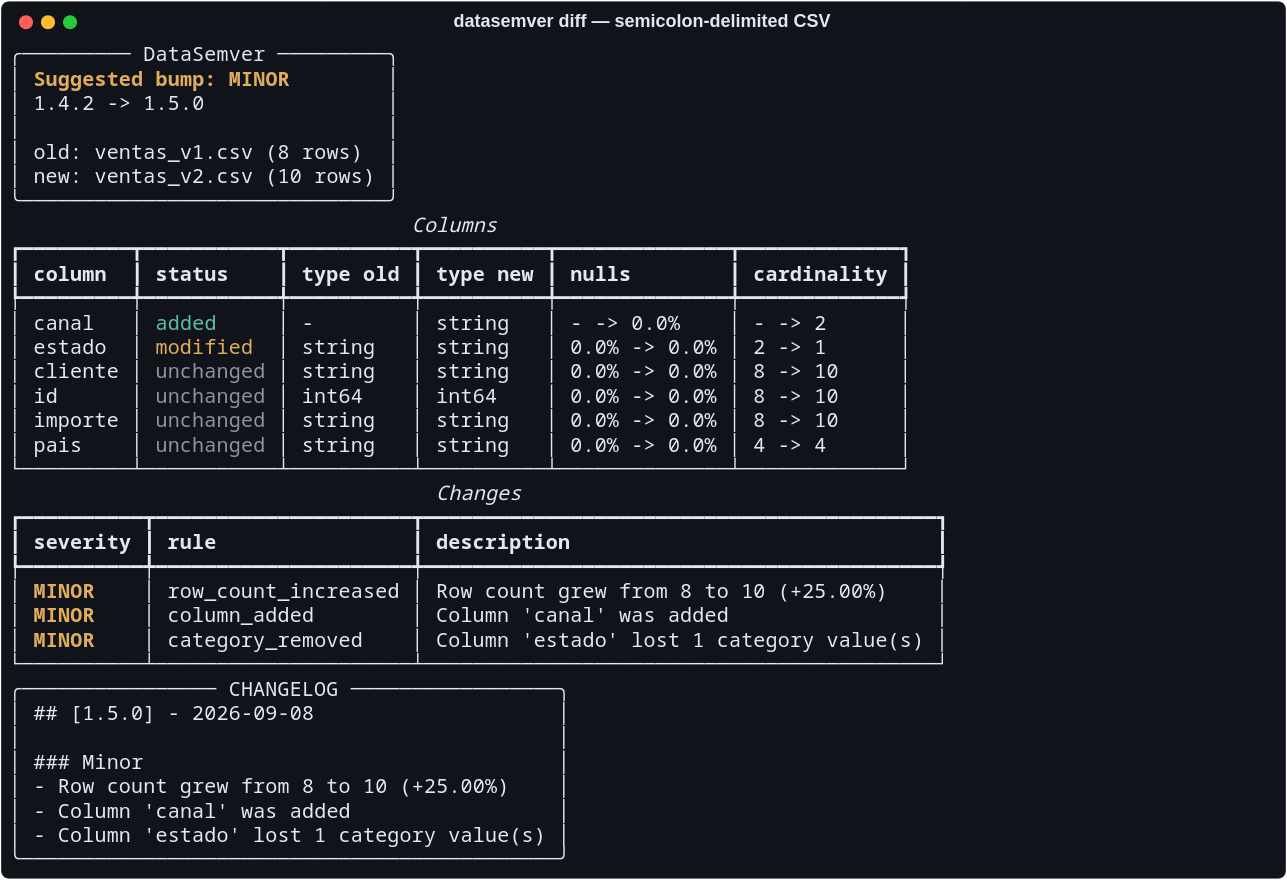
A semicolon-delimited export, where every importe also contains a comma.
The comma never reaches the header, so the semicolon wins and the file loads as five
columns instead of one.
Types are inferred for the text formats, where a column of "12" values is read as
int64. Parquet carries its own schema and is trusted as it stands, so a column stored as
a string stays a string even when every value looks numeric. Comparing a CSV against the
Parquet export of the same data is supported and reports the same changes:
datasemver diff tests/fixtures/old.csv tests/fixtures/new.parquetEverything above compares profiles, which answers whether this is still the same kind of data and deliberately not which rows changed. Give it a key and it answers that too:
datasemver diff old.csv new.csv --key id
# 1500 of 5000 row(s) present in both changed value (30.0%): email (1500), amount (1500)
A version where a third of the rows were rewritten with values drawn the same way has the same
profile as the one before it, and is a different dataset to anyone joining against it. This is
the comparison that sees it. It needs both datasets in memory and a key that identifies a row,
which is why it sits behind a flag; a key that is missing or repeated is refused with the count
rather than matched arbitrarily. Repeat --key for a composite key.
A comparison reads a profile: the columns, their types, their null ratios, a quantile grid per numeric column and the counts per category. That is a few hundred bytes where the dataset is megabytes, so it can be written to a file and kept.
datasemver profile customers_v3.parquet          # writes customers_v3.profile.json
datasemver diff customers_v3.profile.json customers_v4.parquet
Without -o the profile goes beside the dataset, named after it: the whole name stays and
only the format suffix is replaced, so sales.2024.csv and sales.2025.csv keep one profile
each. A source that is not a file has nothing to sit beside, so a table and a sheet are named
after what they hold, in the working directory — quarterly.xlsx#Q3 writes
quarterly-Q3.profile.json, and a database table writes customers.profile.json, never the
connection URL that would carry its password into the file name.
The dataset a profile describes does not have to exist any more. Commit the profile beside the data — next to the DVC pointer, in the same pull request — and the next comparison needs only the new version, instead of fetching a previous one that may be large, remote or gone. It also makes a suggestion auditable months later: the profile still says exactly what the bump was computed from.
--schema-only stores a profile read from the Parquet footer: a seek to the end of the file
rather than a decode of it, which is the command's own case — the reason to store a profile is
that the dataset is large. What the footer cannot give is the quantile grid and the category
counts, so the profile records that it came from there, and any comparison against it says
that no distribution was checked. Without that, the report would read exactly like one where
nothing moved, and those are different answers. The flag applies to Parquet, the only format
with a footer to read; asked for anything else, the command says so and profiles the data.
A profile is read wherever a dataset is, on either side of a comparison, so this works from
the Python API and the dashboard too. .profile.json is the extension that marks one, kept
distinct from .json because that is a format DataSemver reads as data. A profile written by
a newer version of DataSemver is refused rather than half-understood.
The bump is a number the run computed. --write-version writes it down beside the new
dataset, instead of leaving someone to read it off the terminal and retype it:
datasemver diff customers_v3.csv customers_v4.csv -c 1.4.2 --write-version
# 2.0.0 written to customers_v4.csv.version
The sidecar is a few bytes of text, so it belongs in git even when the dataset itself is in
DVC or an object store. datasemver dvc reads it to know what a bump continues from, and the
GitHub Action compares it against what the run suggests, so a version that
was never recorded says so in the pull request instead of drifting quietly.
Whether the number gets recorded is still the author's call — that is the point of a sidecar
the tool does not own — which is why the flag is opt-in. What it removes is the retyping,
because every hand-copied version is a chance to write 1.5.0 where the run said 2.0.0.
Two details worth knowing:
- A refused run writes nothing. With
--fail-on, a bump that closes the gate leaves the sidecar exactly as it was. It is what the next comparison starts from, so a rejected number written down is a rejected number the next run continues from.--outputbehaves the other way on purpose: a changelog entry is a note for a human to read. - The whole file name is kept, unlike a profile's.
sales.csvgetssales.csv.version, because two formats of one dataset are not obliged to be at the same version. A source that is not a file is named after the table or the sheet, in the working directory, and never after a connection URL that would carry its password into a file name.
Every severity is a list of rules. The engine evaluates major, then minor, then
patch, and the first rule that matches a change assigns its severity:
major:
  - column_removed
  - type_changed_incompatible
  - row_count_decrease_greater_than: 20

minor:
  - column_added
  - row_count_decreased

patch:
  - nulls_fixed
  - minor_stat_change
Pass it with --rules custom.yaml to replace the defaults, and check how it was parsed
with datasemver rules custom.yaml, which prints the rule set exactly as the engine
understood it:
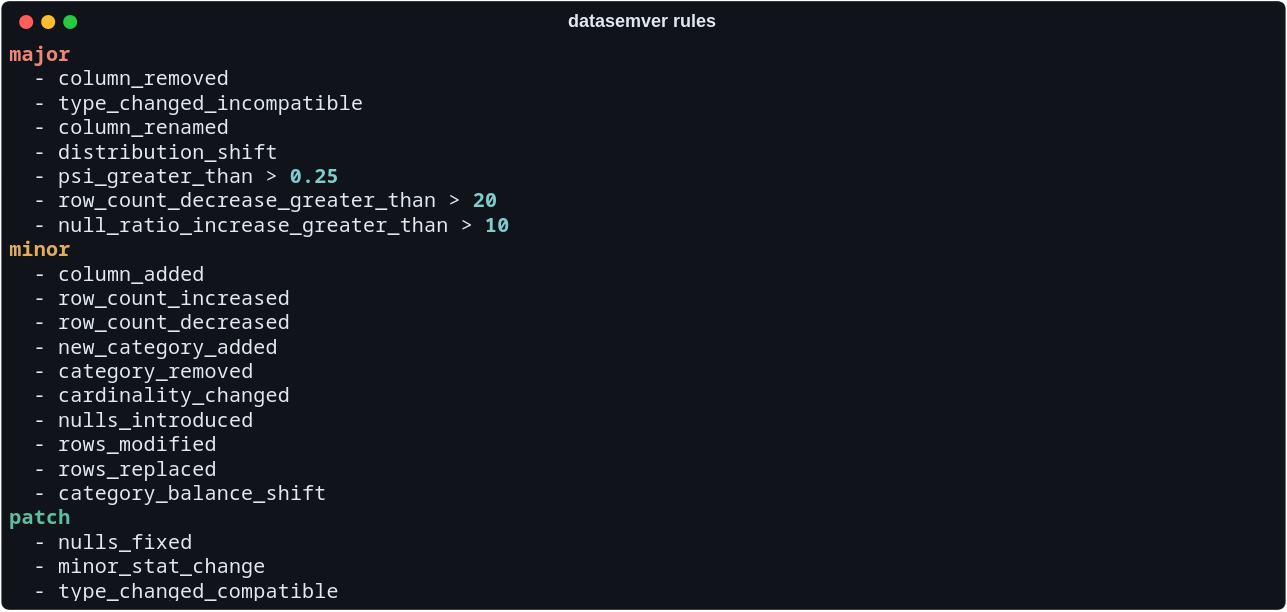
Two rules compare distributions rather than single numbers, which is what catches a change
that leaves every summary statistic where it was. distribution_shift fires on the
Kolmogorov-Smirnov statistic between the two versions of a numeric column, so a spread that
grows fortyfold under an unchanged mean, or a column that splits into two modes around the
same centre, is a change rather than a coincidence. category_balance_shift fires on the
Population Stability Index of a categorical column, which sees a label going from balanced to
one-in-a-hundred while both values are still present — invisible to a comparison of the
category sets. The conventional PSI readings are the defaults: 0.1 unstable, 0.25 no longer
the same population.
Datetime columns are compared the same way, on their epoch: a window that slides forward, or an export that only covers half the period it used to, is a change rather than the silence a date column produced when it carried no statistics at all. It is only ever the distribution — a percentage move of a datetime's mean would be a percentage of the time since 1970 — and the change is described in dates.
A categorical column with more distinct values than are tracked individually is still compared on its balance, with everything below the most frequent values summed into one bucket. Where the two versions truncate differently, only the categories both of them kept are compared, so a category sitting near the cut is not read as one that disappeared.
Both are measured against what the sample size can support. A KS statistic has no fixed meaning on its own: on four rows against five, appending a single row moves the distribution by a fifth, so a shift has to clear the critical value for those sample sizes as well as the configured threshold. On a handful of rows nothing is reported, because there is nothing to report.
The full catalogue of rules, metrics and thresholds is in docs/rules.md.
Two ready-made profiles ship in examples/: strict_rules.yaml and
lenient_rules.yaml.
Profiling reads every row and keeps a summary. Which is to say every statistic in a profile is an aggregate, and an aggregate does not need the dataset in memory — only the thing computing it does. Loading a CSV into a dataframe costs roughly ten times the file on disk, and that multiple, not the tool, is what decides which datasets can be versioned on a given machine.
pip install "datasemver[duckdb]"
datasemver diff snapshots/2026-08.csv snapshots/2026-09.csv --engine duckdb
Measured on 16 million rows, seven columns, peak RSS of the whole process:
| Engine | Parquet, 380 MB | CSV, 1.21 GB | Numbers |
|---|---|---|---|
pandas (default) |
21.4 s · 3190 MB | 49.9 s · 3311 MB | the reference |
duckdb |
16.1 s · 1736 MB | 20.9 s · 2856 MB | identical, to float rounding |
duckdb-sketch |
3.1 s · 1246 MB | 7.9 s · 1952 MB | quantile grid estimated |
duckdb answers exactly what the default answers: the same types, null ratios, cardinalities,
categories and quantile grids, down to the last float. It is a question about what a run costs
and never about what a bump means.
duckdb-sketch takes the quantile grid from a t-digest instead of computing it. Everything
else stays exact — cardinality especially, since a sketch of that answers 616 for 500 distinct
values and the tool would report a change nobody made. The grid itself is out by at most 0.23%
of a column's range on those 16M rows, and the two ends are not estimated at all, because min
and max are exact aggregates already being computed and a sketch is at its worst exactly
there. On the pair above, the sketch moved one KS statistic from 0.118 to 0.119 and changed
nothing else: same changes, same severities, same bump.
Neither engine is chosen for you. A run that switched engine because a file looked large would
answer a question nobody asked, and these two read less than the library does — .csv,
.csv.gz, .tsv, .tsv.gz, .parquet and .pq, with a nested column or a workbook or a
database table refused by name rather than quietly handed back. --key is refused too: matching
rows needs the rows, which is the one thing these engines never load.
DATASEMVER_ENGINE sets the default for a shell or a CI job, and --engine overrides it. Every
caller that profiles through the library obeys it, the DVC integration included; the dashboard
does not, because it reads uploads capped at 25 MB. DATASEMVER_DUCKDB_MEMORY_LIMIT caps what
DuckDB may hold — 1GB, 500MB — and what does not fit spills to disk instead of failing.
A .xlsx or .xlsm file holds several sheets, so a source names one after # — the same
separator a database source uses for its table, because a workbook and a database are the two
sources here that carry more than one dataset:
datasemver diff quarterly.xlsx#Q1 quarterly.xlsx#Q2
datasemver diff last-year.xlsx report.xlsx#'2024'   # quoted: a sheet actually called 2024
Without a fragment the first sheet is read, which is what a single-sheet export is; a bare
number is a position, so #1 is the second sheet. Naming a sheet that is not there answers
with the ones that are. Types are inferred as they are for CSV, because a column of numbers
stored as text is the normal state of a spreadsheet.
pip install "datasemver[excel]"A source can be a database table instead of a file. The connection URL names the database and the fragment names the table:
pip install "datasemver[sql]"

datasemver diff "sqlite:///snapshots.db#customers_v1" "sqlite:///snapshots.db#customers_v2"
datasemver diff "postgresql://reader:secret@warehouse:5432/analytics#customers" new.csv
The table goes after # because that part is not something a SQLAlchemy URL uses, so it
cannot collide with anything the URL already means. Quote the whole argument: # starts a
comment in most shells.
| Database | URL | Driver |
|---|---|---|
| SQLite | sqlite:///path/to.db#table |
none, it is in the standard library |
| PostgreSQL | postgresql://user:pass@host:5432/db#table |
psycopg2, in the sql extra |
| MySQL or MariaDB | mysql://user:pass@host/db#table |
pymysql, in the sql extra |
Two spellings are corrected on the way through. postgres:// lost its alias in SQLAlchemy 2
and would otherwise fail with "Can't load plugin"; a bare mysql:// means MySQLdb rather
than the PyMySQL the extra installs. A driver you name yourself, like
postgresql+psycopg://, is never rewritten.
Passwords never reach the report. The source is rendered into changelog entries, pull request
comments and --json output, so it arrives there as
postgresql://reader:***@warehouse:5432/analytics#customers.
What it does not do yet: only whole tables, named directly. No views, no queries, no schema
qualification, and the whole table is read because the profile compares row counts and column
statistics, which a partial read would misreport. Types come from the database rather than
being guessed, so a column declared TEXT stays text even when every value looks numeric.
DVC versions datasets by keeping them out of git: a commit records a .dvc
pointer holding a hash, and the bytes live in a local cache or a remote. So the previous
version of a dataset cannot be read with git show — there is nothing there to read. It has
to be asked of DVC, and that is what this command does.
pip install dvc          # DataSemver does not depend on it
datasemver dvc --rev HEAD^
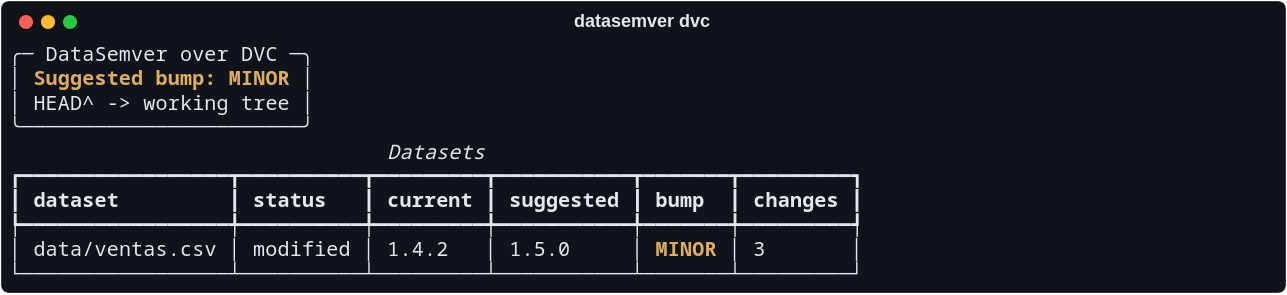
The version it starts from, 1.4.2, was read out of the
data/ventas.csv.version file recorded in the base revision.
It runs dvc diff, keeps the entries that are datasets in a format DataSemver reads, fetches
each previous version with dvc get, and compares it against the newer one.
| Option | Default | What it does |
|---|---|---|
--rev |
HEAD^ |
Revision to compare from |
--to |
the working tree | Revision to compare to |
--repo |
the current directory | Path to the DVC repository |
--json |
off | Print the run as JSON instead of the table |
--output PATH |
Write a Markdown report to a file | |
--current-version |
0.0.0 |
Version to bump from when a dataset records none beside it |
--rules PATH |
the bundled rules | Rules file replacing the defaults |
Naming datasets limits the run to those: datasemver dvc data/customers.csv.
Only modified and renamed datasets are compared, because those are the ones that exist on
both sides of the range; a rename is read under each of its two names. An added or deleted
dataset is listed as skipped, with the reason. Everything else DVC tracks — models, images,
archives — is left out by extension.
DVC is never imported. It is run as a command, so it can live in a different environment (a
pipx or brew install is the usual case) and DataSemver keeps working without it. When it is
missing, the command says so and how to install it.
The comparison reads the local workspace and the local cache, so data that was never pulled is
not there to compare. Run dvc pull first. DVC reports a missing cache as "unexpected error",
which reads like a bug rather than a missing pull, so that one is translated into a sentence
naming dvc pull.
This is what --json is for. Every dataset carries the version it should move to:
datasemver dvc --rev HEAD^ --json \
  | jq -r '.datasets[] | [.next_version, .path] | @tsv' \
  | while IFS=$'\t' read -r version path; do printf '%s\n' "$version" > "$path.version"; done
The sidecar is a few bytes of text, so git tracks it rather than DVC and DataSemver reads it
straight out of the base revision. That is what makes each bump continue from the last one
instead of restarting at 0.0.0 every time.
The command works inside dvc repro:
stages:
  version:
    cmd: datasemver dvc --rev HEAD^ --output report.md
    deps:
      - data/raw.csv
    outs:
      - report.md
That stage answers "what changed since the last commit". To compare two datasets the pipeline
itself produces — a different question, and the more common one in a dvc.yaml — use
datasemver diff on the two files directly:
stages:
  validate:
    cmd: >-
      datasemver diff data/raw.csv data/processed.csv
      --current-version $(cat data/processed.csv.version)
      --output CHANGELOG.md
    deps:
      - data/raw.csv
      - data/processed.csv
    outs:
- CHANGELOG.mdfrom datasemver import analyze
report = analyze("old.csv", "new.csv", current_version="1.4.2")
print(report.bump) # Severity.MAJOR
print(report.next_version) # 2.0.0
for item in report.classified:
print(item.severity, item.rule, item.change.description)analyze_schemas() takes two already loaded profiles, so dataframes coming from anywhere
can be compared without touching the filesystem:
import pandas as pd
from datasemver import analyze_schemas, schema_from_frame

report = analyze_schemas(
    schema_from_frame(pd.read_sql(query, engine), "warehouse@yesterday"),
    schema_from_frame(pd.read_sql(query, engine), "warehouse@today"),
)
A profile can be written and read back, which is what lets a comparison outlive the dataset it describes:
from datasemver import analyze, load_schema, write_profile

write_profile(load_schema("customers_v3.parquet"), "customers_v3.profile.json")

# months later, with the dataset long gone
report = analyze("customers_v3.profile.json", "customers_v4.parquet")
Everything reachable from the datasemver namespace is the supported interface. The module
paths underneath it — datasemver.core.analyzer and the rest — are free to move between
releases, so import from the package itself rather than from inside it.
Five lines in a workflow, and every pull request gets the bump its datasets deserve:
      - uses: actions/checkout@v5
        with:
          fetch-depth: 0          # the base version of each dataset lives in the history
      - uses: IzanVil/datasemver@v0.8.2
        with:
          fail-on: major          # optional: refuse the merge on a breaking change
It compares each dataset the branch touches against its version in the base branch, posts the result as a comment, and rewrites the same comment on every push instead of stacking new ones. The action carries the library it runs, so the tag picks both: it ships from 0.8.0 onwards, and the workflow in this repository runs it from the working tree, which makes every pull request here a rehearsal of what it does elsewhere.
## DataSemver report

Suggested bump for this branch: **MAJOR**

| Dataset                | Current | Suggested | Bump  | Changes |
| ---------------------- | ------- | --------- | ----- | ------- |
| `data/customers.csv`   | 1.4.2   | **2.0.0** | MAJOR | 7       |
| `data/users.json`      | 0.0.0   | **0.1.0** | MINOR | 3       |

<details><summary><code>data/customers.csv</code> — 7 classified change(s)</summary>

- **MAJOR** (`column_removed`): Column 'legacy_code' was removed
- **MAJOR** (`type_changed_incompatible`): Column 'phone' changed type from int64 to string
- **MINOR** (`row_count_increased`): Row count grew from 8 to 10 (+25.00%)
- … and 4 more

</details>
The work happens in scripts/run_datasemver_on_pr.py,
so the workflow stays a thin wrapper and the same analysis can be run by hand:
python scripts/run_datasemver_on_pr.py --base-ref origin/main --output report.md| Option | Description |
|---|---|
--base-ref |
Ref holding the previous version of each dataset (default origin/main) |
--head-ref |
Ref to compare against the base; defaults to the working tree |
--paths |
Analyse these datasets instead of detecting the changed ones |
--rules |
Rules file passed through to datasemver diff |
--default-version |
Version assumed when a dataset has no sidecar file |
--top-changes |
Changes listed per dataset (default 5) |
--output |
Write the Markdown report to this file |
It exposes has_report, max_bump and dataset_count as step outputs, writes the report
to the job summary, and always exits 0: a branch with no dataset changes, a dataset added
for the first time, an unreadable file or a missing base ref are reported rather than
failing the job.
The current version of a dataset is read from a sidecar file committed next to it, so each dataset carries its own version:
data/customers.csv
data/customers.csv.version   # contains 1.4.2
Without a sidecar the analysis starts from --default-version (0.0.0). Bumping is
deliberate: the comment tells you the version the dataset deserves, and you write it into
the sidecar in the same pull request.
Which means it can be forgotten, and a version nobody wrote down does not announce itself: the next branch reads the stale number, bumps from there, and the drift compounds quietly. The report has a Version files section that appears only when a sidecar and its dataset disagree:
| What it found | What it says |
|---|---|
| The dataset changed, the sidecar did not | still reads 1.4.2; 2.0.0 is not recorded yet |
| The sidecar holds a different number | reads 1.5.0, but this branch suggests 2.0.0 |
| There is no sidecar at all | does not exist, so the comparison started from the default |
| The sidecar was deleted in the branch | was removed in this branch, and recorded 1.4.2 |
When the recorded version matches the suggestion the section is absent, so the report stays quiet in the case that needs nothing. Deciding the number is still yours; noticing that it was never written is what the tool can do about it.
name: DataSemver

on:
  pull_request:
    types: [opened, synchronize, reopened]

permissions:
  contents: read
  pull-requests: write

jobs:
  analyse:
    runs-on: ubuntu-latest
    steps:
      - uses: actions/checkout@v5
        with:
          fetch-depth: 0
      - uses: IzanVil/datasemver@v0.8.2
        with:
          rules: .datasemver/rules.yaml
fail-on: major| Input | Default | Description |
|---|---|---|
base-ref |
the pull request's base | Ref holding the previous version of each dataset |
paths |
the datasets that changed | Analyse these instead, space separated |
rules |
the bundled rules | Rules file replacing the defaults |
fail-on |
(unset) | Fail the job when the worst bump reaches patch, minor or major |
engine |
pandas |
duckdb or duckdb-sketch profile without loading; the extra is installed for you |
default-version |
0.0.0 |
Version assumed for a dataset with no .version sidecar |
comment |
true |
Post the report as a pull request comment |
python-version |
3.11 |
Python the analysis runs on |
token |
github.token |
Token the comment is posted with |
| Output | Description |
|---|---|
bump |
The worst bump across every dataset analysed, or none |
dataset-count |
How many datasets were analysed |
has-report |
Whether anything was analysed |
report |
Path to the Markdown report, written whether or not it was posted |
fetch-depth: 0 is required: without the full history the base version of the dataset is
not in the clone, and the action says so rather than letting git explain it. The default
GITHUB_TOKEN is enough as long as the job declares pull-requests: write.
Two limits worth knowing. Pull requests opened from a fork get a read-only token, so the
comment is skipped for them; the report is still in the job summary. And a dataset large
enough to be stored in Git LFS needs lfs: true on the checkout step, otherwise the base
version is a pointer file rather than data.
When fail-on is set and reached, the report is posted before the job fails. A refusal
that suppressed its own explanation would block a merge without saying which dataset or why.
A FastAPI backend and a dependency-free frontend live in datasemver_web/.
Upload two versions of a dataset, or pick two versions from a directory, and read the
bump, the classified changes, the column comparison and the changelog entry in the
browser. It ships in the package, so it needs no checkout:
pip install "datasemver[web]"
uvicorn datasemver_web.backend.main:app
From a clone, pip install -r requirements/web.txt and add --reload.
Then open http://127.0.0.1:8000; the backend serves the frontend, so that is the only
command. The history view scans ./datasets/ by default, grouping files named
customers_v1.csv, customers_v2.csv and so on.
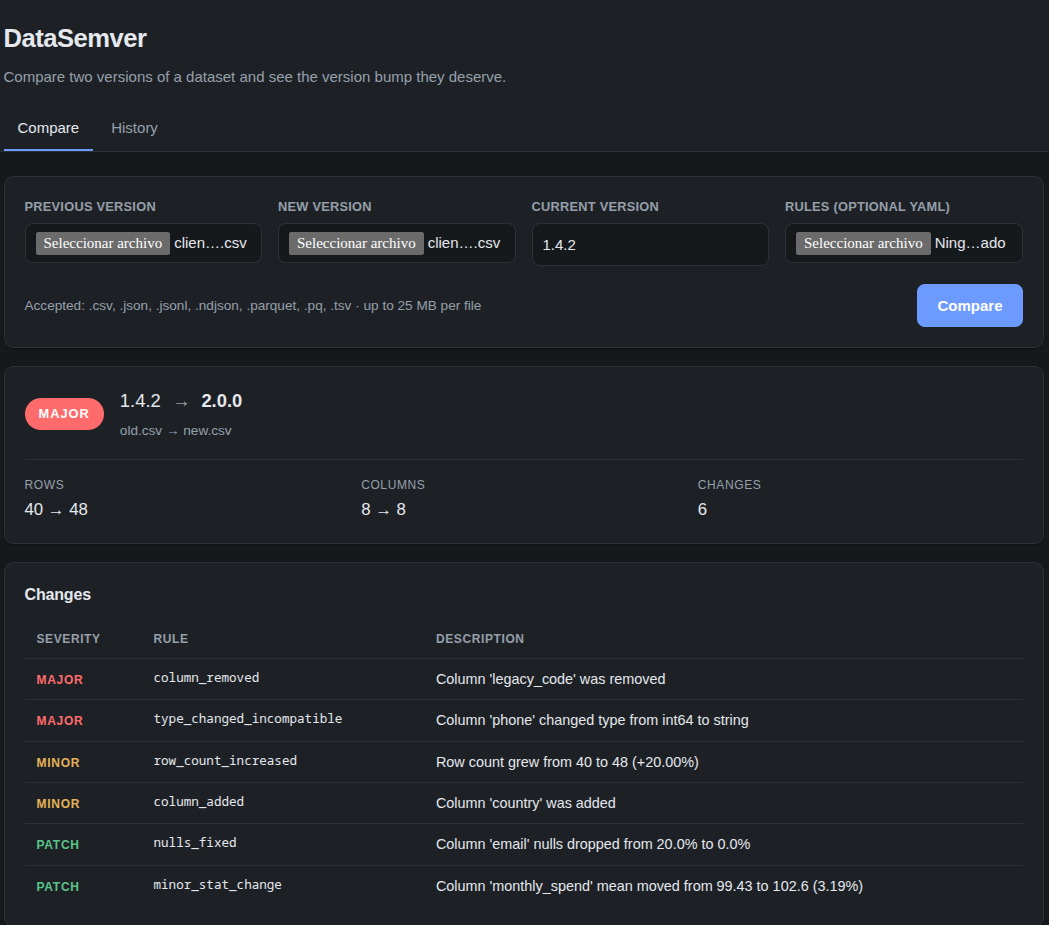
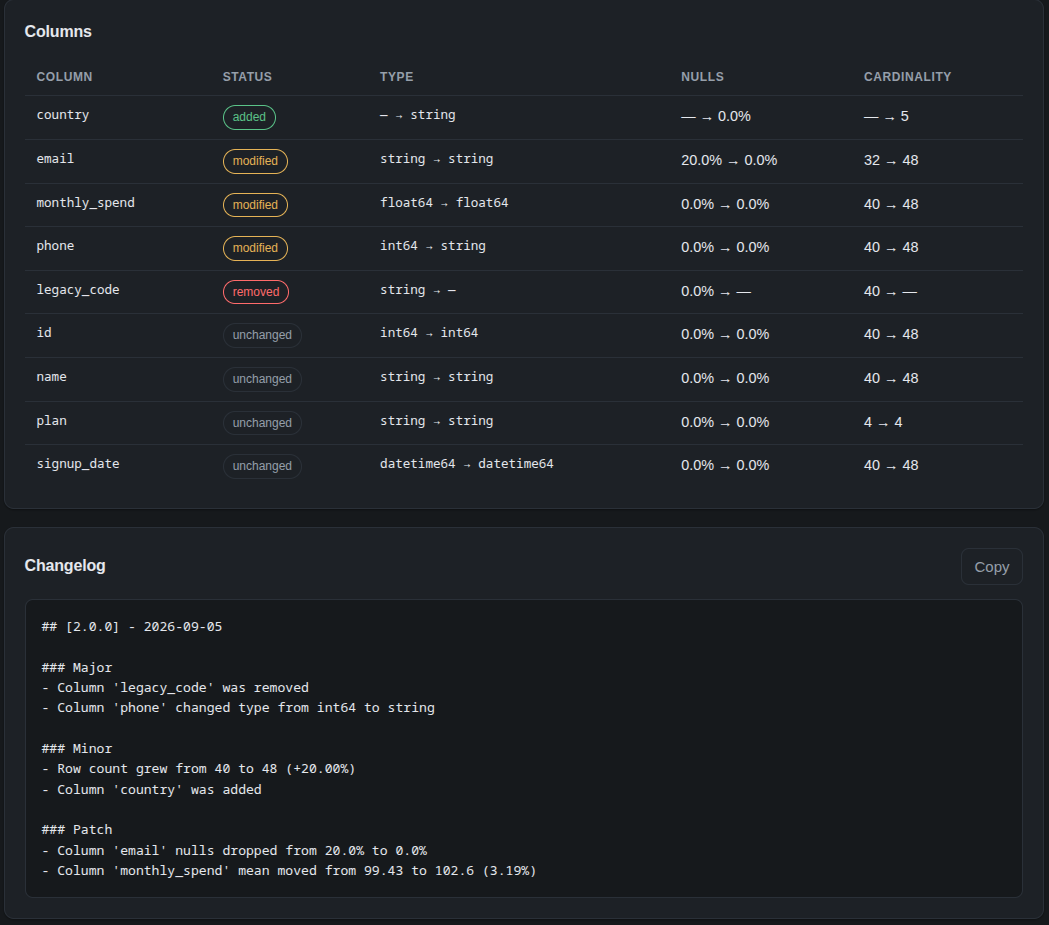
The same comparison the CLI prints above, read in the browser: the bump and the classified changes first, then the column-by-column table and the changelog entry, ready to copy.
The dashboard is a client of the library, not a fork of it: it calls analyze() and
returns the same report the CLI prints with --json.
curl -X POST http://127.0.0.1:8000/api/diff \
  -F "old=@tests/fixtures/old.csv" \
  -F "new=@tests/fixtures/new.csv" \
  -F "current_version=1.4.2"
Endpoints, configuration and the dataset naming convention are documented in datasemver_web/README.md.
Either side of a comparison may be a stored profile rather than a dataset, which is what lets it reach a version too large to upload or no longer on disk: the profile is a few hundred bytes. Save profile writes the profile of the new version, so the dashboard can produce one for someone who never opens a terminal. A Key field turns the comparison into a row-level one, naming one column or several separated by commas.
datasemver/
├── core/
│   ├── analyzer.py       load, diff, classify, version
│   ├── changelog.py      changelog rendering and file writing
│   ├── differ.py         comparison of two dataset profiles
│   └── models.py         pydantic models shared across the pipeline
├── formats/
│   ├── loader.py         CSV, JSON and Parquet readers
│   ├── sql.py            database tables read as datasets
│   └── utils.py          type inference and column profiling
├── rules/
│   ├── engine.py         rule parsing and severity assignment
│   └── default_rules.yaml
├── integrations/
│   └── dvc.py            running over the datasets DVC versions
├── utils/
│   ├── similarity.py     rename detection heuristics
│   └── version.py        semantic version arithmetic
└── cli/main.py           typer entry point

CHANGELOG.md              the project's own versions
datasemver_web/           FastAPI backend and static frontend for the dashboard
docs/                     rule catalogue, the PyPI readme, the demo recording and the images
examples/                 alternative rule profiles
requirements/             the plain `pip install -r` path, mirroring the extras
scripts/                  CI helper for pull requests, and the standalone-executable build
datasets/                 sample versioned datasets for the dashboard history view
tests/                    pytest suite and dataset fixtures
.github/                  workflows, and the contributing, security and conduct documents
Releases publish through Trusted Publishing, so there is no API token stored in this repository. The workflow mints a short-lived OpenID Connect token that names the repository, the workflow file and the environment it came from, and the index verifies that against what it was told to expect. What each index has to be told, once, is in CONTRIBUTING.md.
Every released version is described in CHANGELOG.md, which uses the same vocabulary the tool applies to datasets: Major for changes that break what consumers already depend on, Minor for new capability that leaves existing contracts intact, Patch for fixes that keep the same meaning.
Issues and pull requests are welcome. Start with CONTRIBUTING.md for the development setup, the test workflow and the style expected in a patch. Everyone taking part is expected to follow the Code of Conduct.
pip install -e ".[dev]"
pytestApache License 2.0. See LICENSE and NOTICE.
Copyright © 2026 Izan Vilchez. You may use, modify and redistribute this, including commercially and inside closed software, provided the licence and the notice travel with it and modified files say they were changed. The licence grants no right to the DataSemver name or marks: a fork is free to exist, and is not free to present itself as this project.
Releases up to and including 0.7.0 were published under the MIT licence and remain available under it; Apache 2.0 applies from the next release onwards.