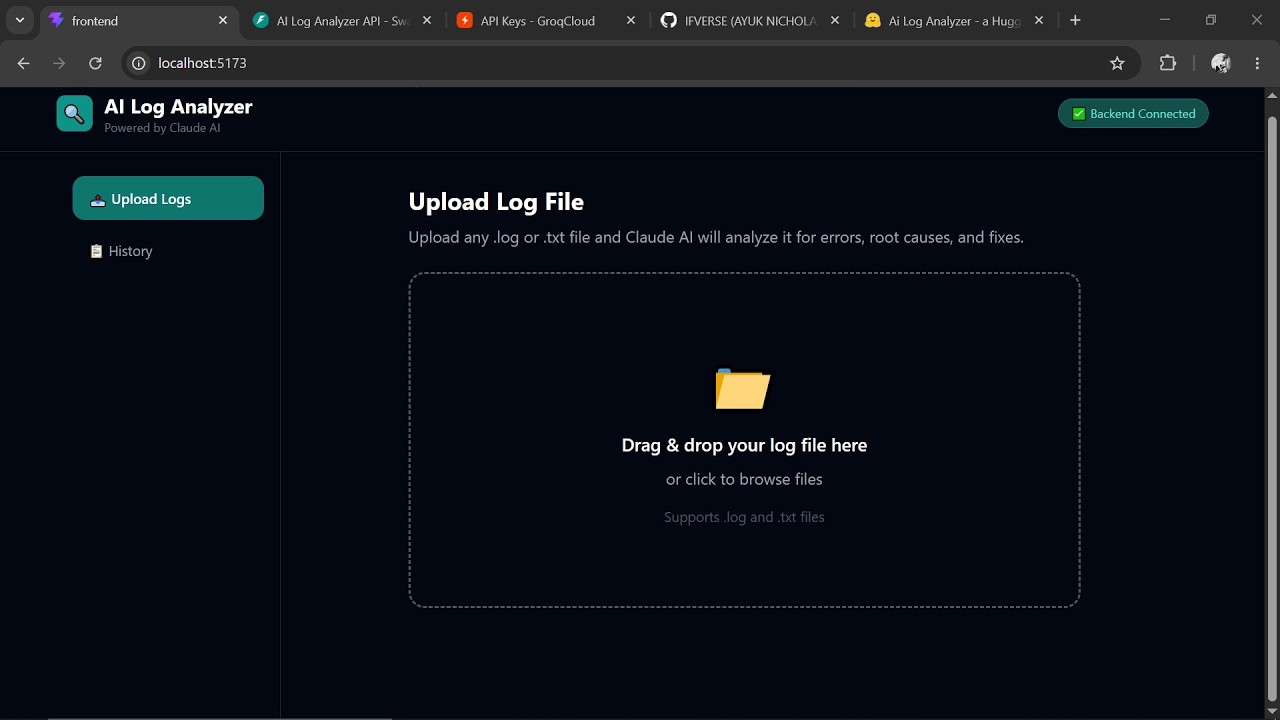
📺 Click the image above to watch the full demo on YouTube
Upload any application log file and get instant AI-powered analysis — errors detected, root causes identified, and fixes recommended in plain English.
- What Is This?
- Features
- How It Works
- Tech Stack
- Getting Started
- Running the App
- How to Use the App
- Sample Log Files
- Project Structure
- Troubleshooting
AI Log Analyzer is a full-stack web application that helps developers and teams quickly understand what went wrong in their software.
When software crashes or has problems, it creates log files — long, technical text files that record everything that happened. Reading these manually can take hours.
This app lets you drag and drop a log file and within seconds, the AI reads it and tells you:
- What happened (in plain English)
- What errors occurred and how serious they are
- Why it broke (root cause)
- Exactly how to fix it
- If the same problem keeps repeating
You can also chat with the AI to ask follow-up questions like "Why did the database crash?" and get clear answers based on your specific logs.
| Feature | Description |
|---|---|
| 📤 Drag & Drop Upload | Simply drag your log file onto the app |
| 🤖 AI Analysis | Powered by Groq AI (LLaMA 3.3) for instant results |
| 🔴 Severity Classification | Errors color-coded as Critical, Warning, or Info |
| 🔍 Root Cause Detection | AI identifies the underlying reason for failures |
| ✅ Fix Recommendations | Specific, actionable steps to resolve issues |
| 🔁 Pattern Detection | Spots recurring problems in your logs |
| 💬 Chat Interface | Ask follow-up questions about your logs |
| 📋 Analysis History | Review past analyses anytime |
You upload a log file
        ↓
React Frontend sends it to FastAPI Backend
        ↓
Backend sends logs to Groq AI (LLaMA 3.3)
        ↓
AI analyzes and returns structured results
        ↓
Results saved to database and displayed to you
The whole process takes 10 to 30 seconds.
| Layer | Technology | Purpose |
|---|---|---|
| Frontend | React + Vite | The website users interact with |
| Styling | Tailwind CSS | Makes the UI look clean and professional |
| Backend | FastAPI (Python) | The server that handles requests |
| AI | Groq API (LLaMA 3.3) | The brain that reads and understands logs |
| Database | SQLite + SQLAlchemy | Stores past analysis results |
| File Upload | react-dropzone | Handles drag and drop |
| HTTP Client | Axios | Connects frontend to backend |
Before running this app, make sure you have these installed:
- Python 3.10 or higher — https://python.org/downloads
- Node.js 18 or higher — https://nodejs.org
- A Groq API key (free) — https://console.groq.com
Open your terminal and run:
python --version
node --version
npm --version
All three should show version numbers. If any says "not found", go install it first.
You need two terminals open at the same time — one for the backend and one for the frontend.
cd Desktop\log-analyzer\backend
venv\Scripts\activate
uvicorn main:app --reload
You should see:
INFO: Uvicorn running on http://127.0.0.1:8000
cd Desktop\log-analyzer\frontend
npm run dev
You should see:
VITE ready on http://localhost:5173
Open your browser and go to:
http://localhost:5173
- Go to https://console.groq.com
- Sign up for a free account
- Click API Keys → Create API Key
- Copy the key (starts with
gsk_...) - Open
backend/.envand paste:
GROQ_API_KEY=gsk_your-key-here
Save the file and restart the backend.
- Click "Upload Logs" in the sidebar
- Drag and drop your
.logor.txtfile onto the upload area - Or click the upload area to browse your files
The app will show "Claude is analyzing your logs..."
This takes 10 to 30 seconds depending on file size.
You will see:
📊 Summary — A plain English explanation of what happened
🔍 Root Cause — The main reason things went wrong
- 🔴 Critical — App crashed or major failure
- 🟡 Warning — Something concerning but not fatal
- 🔵 Info — General information
✅ Recommended Fixes — Step by step instructions to fix the problems
🔁 Patterns — Recurring issues detected in the logs
Scroll down to the Chat section and ask anything like:
- "Why did the database keep timing out?"
- "What caused the app to crash?"
- "How do I prevent this from happening again?"
Click "History" in the sidebar to see all your previous log analyses.
Two sample log files are included to test the app:
2026-05-14 10:00:01 INFO Server started
2026-05-14 10:00:05 ERROR Database connection failed
2026-05-14 10:00:06 CRITICAL Application crashed
A realistic 60-line log showing:
- Payment gateway failures
- Database connection pool exhaustion
- OutOfMemoryError crash
- Multiple crash and restart cycles
- Possible DDoS attack detection
- NullPointerException bug
- Memory leak after restart
Upload c sample.log to see the full power of the analyzer.
log-analyzer/
│
├── backend/                    # Python FastAPI server
│   ├── main.py                 # API routes (upload, history, chat)
│   ├── analyzer.py             # Groq AI integration
│   ├── database.py             # Database setup and models
│   ├── .env                    # Your API key (never share this)
│   ├── requirements.txt        # Python packages needed
│   └── venv/                   # Python virtual environment
│
├── frontend/                   # React web application
│   ├── src/
│   │   ├── App.jsx             # Main app component
│   │   └── components/
│   │       ├── UploadZone.jsx  # Drag and drop upload area
│   │       ├── AnalysisPanel.jsx # Displays AI results
│   │       ├── ChatPanel.jsx   # Chat interface
│   │       └── HistoryPanel.jsx # Past analyses list
│   ├── package.json            # JavaScript packages needed
│   └── index.html              # App entry point
│
├── sample.log                  # Simple test log file
├── complex-test.log            # Advanced test log file
└── README.md                   # This file
For developers who want to integrate with the backend directly:
| Method | URL | Description |
|---|---|---|
POST |
/api/analyze |
Upload and analyze a log file |
GET |
/api/history |
Get list of past analyses |
GET |
/api/history/{id} |
Get a specific past analysis |
POST |
/api/chat/{id} |
Ask a question about a log |
GET |
/ |
Health check |
Full API documentation available at: http://localhost:8000/docs
- Make sure your backend is running in a second terminal
- Check that your
GROQ_API_KEYis set inbackend/.env - Restart the backend:
uvicorn main:app --reload
- Make sure you are inside the
frontendfolder - Run
npm installfirst to install packages
- Make sure your virtual environment is activated (you should see
(venv)) - Run
pip install -r requirements.txtto install packages
- Go to https://console.groq.com and create a new API key
- Make sure there are no spaces or quotes around the key in your
.envfile
- Backend: try
uvicorn main:app --reload --port 8001 - Frontend: Vite will automatically suggest a new port
Ayuk Nicholas — Founder, NexuSTEM Initiative
This project was built as a demonstration of full-stack AI engineering — combining React, FastAPI, and Groq AI to solve a real developer problem: making log analysis fast, intelligent, and accessible to everyone.
*AI Log Analyzer — Making logs readable for humans, powered by AI