
An MP3 renamed to .flac looks lossless, weighs lossless, and fools every player you own. It can't fool a spectrogram — and this reads it for you.


Find the fake FLACs in your music library.
A lossy codec throws away the top of the spectrum and never gives it back. FLAC Detective reads each file, spots the fingerprints that loss leaves behind, and tells you which files are real and which are fakes.
pip install flac-detective       # needs Python 3.10+
flac-detective /path/to/music    # scan a file or a whole folder
Every file gets a verdict, like a traffic light:
✅ AUTHENTIC      real lossless         → keep it
❓ WARNING        borderline            → give it a listen
⚠️  SUSPICIOUS     probably a transcode  → likely a fake
❌ FAKE_CERTAIN   definitely a fake     → replace it
The scan only reads your files — it never changes anything.
🟢 New to all this? → Start Here — the 5-minute beginner's guide No command line, no jargon. From "what is this?" to "I checked my music".
Add --format html and you get a single self-contained page: a triage table sorted
worst-first, plus a spectrum plot for every flagged file. The MP3 "cliff" — a sharp drop
well below the real ceiling — is right there for the eye, with the detected cutoff marked.
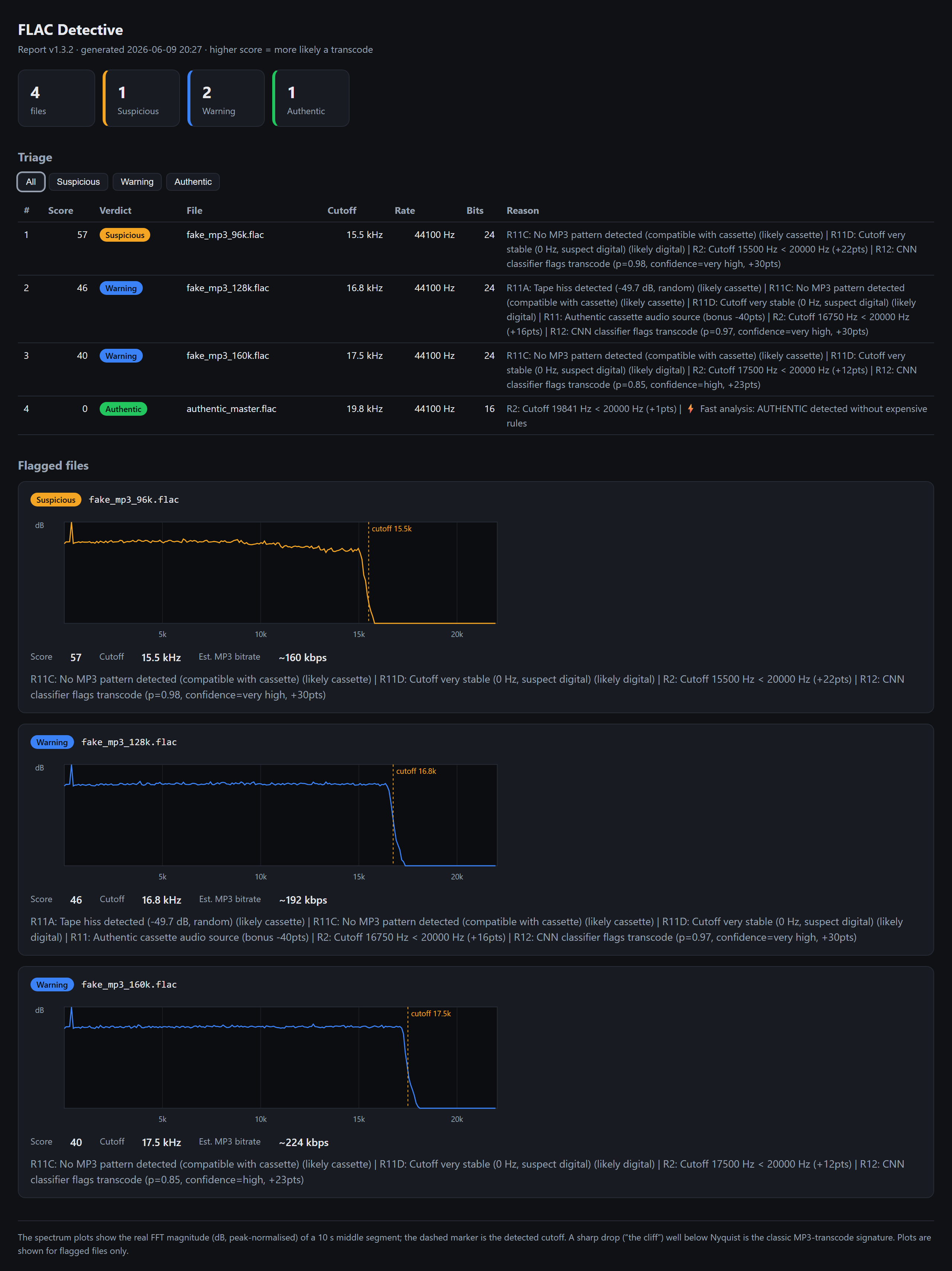
Three transcodes at different MP3 bitrates show the wall falling at different frequencies (96 kbps ~11 kHz, 128 kbps ~16 kHz, 160 kbps ~17.5 kHz); the authentic file runs full-range.
An MP3 re-saved as FLAC is lossless as a container, but the audio already passed through a lossy codec — and that leaves fingerprints. The clearest is the spectral cliff: MP3 discards everything above a bitrate-dependent frequency, so the spectrum falls off a wall where a real recording keeps going.
FLAC Detective scores each file with 11 heuristic rules built around that idea (cutoff frequency, MP3-bitrate signatures, compression artefacts) plus protection rules so genuine vinyl rips, cassette transfers and naturally quiet recordings aren't flagged. An optional 12th rule — a small CNN — sharpens borderline verdicts. The rules sum to a 0–150 score:
| Verdict | Score | What to do |
|---|---|---|
| ✅ AUTHENTIC | ≤ 30 | keep it |
| ❓ WARNING | 31–54 | borderline — check manually |
| 55–85 | likely a transcode | |
| ❌ FAKE_CERTAIN | ≥ 86 | definitely transcoded |
The guiding principle is "protect authentic files first": a false alarm on real music is worse than missing a borderline fake. Treat AUTHENTIC as "no evidence of transcoding", not a guarantee.
→ Every rule explained: Technical Details.
flac-detective /path/to/music              # scan a folder
flac-detective                             # interactive (prompts for a path)

flac-detective /music --format csv  -o triage.csv   # spreadsheet, worst-first
flac-detective /music --format html -o report.html  # visual report (see above)
flac-detective /music --deep                        # catch high-bitrate AAC/Opus/Vorbis (slower)
flac-detective /music --advanced                    # show the plumbing: scores, cutoff, per-rule detail
By default the output is easy mode — a plain-language verdict and a recommended action
per file ("Almost certainly a fake — the sound stops dead at ~16 kHz, the wall of a
128 kbps MP3. → Replace it."). Add --advanced for the scores, cutoff frequencies and
per-rule reasoning. The desktop GUI has the same Advanced toggle.
Analyses FLAC, WAV, ALAC (.m4a) and APE (.ape) — codec-agnostic, and a lossy .m4a
is correctly rejected (the real codec is probed, never trusted by extension).
→ Full guide & every flag: User Guide.
pip install "flac-detective[gui]"
flac-detective-gui
A desktop app (PySide6): choose a folder or drag it in, watch the progress bar, then triage a sortable, colour-coded verdict table — click any file to see its spectrum with the detected cutoff marked and the reasons for its verdict. Export to HTML/CSV/JSON.
Beyond lossy-as-lossless, FLAC Detective flags files sold as high-resolution that
aren't: 44.1/48 kHz upsampled to 96/192 kHz (a hard spectral cliff with digital
silence above it), and 16-bit audio padded into a 24-bit container. This is a
separate axis from the transcode verdict — reported as hires_verdict
(GENUINE_HIRES / UPSAMPLED / PADDED_DEPTH / …) in the CSV report, the GUI and the
Python API. A genuine 96 kHz recording that simply rolls off early reads GENUINE_HIRES,
not a false alarm.
Install options & upgrading
pip install flac-detective                 # base
pip install "flac-detective[ml]"           # + optional CNN (Rule 12)
pip install "flac-detective[gui]"          # + desktop GUI (flac-detective-gui)
docker pull ghcr.io/guillain-rdcde/flac_detective:latest   # or Docker (amd64 + arm64)
pip install does not upgrade an existing install — use -U to get the latest release:
pip install -U flac-detective
flac-detective --version
Use it from Python or beets
Python API:
from flac_detective import FLACAnalyzer

result = FLACAnalyzer().analyze_file("song.flac")
print(result["verdict"])   # AUTHENTIC, WARNING, SUSPICIOUS, or FAKE_CERTAIN
beets plugin — triage transcodes without leaving your workflow:
pip install "flac-detective[beets]"
# in config.yaml:  plugins: flacdetective

beet flacdetective                          # analyse & tag the whole library
beet ls flacdetective_verdict:FAKE_CERTAIN  # list the certain fakes
Stores flacdetective_verdict and flacdetective_score on each item; an optional
auto: yes analyses files as they're imported.
Rule 12's model went through a real R&D saga, written up as a learning resource: a false-positive audit over 11 234 real FLACs, four instructive dead-ends, a debunked "AUC 0.99" caught by cross-validation, and a twist where a "fundamental limit" turned out to be an artifact of listening in mono — fixed by going stereo. Real-world specificity on 11 234 authentic FLACs climbed from 80 % to 95 %.
📖 Read the ML detective story →
- 📖 Full documentation site — getting started, user guide, technical details, API
- 🚀 Getting Started — install, first analysis, accuracy & file-safety notes
- 📋 Changelog · 🤝 Contributing · 🔒 Security
- 💬 Issues · Discussions
Licensed under the MIT License.