


Opinionated TypeScript building blocks for Pulumi-based AWS infrastructure.
Deploying examples or components can create billable AWS resources. Preview changes before deploying and run
pulumi destroywhen resources are no longer needed.
- Overview
- Quick start
- Usage
- SSM Connect
- API reference
- Development
- Contributing
- Troubleshooting
- License
@studion/infra-code-blocks provides reusable Pulumi components for common AWS infrastructure patterns used in Studion projects.
Use this package when you want to:
- provision common AWS infrastructure patterns without rewriting Pulumi boilerplate
- standardize networking, compute, data, and observability setup across multiple services
- compose higher-level infrastructure from opinionated building blocks instead of low-level resources
This package is most useful for teams already working with Pulumi, AWS, and TypeScript.
The package provides building blocks across four areas:
| Area | What it covers | Typical entry points |
|---|---|---|
| Networking and delivery | VPCs, ACM certificates, CloudFront, and static hosting | Vpc, AcmCertificate, CloudFront, StaticSite, S3Assets |
| Compute | Generic ECS services and ALB-backed web services | EcsService, WebServer, WebServerBuilder, WebServerLoadBalancer |
| Data | PostgreSQL, replicas, SSM access helpers, Redis, and password storage | Database, DatabaseBuilder, DatabaseReplica, Ec2SSMConnect, ElastiCacheRedis, UpstashRedis, Password |
| Observability | OpenTelemetry collector integration, Grafana resources, and PromQL helpers | openTelemetry, grafana, prometheus |
Required for all usage
- Node.js 20 or newer and npm.
- A Pulumi TypeScript project. If you do not already have one,
pulumi new aws-typescriptis a suitable starting point.
Required for AWS deployment
- Pulumi CLI authenticated with
pulumi login. - AWS credentials with permissions for the resources you create.
- Pulumi AWS provider region configuration, for example
pulumi config set aws:region eu-central-1(environment:AWS_REGION).
Required only for ECS/web-service components
- An ECS cluster when using
EcsService,WebServer, orWebServerBuilder.
Required only for DNS/TLS/static-site/custom-domain components
- A Route 53 hosted zone.
- A domain name managed by or delegated to that hosted zone.
Required only for database and SSM Connect components
- Private or isolated subnets from this package's
Vpccomponent or a compatible AWSX VPC. - AWS CLI and the Session Manager plugin when opening local SSM tunnels.
Required only for Grafana components
- Grafana Cloud stack URL configured as Pulumi config
grafana:urlor environment variableGRAFANA_URL, for examplehttps://<stack>.grafana.net. - Grafana Cloud access policy token configured for the Grafana provider as Pulumi config
grafana:cloudAccessPolicyTokenor environment variableGRAFANA_CLOUD_ACCESS_POLICY_TOKEN. - Initial Grafana Cloud token scopes:
accesspolicies:read,accesspolicies:write,accesspolicies:delete,stacks:read, andstack-service-accounts:write. - The access policy managed by this package includes the scopes needed for data sources, dashboards, and plugins.
Required only for Upstash components
- Pulumi config value
upstash:apiKey(environment:UPSTASH_API_KEY). - Pulumi config value
upstash:email(environment:UPSTASH_EMAIL).
npm install @studion/infra-code-blocksUse this flow in a new directory if you want the shortest domain-free path from a Pulumi project to a deployed resource:
pulumi new aws-typescript
npm install @studion/infra-code-blocks
pulumi config set aws:region eu-central-1
Add a minimal VPC to your Pulumi program:
import * as studion from '@studion/infra-code-blocks';

const vpc = new studion.Vpc('app', {});

export const vpcId = vpc.vpc.vpcId;
Preview, deploy, and clean up when finished:
pulumi up
pulumi destroy
This example avoids Route 53 and ACM, but creating a VPC can still create billable AWS resources such as NAT gateways depending on provider defaults and region.
- Start with a foundation resource such as
Vpc. - Add higher-level components such as
WebServer,Database,ElastiCacheRedis, orStaticSite. - Export the resulting IDs, ARNs, hostnames, or endpoints from your stack.
- Use
pulumi previewbefore deploying andpulumi destroyfor cleanup in temporary environments.
Use this example when your stack already has a public Route 53 hosted zone and you need a DNS-validated certificate:
import * as aws from '@pulumi/aws';
import * as studion from '@studion/infra-code-blocks';

const hostedZone = aws.route53.getZoneOutput({
  name: 'example.com',
  privateZone: false,
});

const vpc = new studion.Vpc('app', {});

const certificate = new studion.AcmCertificate('app-cert', {
  domain: 'app.example.com',
  hostedZoneId: hostedZone.zoneId,
});

export const vpcId = vpc.vpc.vpcId;
export const certificateArn = certificate.certificate.arn;This example creates the surrounding AWS resources required by the web service instrumentation: a VPC, ECS cluster, CloudWatch log group, and AWS Managed Service for Prometheus workspace. It also expects the AWS provider region to be configured through aws:region or AWS_REGION.
import * as aws from '@pulumi/aws';
import * as pulumi from '@pulumi/pulumi';
import * as studion from '@studion/infra-code-blocks';

const env = pulumi.getStack();
const vpc = new studion.Vpc('app', {});
const cluster = new aws.ecs.Cluster('app-cluster', {});
const logGroup = new aws.cloudwatch.LogGroup('app-otel-logs', {});
const workspace = new aws.amp.Workspace('app-amp', {});

const otelCollector = new studion.openTelemetry.OtelCollectorBuilder('app', env)
  .withDefault({
    prometheusNamespace: 'app',
    prometheusWorkspace: workspace,
    region: aws.config.requireRegion(),
    logGroup,
    logStreamName: 'app',
  })
  .build();

const web = new studion.WebServerBuilder('app')
  .withContainer('nginx:stable', 80, {
    environment: [
      { name: 'OTEL_SERVICE_NAME', value: 'app' },
      { name: 'OTEL_EXPORTER_OTLP_ENDPOINT', value: 'http://127.0.0.1:4318' },
      { name: 'OTEL_EXPORTER_OTLP_PROTOCOL', value: 'http/json' },
    ],
  })
  .withEcsConfig({
    cluster,
    desiredCount: 1,
    size: 'small',
    autoscaling: { enabled: false },
  })
  .withVpc(vpc.vpc)
  .withOtelCollector(otelCollector)
  .build();

export const webServiceName = web.service.apply(
  ecsService => ecsService.service.name,
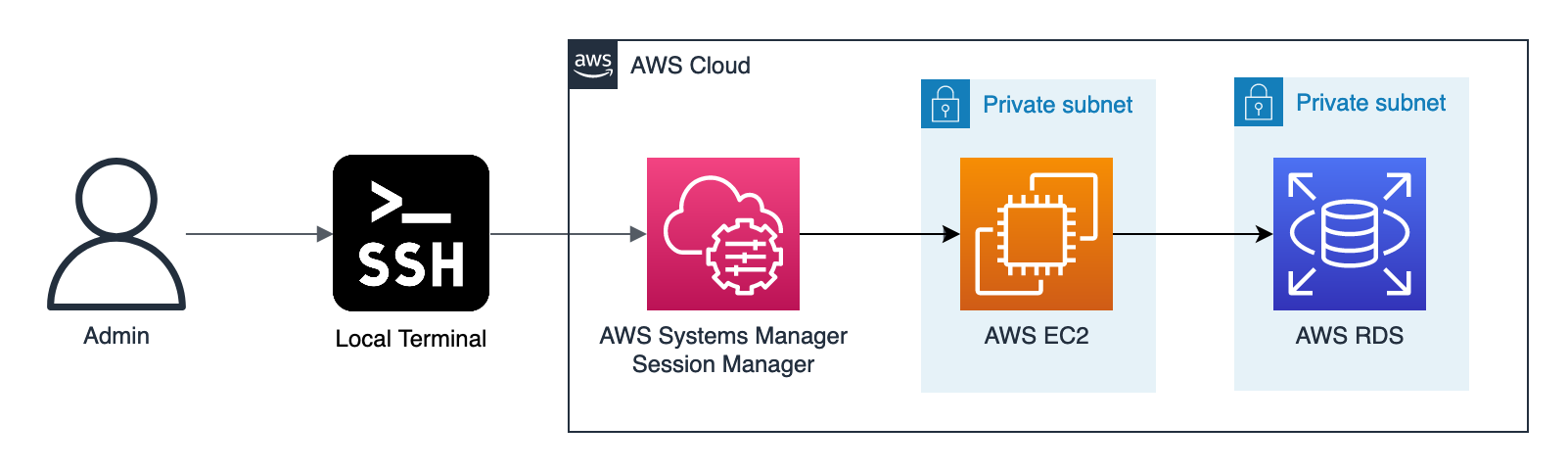
);Database instances are deployed inside isolated subnets and are not publicly reachable. When you need operator access for migrations, debugging, or a desktop database client, this package can provision an Ec2SSMConnect helper host that stays private and is reachable through AWS Systems Manager.
This workflow reuses the helper EC2 instance plus the SSM, EC2 Messages, and SSM Messages VPC interface endpoints created by the component, so you do not need a bastion with a public IP or SSH key pair. The helper instance itself accepts SSH only from within the VPC, while your local machine connects through an SSM session.
- Install the AWS CLI and the Session Manager plugin.
- Ensure your stack sets
aws:region, becauseEc2SSMConnectuses region-specific VPC endpoint service names. - Provision a
Databasewith SSM helper access enabled.
Use the database builder when you want the database and helper instance created together:
import * as studion from '@studion/infra-code-blocks';

const vpc = new studion.Vpc('platform', {});

const database = new studion.DatabaseBuilder('platform-db')
  .withVpc(vpc.vpc)
  .withInstance({ dbName: 'platform' })
  .withCredentials({ username: 'platform_user' })
  .withSSMConnect({ instanceType: 't4g.small' })
  .build();

export const databaseAddress = database.instance.address;
export const databasePort = database.instance.port;
export const ssmHostId = database.ec2SSMConnect!.ec2.id;
You can also provision Ec2SSMConnect directly when you want a standalone helper host for an existing VPC:
import * as studion from '@studion/infra-code-blocks';

const vpc = new studion.Vpc('platform', {});

const ssmConnect = new studion.Ec2SSMConnect('platform-db-ssm', {
  vpc: vpc.vpc,
  instanceType: 't4g.small',
});

export const ssmHostId = ssmConnect.ec2.id;Export the stack outputs into local shell variables:
export SSM_HOST_ID=$(pulumi stack output ssmHostId)
export DATABASE_ADDRESS=$(pulumi stack output databaseAddress)
export DATABASE_PORT=$(pulumi stack output databasePort)
Start a single SSM port-forwarding session from your laptop to the private database through the helper instance:
aws ssm start-session --target "$SSM_HOST_ID" --document-name AWS-StartPortForwardingSessionToRemoteHost --parameters "{\"host\":[\"$DATABASE_ADDRESS\"],\"portNumber\":[\"$DATABASE_PORT\"],\"localPortNumber\":[\"5555\"]}"Where:
SSM_HOST_IDis the exported EC2 instance ID fromdatabase.ec2SSMConnect.ec2.idorssmConnect.ec2.id.DATABASE_ADDRESSis the RDS endpoint, for exampledatabase.instance.address.DATABASE_PORTis the RDS port, for exampledatabase.instance.port.
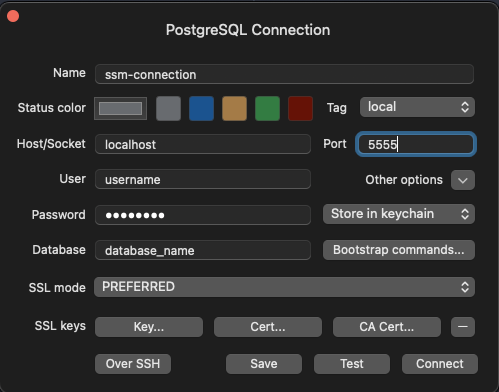
Keep that command running, then connect your database client to localhost:5555 using the same database name, username, and password you configured for the Database component. The examples above do not export database credentials automatically.
| Export | Kind | Use it for | Docs |
|---|---|---|---|
Vpc |
class | Standard AWSX VPC with fixed subnet ordering. | vpc |
AcmCertificate |
class | ACM certificate with Route 53 DNS validation. | acm-certificate |
EcsService |
class | Generic ECS/Fargate service composition. | ecs-service |
WebServer |
class | ALB-backed ECS web service. | web-server |
WebServerBuilder |
class | Fluent builder for WebServer. |
web-server |
WebServerLoadBalancer |
class | Standalone ALB and target group. | web-server |
Database |
class | PostgreSQL primary instance with extras. | database |
DatabaseBuilder |
class | Fluent builder for Database. |
database |
DatabaseReplica |
class | PostgreSQL read replica. | database |
Ec2SSMConnect |
class | Private EC2 helper reachable through SSM. | database |
ElastiCacheRedis |
class | VPC-scoped Redis on ElastiCache. | redis |
UpstashRedis |
class | Managed Redis on Upstash. | redis |
Password |
class | Secret-backed password generation and storage. | password |
CloudFront |
class | Behavior-driven CloudFront distribution. | cloudfront |
StaticSite |
class | S3 website plus CloudFront composition. | static-site |
S3Assets |
class | Public S3 website bucket for static assets. | static-site |
openTelemetry |
namespace | ECS-side collector container generation. | otel |
grafana |
namespace | Grafana folders, data sources, and dashboards. | grafana |
prometheus |
namespace | PromQL query helpers for SLOs and latency. | prometheus |
These steps are for contributors developing this package, not for consumers using it in a Pulumi project.
- Install dependencies with
npm install. - Install the AWS and Pulumi CLIs.
- Configure AWS credentials, preferably with an
AWS_PROFILEthat uses SSO. - Authenticate Pulumi with
pulumi login. - Set these environment variables when running the full test suite; all are required for the complete integration/E2E suite:
AWS_REGIONICB_DOMAIN_NAMEICB_HOSTED_ZONE_IDGRAFANA_AWS_ACCOUNT_IDGRAFANA_CLOUD_ACCESS_POLICY_TOKENGRAFANA_URLUPSTASH_API_KEYUPSTASH_EMAIL
npm run build                                        # Compile the package into dist/
npm run format                                       # Format code using Prettier
npm run test                                         # Run the integration/E2E test suite
npm run test -- tests/<component-name>/index.test.ts # Run integration/E2E tests for specific component(s)
npm run test:build # Run build validation and type-level checksContributions should keep the documentation and exported API aligned.
- Install dependencies with
npm install. - Make your changes in
src/and update any affected README files. - Add or update integration/E2E tests and run
npm run test -- tests/<component-name>/index.test.tswhen your change affects infrastructure behavior. - Add or update build-level tests and run
npm run test:buildwhen your change affects public API. - The pre-commit hook will automatically format code before committing, or you can run
npm run formatmanually.
- Missing AWS region or provider-region error: run
pulumi config set aws:region <region>or setAWS_REGION. ECS service and SSM Connect components require the region explicitly. - AWS credentials, profile, or authorization errors: configure AWS credentials, set the intended
AWS_PROFILE, and confirm the identity has the required permissions. - Route 53 validation or custom-domain setup failure: confirm that the domain is managed by, or delegated to, the hosted zone whose ID you passed to the component.
- ACM certificate validation appears stuck: DNS validation can take time. Check that the generated Route 53 validation record exists in the public hosted zone.
aws ssm start-sessionfails before opening a tunnel: install the Session Manager plugin, verifySSM_HOST_ID, and confirm the helper instance is managed by Systems Manager.- Grafana authentication or authorization errors: check
grafana:cloudAccessPolicyToken,grafana:url, and the required access-policy scopes. - Upstash provider authentication errors: check
upstash:apiKeyandupstash:email. - CloudFront or static-site deployments appear slow: CloudFront distribution creation and updates commonly take several minutes.