
Friction Sources is a molecular dynamics simulation for studying friction at nanoscale with variable built-in thermostats, integrators, substrate&agent structure, and boundary conditions.
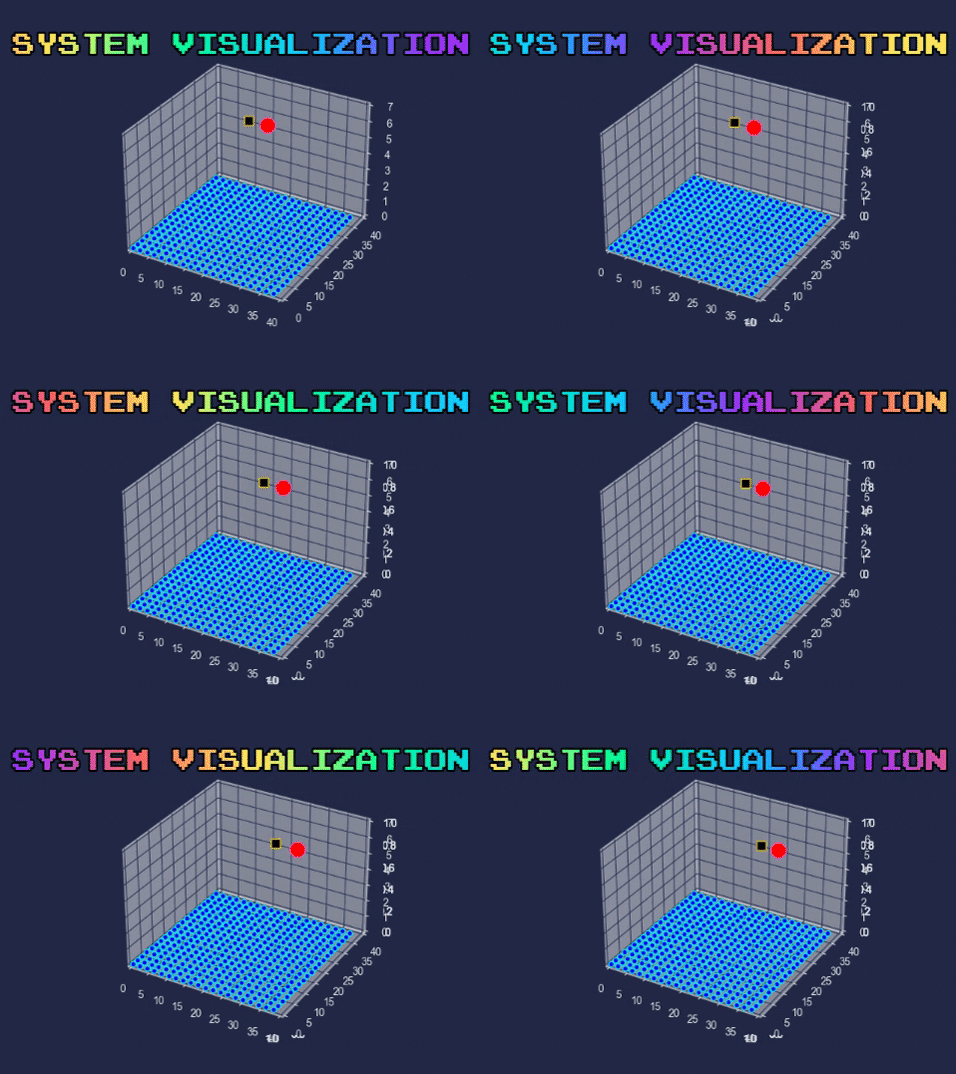
There is a substrate system that can either be in one, two or three dimensions. Thermostats can be apllied to the substrate system any way the user wants to. On top of the substrate system, there is a slider that moves from a user specified position with a user specified constant velocity which is connected to an agent atom with a spring. The slider basically slides the agent atom on the substrate system. Here is a little visualization:
The list of units used are:
-> distance is in Angstroms.
-> time is in picoseconds.
-> sigma is in Angstroms.
-> equilibrium length of the spring between agent-slider is in Angstroms.
-> epsilon is in eV.
-> substrate spring constant is in eV/Angstroms^2.
-> substrate mass is in amu(atomic mass units).
-> latt_const for Argon is in Angstroms.
-> Cutoff constant taken as 2.5 * sigma.
- Go to the directory you want to download the code at.
cd my/directory
- Download the source code.
git clone https://github.com/AtomicFriction/FrictionSources.git
- Locate and access the
input.txtfile which will allow you to change the parameters of the simulation to your liking.
cd FrictionSources/codebase/input_parser
For UNIX based systems:
nano input.txt
For Windows:
start notepad input.txt
- Once you configure the parameters at step 3, the software is ready to run. Go back to the previous directory
./FrictionSources/codebase.
cd ..
At this point, please make sure you have the necessary packages installed. The following command can be used to automatically install all the necessary packages.
pip install -r requirements.txt
- Run the software! This will fire up our command line interface.
python main.py
Alternatively you can use command line arguements to bypass the interface and directly run the software.
- If you are using a new input configuration,
python main.py --calc_hessian
- If you have already calculated Hessian matrix once for your configuration,
python main.py --load_eigs
The explanation of the input file for our software is below:
&general
cutoff = 8
interact = LJ
/
&protocol
numba = False
dt = 0.001
run = 60 100 125000 100 100 1250 100 100 375000
eig_proj = 1587 100
integ = ec
apply_agent = 0 0 1
apply_thermo = 100 100 100
/
&analysis
N_dump = 100000
data = ff vf temp
/
&substrate
dim = Number of dimensions for the substrate system. (1 or 2 or 3)
layers = Number of layers for the substrate system. (int)
fix_layers = Number of layers that will be fixed, they will not move when the system starts. (int)
num = Number of atoms for the substrate system. (int)
bound_cond = Boundary condition selection for the susbtrate system. (fixed or periodic)
latt_const = Lattice constant selectrion. (float or int)
cuto_const = Cutoff constant selection for the atoms in the substrate system. (float or int)
displace_type = random
k = Spring constant selection for the springs between the atoms in the substrate system. (float or int)
mass = Mass of the atoms in the substrate system. (float or int)
/
&slider
mass = Mass of the agent atom. (float or int)
k = Spring constant selection fior the spring between the slider and the agent atom. (float or int)
shape = WIP
sigma = Sigma value selection for the Lennard-Jones interaction between the agent atom and the substrate system. (float or int)
epsilon = Epsilon value selection for the Lennard-Jones interaction between the agent atom and the substrate system. (float or int)
agent_pos = Starting position of the agent atom. (float, float, float)
slider_pos = Starting position of the slider. (float, float, float)
slider_vel = Constant velocity of the slider. (float, float, float)
eq_len = Equilibrium length of the spring between the agent atom and the slider. (float or int)
constrain = Choice to constrain the motion the agent atom. (none or x or y or z)
/
&thermostat
thermo = Type of the thermostat that will be applied on the substrate system. (vel_rescale, berendsen)
mode = partial
thickness = 2
tau = 0.1
s = 0.1
Q = 0.1
gamma = 0.1
/
Assuming that you are operating in the codebasedirectory, use the following command to see possible command line arguments
python main.py --help
The software needs the eigenvectors and eigenvalues from the Hessian matrix. Therefore, you need to calculate the Hessian matrix at least once for each input configuration. If you have calculated the Hessian matrix once, you can just load the eigenvectors and eigenvalues if you are using the same input configuration.
Calculates the Hessian matrix and saves its eigenvectors and eigenvalues, then goes on to run the protocols. Choose this option if you are using a new input configuration.
python main.py --calc_hessian
Skips the Hessian matrix calculation,directly loads pre-calculated eigenvectors and eigenvalues from the disk. Choose this option if you have already calculated the Hessian matrix for your input configuration.
python main.py --load_eigs
This mode can be used by the following command, replace save_per_steps with the step interval you prefer for the saving process.
python main.py --save_progress save_per_steps
Saves the state of the system to a ".npz" file every save_per_steps steps. This option is implemented to prevent progress loss, may be preferred for longer runs. The save file is a compressed NumPy file, the size of the file is relatively small.
This mode can be used by the following command, does not require additional arguments.
python main.py --from_progress
Finds the saved ".npz" file and resumes the interrupted run. Keep in mind that this mode requires the same system variables in the "input.txt" file that you used to save the previous state, changing the variables in the "input.txt" file may result in unwanted consequences.
While using the "--from_progress" argument, the user must enter the remaining protocols, i.e. if the original run had completed the first two protocols and the third protocol must run from the system_state file, the user needs to enter only the third protocol to the input.txt file.
python main.py --animate animate_per_steps
Animates the system per animate_per_steps steps. This is a very basic visualization, may be used to get a rough understanding of the system.
Keep in mind that the software will already show the elapsed time and maximum memory used at the end of execution.
- Locate to the repository, assuming that you have the repository at ./Desktop.
cd Desktop/FrictionSources/codebase
- Use cProfile to profile the software and print them on the terminal in decreasing total time taken to execute.
python -m cProfile -s tottime main.py
- Install the snakeviz package.
pip install snakeviz
- Use cProfile to profile the software and save the results to a ".dat" file
python -m cProfile -o temp.dat main.py
- Use the snakeviz package to visualize the result.
snakeviz temp.dat
Feel free to create issues in this repository if you have any problems, ideas or suggestions. To work on a new feature, please create an issue first so that the developers can track the progress easier. Simply create a pull-request when you are done with your work.
The developers can be contacted for questions/ideas/suggestions via email:
- Bartu Yaman, yaman.bartu@metu.edu.tr
- Cagdas Kilic, kilic.cagdas@metu.edu.tr