
An AI-powered real-time scene narration system that captures images from multiple cameras, analyzes surroundings using Google's Gemini AI, and provides intelligent voice feedback through text-to-speech technology.
This project is designed to enhance accessibility and environmental awareness by converting visual surroundings into spoken descriptions.
This repository is part of my B.Tech Final Year Project and represents Module 6 of 7 in the complete system.
This module focuses on developing an AI-powered scene narration and environmental awareness assistant using computer vision and generative AI technologies.
The system integrates Gemini AI, OpenCV, image processing, and text-to-speech technologies to provide intelligent real-time voice descriptions of surroundings for accessibility and assistive applications.
The project demonstrates the practical implementation of artificial intelligence and real-time visual understanding in an accessibility-focused smart assistance system.
- 📷 Dual Camera Image Capture
- 🤖 AI Scene Understanding using Gemini AI
- 🗣️ Real-Time Voice Narration
- ⚡ Fast and Lightweight Processing
- 🧠 Smart Image Validation System
- 🔊 Text-to-Speech Feedback
- 🛡️ Camera Failure Detection & Handling
- ♿ Accessibility-Focused Design
- 🎯 Obstacle & Object Awareness
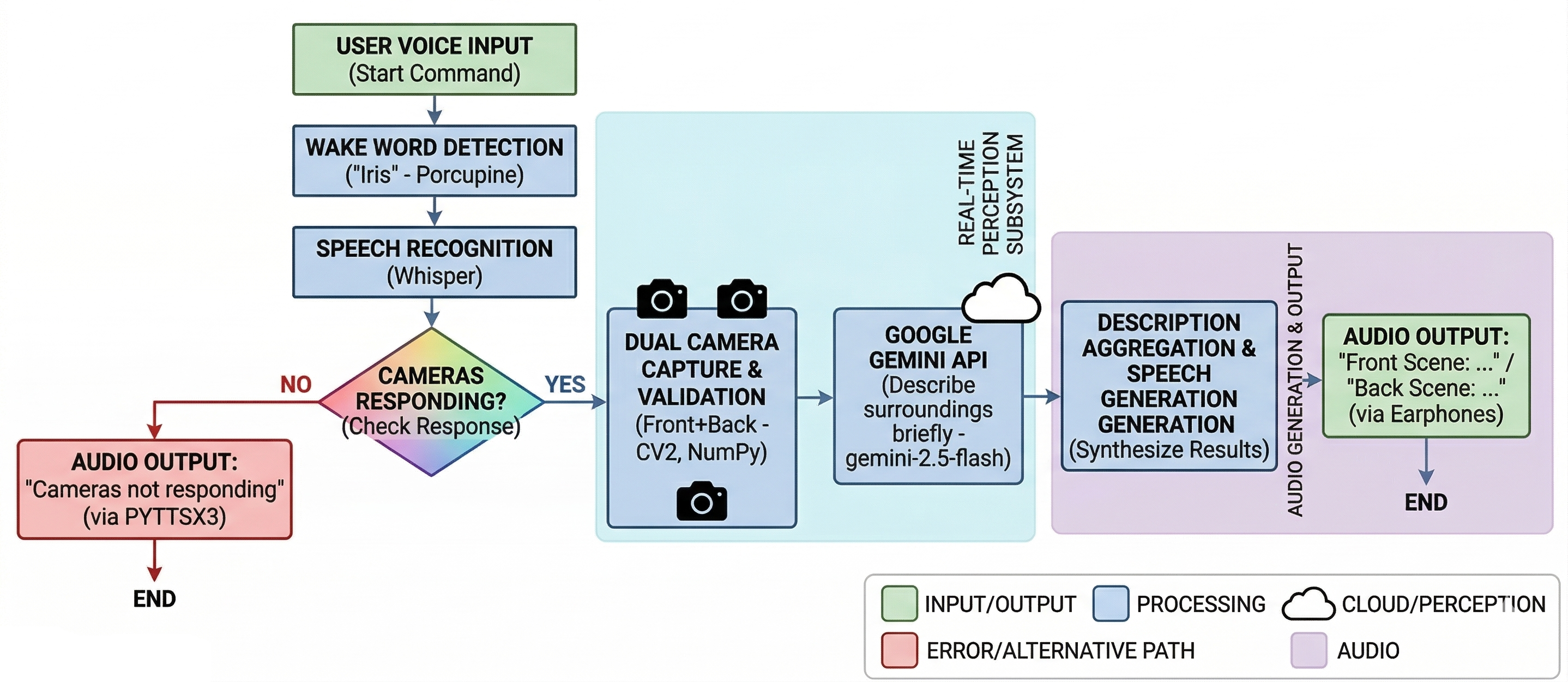
The system captures images from both front and back cameras, validates the captured frames, and sends them to Gemini AI for intelligent scene understanding.
Gemini AI generates short and meaningful descriptions focused on important objects, surroundings, and obstacles. These descriptions are then converted into speech using pyttsx3, enabling hands-free environmental awareness.
The project demonstrates the practical integration of:
- Computer Vision
- Generative AI
- Real-Time Image Processing
- Voice Synthesis
- Accessibility Technologies
| Technology | Purpose |
|---|---|
| Python | Core Programming Language |
| OpenCV | Camera Access & Image Processing |
| Gemini AI | Scene Understanding & Description |
| PIL | Image Conversion |
| NumPy | Frame Validation |
| pyttsx3 | Text-to-Speech Engine |
- Capture images from front and back cameras
- Process and extract image frames
- Validate image quality using frame analysis
- Send validated images to Gemini AI
- Generate intelligent scene descriptions
- Convert descriptions into speech using TTS
- Provide real-time voice-based environmental awareness
git clone https://github.com/Adithya2369/AI-Scene-Narrator.git
cd AI-Scene-Narratorpip install opencv-python google-generativeai pillow numpy pyttsx3Open the Python file and replace:
GEMINI_API_KEY = "YOUR_API_KEY"with your own Gemini API key.
python main.py=== SMART SCENE VOICE SYSTEM STARTED ===
Scanning surroundings
Front scene: A person standing near a table and laptop.
Back scene: A parked motorcycle beside a wall.
=== PROCESS COMPLETE ===
The system captures images from both front and back cameras independently.
Captured frames are validated using grayscale variance analysis to ensure image quality before AI processing.
Images are processed using Gemini AI to generate concise descriptions focused on:
- Objects
- Obstacles
- Environmental context
- Important surroundings
Generated descriptions are spoken aloud using pyttsx3 for real-time audio narration.
- ♿ Assistive Technology for Visually Impaired Users
- 🤖 Smart Robotics Systems
- 🚗 Autonomous Navigation Assistance
- 🏠 Smart Surveillance Systems
- 🧠 AI Accessibility Research
- 👓 Wearable AI Devices
- 📡 Real-Time Environmental Monitoring
├── main.py
└── README.md
- 🎥 Continuous Real-Time Video Analysis
- 🧭 Indoor Navigation Assistance
- 🌍 Object Distance Estimation
- 📱 Mobile Application Integration
- ☁️ Cloud-Based AI Processing
- 🧑 Face & Emotion Recognition
- 🚨 Emergency Alert Detection
This project is intended for educational and research purposes.
T. Adithya Reddy