A precise timekeeping system using a Global Navigation Satellite System (GNSS) module and an Arduino microcontroller. This project demonstrates how to acquire accurate global time from GNSS satellites and display it on a local output such as an LCD monitor.
- Arduino Board (e.g., Arduino Uno)
- GNSS Module (e.g., NEO-6M, NEO-7M, NEO-8M)
- Display Module (e.g., 16x2 LCD)
- Jumper Wires
- Breadboard (optional)
Connect the GNSS and display module to the Arduino as follows:
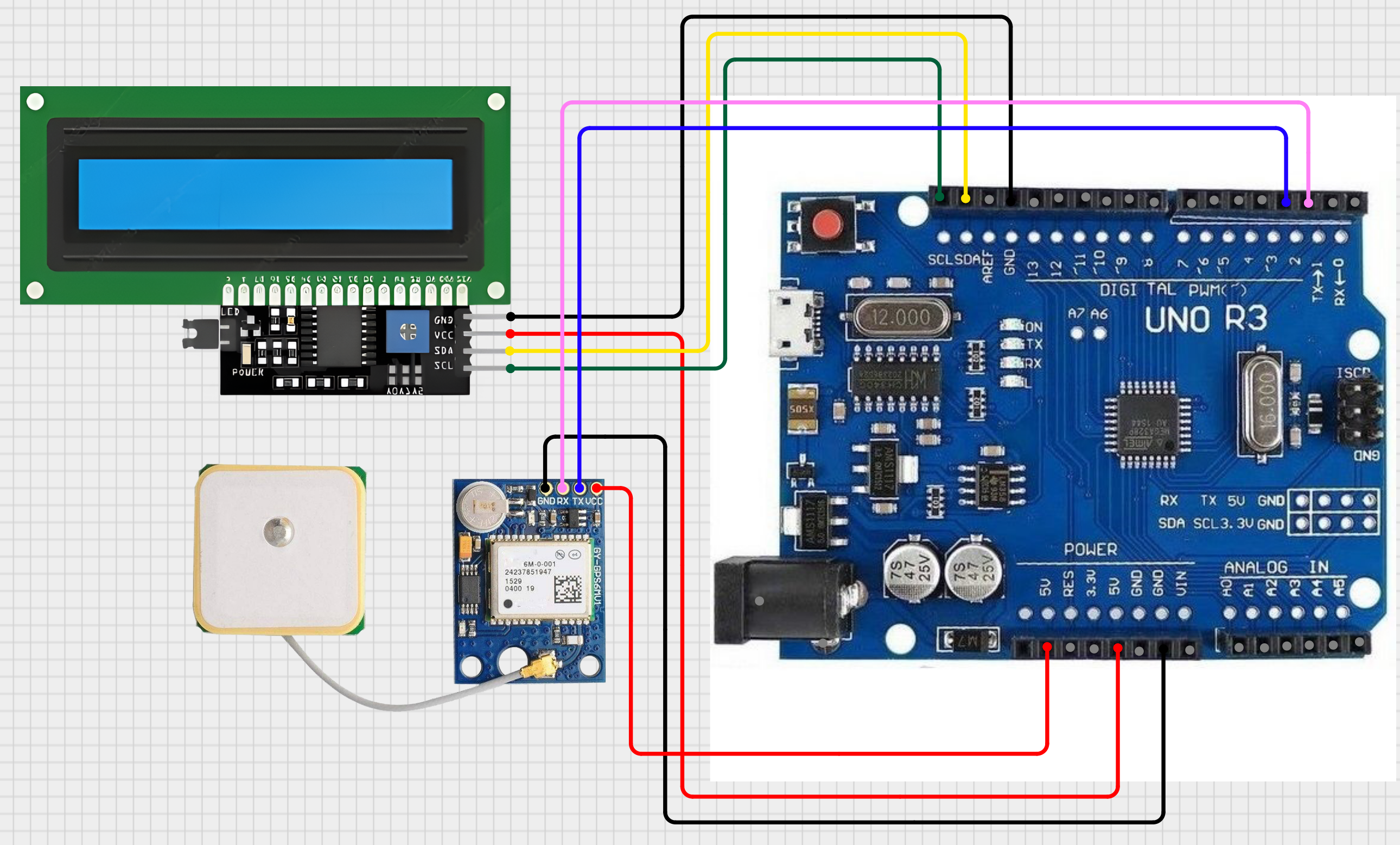
- Clone or Download this repository to your local machine.
- Open the
.inofile in the Arduino IDE. - Install required libraries (
TinyGPSPlus,LiquidCrystal_I2C). - Adjust for your local time zone if needed.
- Connect your hardware as per the wiring diagram.
- Upload the sketch to your Arduino.
This project is open-source and available under the MIT License.