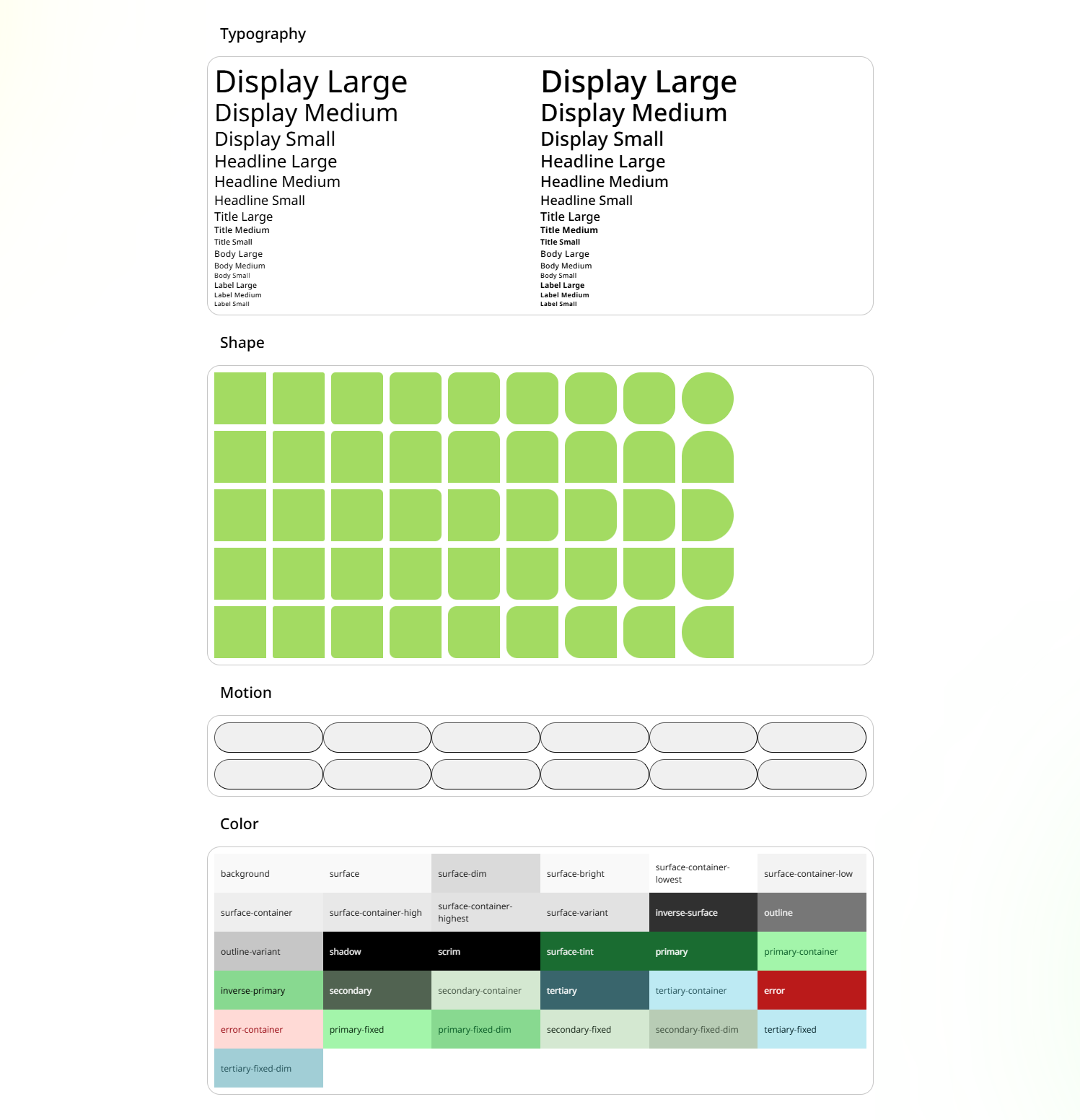



@sandlada/material-design-css is a CSS npm package for Material Design Tokens, styles include:
- Color
- Palette
- Prebuilt Colors
- Prebuilt Palettes
- Motion
- Shape
- Typography
It also supports TailwindCSS v4.
For more information on how to use, please visit the project's official website
npm i @sandlada/material-design-css
// TypeScript File
// If you are using Vite or Webpack.
// In CSS file, use @import instead. (You may need to adjust the path depending on your setup, e.g., `@import "../node_modules/@sandlada/material-design-css/preset.css";`)

// Load preset before color or prebuilt-color utilities.
import '@sandlada/material-design-css/preset.css'

// text-on-surface
import '@sandlada/material-design-css/color/text-utilities.css'

// bg-surface
import '@sandlada/material-design-css/color/bg-utilities.css'

// text-primary-0
import '@sandlada/material-design-css/palette/text-utilities.css'

// bg-primary-100
import '@sandlada/material-design-css/palette/bg-utilities.css'

// display-large
import '@sandlada/material-design-css/typography/typography-utilities.css'

// rounded-medium
import '@sandlada/material-design-css/shape/shape-utilities.css'

// animation-easing-expressive-fast-spatial
import '@sandlada/material-design-css/motion/animation-utilities.css'

// transition-easing-expressive-fast-spatial
import '@sandlada/material-design-css/motion/transition-utilities.css'@import "tailwindcss";
/**
* Optional ready-made palette.
* Replace the path with any file under prebuilt-colors/.
*/
@import "@sandlada/material-design-css/prebuilt-colors/tonal-spot/h0-2025.css";
/**
* bg-primary
* text-on-primary
*/
@import "@sandlada/material-design-css/color/tailwind-theme.css";
/**
* bg-primary-90
* text-primary-10
*/
@import "@sandlada/material-design-css/palette/tailwind-theme.css";
/* rounded-medium */
@import "@sandlada/material-design-css/shape/tailwind-theme.css";
/*
* font-display-large
* text-display-large
* tracking-display-large
* leading-display-large
* font-weight-display-large
*/
@import "@sandlada/material-design-css/typography/tailwind-theme.css";
/* display-large */
@import "@sandlada/material-design-css/typography/tailwind-utilities.css";
/**
* ease-emphasized
* duration-[var(--duration-medium1)]
*/
@import "@sandlada/material-design-css/motion/tailwind-theme.css";
@layer base {
:root:not([dark]) {
color-scheme: light;
}
:root[dark] {
color-scheme: dark;
}
}- Color utilities use
bg-*andtext-*. - Prebuilt color files use the filenames from
prebuilt-colors/as described above. - Prebuilt palette files are organized under
prebuilt-palettes/{variant}/. Most variants useh{hue}-{year}.css/h{hue}-{year}-minimal.css;contentandfidelityuseh{hue}c{chroma}t{tone}-{year}.css/h{hue}c{chroma}t{tone}-{year}-minimal.css;monochromeusesblack-{year}.css/black-{year}-minimal.css. - Shape utilities use
rounded-*plus directional suffixes like-t,-r,-b, and-l. - Motion utilities use
animation-*andtransition-*withduration-*andeasing-*tokens. - Typography utilities use
emphasized-*for emphasized variants and the base type scale names for standard variants.
Copy this code into your configured project and you will see a button with color and rounded corners.
<button class="rounded-medium bg-primary text-on-primary">
    A rounded button
</button>
Prebuilt colors are ready-made color palettes generated by Material Design's color system. Each CSS file contains light/dark schemes and three contrast levels (default, low-contrast, high-contrast) built in.
To use a prebuilt color, import preset.css first, then import the desired prebuilt color file, followed by the color utilities.
import '@sandlada/material-design-css/preset.css'

import '@sandlada/material-design-css/prebuilt-colors/tonal-spot/h0-2025.css'
import '@sandlada/material-design-css/color/text-utilities.css'
import '@sandlada/material-design-css/color/bg-utilities.css'
Toggle the dark attribute on :root to switch between light and dark themes, or use low-contrast / high-contrast attributes to adjust contrast.
Prebuilt colors are organized into 9 variants under prebuilt-colors/:
| Variant | Directory | Description |
|---|---|---|
| Monochrome | monochrome/ |
Single-tone grayscale palette |
| Neutral | neutral/ |
Neutral palette with a subtle hue |
| Tonal Spot | tonal-spot/ |
Balanced tonal palette |
| Vibrant | vibrant/ |
Highly saturated palette |
| Expressive | expressive/ |
Expressive and dynamic palette |
| Rainbow | rainbow/ |
Rainbow-inspired palette |
| Fruit Salad | fruit-salad/ |
Diverse multi-hue palette |
| Content | content/ |
Content-color aligned palette |
| Fidelity | fidelity/ |
Fidelity-optimized palette |
There are two filename patterns depending on the variant:
Pattern A — Hue + Year (monochrome is a special case)
Used by: neutral, tonal-spot, vibrant, expressive, rainbow, fruit-salad
h{hue}-{year}.css
{hue}: Hue angle in degrees. Available values:0,30,60,90,120,150,180,210,240,270,300,330,360{year}: Material Design spec version. Values:2021or2025
Example filenames:
prebuilt-colors/tonal-spot/h0-2025.cssprebuilt-colors/vibrant/h180-2021.css
Note: Each file internally contains three contrast modes: default (
:root),low-contrast(:root[low-contrast]), andhigh-contrast(:root[high-contrast]).
Special case — monochrome
prebuilt-colors/monochrome/black.css
Only one file exists for monochrome.
Pattern B — Hue + Chroma + Tone + Year
Used by: content, fidelity
h{hue}c{chroma}t{tone}-{year}.css
{hue}: Hue angle (0,30,60,90,120,150,180,210,240,270,300,330,360){chroma}: Chroma value in HCT color space. Values:30,60,90{tone}: Tone value in HCT color space. Values:20,50,80{year}: Material Design spec version. Values:2021or2025
Example filenames:
prebuilt-colors/content/h0c30t20-2025.cssprebuilt-colors/fidelity/h180c60t50-2021.css
Each file also contains three built-in contrast levels.
Monochrome
import '@sandlada/material-design-css/preset.css'
import '@sandlada/material-design-css/prebuilt-colors/monochrome/black.css'
Neutral / Tonal Spot / Vibrant / Expressive / Rainbow / Fruit Salad
import '@sandlada/material-design-css/preset.css'
import '@sandlada/material-design-css/prebuilt-colors/neutral/h120-2025.css'
import '@sandlada/material-design-css/prebuilt-colors/tonal-spot/h0-2025.css'
import '@sandlada/material-design-css/prebuilt-colors/vibrant/h240-2025.css'
Content / Fidelity
import '@sandlada/material-design-css/preset.css'
import '@sandlada/material-design-css/prebuilt-colors/content/h0c30t20-2025.css'
import '@sandlada/material-design-css/prebuilt-colors/fidelity/h180c60t50-2025.css'
preset.css also defines the light and dark color-scheme contract used by the color utilities. Toggle the dark attribute on :root to switch themes.
Prebuilt palettes provide raw reference tonal palettes generated by Material Design's color system. Unlike prebuilt colors, these are not semantic color schemes — they are low-level palette data you can use to build custom designs.
Each file defines CSS custom properties for six reference palettes:
--md-ref-palette-primary-{tone}: #hex;
--md-ref-palette-secondary-{tone}: #hex;
--md-ref-palette-tertiary-{tone}: #hex;
--md-ref-palette-error-{tone}: #hex;
--md-ref-palette-neutral-{tone}: #hex;
--md-ref-palette-neutral-variant-{tone}: #hex;
Where {tone} ranges from 0 to 100.
There are 9 variants, organized into subdirectories under prebuilt-palettes/:
| Variant | Directory | Filename Pattern | Description |
|---|---|---|---|
| Monochrome | monochrome/ |
black-{year}.css / black-{year}-minimal.css |
Single-tone grayscale palette |
| Neutral | neutral/ |
h{hue}-{year}.css / h{hue}-{year}-minimal.css |
Neutral palette with a subtle hue |
| Tonal Spot | tonal-spot/ |
h{hue}-{year}.css / h{hue}-{year}-minimal.css |
Balanced tonal palette |
| Vibrant | vibrant/ |
h{hue}-{year}.css / h{hue}-{year}-minimal.css |
Highly saturated palette |
| Expressive | expressive/ |
h{hue}-{year}.css / h{hue}-{year}-minimal.css |
Expressive and dynamic palette |
| Rainbow | rainbow/ |
h{hue}-{year}.css / h{hue}-{year}-minimal.css |
Rainbow-inspired palette |
| Fruit Salad | fruit-salad/ |
h{hue}-{year}.css / h{hue}-{year}-minimal.css |
Diverse multi-hue palette |
| Content | content/ |
h{hue}c{chroma}t{tone}-{year}.css / h{hue}c{chroma}t{tone}-{year}-minimal.css |
Content-color aligned palette |
| Fidelity | fidelity/ |
h{hue}c{chroma}t{tone}-{year}.css / h{hue}c{chroma}t{tone}-{year}-minimal.css |
Fidelity-optimized palette |
Parameters:
{hue}: Hue angle in degrees. Available values:0,30,60,90,120,150,180,210,240,270,300,330,360{chroma}: Chroma value in HCT color space. Values:30,60,90(only forcontentandfidelity){tone}: Tone value in HCT color space. Values:20,50,80(only forcontentandfidelity){year}: Material Design spec version. Values:2021or2025
Versions:
| Version | Suffix | Tone values |
|---|---|---|
| Full | (none) | 0 ~ 100 (101 tones) |
| Minimal | -minimal |
0–5, 10, 20, 30, 40, 50, 60, 70, 80, 90, 95–100 (21 tones) |
Example filenames:
prebuilt-palettes/tonal-spot/h0-2025.cssprebuilt-palettes/tonal-spot/h180-2025-minimal.cssprebuilt-palettes/content/h0c30t20-2025.cssprebuilt-palettes/fidelity/h180c60t50-2025-minimal.cssprebuilt-palettes/monochrome/black-2025.css
import '@sandlada/material-design-css/prebuilt-palettes/tonal-spot/h0-2025.css'Then use the palette tokens in your styles:
.my-element {
    background-color: var(--md-ref-palette-primary-40);
    color: var(--md-ref-palette-primary-90);
}