An AI assistant built into Ableton Live. Describe what you want in plain English — Live Agent executes it directly on your session.
"Delete all audio tracks. In one of the remaining MIDI tracks, add a punchy synth and a 4-bar clip with an Em bassline. Lastly, set the tempo to 150." → Done.
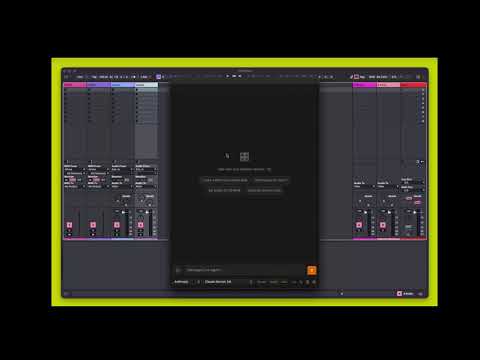
Live Agent opens a chat panel inside Live via the Ableton Extensions SDK. You describe what you want; the agent calls the right SDK methods to make it happen — creating tracks, setting tempos, adding clips, adjusting devices, and more.
Full SDK coverage. Tool schemas are auto-generated directly from the SDK type definitions — all 15 SDK classes, every method and setter, kept in sync automatically when the SDK updates. No hand-written tool definitions.
Multi-step reasoning. The agent chains multiple tool calls when needed. "Duplicate the drum rack on track 3 to a new track and set its volume to -6dB" runs as a sequence, not a single command. When a tool fails (stale id, Live constraint), the agent gets the error and keeps going instead of stopping the turn. After track layout changes, tool results include a fresh liveSnapshot so ids from the opening prompt are not reused. Long tasks pause every 5 steps with Continue / Stop (counted across follow-up messages in the same Live session).
Web lookup & learning. web_search looks up song tabs and reference, production techniques, mixing tips, and Ableton Live / built-in device guidance — DuckDuckGo links, ASCII tab excerpts, Ableton.com articles when fetchable, and Wikipedia for song overview.
Three confirmation modes to match how much you trust the agent:
- Review — approve every action before it runs
- Guard — auto-approve safe actions, confirm destructive ones
- Auto — run everything immediately
Undo is native. Every agent action is an ordinary Live edit — ⌘Z reverts them one step at a time.
Free to use, always. Works with free-tier models (Gemini Flash has a free API key, no credit card required). No subscription, no account, no charges from this project.
Supported providers:
| Provider | Models |
|---|---|
| OpenAI | GPT-5.5, GPT-5.5 Pro, GPT-5.4, GPT-5.4 mini, o3, o3 Pro |
| Anthropic | Claude Opus 4.8, Claude Sonnet 4.6, Claude Haiku 4.5 |
| Gemini 3.5 Flash, Gemini 3.1 Pro (preview), Gemini 3.1 Flash-Lite |
API keys are stored locally in Live's extension storage and never leave your machine.
To run:
- Ableton Live 12 version 12.4.5 beta or later (Extensions require Live Suite)
- An API key from at least one supported provider:
- Google AI Studio — free tier, no credit card required
- OpenAI — pay-as-you-go
- Anthropic — pay-as-you-go
To build from source:
- Node.js v24.16.0 or higher — download
git clone https://github.com/nonogv/live-agent.git
cd live-agent
npm install
The Ableton Extensions SDK is vendored in vendor/ — npm install handles it automatically.
npm run build- Open Live 12.4.5 beta
- Go to Live → Preferences → Extensions
- Enable Developer Mode
- Point Live to this project folder
- Run
npm start— Live connects and hot-reloads on save
- Right-click any track → Live Agent
- Click the gear icon in the bottom bar → paste your API key
- Click the chat icon to return and start talking
npm start          # watch mode — recompiles on save, Live hot-reloads
npm run typecheck  # type-check only
npm run generate   # regenerate tool schemas from SDK types
npm test # run testsscripts/generate-tools.ts reads the SDK's TypeScript type definitions using ts-morph and writes two files:
src/agent/generated-tools.ts— function schemas the AI model seessrc/live/generated-executor.ts— the dispatcher that maps tool calls to SDK method invocations
Run npm run generate after updating the SDK to pick up any new API surface automatically.
scripts/
└── generate-tools.ts       # SDK type parser → tool schema + executor generator

src/
├── extension.ts            # Entry point — registers context menu, starts server, opens webview
├── server.ts               # Local HTTP + WebSocket server, agentic loop, confirmation flow
├── storage.ts              # Persistent key + settings storage
├── providers/
│   ├── index.ts            # ProviderAdapter interface, model list, factory
│   └── http-stream.ts      # Streaming over node:https — no provider SDK dependencies
├── agent/
│   ├── chat.ts             # System prompt builder + LiveState types
│   ├── safety.ts           # DESTRUCTIVE_TOOLS set for confirmation mode
│   ├── tools.ts            # Custom tool schema (get_live_state)
│   └── generated-tools.ts  # Auto-generated — do not edit
└── live/
    ├── executor.ts         # getLiveState + custom tool handler
    ├── handle-registry.ts  # Float64 → BigInt precision recovery
    └── generated-executor.ts  # Auto-generated — do not edit

ui/src/                     # React + Vite webview
├── App.tsx
├── chatReducer.ts
├── types.ts
└── components/             # ChatPanel, ChatInput, MessageBubble, ProviderBar, SettingsPanel, …
Full issue tracking is on GitHub (v1 / v2 / v3 labels). High-level milestones:
v1 — Developer release (in progress)
Polished, stable experience for developer-musicians who build from source and bring their own API key. Manual QA across all three providers is the remaining gate.
v2 — Power features
Consumer packaged installer · producer rules (persistent agent instructions) · @track / @clip / @device context targeting · local model support (Ollama) · RAG over the Ableton Live manual (scraped, BM25-indexed, auto-refreshed by CI) · SDK auto-sync on new Ableton releases.
v3 — Platform
Cloud conversation sync · collaborative sessions for remote co-production.
Ideas (not yet scheduled)
Max for Live patch generation, M4L bridge, cloud plugin parameter database, voice-first / hum-to-MIDI mobile interface.
See CHANGELOG.md for what has already shipped.
MIT — see LICENSE.